Keeping your HMWSSB water bill paid on time is now easier than ever. Instead of standing in queues or visiting a payment centre, Hyderabad consumers can check their bill, verify outstanding dues, and make secure online payments from home. In this blog, we will be exploring how to pay the water bill, download a receipt, check your payment status, and register grievances.
What is HMWSSB?
The Hyderabad Metropolitan Water Supply and Sewerage Board (HMWSSB), established in 1989, manages water supply and sewerage services in Hyderabad. It distributes treated water to consumers across the city and manages the sewerage network and related infrastructure. The board also provides consumer services such as water connections, meter-related services, billing, bill payment, complaints, and grievance resolution.
What is a CAN Number on a Water Bill?
A CAN (Consumer Account Number) is a unique 9-digit identification number assigned to an HMWSSB water connection. Its primary use is to identify the consumer account. You can use it to check or pay your HMWSSB water bill online, view payment history, check connection information, raise service requests, or address other bill-related issues.
How to Find CAN Number in Hyderabad?
Your HMWSSB CAN (Consumer Account Number) is usually mentioned on your water bill, as it is used to identify your water connection. You can find it through the following methods:
- Check your latest HMWSSB bill, where the consumer number will be present.
- Use the required consumer or connection details on the official HMWSSB portal to access your account information.
- You can contact HMWSSB customer support or visit a service centre with your water connection details if you are unable to locate it.
How to Pay HMWSSB Water Bill Online?
You can pay your HMWSSB water bill online through the board's digital payment services. Keep your CAN number ready before starting the payment. The general process is:
Step 1: Visit the official HMWSSB online payment portal and then choose “Online Bill Payment.”


Step 2: Now you need to choose a payment option from BillDesk Payment or Official Govt. Wallet; neither includes any transaction charges.

Step 3: Enter your CAN number and click on Submit to start the payment process.

Step 4: Carefully check the consumer details, billing period, and outstanding amount before making the payment.
Step 5: You can select an available payment method, such as UPI, debit card, credit card, or net banking.
Step 6: Complete the transaction after verifying the bill details, and you can save or download the payment receipt for future reference.
How to Pay Your HMWSSB Water Bill Offline
You can pay your HMWSSB water bill offline by visiting a nearby MeeSeva centre or designated HMWSSB cash collection counter. Carry your Consumer Account Number (CAN) or a copy of your latest water bill and provide the details to the counter operator to check your outstanding dues. Pay using the payment methods accepted at the centre, and keep the receipt for future reference.
How to View Bill History and Download Your HMWSSB Receipt
You can view, download, and access your previous HMWSSB bills or payment history through the steps below:
Step 1: Visit the official HMWSSB online services portal and, from the “Services” drop-down menu, select “Download latest payment” or “Download Bill History,” depending on your intent.

Step 2: Now you need to enter your CAN number and registered mobile number.

Step 3: You can enter the OTP sent to your registered mobile number and check the details.
Step 4: For billing history and bill payment receipts, select the required billing period or transaction to view the details, then choose to view, download, or print as needed.
How to Register a Billing Dispute and Check Its Status
If you find an error in your HMWSSB water bill, such as an incorrect bill amount, meter reading, or other billing-related issue, here are the steps to register an HMWSSB Billing Dispute:
Step 1: You need to visit the official HMWSSB website and choose “Register Billing Dispute” under the “Consumer services” drop-down menu.
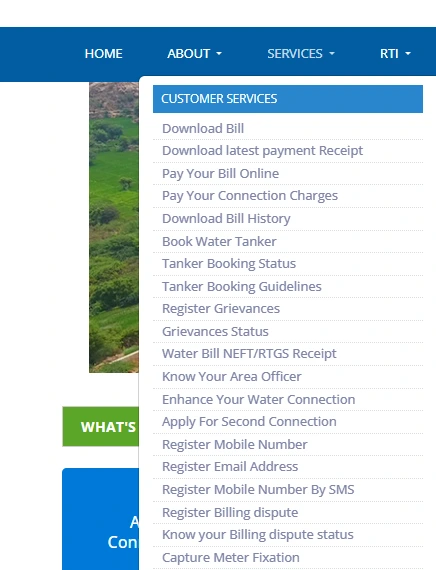
Step 2: Give your CAN number and registered mobile number to register for the dispute.

Step 3: Select the option related to a billing complaint/dispute, mention the billing issue, and provide other relevant details.
Step 4: You can now submit the complaint and save the number for future reference.
How to Check HMWSSB Billing Dispute Status?
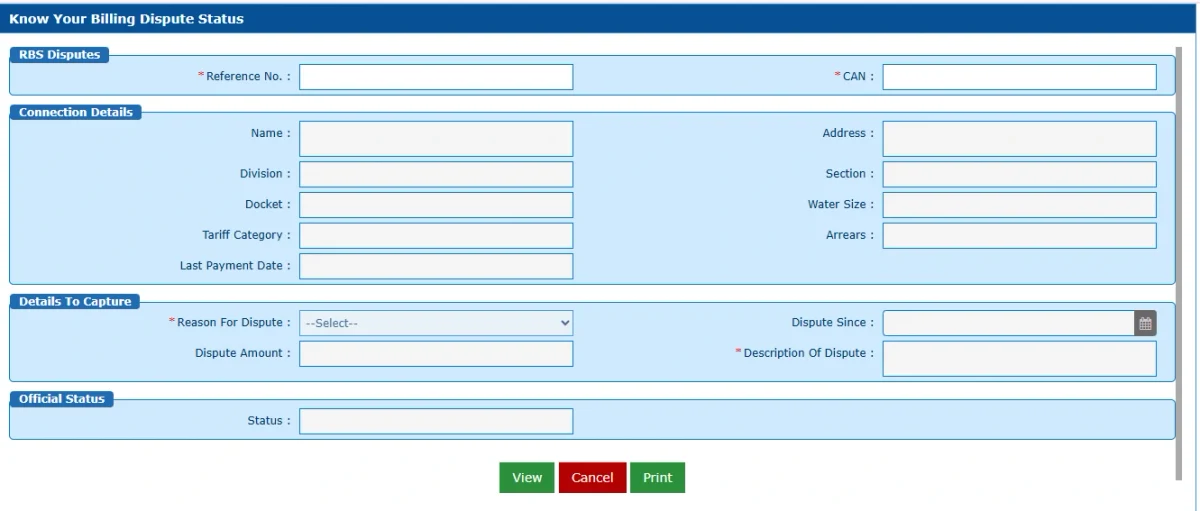
Once the complaint is registered, you can use the complaint/reference number on “Know your billing dispute status” in the consumer grievance service drop-down menu. You will be able to see the status of the complaint and download it as well.
HMWSSB Water Tariff Rates
According to the HMWSSB water tariff schedule, the published domestic water charges are as follows:
| Monthly consumption | Domestic water charge |
|---|
| 0–15 KL | ₹10/KL |
| 16–30 KL | ₹12/KL |
| 31–50 KL | ₹22/KL |
| 51–100 KL | ₹27/KL |
| 101–200 KL | ₹35/KL |
| Above 200 KL | ₹40/KL |
Note: The tariff document states that these rates took effect on 1 February 2014. A 35% sewerage cess is also listed on water charges. Eligible domestic consumers may receive up to 20 KL (20,000 litres) of water free per month under Telangana's 20 KL Free Drinking Water Scheme, subject to its eligibility and metering requirements.
How to Calculate Your HMWSSB Water Bill?
You can estimate your HMWSSB water bill by following these steps:
Formula: Total Bill = Water Charges + Sewerage Cess + Other Applicable Charges
Suppose a household consumes 25 KL of water in a month, and the applicable tariff is ₹12 per KL.
Step 1: Calculate water charges
Water Charges = 25 KL × ₹12 = ₹300
Step 2: Calculate the sewerage cess
Sewerage Cess = ₹300 × 35% = ₹105
Step 3: Calculate the estimated bill
Total Bill = ₹300 + ₹105 = ₹405
Therefore, the estimated monthly water bill is ₹405, excluding any other applicable charges.
Note: This example assumes the ₹12 per KL rate applies to the entire 25 KL consumption. The actual amount may differ depending on HMWSSB's billing method.
HMWSSB Water Bill Customer Care
| Customer Care Service | Contact Details |
|---|
| HMWSSB Customer Care | 155313 |
| Bill Amount via SMS | Send BILL,<CAN> to 9985035035 |
| Mobile Number Registration | Send REGMOB<CAN> <LATEST BILL NO> to 9985035035 |
| Official Website | HMWSSB Official Website |
Tips for Safe HMWSSB Bill Payment
- Pay Before the Deadline: Make sure to clear your HMWSSB bill by the due date to avoid penalties or possible service disconnection.
- Payment Failure: If your amount is debited but the payment confirmation does not appear due to a connection issue, wait for the transaction to be updated. It usually takes HMWSSB at least 2 working days to receive the payment confirmation.
- Check Outstanding Dues: You can check the outstanding amount by sending BILL,<CAN> to 9985035035.
- Register Your Mobile Number: You can also link your mobile number with your HMWSSB account by sending REGMOB<CAN> <LATEST BILL NO> to 9985035035.
- Raise Billing Objections: If you have any disagreement or dispute with the bill, the objection should be submitted within 14 working days from the bill's issue date.
- Pay Before Complaint Registration: Generally, you should pay the bill before lodging a complaint.
- Avoid Outstanding Dues: Unpaid dues can lead to recovery proceedings against the property of the CAN holder or occupant under applicable provisions.
Pay Your Hyderabad Metro Water Bill With Nobroker
Have an active HMWSSB water connection in Hyderabad? You can add your bill details on NoBroker Pay and pay your Hyderabad Metro Water bill online from the comfort of your home. NoBroker Pay uses the Bharat Bill Payment System (BBPS), a payment network supported by banks and other digital payment platforms, to provide a convenient way to pay your water bill through a familiar payment channel. Follow these simple steps to pay your HMWSSB water bill online through NoBroker Pay:
Step 1: You need to visit the NoBroker bill payment platform or the NoBroker application to start the bill payment process.
Step 2: Now you need to select the Water Bill Payment option.
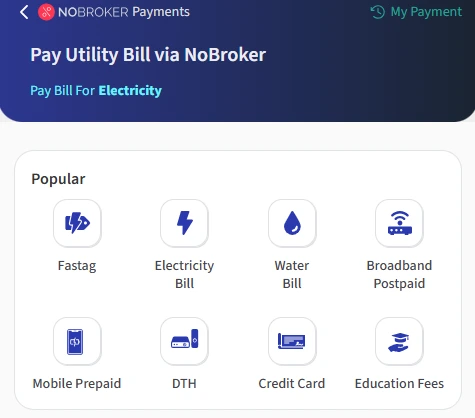
Step 3: You need to select HMWSSB from the list of available billers.
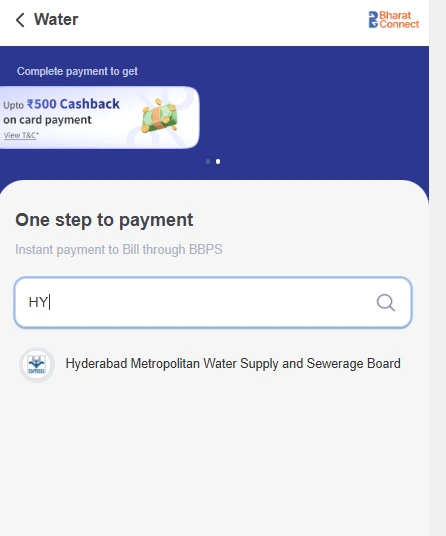
Step 4: Enter the CAN number as shown on your water bill and click on Submit.
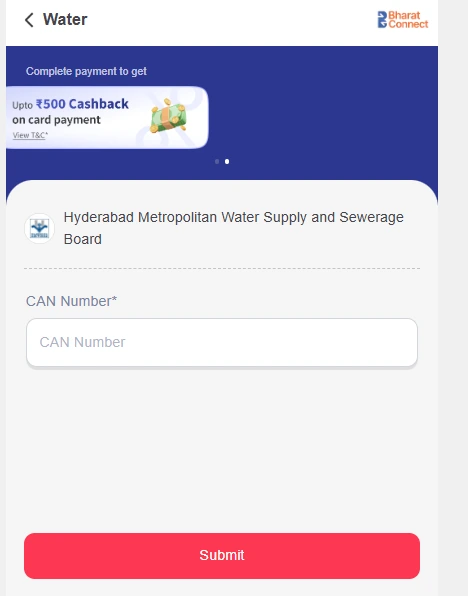
Step 5: Verify the bill details and amount, then choose your preferred payment method to complete the transaction.
Step 6: After successful payment, save the payment confirmation or receipt for your records
Frequently Asked Questions
Q. How can I pay my HMWSSB water bill online? Ans: You can pay your HMWSSB water bill online through the official HMWSSB portal or supported digital payment platforms by entering your CAN number and following the payment instructions.
Q. What is the CAN number in an HMWSSB water bill? Ans: CAN stands for Consumer Account Number, which is associated with your HMWSSB water connection and can be found on your HMWSSB water bill or previous payment receipt.
Q. Can I check my HMWSSB bill amount online? Ans: Yes, you can check your outstanding HMWSSB water bill amount through the online services using your CAN number.
Q. How can I download my HMWSSB water bill receipt? Ans: After completing a successful payment, you can access the transaction details from the Services drop-down menu and use the available download or print option to save your HMWSSB payment receipt.
Q. How can I register a billing dispute with HMWSSB? Ans: You can raise a billing-related complaint through HMWSSB's consumer grievance channels within the applicable period specified by them.
Q. My HMWSSB payment on NoBroker is showing as pending. Is something wrong? Ans: A pending status does not necessarily indicate an issue with your payment. The biller may take up to 24 hours to confirm and update the payment status. If the payment continues to show as pending after 24 hours, contact NoBroker Support for assistance.
Most Viewed Articles
Ritika is a content writer at NoBroker who writes practical guides on running a home, including paying utility bills, personal loans, household finance, repairs and home improvement. She explains each task in simple steps, with the charges, documents and official links a reader needs.
Loved what you read? Share it with others!



 ✕


 Full RM + FRM support