A TSSPDCL (Telangana State Southern Power Distribution Company Limited) new connection is required when a property needs a separate electricity supply for the first time. The service is available for residential, commercial and other premises within the distribution network. The property's electricity requirement determines the applicable service category and technical requirements. Applicants should identify their premises type and expected usage before starting the connection process.
TSSPDCL New Electricity Connection: Important Details
| Particulars | Details |
|---|
| Electricity provider | Southern Power Distribution Company of Telangana Limited (TSSPDCL/TGSPDCL ) |
| Application modes | Online through the TGSPDCL portal, through Mee-Seva, or at a Customer Service Centre |
| Individual connection | LT New Service Registration |
| Apartment connections | Multiple Service Registration |
| Higher-load connection | HT New Service Registration |
| Mobile verification | OTP verification is required for online registration |
| Main documents | ID proof and ownership document |
| Additional documents | Patta/Pass Book for agricultural consumers, where applicable; MRO certificate for SC/ST consumers, where applicable |
| Domestic example | Category I – Domestic, 1000W |
| Example charges | ₹1,200 development charge + ₹200 security deposit + ₹25 application fee= ₹1,425 |
| Line extension | Additional service-line charges may apply as per the estimate |
| Charge calculation | The amount shown online is provisional and may change after field verification, load assessment, technical feasibility and other applicable requirements |
| Official helpline | 1912 |
TSSPDCL New Connection Eligibility: Who Can Apply?
Anyone requiring a new electricity supply for an eligible premises can apply through the applicable TGSPDCL service category. The connection type and technical requirements depend on the premises and required load.
- Individual homes: LT New Service Registration
- Multiple connections: Multiple Service Registration
- Higher-load requirements: HT New Service Registration
- Registered mobile number: You can submit up to 4 new-service applications using one registered mobile number on the TGSPDCL portal.
- Technical requirements: Applicants must meet the applicable load, wiring, service-line, meter, earthing and other technical requirements prescribed for the selected connection category.
- Additional infrastructure: If the connection requires a new pole, line extension or other additional work, applicable charges will be assessed separately.
Documents Required for TSSPDCL New Connection
For an LT new service connection, applicants need to provide identity and ownership-related documents. Additional documents may apply depending on the property type or applicant.
| Document | When it is required |
|---|
| Aadhaar, Driving Licence, PAN, Ration Card, Voter ID Card or Passport | Identity proof of the applicant |
| Registered Sale Deed, Gift Deed or other accepted ownership document | Proof of ownership of the premises |
| Patta Passbook / relevant land document | Agricultural consumers, where applicable |
| MRO Certificate | SC/ST consumers, where applicable |
| Passport-size photograph | Applicant, where required |
Note: The exact documents can vary based on the connection category and applicant's circumstances. For example, a tenant may need to provide additional documents or consent/NOC as required by TGSPDCL. Requirements can depend on the premises and the applicant's circumstances, so check the latest requirements before submitting the application.
TSSPDCL New Connection Charges & fees in 2026-27
The following are example charges for the listed categories and loads. The amount payable for an individual application may differ after load assessment, site verification, technical feasibility and additional work.
| Category | Example Load | Development Charge | Security Deposit | Application Fee | Example Total |
|---|
| Category I – Domestic | 1000W | ₹1,200 | ₹200 | ₹25 | ₹1,425 |
| Category II – Non-domestic/Commercial | 1000W | ₹1,200 | ₹800 | ₹50 | ₹2,050 |
| Category III – Industry | 1 HP | ₹900 | ₹500 | ₹50 | ₹1,450 |
| Category IV – Cottage Industry | 1 HP | ₹900 | ₹500 | ₹50 | ₹1,450 |
| Category V – Agricultural | 1 HP | ₹925 | ₹60 | ₹25 | ₹1,010 |
| Category VIA – Street Lights | 1000W | ₹1,200 | ₹800 | ₹50 | ₹2,050 |
| Category VIB – Water Works/PWS | 1 HP | ₹900 | ₹800 | ₹50 | ₹1,750 |
| Category VII – General Purpose | 1000W | ₹1,200 | ₹800 | ₹50 | ₹2,050 |
| Category VIII – Temporary Supply | - | - | - | ₹50 | ₹50 |
| Category IX – EV Charging Stations | 1000W | ₹1,200 | ₹800 | ₹50 | ₹2,050 |
Note: Charges shown online are provisional and may change after field verification, load assessment or technical checks. Additional charges may apply for line or pole extensions.
Can I Get a TSSPDCL New Connection Without a Sale Deed?
If registered ownership documents are not available, TGSPDCL accepts alternative property documents depending on the case. For domestic LT connections, these include a Government Allotment Letter or Assignment Patta for government-allotted or regularised property. In rural areas, you may submit a Gram Panchayat NOC with the tax-paid receipt. For agricultural land, you must submit the NALA Order with the Patta Passbook or Sale Deed, along with an indemnity bond on ₹100 non-judicial stamp paper.
TSSPDCL New Connection Online Application Process
- Step 1: Open New Service Registration: Visit the TGSPDCL portal and select New Service Connection. Enter the applicant/consumer mobile number and use Check Prerequisites.

- Step 2: Verify your mobile number: Complete OTP verification using the registered mobile number. TGSPDCL uses this number for future SMS and alerts.
- Step 3: Select category and load: Choose the applicable consumer category and enter the required connected load (kW).
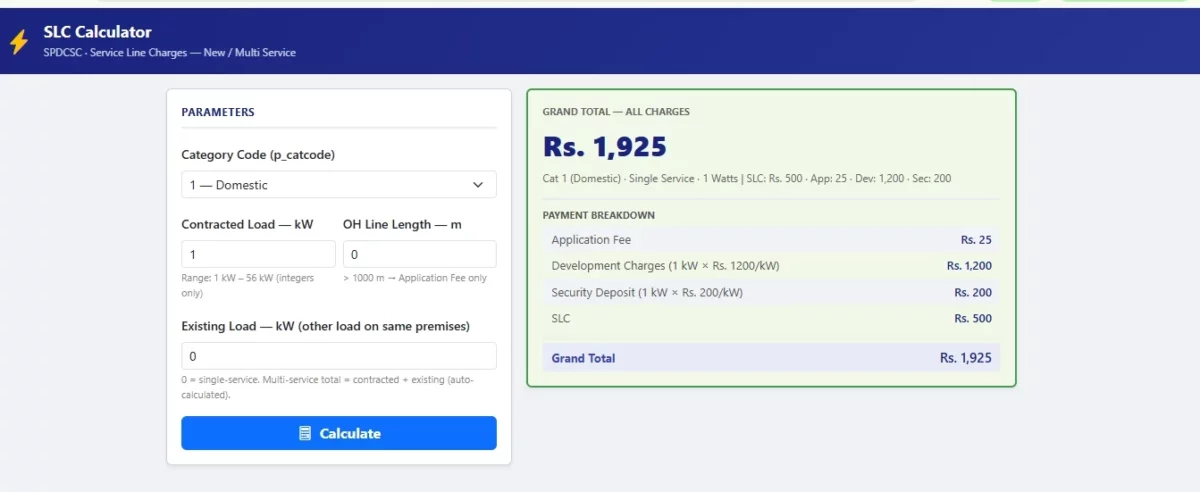
- Step 4: Check charges and documents: Review the applicable application fee, security deposit, development charges and service-line charges. Upload the documents required for the selected category.
- Step 5: Submit the registration: Complete the registration after verifying the details and making the applicable payment. Charges displayed at this stage are provisional and may change after field verification, load assessment and technical feasibility.
- Step 6: Track the application: Keep the registration/application number and payment details for future reference and to check application status.
TSSPDCL New Connection Offline Application Process
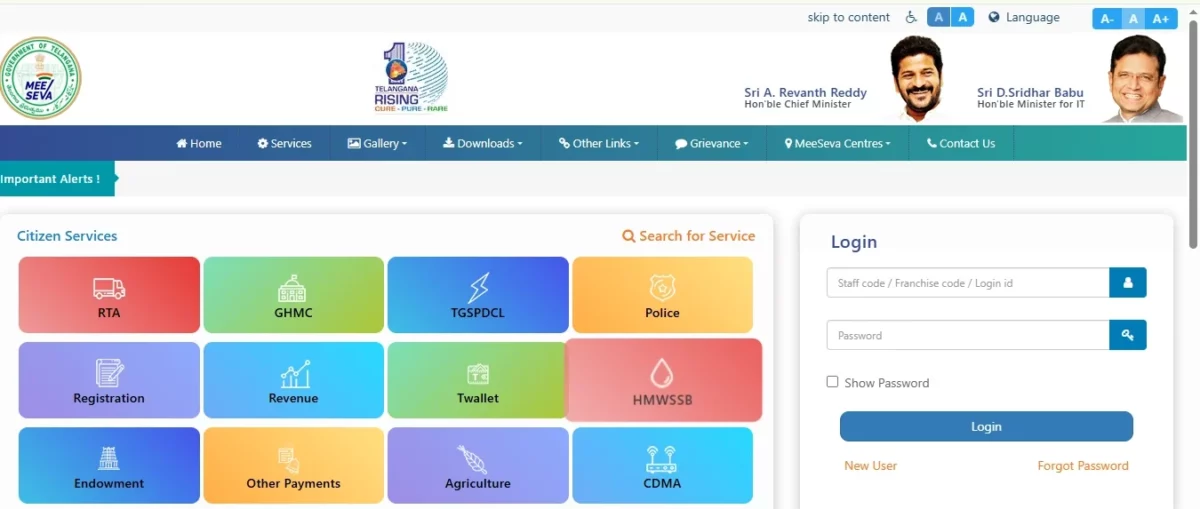
If you prefer not to apply online, you can visit a TGSPDCL Customer Service Centre (CSC). New service registration is also available through Mee-Seva.
- Step 1: Visit a CSC or Mee-Seva centre: Ask for the new electricity connection application form.
- Step 2: Submit your details and documents: Provide the required property, applicant, category and load details along with the applicable documents.
- Step 3: Pay the charges: Pay the applicable connection charges through the available payment method.
- Step 4: Collect the acknowledgement: Keep the acknowledgement and payment receipt for reference.
- Step 5: Complete verification: TGSPDCL verifies the New service connection application and may conduct a site inspection before releasing the connection.
Which TSSPDCL New Connection Should You Choose?
The connection type depends mainly on the property and the required electricity load.
| Connection Type | Generally Used for |
|---|
| LT New Service Registration | Individual homes and other low-voltage connections |
| Multiple Service Registration | Apartments or premises requiring multiple individual services |
| HT New Service Registration | Premises with higher electricity-load requirements |
How to Check TSSPDCL New Connection Application Status?
After applying, keep your application/registration number and payment receipt. To check the status, visit the TGSPDCL website and go to Consumer Services → Application Status → My Application Status. You can also use Search Registrations By Mobile Number to find applications linked to your registered mobile number.
What Happens After You Submit the TSSPDCL Application?
After submitting the TSSPDCL new connection application form, TGSPDCL verifies your documents and may inspect the premises. If additional work or an estimate is required, you must complete it before TGSPDCL processes the meter and releases the connection.
Application submitted → Document verification → Site inspection, if required → Estimate/additional work, if required → Meter processing → Connection release
If a document is rejected, TGSPDCL may provide an option to re-upload it.
Important Things to Remember When Applying
- Use an active mobile number for OTPs and updates.
- Keep your application/acknowledgement and payment receipt.
- Ensure uploaded documents are valid and match the application details.
- Keep wiring, earthing and the meter location ready.
- Be prepared for additional charges if TGSPDCL requires line/pole extension or other site work.
How Can NoBroker Help With Your Electricity Needs?
Once your new electricity connection is active, you will need to pay your regular electricity bills on time. NoBroker Payments lets you pay electricity bills online through Bharat Connect (BBPS), so you can manage recurring utility payments without visiting a payment centre.
If you are moving into a new property, you can also use NoBroker to explore property listings and home services.
Pay Your TSSPDCL Bill Through NoBroker
Once your new electricity connection is active, you can pay an eligible TSSPDCL electricity bill through NoBroker Payments on the NoBroker website or app. NoBroker Payments uses Bharat Connect (BBPS), which supports utility bill payments through participating billers.
Steps to pay your TSSPDCL bill through NoBroker:
Step 1: Open the NoBroker website or download the NoBroker app from the Google Play Store, then go to Bill Payments/Utility Bills.

Step 2: Select Electricity and choose Telangana as your state.
Step 3: Select the available TSSPDCL (Southern Power Distribution Company of Telangana Limited) biller and enter your Unique Service Number/Consumer Number.

Step 4: Click Submit and check the fetched bill details.
Step 5: Choose your preferred payment method and complete the payment.
Step 6: Save the payment confirmation for future reference.
Note: NoBroker Payments is only for eligible TSSPDCL electricity bill payments. It does not provide or process a new TSSPDCL electricity connection. For a new connection, follow the official TGSPDCL application process.
Pay your electricity bill through NoBroker Payments
Frequently Asked Questions
Q. Can I apply for a TSSPDCL new connection online? Ans: Yes. TGSPDCL provides an online New Service Registration facility. Individual services can be registered through the LT New Service Registration route.
Q. Can I apply for a new connection through Mee-Seva? Ans: Yes. TGSPDCL's official website currently states that you can also register new services through Mee-Seva.
Q. Does an online application mean the connection will be released immediately? Ans: No. After registration, TGSPDCL's workflow includes document verification, field verification, possible estimation and work execution before meter issuance and final release.
Q. What happens if my documents are rejected? Ans: TGSPDCL's workflow provides an upload link sent to the consumer through SMS or made available on the website, allowing the applicant to re-upload the required documents.
Q. Is earthing required before getting a new connection? Ans: Yes. TGSPDCL's consumer guidelines state that proper earthing must be ensured and earth pits must be provided by consumers as a mandatory safety requirement.
Most Viewed Articles
Ritika is a content writer at NoBroker who writes practical guides on running a home, including paying utility bills, personal loans, household finance, repairs and home improvement. She explains each task in simple steps, with the charges, documents and official links a reader needs.
Loved what you read? Share it with others!




 ✕


 Full RM + FRM support