Getting a new BESCOM connection is essential when moving into a newly constructed property or a home without an existing electricity connection. BESCOM provides electricity services across Bengaluru and surrounding areas. The application process involves submitting the required documents, completing verification, paying applicable charges, and getting the connection installed. Knowing each step beforehand can make the process smoother and help avoid unnecessary delays. This blog details the step-by-step process to apply for a new BESCOM electricity connection in 2026, including online/offline submission steps, mandatory documents, inspection procedures, and official tariff schedules.
What is BESCOM?
BESCOM (Bangalore Electricity Supply Company Limited) is a state-owned electricity distribution company responsible for supplying and distributing power across Bengaluru and several districts in Karnataka. It manages electricity connections, billing, metering, maintenance, and related consumer services. BESCOM serves residential, commercial, and industrial consumers within its designated service area and facilitates new electricity connections for eligible applicants.
Districts Covered by BESCOM
BESCOM is responsible for electricity distribution across eight districts in Karnataka. It covers a vast area of 41,092 square kilometres and serves a population of more than 207 lakh people. The service area extends across the following eight major districts:
- Bengaluru Urban
- Bengaluru Rural
- Chikkaballapura
- Kolar
- Ramanagara
- Tumkur (Tumakuru)
- Chitradurga
- Davanagere
What Are RAPDRP and Non-RAPDRP Areas?
Electricity distribution areas are classified based on their coverage under the Restructured Accelerated Power Development and Reforms Programme (R-APDRP).
- RAPDRP Areas: Areas covered under the R-APDRP, with projects aimed at improving electricity distribution and reducing power losses.
- Non-RAPDRP Areas: Areas not covered under the R-APDRP, where these specific programme-based projects were not implemented.
RAPDRP vs. Non-RAPDRP Areas for Your New BESCOM Connection
RAPDRP stands for Restructured Accelerated Power Development and Reforms Programme, while Non-RAPDRP refers to Non-Restructured Accelerated Power Development and Reforms Programme.
The table below highlights the key differences between RAPDRP and non-RAPDRP areas under BESCOM:
| Parameter | RAPDRP Areas | Non-RAPDRP Areas |
|---|
| Location | Bengaluru and designated towns such as Anekal, Kolar, Tumakuru, Davanagere, Chitradurga, Ramanagara, Chikkaballapur, Hoskote, Kanakapura, KGF and others. | BESCOM-served locations that are not included in the official RAPDRP town or sub-division list. |
| Coverage | Specific urban towns and designated Bengaluru sub-divisions covered under RAPDRP. | Other BESCOM service areas outside the designated RAPDRP locations. |
| Application | New connection applications can be submitted through BESCOM's available online channels. | Applications can be submitted through BESCOM's available online or offline channels, as applicable. |
| Services | Benefits from infrastructure and technology upgrades implemented under RAPDRP. | Served through BESCOM's regular electricity distribution network. |
| How to Check | Check whether your town or Bengaluru sub-division appears on BESCOM's RAPDRP list. | If your location is not on the RAPDRP list, it is generally considered non-RAPDRP. |
Types of Connections Offered by BESCOM
Here are the main types of BESCOM electricity connections and the premises or purposes they are generally intended for:
| Type of Connection | Category / Use | Suitable For |
|---|
| LT Connection | Low Tension supply | Residential, commercial and other low-load premises |
| HT Connection | High Tension supply | High-load commercial and industrial establishments |
| EHT Connection | Extra High Tension supply | Large industrial and high-power installations |
| MC/MSB Connection | Multiple connections / Multi-storey buildings | Residential or commercial buildings requiring multiple individual connections |
| Temporary Connection | Temporary power supply | Construction sites, temporary premises and other short-term requirements |
| Permanent Connection | Long-term power supply | Homes, offices, shops, industries and other permanent premises |
Documents Required for a New Commercial Electricity Connection
Here are the documents required for a new commercial electricity connection, depending on the applicant and premises:
| Category | Documents Required |
|---|
| ID Proof – Any One | Aadhaar Card, EPIC (Voter ID) Card, Driving License, Passport, PAN Card, TAN Card |
| Proof of Ownership / Occupancy | Registered Sale Deed, Registered Partition Deed, Registered Lease Deed, Registered Deed of Last Will, Registered Gift Deed, General License issued by the Competent Authority, Khatha Certificate, Latest Rent Paid Receipt, Proof of Occupancy with Owner's Consent |
| Where Owner's Consent Is Unavailable | Indemnity Bond as per Annex-8 of CoS |
| Water / Land Documents | Water Right Certificate, Khatha Certificate, Record of Rights (Geni and Pahani Patrike), No Objection Certificate to lift water |
| Firm / Company Documents | Partnership Deed; Memorandum of Association and Certificate of Incorporation |
| Other Documents | License to Carry on Trade, Business or Profession; Building/Layout Plan; Undertaking for installation of Solar Water Heating System; Registration wherever applicable under Clause 4.02 of the Conditions of Power Supply Regulations of KERC |
How to get a New Commercial Electricity Connection in Bangalore?
Here is how to get a new commercial electricity connection in Bangalore:
Step 1: Visit the official website of BESCOM
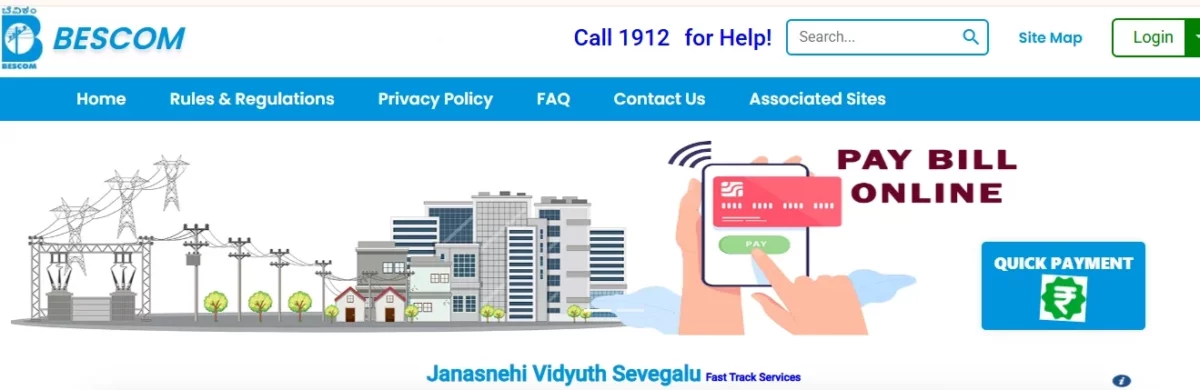
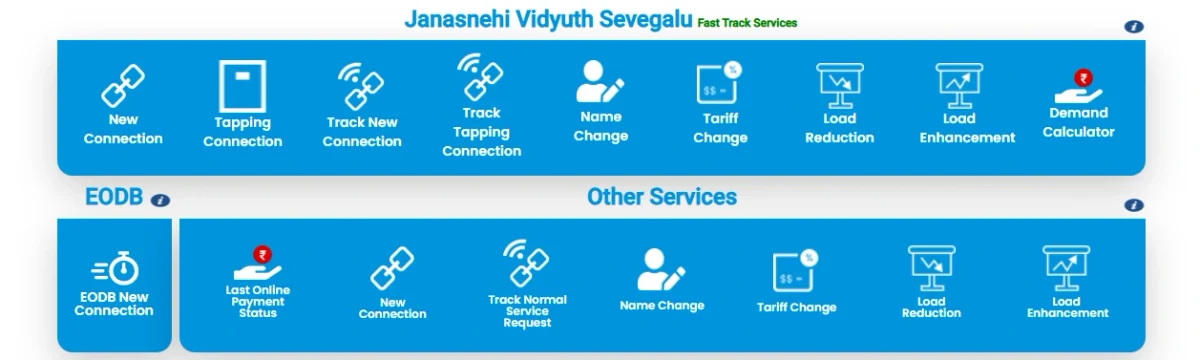
Step 2: On the home page, click on the new connection option.
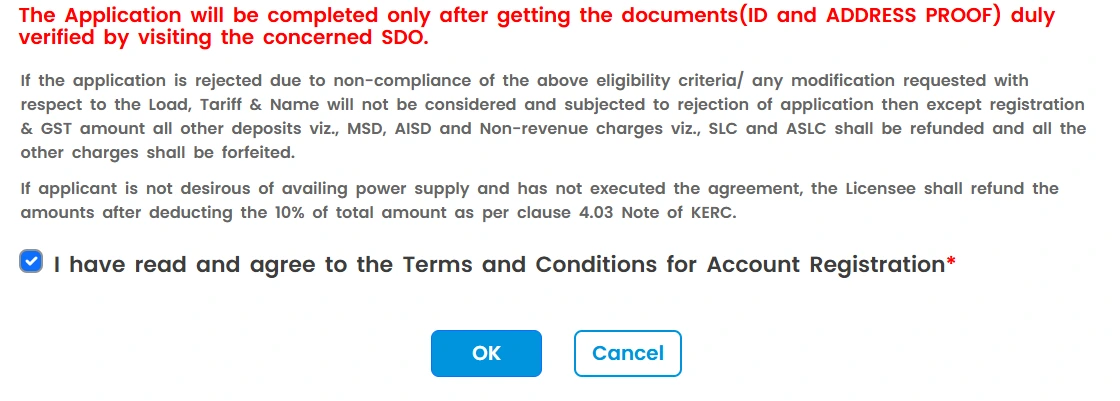
Step 3: Then agree to the terms and conditions and click the OK button to continue.
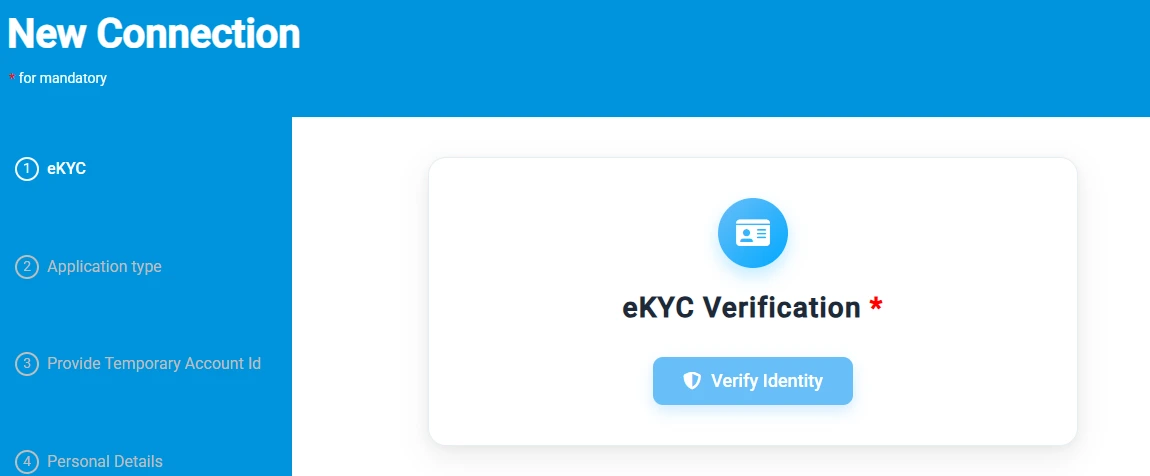
Step 4: Complete eKYC by providing your required identification details.
Step 5: Click on the type of connection. Fill in the application and location details and upload the required documents.
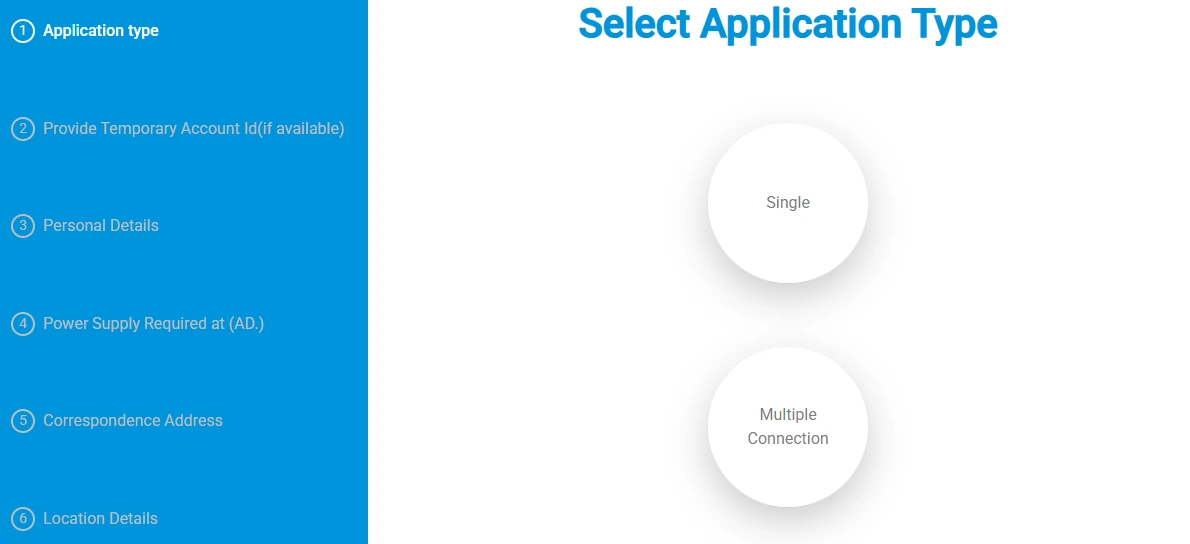
Step 6: Review the information and submit the application form. Pay the required fee through the online payment gateway. After submitting your application, you’ll receive a confirmation regarding your application status.
BESCOM Tariff Structures for Different Types of Connection
Here is a comparison of the major BESCOM tariff categories, their applicable energy rates, fixed charges, and typical uses:
| Connection Type (Category) | Energy Rate | Fixed / Demand Charges | Key Applicability |
|---|
| LT-1: Domestic / Residential | ₹5.80/unit | ₹150/kW/month | Residential houses, flats and apartments. |
| LT-2: Educational & Medical | ₹6.55/unit | ₹195/kW/month | Private educational institutions, nursing homes and private hospitals. |
| LT-3(a): Commercial | ₹6.80/unit | ₹215/kW/month | Shops, hotels, restaurants, offices, banks, clinics and commercial establishments. |
| LT-5: Industrial | ₹4.40/unit | ₹150/HP/month | Industrial units, workshops, MSMEs, flour mills, dairies and other specified industrial activities. |
| LT-6(c)/HT: EV Charging | ₹4.50/unit | ₹70/kW/month for LT; ₹200/kVA/month for HT | Electric vehicle charging and battery-swapping stations. |
| HT Categories | Varies by category | Demand-based, generally per kVA/month | Large commercial, industrial, institutional and other high-tension consumers. |
Note: Electricity tariffs can change based on the latest KERC tariff orders, and the applicable rate may vary based on the consumer category, load, and other conditions.
Mandatory Additional Bill Components
Besides the base energy and fixed charges, your BESCOM bill may include the following additional components:
- Pension & Gratuity (P&G) Surcharge: A surcharge of 35 paise per unit applicable across consumer categories.
- FY25 True-Up Recovery: An additional 56 paise per unit recovered towards previous revenue adjustments.
- State Electricity Duty: A 9% state electricity duty levied on applicable energy and fixed charges.
- FPPCA (Fuel Cost Adjustment): A variable monthly adjustment based on changes in fuel and power procurement costs.
Note: These charges can change based on the latest KERC orders and BESCOM billing regulations.
BESCOM Contact and Support Details
| Support Channel | Contact Details | Purpose |
|---|
| 24x7 Helpline | 1912 (Toll-Free) | Electricity-related complaints and assistance |
| General WhatsApp Support | 9449844640 | General customer support |
| Safety Issues WhatsApp | 9483191212 / 9483191222 | Reporting electricity safety-related issues |
| Alternative Phone | 080-22238888 | Customer support and assistance |
| Email | helpline@bescom.co.in | Online queries and support |
| Official Website | BESCOM Portal | Bill payments, services, complaints, and other online services |
| Mobile App | BESCOM Mithra | Bill-related services and complaint registration |
| Social Media | X: @NammaBescom / Facebook: BESCOM | Updates and customer communication |
How to Make Monthly BESCOM Bill Payments?
You can pay your BESCOM electricity bill through the following options:
- BESCOM Website: Visit the BESCOM online payment portal, enter your consumer number, verify the bill, choose a payment method, and complete the transaction.
- BESCOM Mithra App: Log in with your consumer details, view your bill, select a payment method, and complete the payment through the app.
- UPI Apps: Use Paytm, Google Pay, PhonePe, or another UPI app to select BESCOM under electricity bill payments, enter your consumer number, and pay.
- NoBroker Pay: Go to Payments → Utilities → BESCOM Bill, enter your consumer number, verify the bill, select a payment method, and complete the payment.
- Authorised Payment Centres: Visit a designated BESCOM payment centre with your bill and pay using cash or cheque.
- Authorised Banks: Pay your BESCOM bill through participating banks using your consumer number, either online or over the counter.
- BESCOM O&M Offices: Visit the nearest O&M office with your bill and make the payment using cash or cheque.
Pay Your BESCOM Bill Through NoBroker
Paying your BESCOM electricity bill doesn’t have to mean visiting an office or standing in a queue. With NoBroker Pay, you can pay your bill online from the comfort of your home. It supports BESCOM bill payments through the Bharat Bill Payment System (BBPS), so you can complete your payment digitally and keep your monthly electricity dues in one place. Here are the steps to pay your commercial electricity bill in Bangalore through NoBroker:
Step 1: Go to the NoBroker Payments Page and select Electricity Bill.
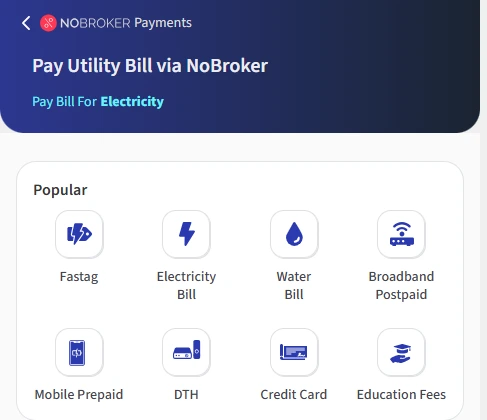
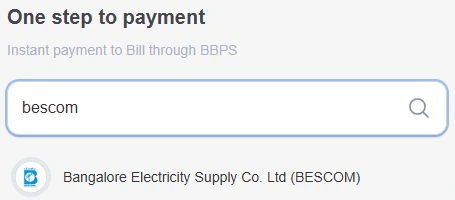
Step 2: Select BESCOM from the list of available billers.
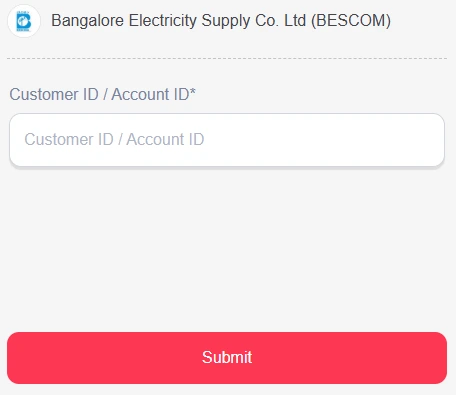
Step 3: Enter your service connection number: Provide your TNPDCL service connection number as shown on your electricity bill.
Step 4: Check your bill: Your outstanding bill amount will be fetched and displayed for you to review.
Step 5: Confirm the payment: Verify the bill details and amount, then proceed with your preferred payment method.
Step 6: Save the confirmation: After successful payment, retain the payment confirmation or receipt for your records.
You can also pay your Tata Power electricity bill through the NoBroker mobile app by following the same steps.
Frequently Asked Questions
Q. Can I apply for a BESCOM connection without an existing Account ID? Ans: Yes. You can apply for a new connection without first registering for a customer account.
Q. How can I check the status of my new BESCOM connection application? Ans: You can track your application using the Request ID or Account ID through BESCOM's New Connection Tracker.
Q. Can I get a BESCOM connection for a rented property? Ans: Yes, subject to BESCOM's requirements. You may need to provide a valid lease agreement or other acceptable proof of occupancy.
Q. What happens if there is no electricity pole or line near my property? Ans: BESCOM may need to extend the distribution line before providing the connection. This may involve additional charges and affect the connection timeline.
Q. Can I apply for multiple BESCOM connections for the same property? Ans: Yes. You can apply for multiple connections where applicable, subject to BESCOM's requirements.
Q. Can I get a BESCOM connection if the building is still under construction? Ans: Yes. Depending on your requirements, you can apply for a temporary or permanent connection.
Q. What can cause a BESCOM new connection application to be rejected? Ans: Incomplete documents, unpaid applicable charges, outstanding dues, or failure to meet electrical safety requirements may affect your application.
Q. Is a BESCOM connection available for commercial and industrial properties? Ans: Yes. BESCOM provides connections for eligible commercial, industrial, residential, and other premises based on the applicable category and load.
Q. Can I change the tariff category after getting a BESCOM connection? Ans: Yes. BESCOM provides a tariff-change service, subject to applicable requirements and documentation.
Q. What is the BESCOM helpline number for new connection queries? Ans: You can contact BESCOM's 24×7 helpline at 1912 for assistance with new connections, billing, meter issues, and other electricity-related concerns.
Most Viewed Articles
With experience of working with various up and coming startups, Prakhar has an eye for the intricate details of any subject. He is an ECE graduate and has travelled and stayed in almost all parts of India. Read his blog to get exciting details and tips from the real estate ecosystem in the world.
Loved what you read? Share it with others!



 ✕
✕


 Full RM + FRM support