LPG Gas Connection - Quick Information 2026
An LPG gas connection provides a safe and reliable fuel supply for cooking at home. It includes a gas cylinder, regulator, and consumer registration, making everyday cooking convenient, efficient, and easily accessible. Below are the important details to understand it:
| Aspect | Details |
|---|
| Providers | Indane Gas, Bharat Gas, HP Gas |
| Application Mode | Online via official websites or offline at the local distributor |
| Documents Required | Aadhaar Card, Address Proof, Photo, KYC Form, Voter ID, PAN Card |
| Initial Deposit Amount | Varies by provider: ₹1,450 to ₹2,900 (see price table below) |
| Booking Options | Mobile app, SMS, IVRS, WhatsApp, Website |
| Delivery Time | 2–7 working days after booking |
| Subsidy Availability | Yes, through Direct Benefit Transfer (DBT) |
| Transfer/Portability | Available across cities and providers |
| Surrender & Refund | Refundable deposit after surrender with documents |
| Emergency Helpline | 1906 (All-India LPG Emergency Helpline) |
Price List of LPG New Connection in India 2026
The price of a new LPG gas connection in India varies by provider, cylinder type, and location. Costs usually include a security deposit, regulator charges, and optional accessories, making it important to compare providers before applying.
| Component | Indane (IOCL) | Bharat Gas (BPCL) | HP Gas (HPCL) |
|---|
| Cylinder Security Deposit | ₹2,200 (India) / ₹2,000 (NE) | ₹2,200 (India/₹2,000 (NE) | ₹2,200 (India/₹2,000 (NE) |
| Regulator Deposit | ₹250 (India)/ ₹200 (NE) | ₹150 (India) /₹100 (NE) | ₹250 (India)/ ₹200 (NE) |
| Installation/Admin Charges | Varies by distributor | ₹75–₹100 (varies based on distributor) | ₹236 (Standard) / ₹59 (PMUY) (varies based on distributor) |
| Administrative Fee (Offline) | Not specified | Included above | ₹118 |
| Hotplate Inspection (Optional) | Not specified | ₹100–₹300 (depending on stove type) | Not specified Distributor-dependent
|
| First Refill (Bengaluru) | ₹944 | ₹944 | ₹944 |
What Are the Different Types of Gas Connections Available?
If you're planning an online application for a new gas connection, it's important to know the available LPG connection types. The right option depends on your household size, cooking needs, and gas usage.
- LPG (Liquefied Petroleum Gas): Widely used for household cooking and supplied through portable cylinders. Available in different cylinder sizes (5, 14,2kg) based on family needs.
- PNG (Piped Natural Gas): Delivered directly through pipelines to homes and apartments. It offers a continuous gas supply without cylinder replacements.
- Commercial Gas Connection: Intended for restaurants, hotels, cafes, and small businesses. Generally uses 19 kg LPG cylinders to support higher daily consumption.
- Industrial Gas Connection: Used in factories, manufacturing units, and industrial processes. Designed to handle large-scale fuel requirements for production activities.
- Bulk LPG Connection: Ideal for residential complexes, hospitals, educational institutions, and large commercial establishments. Gas is supplied from a central storage tank through a pipeline system.
- Domestic Double-Cylinder Connection: Connects two LPG cylinders to a single connection. Ensures uninterrupted cooking when one cylinder runs out of gas.
What Documents Are Required to Apply for a New Gas Connection?
If you are confused about what documents are required for a new gas connection in Bangalore, we have a list you can use to organise the new LPG connection documents.
What Address Proof Documents Are Required for a New LPG Gas Connection?
To get a new LPG gas connection, you must submit valid address proof documents. These help verify your residential address and complete the KYC process smoothly.
- Aadhaar Card
- Voter ID Card
- Passport
- Driving Licence
- Ration Card
- Electricity Bill
- Water Bill
- Telephone/Landline Bill
- Bank Passbook with Address
- Registered Rent Agreement
- Property Tax Receipt
- House Registration or Sale Deed
- Employer-issued Residence Certificate (where applicable)
- Government-issued Address Certificate
Note: Gas providers may ask for additional documents depending on your location and application type. Always check the latest requirements before applying.
How to Get a New Gas Connection for a Rented House?
Getting a new gas connection for rented house is simple if you have a valid identity and address proof. Most LPG providers accept rental documents and offer a straightforward application process. Below are a few pointers to keep things easy to understand:
- Keep your Aadhaar Card and identity proof ready.
- Submit a registered rent agreement or landlord-authorised address proof.
- Complete the KYC form and application process.
- Choose your preferred LPG provider and cylinder type.
- Pay the applicable security deposit and connection charges.
- Schedule verification and wait for connection approval.
Note: If you are staying temporarily or have lower cooking needs, a 5 kg LPG cylinder can be a convenient and affordable option with simpler documentation requirements in many areas.
Documents needed specifically for renters:
- Aadhaar Card or any valid government-issued identity proof.
- Registered Rent Agreement showing your current rental address.
- Landlord's Declaration or NOC (if requested by the gas provider).
- Recent Utility Bill linked to the rented address, if available.
- Completed the KYC Form along with a passport-size photograph.
Note: If you live in a PG, rented room, or temporary accommodation, a 5 kg LPG cylinder can be a practical choice. It is easy to carry, requires minimal paperwork, and is well-suited for students, working professionals, and people who move frequently.
Tip: Once your connection is active, you can conveniently make LPG and other utility payments through the BBPS bill payment platforms.
How Can You Apply for a New Gas Connection Online?
Applying for a new gas connection online is quick and convenient. Simply select your preferred LPG provider, complete the application form, upload the required documents, finish KYC verification, and pay the applicable connection charges.
How to Get a Bharat Gas New Connection?
- Step 1: Visit - https://ebharatgas.com/ebharat/forHome/home.html
- Step 2: Then click on Get a new connection. Now, follow the instructions as given. Keep Proof of Identity (POI) and Proof of Address (POA) ready; you must also attach scanned copies.
- Step 3: You will be redirected to the Indane customer portal at https://cx.indianoil.in. Navigate to Consumer Services and then select New LPG Connection to begin your application process.
- Step 4: If you don’t have scanned copies, you can take a Xerox of your POI and POA and hand it over to the distributor, along with a printout of the registration form. The whole process is straightforward.
- To know more information about Bharat Gas New Connection - Read on!
How to Get Indane Gas New Connection?
- Step 1: Visit https://indane.co.in/
- Step 2: Go to ‘Online Services’ on the home page and then click on ‘New Connection’
- Step 3: You will be redirected till you reach this page https://cx.indianoil.in/webcenter/portal/LPG/pages_lpgservicenewconnection
- Step 4: Click on new connection and create an account by clicking ‘Register Now’
- Step 5: Post this, the process is simple, you will again need to have your documents ready (Identity proof and Address proof). You can make payments online and submit scans online or directly to the distributor.
How to Get Hp Gas New Connection?
- Step 1: visit https://myhpgas.in/myHPGas/NewConsumerRegistration.aspx
- Step 2: You will need to follow the same process of having your ID and address proof ready, or you can opt to try the e-KYC facility, you use your Aadhaar Number and OTP sent to your mobile by UIDAI.
- Step 3: You will need to upload your photo, and proofs. Once you register you will get a reference number to track the status of your application, you can make payments online.
How to Get a Jyothi Gas New Connection?
- Step 1: Visit the official Jyothi Gas website: https://www.jyothigas.com/ or go to the enquiry/new connection form section. You can find information on new connections and outlets.
- Step 2: Fill out the enquiry/new connection form with your name, address, mobile number, and PIN code. A customer service executive will contact you.
- Step 3: Provide basic KYC documents (ID proof and address proof) when requested.
- Pay the refundable cylinder/security deposit and any connection charges as communicated by the executive.
- Step 4: Expect doorstep delivery and installation after the terms and conditions are accepted.
- Step 5: Contact for help or questions: Call 080‑43404040 (Jyothi Gas customer care).
How to Get a Totalgaz Gas New Connection?
- Step 1: Go to totalenergies.in
- Step 2: Fill out the online connection form with your full name, mobile number, email address, state, city, and PIN code.
- Step 3: Submit and wait for a call back from a TotalEnergies representative to collect additional details and confirm your order.
- Step 4: Pay the connection charges (approx. refundable deposit: ₹1,600; regulator: ₹250; connection fees: ₹150; total: around ₹2,000).
- Step 5: Receive delivery and installation of your cylinder after confirmation.
- Step 6: For help: Call 1800‑102‑3339 (TotalEnergies LPG support).
How to Get an Eastern Gas New Connection?
- Step 1: Eastern Gas is a private LPG supplier that operates via a distributor network.
- Step 2: To get a new connection, contact Eastern Gas customer service or a local Eastern Gas distributor in your area.
- Step 3: Provide ID proof and address proof when requested. Private LPG providers generally require minimal documentation.
- Step 4: Pay the refundable security deposit and connection charges as specified by Eastern Gas.
- Step 5: Your connection and cylinder delivery are arranged by the distributor once details are processed.
How to Get a Kwality Gas New Connection?
- Step 1: Visit the official Kwality Gas website https://www.kwalitygas.com to learn about their LPG offerings and products.
- Step 2: Find the nearest Kwality Gas distributor through the website contact options.
- Step 3: Call the distributor or Kwality Gas support to enquire about getting a new LPG connection.
- Step 4: Submit your basic documents (ID proof and address proof) as required by the distributor.
- Step 5: Pay the refundable deposit and any connection or cylinder charges.
- Step 6: Receive delivery and installation of the gas cylinder at your home.
How Can You Apply for a Gas Connection From the Official LPG Website?
- Step 1: Visit the official LPG website http://mylpg.in/index.aspx
- Step 2: Click on ‘register for LPG connection’ or hit the ‘new customer’ option
- Step 3: You will see an online application on the screen, which you need to fill out with details like state, city, distributor, mobile number, date of birth, email, etc. Then hit the ‘submit’ tab.
- Step 4: A verification link is sent to your email ID for you to click and verify, and then you get a registration ID
- Step 5: Print out the form and visit the nearest distributor with a photograph and ID proof.
- Step 6: Pay the charges for the new connection, and you are good to install a new LPG at home!
How to Apply for a New Gas Connection Offline?
Applying for a new gas connection offline is simple. Visit your nearest LPG distributor, collect and fill out the application form, submit KYC documents and address proof, choose your cylinder type, and pay the required charges. After document verification, the connection is approved, and the cylinder is delivered or collected as instructed by the distributor.
How to Check LPG Gas Connection Status?
After applying for a new LPG connection, tracking your application status helps you know whether verification, approval, or delivery is pending. Below are the processes for different gas supplier brands:
For Indane Gas (Indian Oil)
- Step 1: Visit: https://cx.indianoil.in
- Step 2: Log in using your mobile number or LPG ID.
- Step 3: Go to the “Track Your Services” section.
- Step 4: Click on “Check Connection Status”.
- Step 5: Enter the required details like Consumer Number or LPG ID.
- Step 6: View the status of your connection request or any pending steps.
For Bharat Gas (BPCL)
- Step 1: Visit: https://my.ebharatgas.com
- Step 2: Enter your request ID and date of birth.
- Step 3: Then, click on the generate OTP button.
- Step 4: Enter the OTP and click on the check status option.
- Step 5: The status will be displayed instantly.
For HP Gas (HPCL)
- Step 1: Visit:https://myhpgas.in
- Step 2: Log in with your mobile number or consumer details.
- Step 3: Navigate to “Check New Connection Status” under services.
- Step 4: Provide your LPG ID or reference number.
- Step 5: The page will display your application or connection status.
How to Pay Your Gas Bill Via NoBroker?
Paying your gas bill through NoBroker is quick and hassle-free, allowing users to manage piped or LPG gas payments online in just a few simple steps:
- Step 1: Open the NoBroker app or visit the NoBroker website.
- Step 2: Go to the Utility / Bill Payment section.
- Step 3: Select “Piped Gas” or “LPG Gas” as per your requirement.
- Step 4: Choose your gas service provider from the list.
- Step 5: Enter your Customer ID / CRN number.
- Step 6: Click to fetch your gas bill details.
- Step 7: Verify the bill amount displayed on the screen.
- Step 8: Select a payment method (UPI, debit/credit card, or net banking).
- Step 9: Confirm and complete the payment securely.
- Step 10: Receive instant payment confirmation after a successful transaction.
Pay all your utility bills instantly and securely with NoBroker Payments click here to get started!
LPG Gas Connection Transfer Application
An LPG gas connection transfer application is required when a customer wants to shift their existing LPG connection from one distributor or location to another, whether within the same city or to another city. The transfer process ensures the continuity of the gas supply without the need to surrender and reapply for a new connection. It applies to all major LPG providers in India, including Indane, Bharat Gas, and HP Gas.
Here is the application form for LPG gas connection transfer:
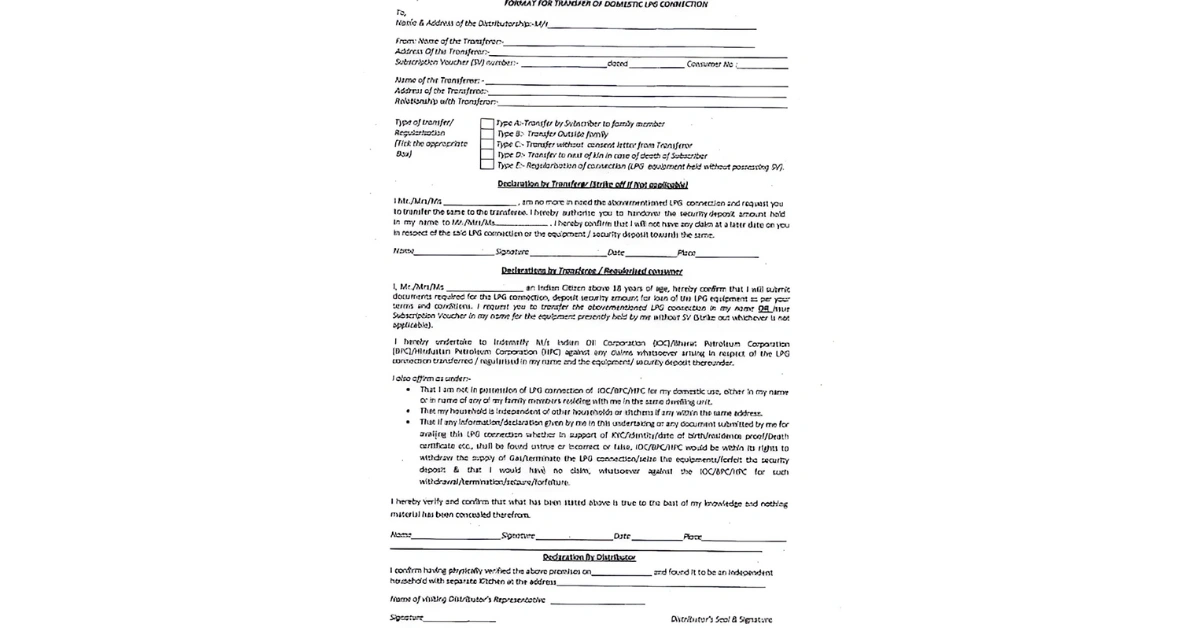 Application Form for LPG Gas Connection Transfer
New Ujjwala 2.0 Connection
The Pradhan Mantri Ujjwala Yojana 2.0 (PMUY 2.0) is a government scheme to provide free LPG connections to economically weaker households in India. It is launched as an upgraded version of the original Ujjwala scheme.
Eligibility Criteria:
- This is applicable only for women applicants over 18 years of age.
- There shouldn’t be any other LPG connection in the house.
- Adult woman belonging to any of the following categories SC, ST, Pradhan Mantri Awas Yojana (Gramin), Most Backward Classes (MBC), Antyodaya Anna Yojana (AAY), Tea and Ex- Tea Garden tribes, Forest Dwellers, People residing in Islands and River Islands, enlisted under SECC Households (AHL TIN) or any Poor Household as per 14-point declaration.
Documents:
- KYC
- Aadhaar card
- Bank account number and IFSC code
- Ration card
- Aadhaar card of the beneficiary
Application Process:
- Step 1: Visit the official PMUY site: https://www.pmuy.gov.in
- Step 2: Click on the new Ujjwala 2.0 new connection.
- Step 3: Choose your preferred LPG provider – HP, Bharat, or Indane Gas.
- Step 4: Fill in the online application form.
- Step 5: Upload scanned copies of the required documents.
- Step 6: Submit and note the application/reference number for status tracking.
Benefits of PMUY to Customers
- Provides free LPG connections to eligible women from economically weaker households
- Reduces dependence on firewood and traditional chulhas, improving indoor air quality
- Helps prevent respiratory and eye-related health issues caused by smoke
- Saves time and effort spent on collecting firewood
- Ensures safer cooking with reduced risk of burns and household accidents
- Promotes women's empowerment by placing the connection in the woman’s name
- Supports a cleaner environment by lowering carbon and soot emissions
- Improves overall quality of life and dignity for rural and low-income families
How Can You Get Your LPG Gas Cylinder Refilled?
Refilling your LPG gas cylinder is quick and easy. You can book a refill through multiple channels and get the cylinder delivered to your doorstep.
- Choose the booking method, such as the provider (Indane, HP, Bharat Gas) website, mobile app, WhatsApp, SMS, or IVRS service.
- Enter your consumer number, registered mobile number, or LPG ID and place the refill request.
- Complete the payment online or choose to pay at the time of delivery, depending on the available options.
- Track your booking status and receive the refilled cylinder at your registered address within the estimated delivery period.
Make Your LPG Gas Payment With NoBroker Pay
Paying your LPG gas bill through NoBroker Pay is a simple and convenient way to manage refills from major providers such as Indane Gas, Bharat Gas, and HP Gas. Just select your gas provider, enter your consumer details, verify the bill amount, and complete the payment using UPI, cards, net banking, or wallets. Users may also receive cashback, discounts, or special rewards during promotional offers. With secure payments, instant confirmation, and support for multiple LPG providers, NoBroker Pay makes gas bill payments fast, easy, and hassle-free.
Frequently Asked Questions?
Q1. Can a tenant apply for a new LPG gas connection without the landlord's consent? Ans: Yes, tenants can usually apply using valid rental documents and KYC. Some providers may request additional address verification.
Q2. What is the 5 kg Indane Chhotu cylinder, and is it good for a rented house? Ans: The 5 kg Indane Chhotu cylinder is portable, affordable, and ideal for PG residents, students, and short-term tenants.
Q3. Is Aadhaar mandatory for a new LPG gas connection? Ans: Aadhaar is generally required for KYC and subsidy benefits, though alternative documents may be accepted in some cases.
Q4.What is a gas cylinder card, and how do I get one? Ans: A gas cylinder card contains your LPG connection details and is usually issued automatically after connection approval.
Q5. Can I get a gas connection if I live in a PG accommodation? Ans: Yes, PG residents are eligible for LPG options. A 5 kg cylinder is often the most practical choice.
Q6. How long does it take to get a new LPG connection after applying? Ans: Most LPG connections are approved and delivered within 2–7 working days after document verification and payment.at Gas, or visit a local distributor with your ID and proof of address.
Most Viewed Articles
Who doesn’t love a stylish home? We know Ananth does! From a young age Ananth could never resist reading Architecture Digest, Good House Keeping, and so on. He did it because he was captivated by the beauty of the homes and the way they kept homes feeling like ‘home’ but yet glamorous. He is a wizard at keeping houses looking top-notch and he does it with the least effort. He writes to shares his tips and make loving your home easy.
Loved what you read? Share it with others!



 ✕
✕



 Full RM + FRM support