GAIL Gas customers can check PNG rates for their service area, calculate gas consumption charges using meter readings, and pay their bills through online or offline methods. The applicable rate per Standard Cubic Metre (SCM) varies by location, while the final bill may include additional charges and taxes. This blog covers GAIL Gas PNG rates for 2026, how to calculate your bill, step-by-step online and offline payment methods, and customer care details for billing assistance.
GAIL Gas PNG Rates 2026
The table below lists the GAIL Gas PNG retail prices across its service areas in India, including the applicable rates for each city and district as of October 2026:
| State | City/Area | PNG Retail Price (₹/SCM) |
|---|
| Uttar Pradesh | Meerut | ₹50.00 |
| Haryana | Sonipat | ₹53.00 |
| Madhya Pradesh | Dewas | ₹50.00 |
| Uttar Pradesh | Firozabad | ₹50.00 |
| Rajasthan | Bharatpur | ₹49.00 |
| Karnataka | Bengaluru Urban & Rural District | ₹53.00 |
| Uttarakhand | Dehradun District | ₹49.50 |
| Odisha | Ganjam-Nayagarh-Puri | ₹50.00 |
| Odisha | Sundergarh-Jharsuguda Districts | ₹50.00 |
| Jharkhand | Giridih-Dhanbad Districts | ₹50.00 |
| Jharkhand | Saraikela-Kharsawan | ₹50.00 |
| Madhya Pradesh | Raisen-Sehore-Shajapur | ₹50.00 |
| Karnataka | Dakshin Kannada (Mangaluru) | ₹53.00 |
| Uttar Pradesh | Mirzapur, Chandauli and Sonbhadra | ₹50.00 |
| Jharkhand | West Singhbhum District | ₹50.00 |
How to Calculate Your GAIL Gas PNG Bill?
GAIL Gas calculates domestic Piped Natural Gas (PNG) bills based on meter readings converted into Standard Cubic Metres (SCM) using the applicable correction factor. Bills are generally issued every two months. If an actual meter reading is unavailable, a provisional bill may be generated using average consumption from the previous six billing cycles.
Steps to Calculate Your GAIL Gas Bill
Step 1: Check your previous and current meter readings: Note the readings recorded at the beginning and end of your billing period.
Step 2: Calculate the meter reading difference: Subtract the previous reading from the current reading to determine the consumption recorded by the meter.
Meter Difference = Current Reading − Previous Reading
Step 3: Convert consumption into SCM: Apply the applicable correction factor to determine the billed gas consumption in SCM.
Billed Consumption = Meter Difference × Correction Factor
Step 4: Check the applicable PNG rate: Refer to your GAIL Gas invoice for the applicable price per SCM.
Step 5: Calculate gas consumption charges: Multiply the billed consumption by the applicable gas rate.
Gas Charges = Billed Consumption (SCM) × Rate per SCM
- Add other applicable charges: Include taxes, network tariff or last-mile connectivity charges, arrears and late-payment charges, if listed on your bill.
- Calculate the final bill amount: Add all applicable charges and subtract payments, discounts or credits already applied.
Example of GAIL Gas PNG Bill Calculation
The following example uses hypothetical readings, a correction factor and a gas rate for illustration only.
| Particulars | Value |
|---|
| Previous meter reading | 500 |
| Current meter reading | 530 |
| Meter reading difference | 30 |
| Illustrative correction factor | 1.02 |
| Billed consumption | 30 × 1.02 = 30.6 SCM |
| Assumed PNG rate | ₹45/SCM |
| Gas consumption charges | 30.6 × ₹45 = ₹1,377 |
The estimated gas consumption charge is ₹1,377, before applicable taxes, network charges and other adjustments.
Note: The actual correction factor, PNG rate and additional charges depend on your connection and applicable tariff.
How to Pay Your GAIL Gas Bill Online?
You can pay your GAIL Gas PNG bill through the official PNG Mitra customer portal by following these steps:
Step 1: Visit the official website: Open the GAIL Gas PNG Mitra Bill Payment Portal.
Step 2: Select the payment category: Under the Online Payment tab, choose the appropriate option from the Payment For dropdown menu, such as Security Deposit or the applicable bill payment option.

Step 3: Enter your BP Number: Enter your Business Partner (BP) Number in the required field.
Step 4: Complete the CAPTCHA: Enter the CAPTCHA displayed on the screen. If it is unclear, click Refresh CAPTCHA.
Step 5: View your bill: Click View Bill to retrieve your invoice details, including your BP name, invoice number and outstanding amount.
Step 6: Check the payment amount: Review the amount payable and enter the amount if required.
Step 7: Choose a payment method: Select an available payment option, such as UPI, QR code, debit or credit card, or net banking.
Step 8: Complete the payment: Follow the on-screen instructions to authorise the transaction. Enter the OTP if prompted.
Step 9: Save the receipt: Once the payment is successful, save the receipt or transaction reference number for future reference.
Note: GAIL Gas states that payments through UPI, QR code and BBPS do not attract payment gateway charges, while other payment methods may incur applicable charges. Always use authorised payment channels.
How to Pay GAIL Gas Bill Offline?
If you prefer to pay your GAIL Gas bill offline or through assisted payment services, you can use the following options:
- Cheque or Demand Draft (DD): Draw a cheque or DD in favour of GAIL Gas Limited and write your Business Partner (BP) Number on the back.
- Drop Boxes: Deposit your cheque or DD in designated drop boxes at official GAIL Gas site offices or authorised distributor/DMA offices. Do not deposit cash in drop boxes.
- Citizen Service Centres: Customers in Bengaluru can visit KarnatakaOne or BangaloreOne centres for assisted bill payments. Accepted payment methods, including cash, cheque and DD, may vary by centre.
Note: GAIL Gas does not accept direct cash payments at individual or personal counters. Check with the relevant centre for its current payment options.
GAIL Gas Customer Care Support
To find GAIL Gas emergency contact numbers and site details, visit the official GAIL Gas Contact Us page. Select your location to view the relevant contact information and site details for your area. For gas leaks or emergencies, use the emergency number listed for your location.
For assistance with GAIL Gas services, billing queries, or emergencies, you can contact the 24×7 customer support team through the following channels:
- Toll-Free Helpline: 1800-102-9282
- WhatsApp Support: +91-9650954560
- Email Support: gailgashelpline@gail.co.in
Pay Your GAIL Gas Bill on NoBroker
You can pay your GAIL Gas bill online through NoBroker Pay to complete the payment conveniently from home. NoBroker supports bill payments through the Bharat Bill Payment System (BBPS), allowing you to complete your payment online in a few steps. Follow the steps below to pay your GAIL Gas bill through NoBroker Pay:
- Step 1: Visit NoBroker Payments: Open the NoBroker bill payment platform. You can also pay your Gail Gas Limited bill through the NoBroker mobile app by following the same steps.
- Step 2: Select Piped Gas or the relevant gas bill payment option.
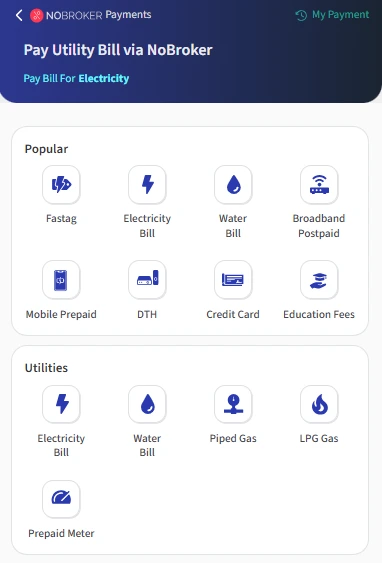
- Step 3: Search for ‘Gail Gas’and select GAIL Gas Limited from the list of billers.

- Step 4: Enter your BP No. (Business Partner Number) in the respective field, then click Submit.

- Step 5: Check your outstanding bill amount, choose an available payment method, and complete the transaction.
- Step 6: Save the payment confirmation or receipt for your records.
Frequently Asked Questions
Q. What happens if I miss the GAIL Gas bill payment due date? Ans: GAIL Gas may levy late-payment charges on overdue bills. Continued non-payment can lead to disconnection, subject to the applicable terms and conditions.
Q. Can I submit my GAIL Gas meter reading myself? Ans: Yes, eligible domestic PNG customers can submit meter readings and photographs through the SAHAJ – PNG MITRA app, subject to availability.
Q. How can I complain about an incorrect GAIL Gas bill? Ans: Contact GAIL Gas customer support or use its complaint registration facility. Provide your BP Number, bill details, and the discrepancy.
Q. Can I check my previous GAIL Gas bill payments online? Ans: Yes, you can check available billing and payment records through the SAHAJ – PNG MITRA app or the customer portal.
Q. What should I do if GAIL Gas disconnects my supply due to non-payment? Ans: Pay outstanding dues and applicable charges, then contact GAIL Gas customer support to confirm the requirements and arrange reconnection.
Most Viewed Articles
Ritika is a content writer at NoBroker who writes practical guides on running a home, including paying utility bills, personal loans, household finance, repairs and home improvement. She explains each task in simple steps, with the charges, documents and official links a reader needs.
Loved what you read? Share it with others!




 ✕



 Full RM + FRM support