If you use Adani Total Gas for your PNG connection, knowing how and where to pay your bill can make managing your monthly expenses easier. This guide covers Adani Total Gas bill payment methods, how to check and self-generate your bill, creating an auto payment for your bill and the tariff structure
How to Pay Adani Total Gas Bill Online
You can pay your Adani Total Gas bill online through the official website. Here are the key steps:
Step 1: Visit the official Adani Total Gas website and click the Quick Bill Pay tab.

Step 2: Enter your 10-digit Customer ID and complete the CAPTCHA before clicking on Go.
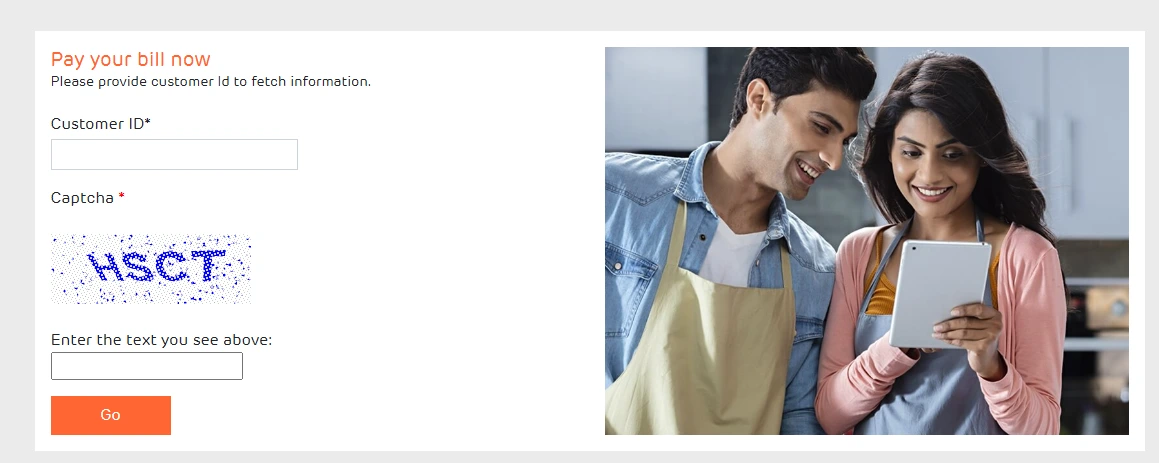
Step 3: You can now view your billing details and outstanding amount.
Step 4 Select your preferred payment method, including UPI, net banking, debit cards, and credit cards.
Step 5: Complete the payment and save the transaction receipt for future reference.
Adani Total Gas Bill Payment Offline
Customers who prefer to pay their Adani Total Gas PNG bill offline can visit the ATGL payment collection centres.
Step 1: Before making an offline payment, you can check the ATGL website for the available collection centres or cheque drop boxes.
Step 2: Visit the nearest collection centre for your location and make the payment by providing the latest gas bill or Customer ID.
Step 3: You can also drop the cheque in the nearest available branch to complete the payment. Make sure to collect and retain the payment receipt for future reference
How to Self-Generate the Bill?
You can self-generate your Adani Total Gas bill by entering your latest meter reading through the official website. Follow these steps to generate the bill:
Step 1: Visit the Adani Total Gas official website and click on “Generate Self Bill.”

Step 2: Enter your Customer ID and CAPTCHA to proceed further.
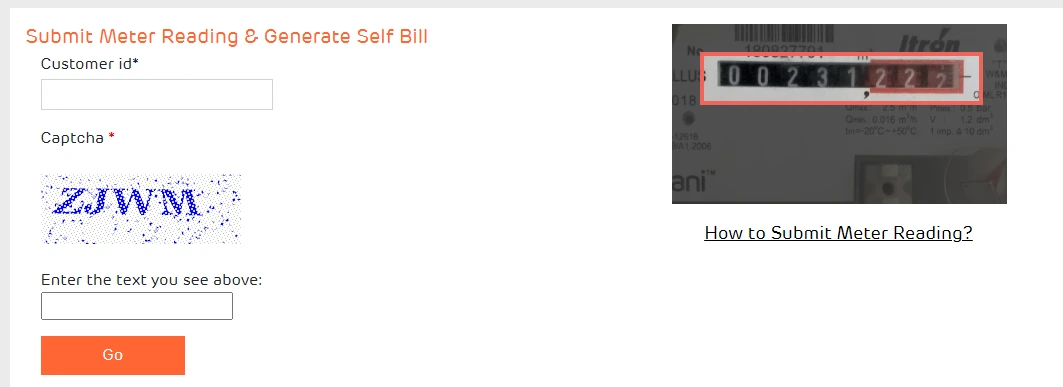
Step 3: Now upload an image of the meter, then crop it so only the numbers are visible.
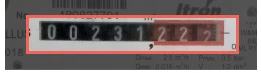
Step 4: Submit the meter reading to receive the payment invoice instantly.
Step 5: You can make the payment through the available payment methods that are suitable for you.
Step 6: Make sure to save the bill for your future records.
How to Register For Gas Bill Auto Payment?
Adani Total Gas allows PNG customers to register for e-NACH, through which the bill amount is automatically debited from the registered bank account. Here are the key steps to process the bill:
Step 1: Visit the Adani Total Gas website and click on Register for Gas Bill Auto Payment.

Step 2: Enter your 10-digit Adani Gas Customer ID and the CAPTCHA to validate the process.
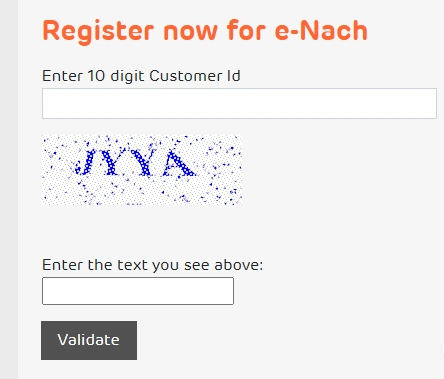
Step 3: Enter the OTP sent to your registered mobile number to proceed with the e-NACH registration.
Step 4: Enter your bank account number, account type, IFSC code, MICR code, and other bank account details.
Step 5: Select a mandate amount based on your average bill, as this will be the maximum amount that can be automatically debited.
Step 6: You can complete the authorization through net banking or debit card.
Step 7: Once the e-NACH mandate is activated, your bill amount will be automatically debited from your bank account.
Note: Bills generated before registering for e-NACH need to be paid through another available payment method. The online e-NACH facility accepts mandate amounts of up to ₹1 lakh; for a higher mandate, you may need to submit a request to a nearest Customer Care Centre. If the bill exceeds the mandate amount you chose, you will need to pay the excess amount through a different payment method.
How to Get a Refund for an Excess Payment?
If you have accidentally paid more than the amount due, ATGL will attempt to refund to the original source account. If a failed or duplicate digital bill payment is not resolved within the usual 24 - 48 hours, or if you have paid through cash or cheque, follow these instructions to initiate a refund request.
- Download and fill out the Excess Payment Refund Form.
- Attach a cancelled cheque for a bank account held in the name of the connection holder.
- Email the completed form and cancelled cheque to customercare.gas@adani.com.
Adani Total Gas My Account: Available Services
Creating an account on the Adani Total Gas My Account portal gives you access to several services that help you manage and pay your gas bill online. The My Account portal allows you to:
| Service | How it helps |
|---|
| Go Paperless | Opt for paperless billing and receive your bills digitally. |
| View & Download Bill | View your bill online and download a copy for your records. |
| Register Query & Complaint | Raise a query or complaint related to your gas service or account. |
Adani Total Gas Tariff Structure
ATGL bills domestic PNG consumption in MMBtu, while gas meters measure consumption in SCM. Both units are reflected in the bill, in line with applicable billing regulations. One MMBtu is approximately 30.12 SCM, depending on the gas's calorific value. ATGL lists Ahmedabad's residential PNG tariff as ₹1,473.92 per MMBtu and is approximately equivalent to ₹48.94 per SCM before taxes. These are the latest rates which are effective from 2 April 2026, excluding all taxes.
| Location | Residential PNG Tariff (₹/MMBTU) |
|---|
| Ahmedabad | ₹1,473.92 |
| Barwala, Surendranagar | ₹1,347.92 |
| Bhilwara, Chittorgarh, Udaipur | ₹1,258.88 |
| Bhind, Datia | ₹1,374.80 |
| Faridabad | ₹1,555.96 |
| Jhansi | ₹1,468.88 |
| Kheda, Navsari, Porbandar | ₹1,378.72 |
| Khurja | ₹1,507.24 |
| Mahendragarh | ₹1,418.20 |
| Palwal | ₹1,423.80 |
| Tiruppur, Vadodara | ₹1,400.00 |
Late Payment and Other Charges
Apart from the gas tariff, Adani Total Gas applies additional charges for late payments, disconnection or reconnection, and other payment-related services. These charges may vary based on the applicable tariff terms.
| Charge | Amount |
|---|
| Late payment for payment more than ₹51 and less than ₹2000 (both inclusive) | ₹100 |
| Late payment for payment more than ₹2001 | ₹250 |
| Legal charges for payment-default notice | ₹2,000 |
| Disconnection/Reconnection due to payment default | ₹750 |
Adani Total Gas Bill Scam Messages: What to Know
Adani Total Gas has cautioned customers about fraudulent SMS and WhatsApp messages claiming that their PNG connection will be disconnected. Keep the following in mind:
- ATGL does not send PNG disconnection messages from random or unauthorised numbers.
- Do not respond to suspicious messages or share your OTP, meter details, personal information or banking details.
- Avoid clicking on unfamiliar links or downloading APK files sent through WhatsApp or other messaging platforms.
- ATGL communicates through its official numbers 8733004747 and 9727097270.
- If you receive a suspicious call or message, contact ATGL Customer Care using the official channels.
Adani Total Gas Customer Care
Adani Total Gas provides customer support for queries related to its services and bill payments. Here are the channels you can communicate with:
| Customer Care Service | Details |
|---|
| Customer Care Helpline | 079 4754 5252 |
| Alternate Helpline | 079 6922 1100 |
| Email | customercare.gas@adani.com |
Pay Adani Total Gas Bill Through NoBroker
Renting in Ahmedabad, Vadodara or Faridabad? Pay your rent and Adani Total Gas bill conveniently through NoBroker Payments all in one app. The payment is processed through the Bharat Bill Payment System (BBPS), enabling you to pay through a secure, interoperable bill payment network. Add your bill details, check the amount due and complete the payment using your preferred payment method. Follow these simple steps to pay your Adani Total Gas bill through NoBroker Pay:
Step 1: Open the NoBroker bill payment platform or launch the NoBroker app.
Step 2: From the available bill payment categories, go to Piped Gas.
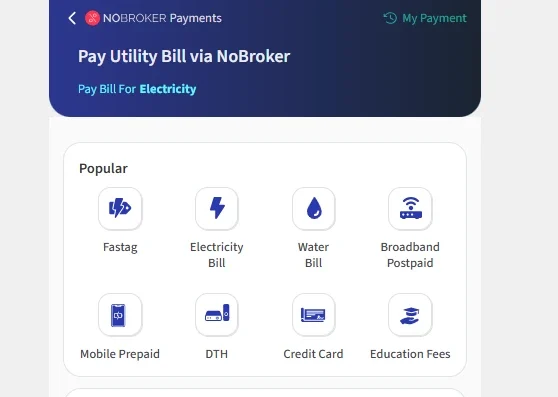
Step 3: Search for and select Adani Total Gas Limited as your gas service provider.
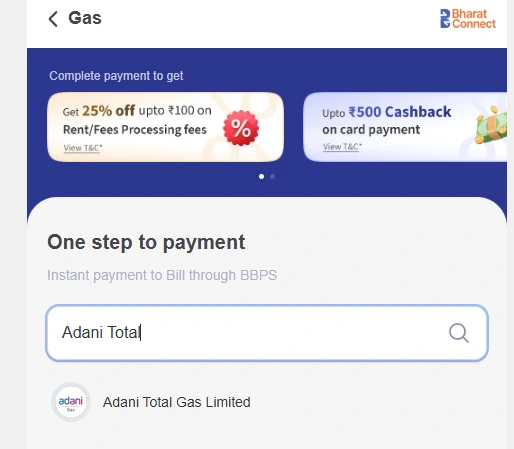
Step 4: Provide the Customer ID linked to your Adani Total Gas connection and proceed to fetch your bill.
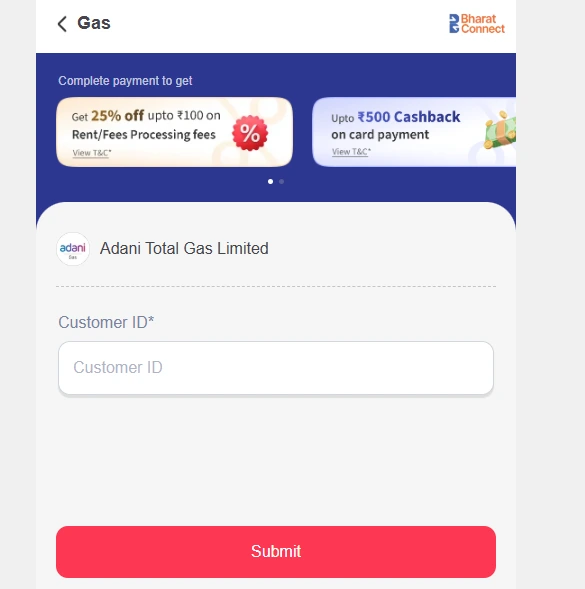
Step 5: Review the bill information displayed on the screen, including the outstanding amount and other payment details.
Step 6: Choose a suitable payment option for you and authorise the transaction to pay your bill.
Step 7: Once the payment is completed successfully, retain the digital receipt or confirmation for your records.
Frequently Asked Questions
Q. How can I pay my Adani Total Gas bill online? Ans: You can pay your bill through the official Adani Total Gas website using the Quick Bill Pay facility. You can also use other supported online payment platforms, including NoBroker Pay where Adani Total Gas is available as a biller.
Q. How often is the Adani Total Gas bill generated? Ans: For residential PNG customers, ATGL states that invoices are prepared based on meter readings and delivered once every two months.
Q. What if the meter reader could not access my house? Ans: If your house was locked during the scheduled reading, ATGL provides options to submit the meter reading through its website, customer care or SMS.
Q. Can I get a duplicate Adani Total Gas bill? Ans: Yes. You can request a duplicate invoice through customer care, visit an ATGL office, or access the bill through the company's website.
Q. What if I paid the bill using the wrong Customer ID? Ans: You can email the transaction receipt or passbook to customercare.gas@adani.com. After verification, ATGL can transfer the payment to the correct Customer ID.
Q. Can I pay my Adani Total Gas bill through NoBroker? Ans: Yes, Adani Total Gas Limited is available as a biller on NoBroker Pay, you can select the gas bill payment option, enter your Customer ID, fetch the bill details and complete the payment using an available payment method.
Q. Why does my bill show MMBtu instead of SCM? Ans: As per applicable PNGRB regulations, authorised City Gas Distribution (CGD) companies must bill gas consumption in MMBtu, with tariffs based on ₹/MMBtu. Accordingly, ATGL includes gas consumption in MMBtu on its invoices alongside the volume measured in Standard Cubic Metres (SCM). This change has been effective for applicable ATGL gas invoices since 1 April 2013.
Most Viewed Articles
Ritika is a content writer at NoBroker who writes practical guides on running a home, including paying utility bills, personal loans, household finance, repairs and home improvement. She explains each task in simple steps, with the charges, documents and official links a reader needs.
Loved what you read? Share it with others!




 ✕



 Full RM + FRM support