Pay your TPDDL bill online on the Tata Power-DDL website using your 11-digit CA Number, or offline at a TPDDL payment centre or designated YES Bank branch. If you use up to 200 units a month, you may pay no energy charge at all under the Delhi government subsidy. Bills have risen in 2026 mainly because of FPPAS, a monthly fuel-cost surcharge, not because base rates changed. This guide shows how to pay, the current tariff and how to estimate your bill.
About Tata Power Delhi Distribution Limited (TPDDL)
Tata Power Delhi Distribution Limited (TPDDL) is a joint venture between the Government of the National Capital Territory of Delhi and Tata Power, with the majority ownership of 51% held by the latter. TPDDL provides electricity services to different consumer categories, including domestic, commercial and industrial consumers, along with other categories covered under the applicable tariff regulations. It serves a population of around 9 million and operates across North and North-West Delhi, covering approximately 510 sq. km.
How to Pay the TPDDL Electricity Bill Online
You can pay your TPDDL electricity bill through the official Tata Power-DDL website, and here’s the step-by-step process:
Step 1: Go to the TPDDL website and select “Pay Your Bill” from the sidebar.

Step 2: Enter your 11-digit CA Number or installment number, mobile number, email, and the CAPTCHA, then click on Pay Now.
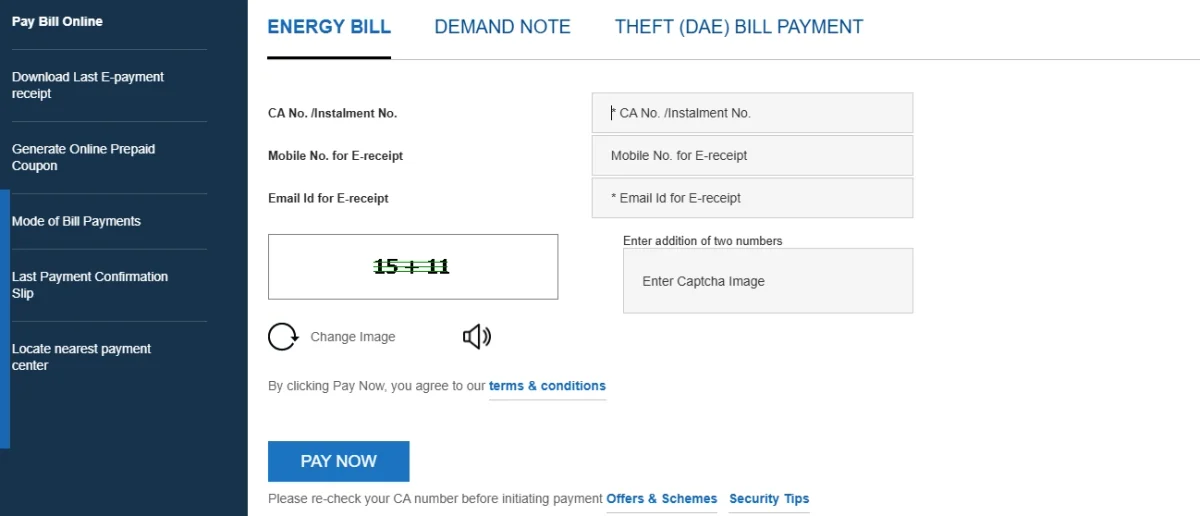
Step 3: Check the displayed bill amount and other details before proceeding with the transaction.
Step 4: Choose from the available online payment options, such as net banking, UPI or credit/debit card, and proceed with the transaction.
Step 5: Once the payment is successful, save or download the online acknowledgement/receipt for future reference.
Note:
- TPDDL also offers an option to download the last e-payment receipt; you will need to provide the CA Number and registered mobile number.
- Your TPDDL online payment status may take up to two hours to reflect on the website.
- If the amount has been debited but the transaction is unsuccessful, do not make another payment immediately. The bank will reverse the amount within 48 hours if the transaction is unsuccessful.
How to Pay the TPDDL Electricity Bill Offline
TPDDL consumers can pay their electricity bills offline through these methods:
TPDDL Bill Payment Centres
You can also visit a TPDDL Bill Payment Centre in North or North-West Delhi to pay your dues. There are currently 22 payment centres listed on the website. Through these centres, you can pay energy bills, demand notes, theft bills and installments.
The available payment methods are:
- Cash
- Cheque/Demand Draft
- Credit/Debit Card
You will be given an instant receipt after making the payment. Cash payments for energy bills and related installments are accepted up to ₹4,000, while non-energy bills such as demand notes can be paid in cash up to ₹20,000.
Designated YES Bank Branches
You can also visit designated YES Bank branches to pay your bills over the counter. Payments can be made through cash, cheque or Demand Draft, subject to the branch’s applicable limits. You can make cash payments of up to ₹50,000 at these designated branches
You need to carry a copy of your electricity bill, e-bill or SMS received from TPDDL. The bank will use the CA Number, bill amount and due date to validate the payment. Only the full bill amount can be paid through this channel; partial or excess payments are not accepted. You will receive a stamped acknowledgement receipt after the transaction.
TPDDL Electricity Tariff and Charges
The electricity tariff applicable to TPDDL consumers is determined by the Delhi Electricity Regulatory Commission (DERC), the statutory electricity regulator for Delhi. TPDDL does not independently decide the retail tariff charged to consumers. The Commission determines the tariff after considering the DISCOM's tariff petitions, revenue requirements, costs and other regulatory factors under the Electricity Act and applicable DERC regulations. The last full tariff schedule applicable to TPDDL was issued by DERC for FY 2021–22, and the tariff schedule took effect from 1 October 2021.
TPDDL FPPAS Charges for 2026
The Fuel and Power Purchase Adjustment Surcharge (FPPAS) is an additional charge on electricity bills to account for changes in power purchase and related costs. In 2026, TPDDL's FPPAS rate was 16% for April and 12.21% for May, while the rate reported for September was 18.50%. These rates apply to specific billing periods and should not be treated as a single rate for the entire year. You should check the latest DERC orders and TPDDL PPAC/FPPAS updates to confirm the rate applicable to their bill.
Delhi Government Electricity Subsidy for TPDDL Consumers
If you are eligible for electricity subsidy under the Delhi government's scheme, you can use up to 200 units per month, with the subsidy covering the bill amount. If you use 201–400 units per month, you may receive a 50% subsidy, limited to ₹800 per month. Consumers who use more than 400 units of electricity per month are not eligible for the general domestic electricity subsidy.
TPDDL Domestic Electricity Tariff
For individual domestic connections, the applicable base tariff is:
| Sanctioned Load | Fixed Charge | 0–200 Units | 201–400 Units | 401–800 Units | 801–1,200 Units | Above 1,200 Units |
|---|
| Up to 2 kW | ₹20/kW/month | ₹3.00/kWh | ₹4.50/kWh | ₹6.50/kWh | ₹7.00/kWh | ₹8.00/kWh |
| Above 2 kW and up to 5 kW | ₹50/kW/month | ₹3.00/kWh | ₹4.50/kWh | ₹6.50/kWh | ₹7.00/kWh | ₹8.00/kWh |
| Above 5 kW and up to 15 kW | ₹100/kW/month | ₹3.00/kWh | ₹4.50/kWh | ₹6.50/kWh | ₹7.00/kWh | ₹8.00/kWh |
| Above 15 kW and up to 25 kW | ₹200/kW/month | ₹3.00/kWh | ₹4.50/kWh | ₹6.50/kWh | ₹7.00/kWh | ₹8.00/kWh |
| Above 25 kW | ₹250/kW/month | ₹3.00/kWh | ₹4.50/kWh | ₹6.50/kWh | ₹7.00/kWh | ₹8.00/kWh |
Note: The rates mentioned above are the applicable base tariff rates as per the available DERC tariff schedule. Your actual TPDDL bill may vary depending on applicable FPPAS/PPAC adjustments, electricity duty, taxes, and other charges. Tariffs and related charges may also be revised through subsequent DERC orders.
How to Calculate Your Estimated TPDDL Electricity Bill
TPDDL bill calculation formula can be given as:
Estimated Base Bill = Energy Charges + Fixed Charges
Where:
Energy Charges = Consumption in each slab × Applicable slab rate
Fixed Charges = Sanctioned Load (kW) × Fixed Charge per kW/month
Here is an example to understand the calculation:
Suppose you have a 2 kW domestic connection and consume 300 units in a month.
For the first 200 units: 200 × ₹3 = ₹600
For the remaining 100 units: 100 × ₹4.50 = ₹450
Fixed charge: 2 kW × ₹20 = ₹40
Therefore:
Estimated Base Bill = ₹600 + ₹450 + ₹40 = ₹1,090
So, the estimated base bill for 300 units would be ₹1,090.
If you are eligible for the Delhi government's electricity subsidy, 300 units fall in the 201–400-unit category, which offers a subsidy of up to ₹800 per month.
Assuming a 50% subsidy applies to the energy charges:
- Energy charges: ₹1,050
- Subsidy (50% of ₹1,050): ₹525
- Fixed charges: ₹40
Estimated Bill After Subsidy = ₹1,050 − ₹525 + ₹40 = ₹565
Note: This is an estimate based on the stated base tariff and assumed subsidy calculation. The final TPDDL bill may also include FPPAS (Fuel and Power Purchase Adjustment Surcharge), electricity duty at the rate prescribed by the applicable government notification, meter-related charges, taxes and other applicable adjustments.
TPDDL Customer Care
Here are the TPDDL customer care services for registering complaints and getting assistance with billing, payments, power supply, metering and other services.
| Contact Type | Details |
|---|
| 24×7 Customer Care / Sampark Kendra | 19124 |
| Customer Care – Outside Delhi | 1800-208-9124 |
| Customer Care Email | customercare@tatapower-ddl.com |
Paying Your TPDDL Bill Through NoBroker
If you want to manage your utility payments from one place, you can use NoBroker Pay to pay your TPDDL electricity bill online. NoBroker Pay uses the Bharat Bill Payment System (BBPS), an interoperable bill payment network that allows customers to pay bills through participating banks and digital payment platforms. Here’s how to pay your TPDDL bill through NoBroker Pay:
Step 1: Visit the NoBroker Bill Payment platform or open the NoBroker app to begin.
Step 2: Select Electricity Bill Payment from the available utility bill payment options.

Step 3: Choose Tata Power - Delhi from the list of electricity billers.

Step 4: Enter your 11-digit CA Number as mentioned on your TPDDL electricity bill and proceed.
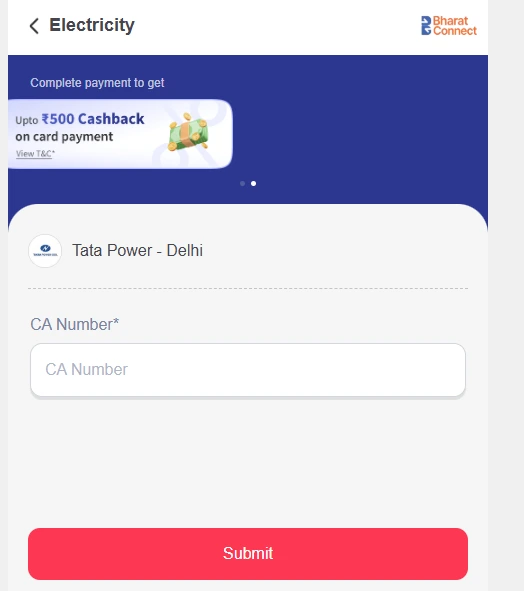
Step 5: Check the bill details and outstanding amount displayed on the screen before making the payment.
Step 6: Select your preferred available payment method and complete the transaction.
Step 7: After successful payment, save the confirmation or receipt for future reference.
Frequently Asked Questions
Q. How can I get a duplicate TPDDL electricity bill? Ans: You can access and print a duplicate bill after registering your CA Number on the TPDDL website.
Q. What is the CA Number required for TPDDL bill payment? Ans: The CA Number (Customer Account Number) is the 11-digit number associated with your TPDDL electricity connection. It is used for accessing billing information and making bill payments. You can find it printed on your TPDDL electricity bill, usually near the top of the bill under the CA No. or Customer Account Number field.
Q. Why is my TPDDL bill higher than the amount calculated using the electricity tariff? Ans: Your TPDDL bill may be higher due to the Fuel and Power Purchase Adjustment Surcharge (FPPAS), also referred to as the Power Purchase Adjustment Cost (PPAC). This surcharge adjusts electricity charges to account for changes in power procurement costs.
Q. How can I report an incorrect TPDDL electricity bill? Ans: You can raise a billing complaint through the TPDDL website. You can also contact the 24×7 Sampark Kendra at 19124 for assistance with billing-related issues.
Q. What is a Red Bill in TPDDL? Ans: A Red Bill indicates that there are outstanding dues reflected in the bill. It serves as an alert to the customer to clear the pending amount.
Q. What is a Green Bill in TPDDL? Ans: A Green Bill is issued to customers who have made their previous payment through digital modes or have opted for a solar net-metering connection.
Q. Do I get free electricity on my TPDDL bill? Ans: Eligible domestic consumers in Delhi can receive electricity subsidies under the Delhi government’s scheme. Consumption of up to 200 units per month qualifies for a subsidy covering the bill amount, while consumers using 201–400 units may receive a 50% subsidy, limited to ₹800 per month.
Q. What if I pay my TPDDL bill late? Ans: If you miss the payment due date, TPDDL charges a Late Payment Surcharge (LPSC) of 18% per annum on the outstanding amount, calculated according to the number of days of delay.
Most Viewed Articles
Ritika is a content writer at NoBroker who writes practical guides on running a home, including paying utility bills, personal loans, household finance, repairs and home improvement. She explains each task in simple steps, with the charges, documents and official links a reader needs.
Loved what you read? Share it with others!




 ✕
✕


 Full RM + FRM support