Your Telangana electricity bill payment depends on which distribution company supplies your area: TGSPDCL or TGNPDCL. Keep your Service Number or Unique Service Number handy when checking your bill or making a payment. If a payment does not appear immediately, check its status before paying again to avoid a duplicate transaction. This guide explains how to track payments, access billing records and resolve failed or pending transactions.
Telangana Electricity Distribution Companies
Telangana has two electricity distribution companies, serving different parts of the state:
- TGSPDCL: Southern Telangana- Hyderabad, Rangareddy, Medchal, Nalgonda, Suryapet and nearby districts.
- TGNPDCL: Northern Telangana-Warangal, Karimnagar, Nizamabad, Adilabad, Khammam, Nirmal and nearby districts.
Note: Check your electricity bill to identify your DISCOM before making a payment, as the process and consumer details may differ.
Telangana Electricity Bill Payment: Key Details
| Details | TGSPDCL | TGNPDCL |
|---|
| Electricity Distribution Company | Telangana Southern Power Distribution Company Limited (TGSPDCL) | Telangana Northern Power Distribution Company Limited |
| Bill Check | Online through the TGSPDCL portal | Online through the TGNPDCL portal |
| Details Needed | Service Number or Unique Service Number | Unique Service Number |
| Online Payment | Available through TGSPDCL's online payment portal | Available through TGNPDCL payment portal |
| Offline Payment | Available at TGSPDCL Electricity Revenue Office (ERO) counters | Available through applicable payment centres |
| Bill History | Bill and payment history can be checked online | Available online |
| Bill Download | Current bill details can be accessed through the online bill services | Available through online bill services |
Telangana Electricity Tariff and Charges 2026-27
Domestic electricity charges in Telangana for FY 2026-27 depend on monthly consumption. The table shows the applicable energy and fixed charges under theofficial tariff schedule
| Domestic Consumption | Energy Charge (₹/unit) | Fixed Charge(₹/kW/month) |
|---|
| 0-50 units | ₹1.95 | ₹10 |
| 51-100 units | ₹3.10 | ₹10 |
| 101-200 units | ₹4.80 | ₹10 |
| 201-300 units | ₹7.70 | ₹10 |
| 301-400 units | ₹9.00 | ₹10 |
| 401-800 units | ₹9.50 | ₹10 |
| Above 800 | ₹10.00 | ₹50 |
Documents Required for a New TGSPDCL & TGNPDCL Connection
Keep the required documents ready before applying. The documents may vary depending on your connection type and category.
- Proof of ownership or occupancy
- Registered Sale Deed, Lease Deed, Gift Deed or Partition Deed, where applicable
- Authorisation document for a firm or company, where applicable
- Patta document or other accepted proof, if registered ownership documents are unavailable
- MRO certificate for SC/ST consumers, where applicable
- ₹100 non-judicial stamp paper Indemnity Bond, if required
- CEIG/required electrical approval for applicable HT connections
- Wiring/electrical installation certification as required for the connection
Telangana Electricity Bill Payment Online
TGSPDCL and TGNPDCL allow consumers to check their electricity bills and make payments online. You can use the Service Number or Unique Service Number to view your bill, check the amount due and pay through the available online payment options. The exact process and details required may vary between the two DISCOMs.
For TGSPDCL
- Visit the TGSPDCL website.
- Select the Pay Bill Online section to proceed with payment

- Enter your unique service number and click on Check Bill
- Verify the consumer details, bill amount and outstanding dues displayed on the portal.
- Select an available payment option, follow the payment gateway instructions and save the confirmation or receipt.
For TGNPDCL
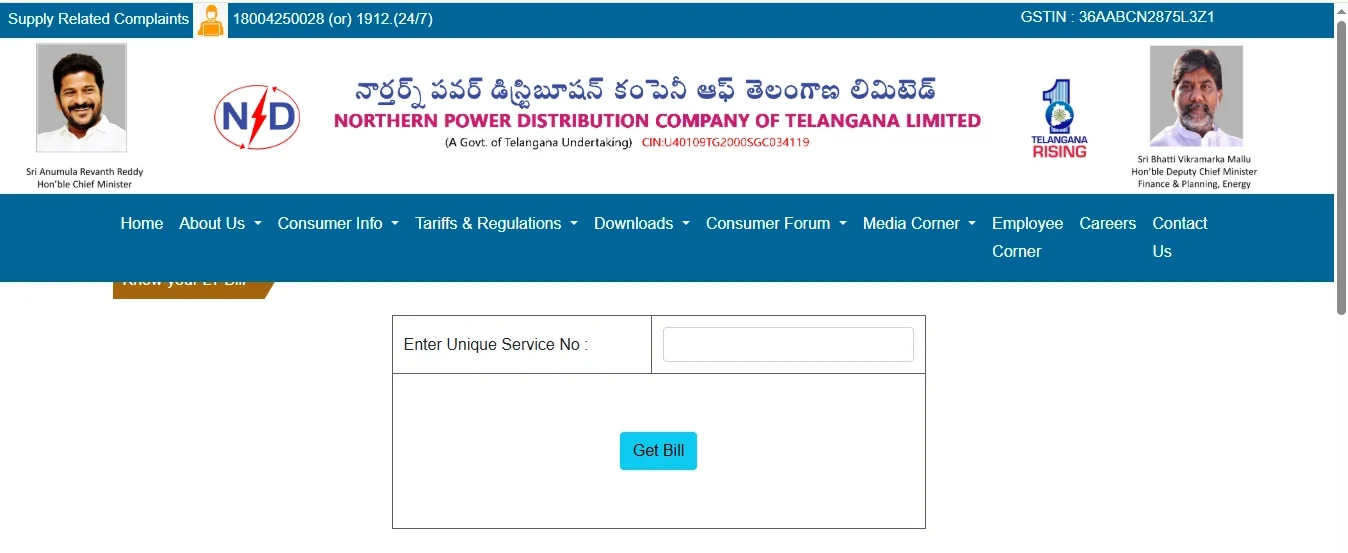
- Choose whichever mode you want to pay, such as QR, Bill Desk, Union Bank or Easebuzz
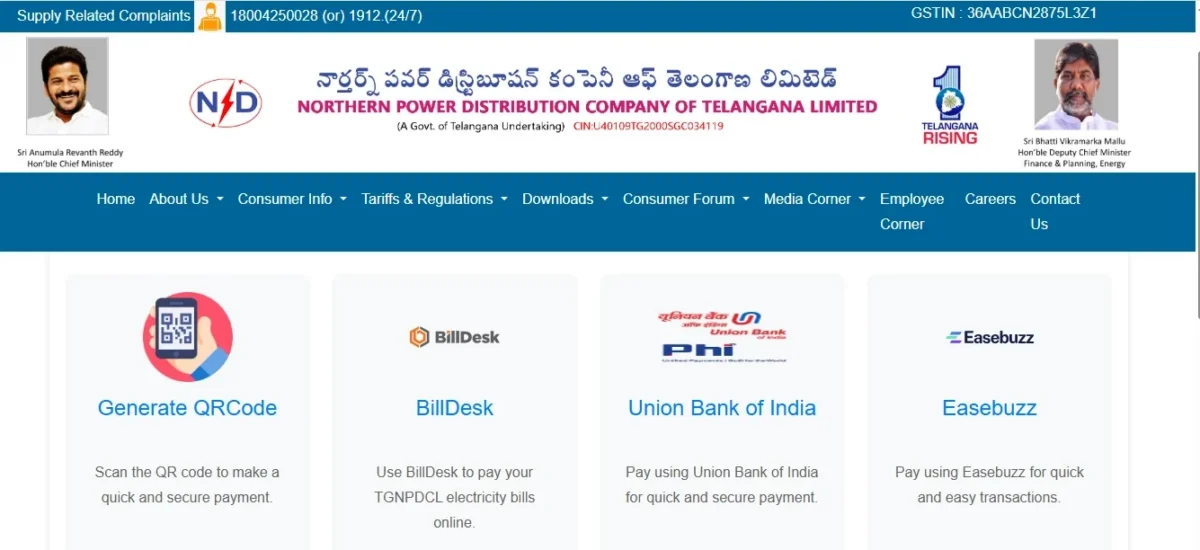
- Enter your Unique Service Number

- Submit the details to view your bill.
Note: TGSPDCL currently lists payment channels such as BillDesk, PhonePe, T-App Folio, T-Wallet, Easebuzz, and other empanelled providers, while the TGNPDCL list includes BillDesk, Generate QR code, Union Bank of India, and Easebuzz.
How to Pay Telangana Electricity Bill Offline
If you prefer to pay in person, both TGSPDCL and TGNPDCL provide offline payment options through their designated payment centres.
For TGSPDCL:
- Keep your electricity bill or Service Number ready.
- Contact your local TGSPDCL Electricity Revenue Office (ERO) to confirm whether it accepts bill payments.
- Visit the authorised counter and provide the requested consumer details.
- Complete the payment using the available facility and collect the receipt.
For TGNPDCL:
- Keep your electricity bill or Unique Service Number ready.
- Contact TGNPDCL to confirm the nearest authorised payment centre.
- Provide your consumer details and follow the counter's payment instructions.
- Collect and retain the payment receipt.
How to Check Telangana Electricity Bill Payment Status
After paying your bill, you can check whether the payment has been updated through the respective DISCOM's online services.
For TGSPDCL:

- Select Bill and Payment History.
- Enter your Service Number and password if the portal requests login.

- Open your billing or payment records to check whether the transaction has been recorded.
For TGNPDCL:

- Enter the USCNO, Circle Code, and ERO Code and enter the details
- Submit the details to access the available billing history.
- Check the displayed records for your payment information.
If your bank account was debited but the payment is not showing, keep your transaction ID or payment receipt and contact the payment provider or the respective DISCOM.
How to Download Electricity Bill Online
You can view and save your electricity bill online through the respective DISCOM portal.
For TGSPDCL:

- Enter your Service Number or Unique Service Number and other requested details.

- View the bill details.
- Use the available download/print option to save a copy of the bill.
For TGNPDCL:
- Visit the TGNPDCL website.
- Open the Bill/Know Your Bill service.
- Enter your Unique Service Number and required details.
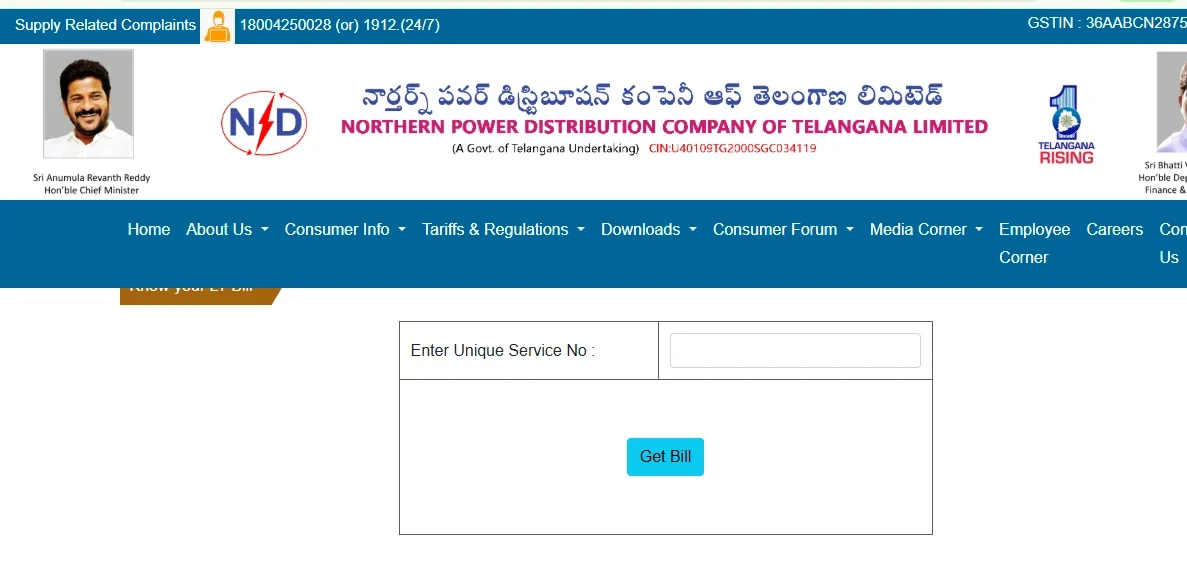
- View the bill details.
- Use the available download or print option to save the bill.
How Is the Telangana Electricity Bill Calculated?
Your Telangana electricity bill depends on the units consumed, the applicable tariff slab, and the connected load. Fixed charges, electricity duty and other applicable charges may also affect the final amount.
Units consumed = Current meter reading − Previous meter reading
Suppose a domestic consumer uses 120 units in a month and has a connected load of 2 kW:
- First 100 units × ₹3.40 = ₹340
- Next 20 units × ₹4.80 = ₹96
- Energy charge = ₹436
- Fixed charge: 2 kW × ₹10 = ₹20
- Subtotal = ₹456
- Electricity duty and other applicable charges: As shown on the bill
- Less applicable subsidy, if eligible: As per the scheme
- Final bill = Subtotal + applicable charges − subsidy
Note: These rates are based on the official Telangana FY 2026–27 tariff schedule. The example is illustrative; the actual bill may differ based on the applicable tariff category, charges and subsidies.
How to Check Payment Status or Resolve a Failed Payment
If your bank account has been debited but your Telangana electricity bill still shows an outstanding amount, check the transaction status before paying again.
- Payment pending: Check the status on your payment app or gateway.
- Payment failed: Confirm whether money was deducted before retrying.
- Money deducted, but bill unpaid: Keep your transaction ID or receipt and contact the payment provider or DISCOM.
- Payment history: Visit the TGSPDCL or TGNPDCL website.
- Due date and late payment: Check your latest bill for the due date. Late payment charges may apply, and continued non-payment may lead to disconnection after at least 15 clear days' written notice under Section 56(1) of the Electricity Act, 2003.
Avoid paying again until you have checked the first transaction to prevent duplicate payments.
Telangana Customer Care
You can contact the respective DISCOM for electricity bill, payment, power supply and service-related queries.
| Contact Type | TGSPDCL | TGNPDCL |
|---|
| 24×7 Customer Care / Helpline | 1912 | 1912 / 18004250028 |
| Customer Care Email | customerservice@tgsouthernpower.org | cmd@tgnpdcl.com |
| Easebuzz | 18008918297 (Toll-Free) | 18008918297 (Toll-Free) |
Pay Your TGSPDCL Bill Through NoBroker
Paying your TGSPDCL & TGNPDCL electricity bill online is simple with NoBroker. The bill payment service is powered by the Bharat Bill Payment System (BBPS), now known as Bharat Connect. Enter your TGSPDCL & TGNPDCL unique service number to fetch your bill, verify the details, and pay online.
- Open the NoBroker website or download the app from the Google Play Store, then go to Bill Payments.

- Select Electricity.
- Choose Telangana as the state.
- Select TGSPDCL or TGNPDCL from the electricity boards.

- Enter your Unique Service Number and fetch the bill.

- Check the bill amount and consumer details.
- Choose your preferred payment method and complete the payment.
- Save the payment receipt for future reference.
Pay Your Electricity Bill through NoBroker Payment
Note: NoBroker only facilitates bill payments and does not issue new TGSPDCL electricity connections. For a new connection, follow the applicable TGSPDCL process.
FAQs
Q. Can I Pay a TGSPDCL or TGNPDCL Bill Without Registration? Ans: Yes. You can pay your TGSPDCL or TGNPDCL electricity bill online without creating a consumer account. Use your Unique Service Number and the respective DISCOM's bill payment service to fetch the bill and complete the payment.
Q. Can I pay my Telangana electricity bill without logging in? Ans: Check the live bill-payment portal for the relevant DISCOM to confirm whether login is required for your transaction. Don't assume the same login requirements apply to both providers.
Q. Can I pay my Telangana electricity bill offline? Ans: Yes. You can pay your electricity bill through the designated payment centres or ERO counters of your respective DISCOM.
Q. What should I do if my electricity bill payment is deducted but not updated? Ans: Keep your transaction ID or payment receipt and wait for the payment status to update. If it remains pending, contact the payment provider or your respective DISCOM.
Q. What should I do if I cannot find my Unique Service Number? Ans: Check your previous bill or use the respective DISCOM’s online service to find your Unique Service Number.
Most Viewed Articles
Ritika is a content writer at NoBroker who writes practical guides on running a home, including paying utility bills, personal loans, household finance, repairs and home improvement. She explains each task in simple steps, with the charges, documents and official links a reader needs.
Loved what you read? Share it with others!




 ✕


 Full RM + FRM support