Mahanagar Gas Limited (MGL) supplies piped natural gas (PNG) to households in Mumbai and Greater Mumbai, Thane, Mira-Bhayandar, Navi Mumbai, Kalyan, Dombivli, Bhiwandi, Ambernath, Badlapur, Ulhasnagar, Panvel, Kharghar, Taloja and authorised areas of Raigad district. However, PNG availability depends on the locality and existing pipeline connectivity. Keep your CA number handy when accessing account-related services, as it helps identify your gas connection. After paying, retain the transaction reference or receipt until the payment is reflected in your account. If a transaction is delayed, verify its status with the payment provider before attempting another payment.
MGL PNG Charges and Bill Payment Details 2026–27
Mahanagar Gas Limited (MGL) revised the Retail Selling Price (RSP) of Domestic PNG (DPNG) by ₹1 per SCM, effective September 1, 2026. The revised delivered price is ₹53 per SCM in and around Mumbai.
| Particular | Details |
|---|
| Domestic PNG (DPNG) price | ₹53 per SCM |
| Price revision | ₹1 per SCM increase |
| Effective from | September 1, 2026 |
| Fixed daily charge | ₹1 per day + 18% GST |
| Fixed charge for 30 days | ₹30 + 18% GST |
| Applicable area | In and around Mumbai |
| Billing frequency | Bills are generally raised on a bimonthly basis |
| Due date | As mentioned on the MGL bill |
| Cheque/DD payment | Payment should be made at least 3 days before the due date |
How to Pay Mahanagar Gas Limited Bill Online
Mahanagar Gas Limited (MGL) provides online payment facilities for PNG customers through its website and MGL Connect app. MGL's current payment options include digital methods such as UPI and net banking. Keep your Customer Account (CA) number ready before starting the payment.
Pay MGL Bill Through Website
Step 1: Visit the Mahanagar Gas Limited official website.

Step 2: Open the Bill Payment or Quick Bill Pay option for PNG customers.

Step 3: Enter your Customer Account (CA) number and other details requested on the payment page.

Step 4: Submit the details to view your outstanding bill.
Step 5: Check the bill amount and due date.
Step 6: Select an available payment method, such as UPI, debit card (Visa, Mastercard or RuPay), credit card (Visa, Mastercard, American Express or RuPay), or net banking. UPI apps and supported banks may vary by payment gateway. Check the available options on the payment screen before proceeding.

Step 7: Save the payment confirmation or receipt after successful payment.
Pay MGL Bill Through MGL Connect
MGL Connect is MGL's official customer app. PNG customers can use it to view bills, check payment details and make online payments.
Step 1: Download and open the MGL Connect app.

Step 2: Log in or register using the details requested by the app.
Step 3: Open the bill or payment section.
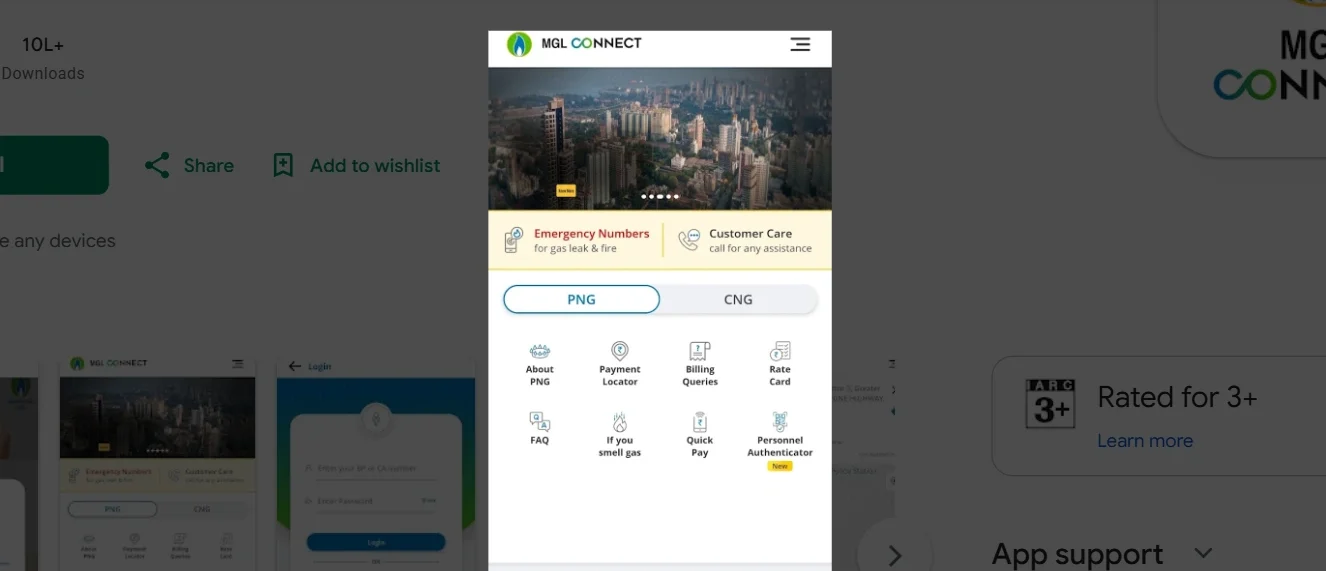
Step 4: View your current PNG bill.
Step 5: Select the payment option.
Step 6: Complete the transaction using an available payment method.
Step 7: Save the payment confirmation for your records.
MGL Late Payment Charges
Pay your MGL gas bill by the due date mentioned on the bill. If you miss the deadline, MGL may levy delayed payment charges and applicable interest on the outstanding amount. The charges depend on MGL's applicable billing terms. Check your latest bill or contact MGL customer care at 022-6867 4500 to confirm the applicable late payment amount.
To avoid additional charges, check your bill's due date and pay on time. If you are paying by cheque or demand draft, MGL advises making the payment at least three days before the due date.
How to Pay Mahanagar Gas Limited Bill Offline
MGL customers can pay their PNG bills offline by cheque or demand draft through authorised payment channels.
Pay MGL Bill by Cheque or Demand Draft
Step 1: Make the cheque or demand draft payable to "Mahanagar Gas Ltd."
Step 2: Follow the payment instructions mentioned on your latest MGL bill.
Step 3: Submit the cheque or demand draft only through an authorised payment channel.
Step 4: Ensure MGL receives the payment at least three days before the bill's due date to avoid delayed-payment charges.
Documents and Details Required for MGL Bill Payment
You do not need to submit separate identity or address documents for a regular MGL PNG bill payment. Keep the following details ready:
- Consumer Reference/CA Number – needed to identify your MGL account.
- Registered mobile number – the payment channel may require it for verification.
- Latest MGL bill – useful for checking the outstanding amount and due date.
- Payment method – such as UPI, net banking or another option available through the selected payment channel.
Note: You may also need the bill amount or outstanding amount when confirming the payment. Check the latest MGL bill before making the payment to ensure that you are paying the correct account and amount.
How to Calculate Your MGL PNG Bill
Your MGL PNG bill depends on the gas consumed, the applicable rate per SCM, fixed daily charges and other applicable charges.
PNG consumption charge = Gas consumed (SCM) × Applicable rate per SCM
For example, if you use 30 SCM at an illustrative rate of ₹53 per SCM:
30 × ₹53 = ₹1,590
Fixed daily charge calculation:
MGL's published fixed daily charge document specifies ₹1 per day plus 18% GST.
| Billing Period | Fixed change | GST (18%) | Total |
|---|
| 30 days | ₹30 | ₹5.40 | ₹35.40 |
| 60 days | ₹60 | ₹10.80 | ₹70.80 |
For a 60-day billing period, your estimated bill calculation would be:
- Gas consumption charge: ₹1,590
- Fixed daily charge: ₹60
- GST on fixed daily charge: ₹10.80
- Subtotal: ₹1,660.80
Your final bill may also include applicable taxes, arrears, delayed-payment charges or other adjustments. Check your latest MGL bill for the applicable rate and total amount payable.
What Happens If MGL Online Bill Payment Fails?
If your MGL bill payment fails, check the transaction status before trying again.
- Issue continues: Contact MGL through its official website or the payment provider, and keep your transaction ID, payment date, and amount ready.
If your MGL bill payment fails, follow these steps depending on your transaction status:
- Money not deducted: Check your bank account or payment app to confirm no amount was debited and that the transaction failed. You can retry the payment after confirming its status.
- Money deducted, but bill not updated: Do not make another payment immediately. Keep your CA Number, transaction ID, payment date and amount ready. Check your MGL account and payment confirmation to verify the transaction status. Allow time for the payment status to be updated, as MGL does not publicly specify a confirmed processing time.
- Payment still unresolved: Contact MGL customer care at 022-6867 4500 or email support@mahanagargas.com. Share your transaction details and payment confirmation to help resolve the issue.
MGL Helpline & Contact Details
| Contact | Details |
|---|
| Customer Care-24×7 | 022-6867 4500 / 022-6456 4500 |
| Whatsapp number | 9899203843 |
| Emergency helpline | 1800 266 9944 |
| Customer Care Email | support@mahanagargas.com |
| For unresolved complaints | 02261564555 |
Pay Your MGL Bill Through NoBroker
Once your MGL PNG connection is active, you can pay your eligible MGL bill online through NoBroker Payments. The payment service works through Bharat Connect (BBPS).
Step 1: Visit the NoBroker website or open the NoBroker app and go to Utility Bills.
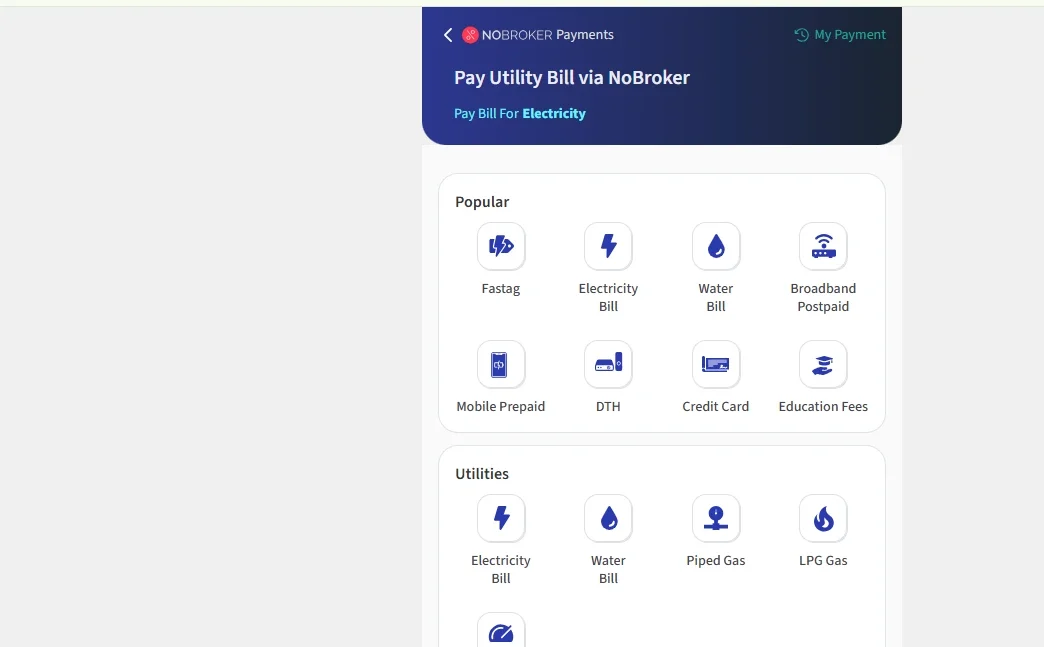
Step 2: Select Gas and choose MGL from the available billers.
Step 3: Enter your MGL Customer Account/CA Number.

Step 4: Check the bill amount and other details shown on the screen.
Step 5: Select your preferred payment method and complete the payment.
Step 6: Save the payment confirmation for your records.
Pay your MGL bill on NoBroker
Important: NoBroker Payments is only a bill-payment option. It does not provide a new MGL PNG connection. For a new connection, use MGL's official application process.
Frequently Asked Questions
Q. How can I find my MGL CA Number? Ans: Your CA Number (Customer Account Number) is printed on your MGL PNG bill. Keep it handy when accessing your account or making bill-related enquiries.
Q. What is the current MGL PNG rate per SCM? Ans: From September 1, 2026, MGL's Domestic PNG rate increased to ₹53 per SCM in and around Mumbai. Check your latest bill for the applicable rate.
Q. Can I pay my MGL PNG bill after the due date? Ans: You can pay an overdue bill, but MGL's applicable terms may apply delayed-payment charges. Check your bill for the outstanding amount and charges before paying.
Q. How can I contact MGL about a payment-related issue? Ans: Call MGL customer care at 022-6867 4500 or email support@mahanagargas.com. Keep your CA Number, payment reference and transaction date ready when raising a query.
Most Viewed Articles
Ritika is a content writer at NoBroker who writes practical guides on running a home, including paying utility bills, personal loans, household finance, repairs and home improvement. She explains each task in simple steps, with the charges, documents and official links a reader needs.
Loved what you read? Share it with others!



 ✕


 Full RM + FRM support