Paying your Kerala Water Authority (KWA) water bill online makes it easier to manage your water payments without visiting a payment counter. Consumers can check their outstanding bills, make payments through available digital modes, and access payment receipts online. This guide explains how to pay your Kerala water bill, check payment status, download receipts, request refunds, and resolve common payment-related issues.
How to Pay Kerala Water Bill Online?
Step 1: Visit the official KWA website to access the online services available to consumers.
Step 2: On the KWA website, choose the Consumers Corner section. This section provides access to various consumer-related services, including water bill payments.

Step 3: From the multiple services under Consumers Corner, choose “Pay Water Charge” to access services related to your water bill.
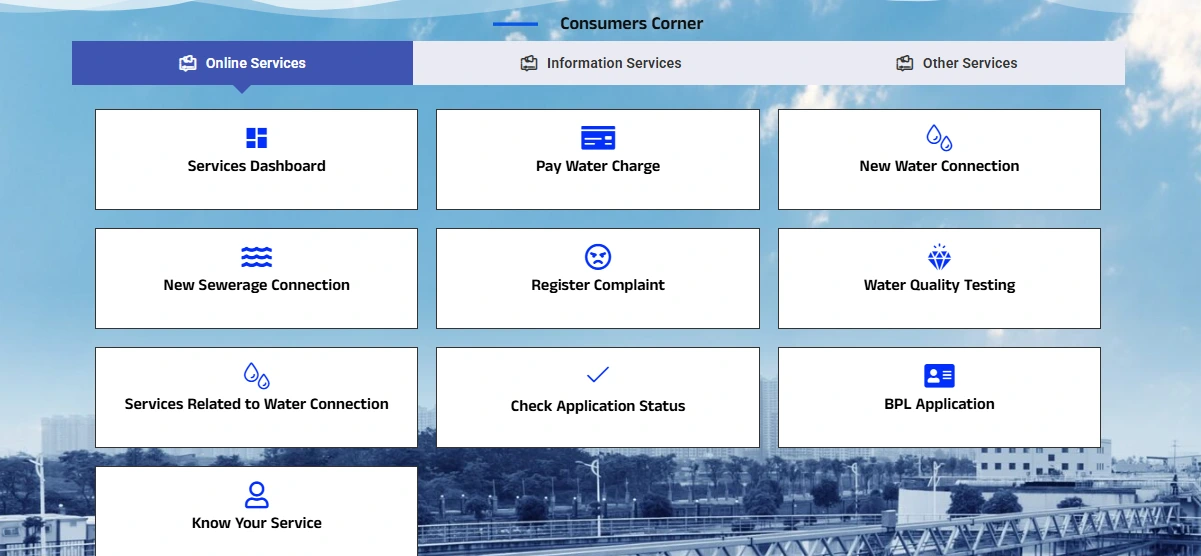
Step 4: You need to provide the Consumer ID (10-digit) and Consumer Number as indicated on your physical KWA bill card, or you can enter the registered mobile number to take you to the payment page.
Step 5: Review your bill details, like consumer information and outstanding amount, before proceeding with payment.
Step 6: KWA offers different payment methods; choose the one suitable for you, enter the required details, and complete the transaction.
How to View or Download Last Kerala Water Bill Payment Receipt?
Kerala Water Authority (KWA) lets you access receipts for previous water bill payments through its online payment services. Here is a step-by-step process:
Step 1: You need to visit the official Kerala Water Authority (KWA) website and go to the Consumers Corner section.
Step 2: Select the service Pay Water Charge to access the KWA payment page.
Step 3: On the payment page, look for the option to access your previous payment or Last Receipt.

Step 4: You need to enter your registered mobile number, and an OTP will be sent for verification.

Step 5: You can now access the payment details of your recent receipt and save or download it for your records.
What to Do If Your KWA Bill Payment Is Successful, Pending or Failed?
After making an online Kerala Water Authority (KWA) water bill payment, verify that the transaction is completed successfully.
Successful Payment
If the payment is successful, you will receive a payment confirmation SMS with reference to the transaction details. Make sure to keep the details or confirmation message for future reference.
Pending Payment
If your amount has been debited but the transaction details have not been generated, KWA suggests waiting up to 48 hours for the payment confirmation. Avoid making another payment during this period to prevent duplicate payments.
Failed Payment
If the payment fails, make sure to check whether the amount has been debited from your bank account. If the amount has not been debited, you can make another payment after confirming the previous transaction was unsuccessful.
Amount Debited but Payment Not Updated
If your amount has been debited, you haven’t received any confirmation even after 48 hours, or if the amount is not refunded to your bank account, you can contact KWA at 1916 or email epaykwa@gmail.com.
What are the Current KWA Domestic Water Tariff Rates?
As per the current Kerala Water Authority (KWA) tariff structure, effective from 3 February 2023, domestic water charges are calculated based on monthly consumption. Here are the applicable rates for the KWA Water Tariff Rates:
| Monthly Consumption | Domestic Water Charge |
|---|
| Up to 5,000 litres | ₹14.41 per 1,000 litres, subject to a minimum charge of ₹72.05 |
| 5,001–10,000 litres | ₹72.05 for the first 5,000 litres + ₹14.41 for every additional 1,000 litres |
| 10,001–15,000 litres | ₹144.10 for the first 10,000 litres + ₹15.51 for every additional 1,000 litres |
| 15,001–20,000 litres | ₹16.62 per 1,000 litres for the entire consumption |
| 20,001–25,000 litres | ₹17.72 per 1,000 litres for the entire consumption |
| 25,001–30,000 litres | ₹19.92 per 1,000 litres for the entire consumption |
| 30,001–40,000 litres | ₹23.23 per 1,000 litres for the entire consumption |
| 40,001–50,000 litres | ₹25.44 per 1,000 litres for the entire consumption |
| Above 50,000 litres | ₹1,272 + ₹54.10 per 1,000 litres above 50,000 litres |
Points to Remember:
- There is no separate fixed charge for standard domestic connections.
- KWA also states that BPL families consuming up to 15,000 litres per month are exempt from water charges.
- For flats, a fixed charge of ₹55.13 per dwelling unit applies.
- If a consumer has a sewerage connection, KWA states that sewerage charges are additionally applicable at 11.02% of the water charges payable.
Kerala Water Bill Calculation
Your Kerala Water Authority bill depends on your monthly water consumption and the applicable tariff slab. If you have a sewerage connection, an additional sewerage charge is added to the water charge.
Example: 12,000 Litres Monthly Consumption
For this example, the consumption falls under the 10,001–15,000 litres slab.
Step 1: Calculate the Water Charge
The first 10,000 litres are charged at ₹144.10, while the remaining 2,000 litres are charged at ₹15.51 per 1,000 litres.
Formula:
Water Charge = ₹144.10 + (2 × ₹15.51) = ₹175.12
Step 2: Calculate the Sewerage Charge
For consumers with a sewerage connection, the sewerage charge is 11.02% of the water charge.
Formula:
Sewerage Charge = ₹175.12 × 11.02% = ₹19.30
Step 3: Calculate the Total Bill
Add the water and sewerage charges to arrive at the estimated bill.
Formula:
Total Bill = ₹175.12 + ₹19.30 = ₹194.42
Note: The final Kerala Water Authority bill amount may vary depending on applicable charges, adjustments, arrears, or other factors reflected in your bill.
Kerala Water Authority: Other Services
Apart from paying water bills, the Kerala Water Authority (KWA) provides several services for managing water and sewerage connections. Some of the key services available through KWA include:
New Water Connection: Consumers can apply for a new water connection for their premises through the KWA portal by using the basic application process.
New Sewerage Connection: KWA allows consumers to apply for a sewerage connection and provides details about the application requirements.
Meter Replacement: If a water meter is defective or not registering consumption correctly, you can request a replacement.
Meter Replacement After Theft: If a water meter is stolen, consumers can report the incident, obtain an FIR from the local police station and approach the concerned KWA office for further action.
Meter Point Shifting: You can request the water meter to be shifted to another location on the same premises, in accordance with KWA's requirements.
Temporary Disconnection: You can request temporary disconnection of your water connection for a minimum of three months and a maximum of 12 months.
Reconnection: You can apply to reconnect your water supply after clearing the applicable outstanding dues.
Permanent Disconnection: You can permanently close your water connection by applying for disconnection after settling the required dues and penalties.
Water Quality Testing: You can submit water samples for quality testing and obtain laboratory results; fees may depend on the parameters tested.
Register Complaint: Consumers can register complaints relating to water supply, connections and other KWA services.
BPL Application and Verification: KWA provides separate facilities for BPL-related applications and verification.
KWA Customer Care for Bill Payment Issues
For KWA water bill payment or transaction-related issues, you can contact:
| Support Channel | Contact Details |
|---|
| KWA Consumer Helpline | 1916 (24×7, toll-free) |
| Payment Support Email | 1916cckwa@gmail.com |
| KWA WhatsApp – Janamithra | 9495998258 |
| Head Office | 0471-2738300 |
Kerala Water Bill Payment Through NoBroker
Rent, utility connection guides, rental agreements and bill payments can all be managed in one place on NoBroker, making it easier to handle the practical tasks that come with moving into a new home. Once your Kerala Water Authority (KWA) water connection is active, you can add your bill details on NoBroker Pay and make your water bill payment online. NoBroker Pay uses the Bharat Bill Payment System (BBPS), providing a digital channel for paying your KWA water bill. You can access NoBroker Pay through the NoBroker website or app. Follow these steps to pay your KWA water bill:
Step 1: Open NoBroker Pay
Visit the NoBroker Bill Payment platform or open the NoBroker app.
Step 2: Select Water Bill Payment
Choose Water Bill from the available bill payment options.
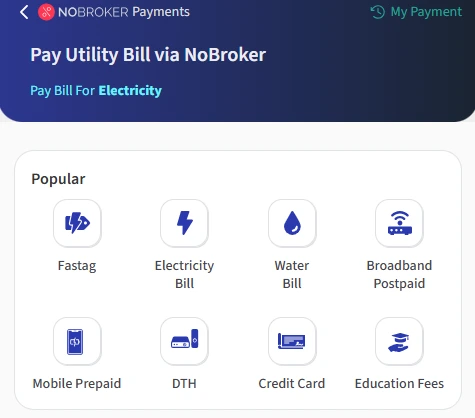
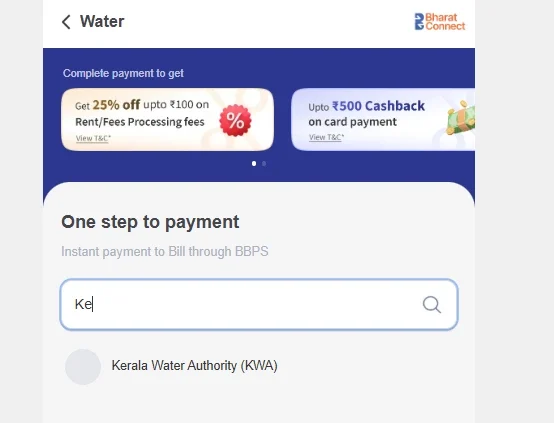
Step 3: Select Kerala Water Authority
Choose Kerala Water Authority (KWA) from the list of available billers.
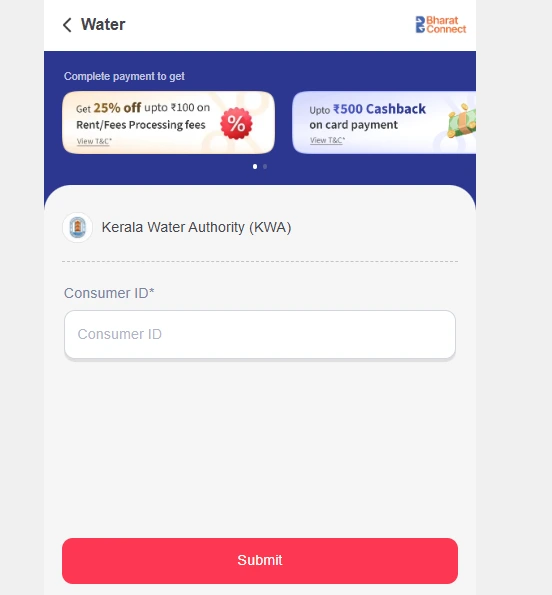
Step 4: Enter Your KWA Details
Enter the required KWA consumer number or account details as shown on your water bill to fetch the bill.
Step 5: Review Your Bill
Check the displayed bill amount, due date and other payment details before proceeding.
Step 6: Complete the Payment
Choose your preferred payment method and complete the transaction.
Step 7: Save Your Receipt
Once the payment is successful, save the payment confirmation or receipt for future reference.
Frequently Asked Questions
Q. How can I pay my Kerala water bill online? Ans: You can pay your Kerala Water Authority bill online through the KWA payment portal or other supported digital payment platforms.
Q. What details are required to pay the Kerala water bill online? Ans: You generally need your KWA Consumer ID and Consumer Number to retrieve your bill and proceed with the payment.
Q. What should I do if my bank account is debited but the payment is not updated? Ans: KWA advises consumers to wait up to 48 hours for the transaction to be completed. If confirmation is still not received, contact KWA at 1916 or email epaykwa@gmail.com.
Q. Why does the amount shown on my KWA bill look different from expected? Ans: The amount may include current water charges, previous outstanding dues, late payment charges or other applicable charges. Check the bill details carefully to understand the total amount payable before making the payment.
Q. What happens if my KWA bill payment through NoBroker fails? Will I get a refund? Ans: Yes. If your KWA bill payment through NoBroker fails after the amount has been debited, NoBroker initiates the refund process within 24 hours. The bank or payment provider may then take up to 7 working days to credit the amount back to your original payment source.
Most Viewed Articles
Ritika is a content writer at NoBroker who writes practical guides on running a home, including paying utility bills, personal loans, household finance, repairs and home improvement. She explains each task in simple steps, with the charges, documents and official links a reader needs.
Loved what you read? Share it with others!




 ✕


 Full RM + FRM support