Paying your Chennai Metro Water bill on time helps avoid late fees and ensures uninterrupted water and sewerage services. Chennai residents can conveniently check their bill, make payments, and raise complaints through online and offline channels. The Chennai Metropolitan Water Supply and Sewerage Board (CMWSSB) provides multiple payment options, including its official portal and authorised payment centres. Understanding how the bill is calculated can also help you verify your charges. This blog explains Chennai Metro Water bill payment methods, complaint registration, bill calculation, and other essential details for 2026.
Chennai Metro Water Bill Payment: Quick Info
Here is the quick info table for Chennai Metro Water Bill Payment:
| Particulars | Details |
|---|
| Official Website | https://cmwssb.tn.gov.in/ |
| Initiated by | Chennai Metropolitan Water Supply and Sewerage Board (CMWSSB) |
| Head Office Address | No. 1, Pumping Station Road, Chintadripet, Chennai – 600002 |
| Contact Number | 044-2845 1300 |
| Email | cmwssb@tn.gov.in |
| Working Days | Monday to Friday |
| Complaint Cell | 044-4567 4567 (24×7) |
| Toll-Free Complaint Number | 1916 |
Who is Responsible for Providing Water in Chennai?
The Chennai Metropolitan Water Supply and Sewerage Board (CMWSSB), commonly known as Chennai Metro Water, is responsible for supplying and managing water across Chennai. The board operates under the Tamil Nadu Government and manages water connections, distribution, water and sewerage infrastructure, billing, and service complaints. CMWSSB also handles new water connections and maintains the city's water supply and sewerage systems for residential and other properties.
Chennai Metro Water Charges and Tariff Rates 2026
Here are the latest Chennai Metro Water charges and tariff rates for 2026, based on the applicable CMWSSB tariff structure:
| Particulars | Water Charges |
|---|
| Domestic - Individual Residential Property | ₹111 per month per dwelling unit* |
| Domestic - Flats/Residential Blocks | ₹111 per month per flat* |
| Billing Frequency for Unmetered Domestic Consumers | Half-yearly |
| Half-Yearly Charge for Unmetered Domestic Consumers | ₹666 per dwelling unit/flat |
| Metered Domestic - Up to 10 KL | ₹8 per KL |
| Metered Domestic - 11 to 15 KL | ₹20 per KL |
| Metered Domestic - 16 to 25 KL | ₹32 per KL |
| Metered Domestic - Above 25 KL | ₹51 per KL |
| Metered Domestic Minimum Charge | ₹111 per month per dwelling unit/flat |
| Water Tax | 1.5% of the assessed annual value |
| Sewerage Tax | 5.5% of the assessed annual value |
| Early Payment Incentive | 5% of water and sewerage tax, subject to a maximum of ₹1,500 per assessment |
How to Pay Chennai Metro Water Bill Online?
Consumers can pay their Chennai Metro Water bill online through the CMWSSB web-based Billing and Collection System:
1. Register on the CMWSSB Portal
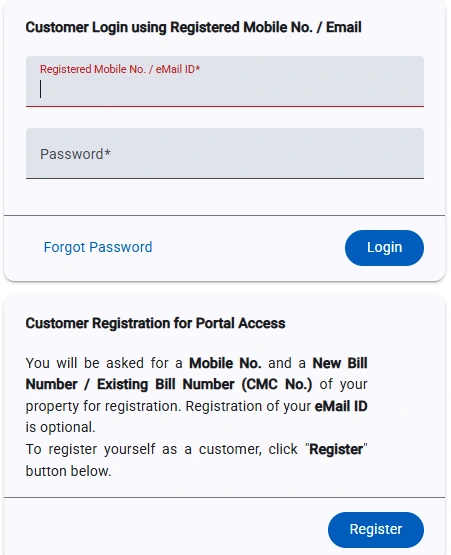
- Step 1: Visit the CMWSSB online payment portal.
- Step 2: Click Pay / Check Water Tax Charges.
- Step 3: On the right-side Login portal, click Register.
- Step 4: Under Find My Property, choose either Using New Bill Number or Using Existing Bill Number.
- Step 5: Enter your New Bill Number/Existing Bill Number, depending on the option selected.
- Step 6: Enter your Mobile Number.
- Step 7: Enter your Email ID.
- Step 8: Create a Password and re-enter it in the Retype Password field.
- Step 9: Click Register to complete the registration.
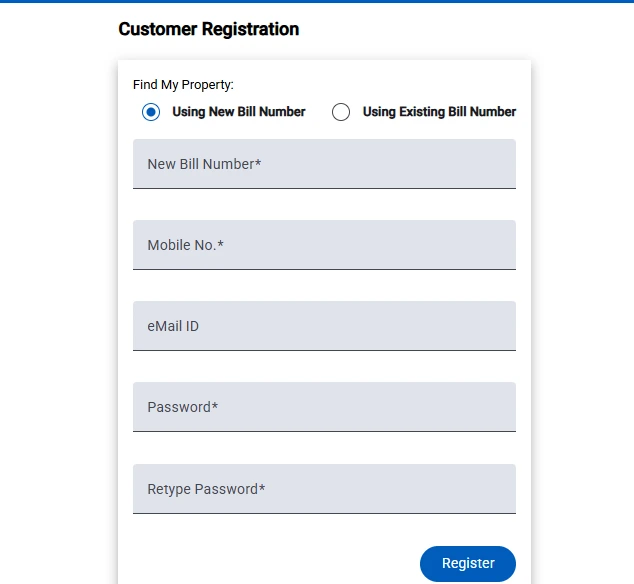
After successful registration, you can log in to the portal and access your CMWSSB water tax and charges payment services.
2. Paying Your Water Bill After Customer Login
- Visit the CMWSSB online payment portal.
- Enter your registered mobile number or email ID.
- Enter the password created during registration.
- Click Login to access your account.
- View your property details and outstanding water bill.
- Select the option to make the water bill payment online.
- Choose your preferred payment method and complete the transaction.
- Save the payment receipt for future reference.
2. Pay Using Quick Pay
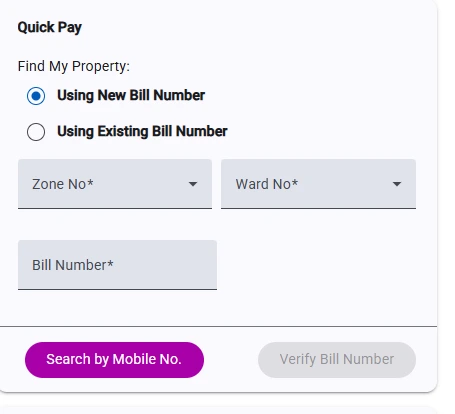
CMWSSB allows consumers to make payments through the Quick Pay option without completing the regular login process. You can use your New Bill Number, Existing Bill Number, or a registered mobile number to find your property and proceed with payment.
- Step 1: Select Quick Pay on the CMWSSB online payment portal.
- Step 2: Under Find My Property, choose Using New Bill Number or Using Existing Bill Number.
- Step 3: Select the applicable Zone No. and Ward No.
- Step 4: Enter your Bill Number.
- Step 5: Click Search by Mobile No. or use the available Verify Bill Number option.
- Step 6: Verify your property and outstanding bill details.
- Step 7: Proceed with the available online payment option and complete the transaction.
3. Scan & Pay
CMWSSB also provides a Scan & Pay option on the payment portal. Consumers can scan the displayed QR code using a supported payment application and proceed with the water bill payment.
4. Find Your Property if You Don't Know the CMC Number
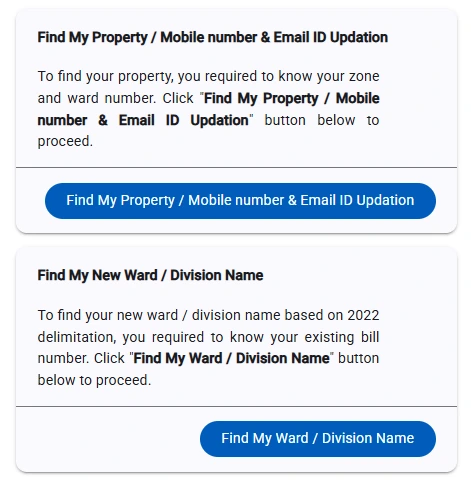
If you do not know your Property ID (CMC Number), use the Find My Property option. You can search for your property by selecting the relevant Zone/Ward and entering details such as a few characters of the name, address or CMC Number. Once you identify the property, you can proceed with the applicable bill payment.
How to Pay Chennai Metro Water Bill Offline?
You can pay your Chennai Metro Water bill offline by visiting an authorised CMWSSB area office or depot office. Carry your CMC/Consumer Number or previous bill copy and use the available payment methods at the designated counter.
Where Can You Pay Your Chennai Metro Water Bill Offline?
- CMWSSB Area Offices: Open from 9:00 AM to 3:00 PM.
- CMWSSB Depot Offices: Open from 8:00 AM to 11:00 AM.
Chennai Metro Water Bill Offline Payment Methods
You can pay your CMWSSB water bill using:
- Cash
- Demand Draft (DD)
- Crossed Cheque drawn in favour of CMWSSB
Tip: Carry your CMC/Consumer Number, connection details, or previous water bill to help the staff locate your account and process the payment.
How to Register Complaints on the CMWSSB Website?
You can register a water supply or sewerage-related complaint through the official CMWSSB website. Follow these steps:
Step 1: Visit the official CMWSSB website: Go to the CMWSSB website.
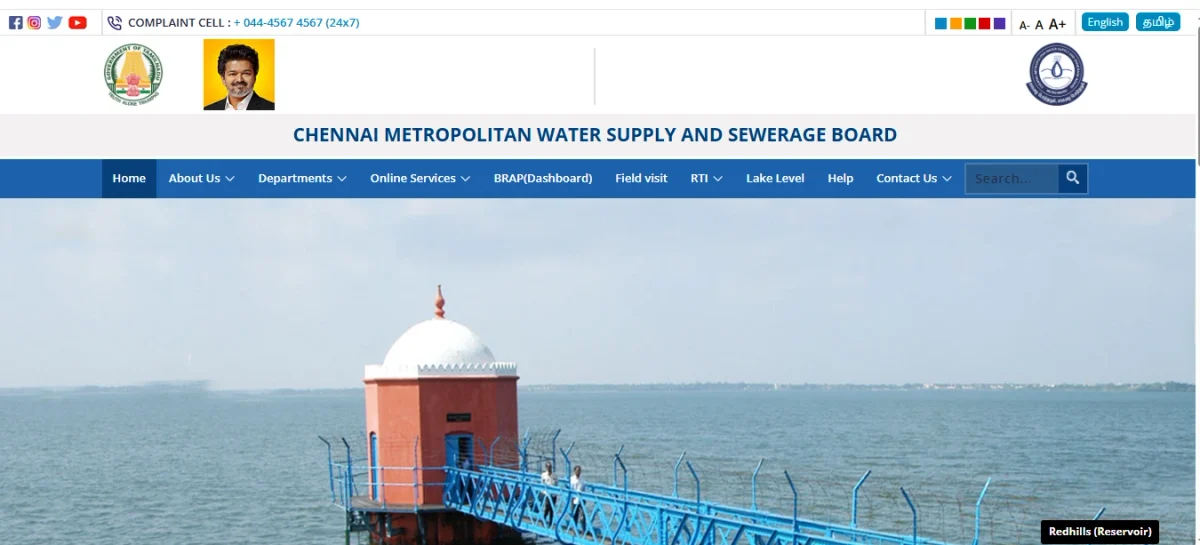
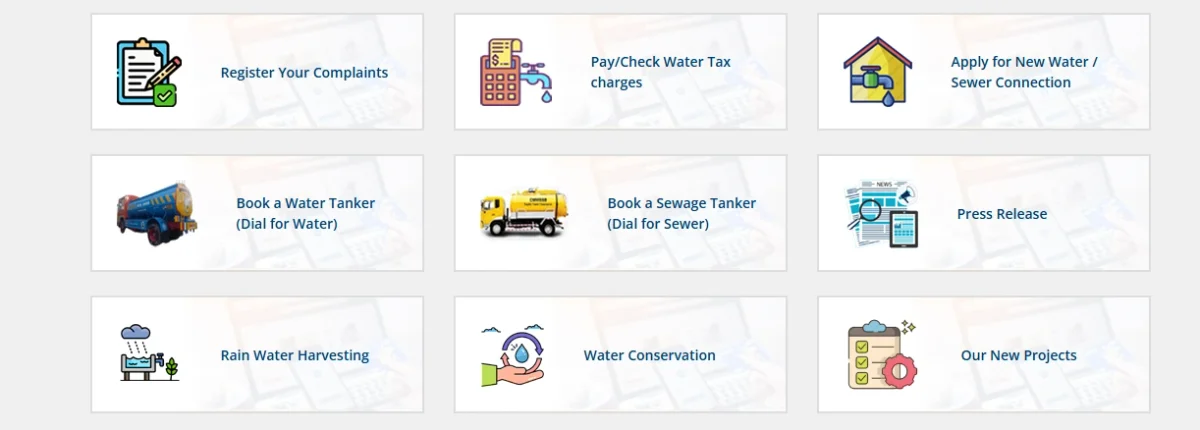
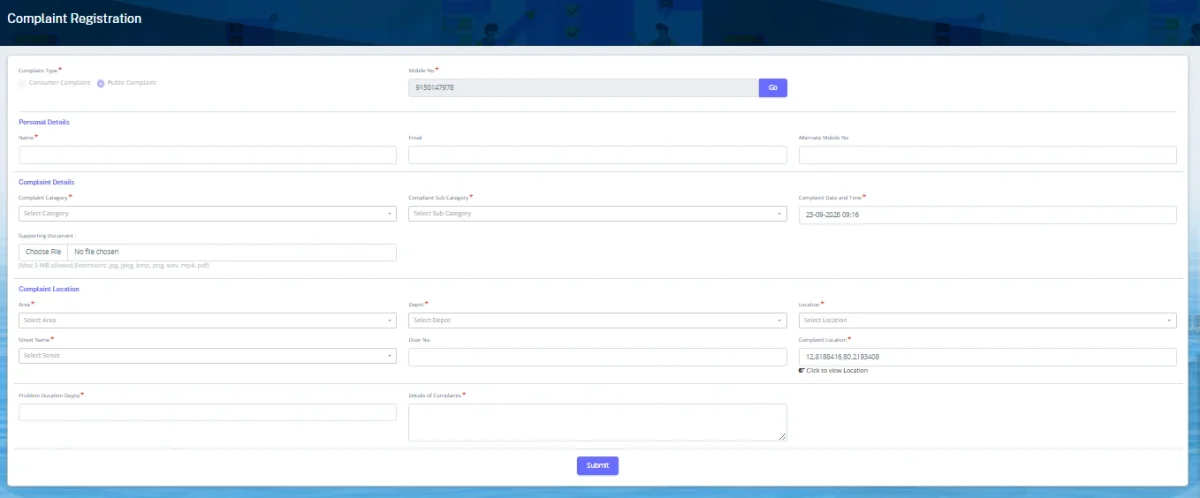
Step 2: Click “Register Your Complaint”: Select the Register Your Complaint option from the available online services.
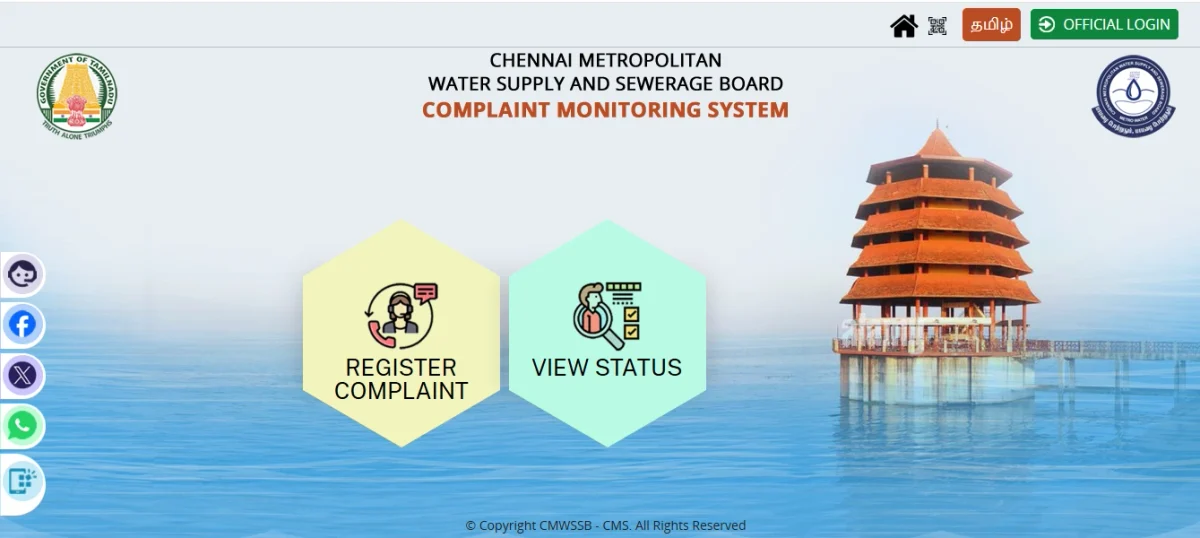
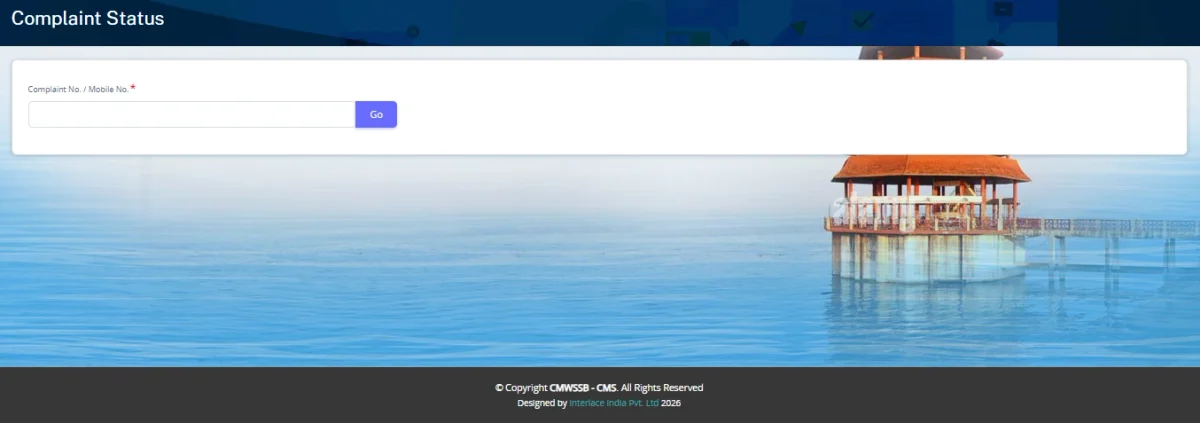
Step 3: Choose an option: You will see two options: “Register Complaint” and “View Status”. Select Register Complaint to submit a new complaint or View Status to check the progress of an existing complaint.
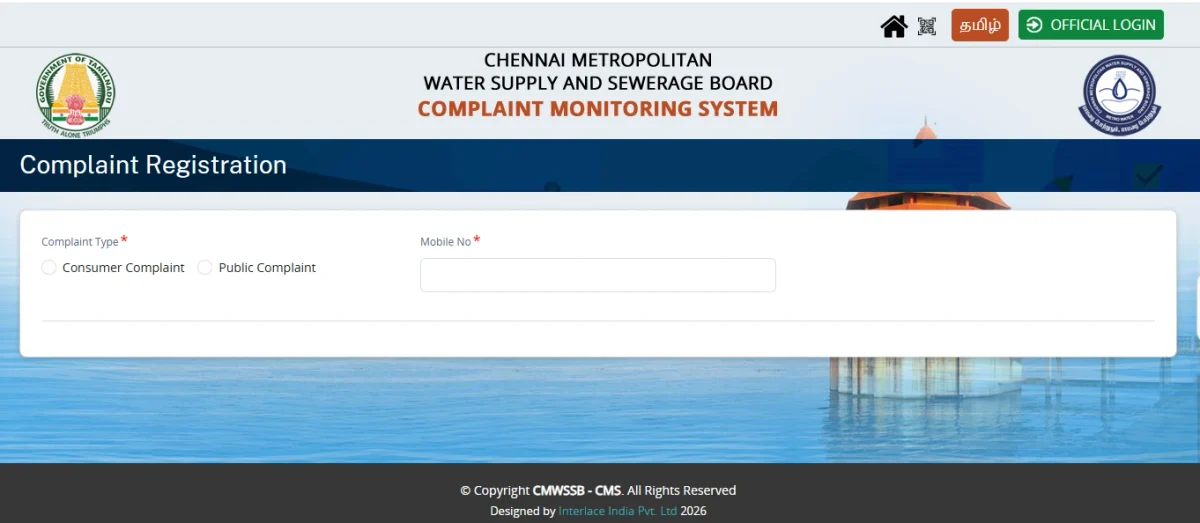
Step 4: Enter complaint details: Select the relevant complaint category, enter your mobile number, and provide the required details about the issue.
Step 5: Submit the complaint: Review the information entered and submit your complaint. Note down the complaint/reference number generated after successful registration.
Step 6: Track complaint status: To check the progress of your complaint, select View Status and enter the required reference details to track its current status.
How to Calculate Chennai Metro Water Bill?
You can calculate your Chennai Metro Water bill using the Water & Sewerage Tax Calculator available on the CMWSSB website. Follow these steps:
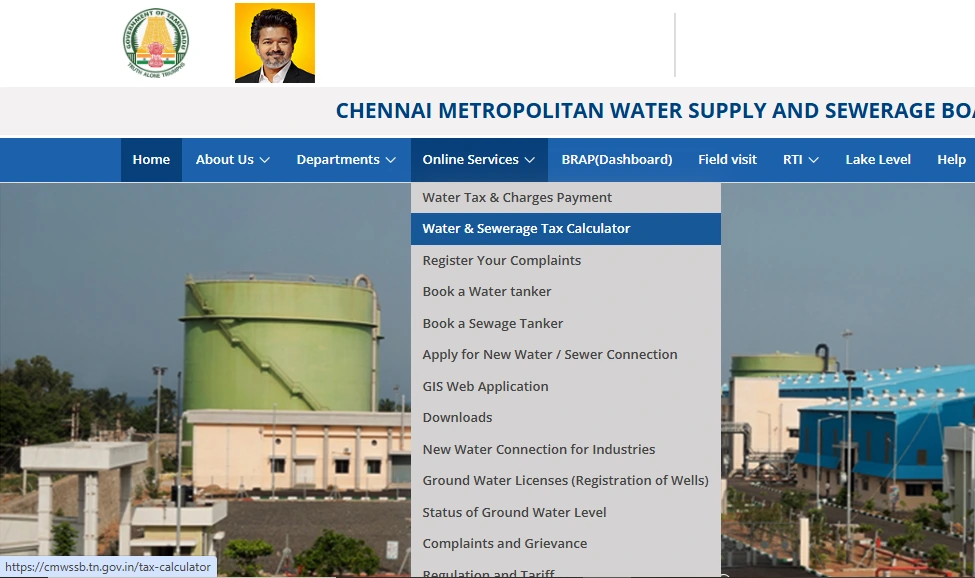
- Step 1: Visit the official CMWSSB website.
- Step 2: Click Online Services from the main menu.
- Step 3: Select Water & Sewerage Tax Calculator.

- Step 4: Enter the Annual Rental Value of your property in the designated field.
- Step 5: The calculator applies the formula: Half-Yearly Water Tax = Annual Rental Value × 3.5%.
- Step 6: Click Calculate to generate the Half-Yearly Tax amount.
- Step 7: Review the calculated water tax displayed on the screen.
How Does CMWSSB Calculate Water Charges?
The Chennai Metropolitan Water Supply and Sewerage Board (CMWSSB) calculates water charges based on the consumer category, connection type and water consumption. Metered connections are generally charged according to applicable consumption slabs, while eligible domestic properties may have fixed charges.
1. Metered Consumers: Volumetric Water Charges
For properties with functional water meters, CMWSSB calculates water charges based on the quantity of water consumed, measured in kilolitres (KL), where 1 KL equals 1,000 litres.
For metered domestic consumers, the applicable rates are:
| Water Consumption | Rate per KL |
| Up to 10 KL | ₹8 |
| 11–15 KL | ₹20 |
| 16–25 KL | ₹32 |
| Above 25 KL | ₹51 |
The applicable minimum charge for domestic consumers is ₹111 per month per dwelling unit or flat, subject to the applicable CMWSSB tariff.
Commercial, industrial and institutional consumers may have different rates based on their consumer category and type of establishment.
2. Unmetered Domestic Water Charges
For eligible domestic properties without an applicable functional meter, CMWSSB follows the prescribed fixed tariff structure rather than calculating the charge solely according to individual household consumption. The current tariff includes a ₹111 monthly charge per dwelling unit or flat for the applicable domestic category.
3. Half-Yearly Water Tax Calculation
CMWSSB also calculates water tax based on the property's Annual Rental Value (ARV). The applicable half-yearly water tax can be calculated using the following formula:
Half-Yearly Water Tax = Annual Rental Value × 3.5%
For instance, if the Annual Rental Value of a property is ₹50,000, the calculation would be:
₹50,000 × 3.5% = ₹1,750
Therefore, the calculated half-yearly water tax would be ₹1,750.
4. Water and Sewerage Taxes
In addition to water charges, applicable water and sewerage taxes are calculated based on the property's Assessed Annual Value (ARV). The applicable rates are:
| Tax | Rate |
| Water Tax | 1.5% of ARV |
| Sewerage Tax | 5.5% of ARV |
4. Other Applicable Charges
The final amount payable may also include applicable sewerage charges, arrears, penalties or other charges, depending on the property and consumer category.
Note: CMWSSB tariffs can differ according to the type of connection, consumer category and metering status. Consumers should check the latest CMWSSB tariff schedule before calculating their exact bill.
Pay Your Chennai Water Bill Payment With NoBroker
Paying your Chennai Metro Water bill online can save you a trip to the CMWSSB office. Our NoBroker Pay platform makes it easy to check your outstanding bill, enter your consumer details and complete the payment digitally. It is enabled by the Bharat Bill Payment System (BBPS), making bill payments secure and streamlined. Here are the steps to pay your Chennai Metro Water bill online through NoBroker Pay:
Step 1: Go to the NoBroker Payments Page and select Water Bill. You can also pay your Tata Power electricity bill through the NoBroker mobile app by following the same steps.
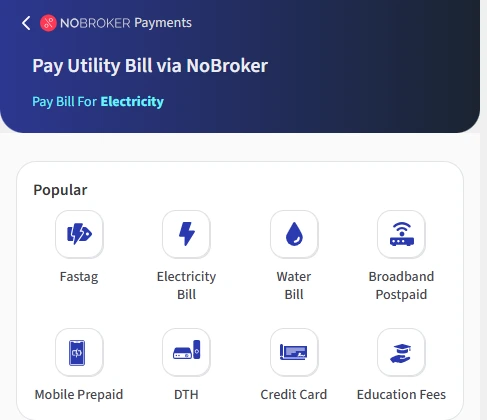
- Step 3: Select Chennai Metropolitan Water Supply And Sewerage Board from the list of available billers.
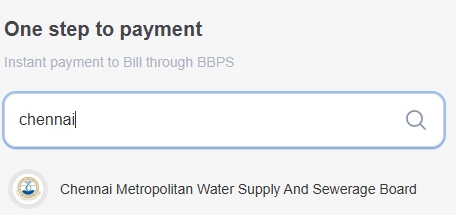
Step 4: Enter the bill number shown on your Chennai Metro Water bill.
Step 5: Enter your mobile number: Provide the registered mobile number associated with your water connection.
Step 6: Click “Submit” to fetch your bill details.
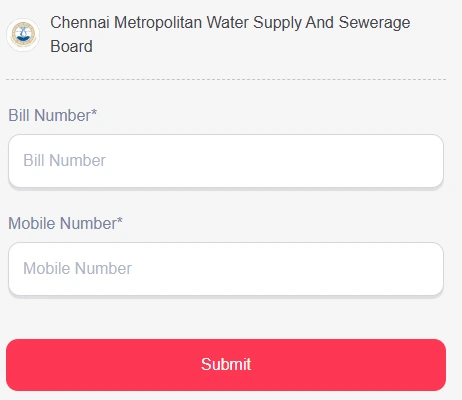
Step 7: Check the outstanding amount and complete the payment using your preferred payment method.
Step 8: After successful payment, save the payment confirmation or receipt for future reference.
Frequently Asked Questions
Q. Can I pay my Chennai Metro Water bill without registration? Ans: Yes. CMWSSB’s Quick Pay option allows consumers to pay using their bill details or registered mobile number without regular login.
Q. How can I find my CMC number for Chennai Metro Water? Ans: Use the Find My Property option on the CMWSSB portal and search using your zone, ward, name, address, or property details.
Q. What is the CMWSSB complaint number? Ans: You can contact CMWSSB’s 24×7 complaint cell at 044-4567 4567 or use the toll-free number 1916 for water-related complaints.
Q. Can I pay Chennai Metro Water charges through WhatsApp? Ans: Yes. Chennai residents can access CMWSSB water-charge payment services through the Greater Chennai Corporation’s official WhatsApp chatbot.
Q. How do I know whether my Chennai Metro Water bill payment was successful? Ans: Save the payment receipt generated after completing the transaction and check your outstanding dues through the CMWSSB payment portal.
Most Viewed Articles
With over 23 years of experience in Real Estate, and an architecture degree, Vivek is here to help others buy/sell or rent the right way. Through his writing you will find out what people look for, and what you can do to get the best out of your home, and also how to get the best for your home.
Loved what you read? Share it with others!



 ✕
✕


 Full RM + FRM support