Managing your MCGM water bill online makes it easier to keep track of your dues and avoid missing payment deadlines. MCGM, also known as BMC or the Brihanmumbai Municipal Corporation, provides online water-bill services through its official Aqua Citizen Portal, allowing Mumbai consumers to check their bill details, view the amount due, and make payments digitally. This guide covers the key online services available for MCGM water bills, including checking dues, paying on time, downloading receipts, and verifying payment status.
MCGM Water Bill Payment Methods
MCGM (Municipal Corporation of Greater Mumbai) offers both online and offline payment methods for paying your water bill.
Online Payment
- You can pay your MCGM water bill through the MCGM Aqua Citizen Portal with the use of basic information. It offers several payment gateways, including net banking, debit cards, credit cards, and other supported digital payment methods.
Offline Payment
- You can also pay your water bills through MCGM offices and collection centres, but you would need to carry your latest water bill or Consumer Number when making an offline payment.
How to Pay MCGM Water Bill Online
Paying your MCGM water bill online is a convenient way to manage your water payments without visiting a municipal office. Here are the key steps to complete payments digitally:
Step1: You can visit the MCGM Aqua Citizen Portal and select Water Bill under the Bill Type option.

Step 2: You need to enter the Consumer Number (CCN) mentioned on your MCGM water bill and click on “Proceed” to continue.
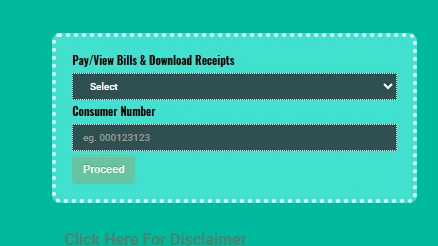
Step 3: You can now access the relevant bill details, check the outstanding bill amount and other details.
Step 4: Select a payment gateway of your choice and complete the transaction.
Step 5: After a successful payment, note down the transaction/reference number for future reference.
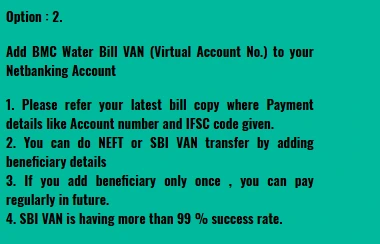
Add BMC Water Bill VAN to Your Net Banking Account
You can add the BMC Water Bill VAN (Virtual Account Number) as a beneficiary in your net banking account to make future payments easier.
Step 1: Refer to your latest BMC water bill for the account number and IFSC code under the payment details.
Step 2: Now you need to add the beneficiary using the account details provided and make the payment through NEFT or SBI VAN transfer.
Step 3: Once you add the beneficiary, you can use the same details for future payments without adding it again.
Step 4: After completing the transfer, save the transaction details and verify that the payment has been credited to your water bill account.
How to Download MCGM Water Bill Receipt
Once you complete your MCGM water bill payment, you can download and save the payment receipt for your records. Here is a step-by-step process for bill payment:
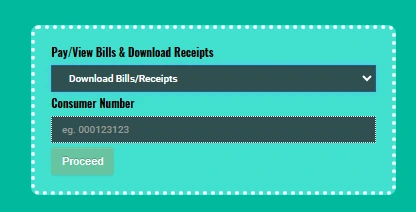
Step 1: Visit the MCGM Aqua Citizen Portal, select “Download Bills/Receipts” from the drop-down menu, enter your Consumer Number (CCN), and click on Proceed.
Step 2: You can choose “Duplicate Bill” or “Duplicate Receipt”, depending on what you need.
Step 3: You need to click the “View” button to display the available document.
Step 4: Under the “Action” tab, click the relevant Bill/Receipt to download it.
How to Check MCGM Water Bill Payment Status
You can verify your MCGM water bill payment status through the MCGM Aqua Citizen Portal after completing an online transaction.
- Check payment confirmation: Log in to the MCGM Aqua Citizen Portal, enter your Consumer Number (CCN), and check the bill/payment details. If it's a successful transaction, it will be updated on the website.
- Amount debited but bill still unpaid: In this scenario, do not immediately make another payment. If the amount still shows as unpaid after a few hours, contact MCGM with your transaction details.
- Keep the transaction details: By saving the transaction ID/reference number, payment confirmation, date, and amount paid, you will be able to resolve issues such as non-payment or outstanding amount details.
MCGM Water Bill Payment: Important Points
Keep these points in mind when paying your MCGM water bill online:
- Verify your CCN/account number carefully before paying.
- Carefully review the bill amount, arrears, penalties, or other applicable charges before making the payment.
- Make payments only through the official MCGM Aqua Citizen Portal or other authorised MCGM payment channels.
- Visit the official MCGM portal for the latest information on applicable charges, payment procedures, and terms.
MCGM Water Bill Customer Care Number
| Service | Contact Details |
|---|
| BMC/MCGM Civic Helpline | 1916 |
| MyBMC WhatsApp Support | 8999228999 |
MCGM Water Bill Payment Through NoBroker
Moved into a new home in Mumbai? Once your MCGM water connection is active, you can add your bill details on NoBroker Pay and manage your payments online from the comfort of your home. The service uses the Bharat Bill Payment System (BBPS), a payment network supported by banks and other digital payment platforms, so you can pay your MCGM water bill through a familiar and secure payment channel. Follow these steps to pay your MCGM water bill online through NoBroker Pay:
Step 1: Visit the NoBroker bill payment platform on the website or open the NoBroker app to get started.
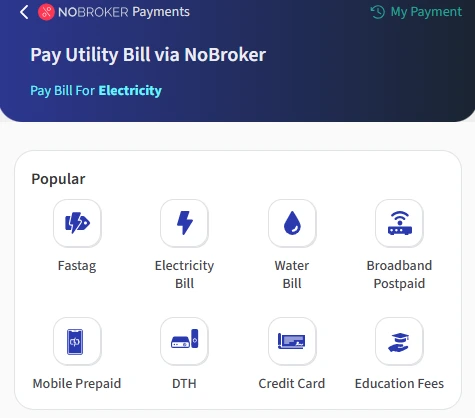
Step 2: Now you need to select the Water Bill Payment option.
Step 3: You need to select MCGM from the list of available billers.
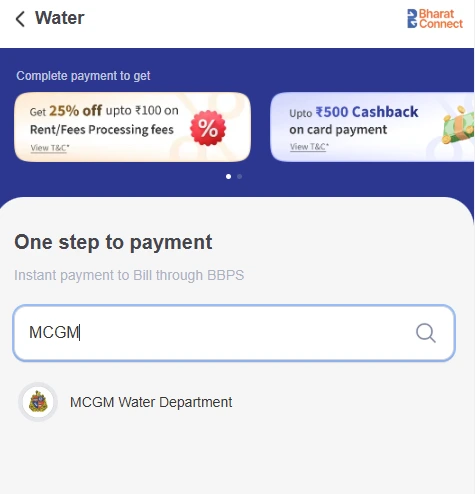
Step 4: Enter your MCGM water connection number as shown on your water bill.
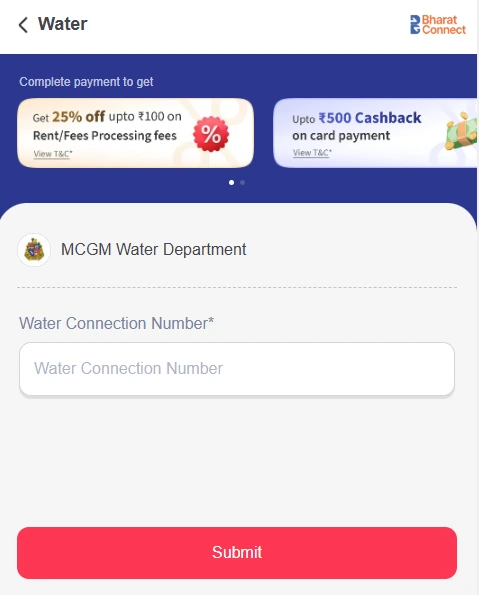
Step 5: Verify the bill details and amount, then choose your preferred payment method to complete the transaction.
Step 6: After successful payment, save the payment confirmation or receipt for your records.
Frequently Asked Questions
Q. How can I pay my MCGM water bill online? Ans: You can pay your MCGM water bill online through the official MCGM Aqua Citizen Portal or supported bill-payment platforms.
Q. How can I check my MCGM water bill payment status? Ans: You can check your payment and bill status through the MCGM Aqua Citizen Portal using your Consumer Number. Keep your transaction or payment reference number for verification.
Q. What should I do if my account is debited but the MCGM bill is unpaid? Ans: MCGM payments may take a minimum of one working day to be credited to its account, so keep this processing time in mind when making your payment. If the bill remains unpaid, you can contact MCGM customer support with your transaction ID, payment receipt, and Consumer Number.
Q. How can I download my MCGM water bill payment receipt? Ans: After a successful online payment, look for the receipt or payment confirmation option on the platform you used to pay. Save the receipt and transaction reference number for your records.
Q. Can I pay my MCGM water bill offline? Ans: Yes, MCGM provides offline payment facilities through designated municipal offices and collection centres.
Most Viewed Articles
With experience of working with various up and coming startups, Prakhar has an eye for the intricate details of any subject. He is an ECE graduate and has travelled and stayed in almost all parts of India. Read his blog to get exciting details and tips from the real estate ecosystem in the world.
Loved what you read? Share it with others!



 ✕
✕


 Full RM + FRM support