The commercial electricity rates in UP range from ₹5.50 to ₹8.75 per unit for standard LMV-2 consumers. Domestic electricity rates range from ₹3.35 to ₹5.50 per unit in rural areas and ₹5.50 to ₹6.50 per unit in urban areas. On the other hand, rural commercial connections are charged around ₹5.50 per unit, while urban commercial rates range from ₹7.50 to ₹8.75 per unit, depending on the sanctioned load and monthly electricity consumption. The final electricity bill in UP can be affected by other additional charges like electricity duty, unpaid bills, over-consumption charges, FPPAS, and other applicable charges.
The Latest Commercial Electricity Rates in UP
Here is a table representing the updated commercial electricity rate per unit in Uttar Pradesh as of 2026. Rates below apply to DVVNL, MVVNL, PVVNL, PuVVNL, and KESCO consumers.:
| Tariff Category | Consumer / Load Category | Fixed / Demand Charge | Energy Charge | How the Rate Applies |
|---|
| LMV-2 – Rural Schedule | Non-domestic usage in rural areas | ₹110/kW/month | ₹5.50/kWh | Flat ₹5.50 on all units. Applies only in rural-schedule areas. |
| LMV-2 – Up to 4 kW | Shops, offices and other commercial users | ₹330/kW/month | Up to 300 kWh: ₹7.50/kWh; Above 300 kWh: ₹8.40/kWh | ₹8.40 applies only to units above 300; the first 300 stay at ₹7.50. Minimum charge applies (see below table). |
| LMV-2 – Above 4 kW | Larger low-tension commercial users | ₹450/kW/month | Up to 1,000 kWh: ₹7.50/kWh; Above 1,000 kWh: ₹8.75/kWh | ₹8.75 applies only to units above 1,000; the first 1,000 stay at ₹7.50. Minimum charge applies (see below table). |
| HV-1 – Commercial, 11 kV | Commercial/private institutional bulk load of 75 kW+ supplied at 11 kV | ₹430/kVA/month | ₹8.32/kVAh | Billed per kVAh, not kWh, so a poor power factor increases the units you pay for. |
| HV-1 – Commercial, above 11 kV | Commercial/private institutional bulk load of 75 kW+ | ₹400/kVA/month | ₹8.12/kVAh | Billed per kVAh. Rate is lower than at 11 kV because supply is taken at a higher voltage. |
Note: These are UPERC's FY 2026-27 rates (order dated 2 July 2026, unchanged from last year) for DVVNL, MVVNL, PVVNL, PuVVNL and KESCO consumers. NPCL (Greater Noida) rates may differ. Your bill may also include FPPAS, late-payment, and excess-demand charges. FPPAS changes monthly; check the current figure on the UPPCL tariff page. Please also note that, along with these charges, commercial consumers may also pay electricity duty of 7.5% and other applicable charges. For eligible LMV-2 consumers, a minimum monthly charge of ₹600/kW from April to September and ₹475/kW from October to March may apply. This is a minimum billing floor, not an additional surcharge added to a higher calculated bill.
How Is a UP Commercial Electricity Bill Calculated?
In UP, the commercial electricity bill is calculated by the amount of electricity consumed multiplied by the consumption slab rate. Any additional units consumed will be charged in their own slabs.
For example: an urban shop with a sanctioned load of 3 kW uses 400 units per month.
- Energy, first 300 units: 300 × ₹7.50 = ₹2,250
- Energy, next 100 units: 100 × ₹8.40 = ₹840
- Fixed charge: 3 kW × ₹330 = ₹990
- Meter rent: ₹50
- Electricity duty: 7.5% of ₹3,090 energy charge = ₹231.75
- Total before FPPAS: ₹4,361.75
Who is Responsible for Providing Commercial Electricity in UP?
Most areas in UP are served by five distribution companies (DISCOMs) named DVVNL, MVVNL, PVVNL, PuVVNL, and KESCO. These companies are regulated by the Uttar Pradesh Electricity Regulatory Commission (UPERC), which sets tariffs and oversees overall electricity supply standards to ensure that power providers are well regulated and provide quality service while adhering to the set norms. The NPCL (Noida distributor), which covers Greater Noida, is a separate private licensee with its own tariff rates, different from UPERC's. These companies are:
- Dakshinanchal Vidyut Vitran Nigam Ltd. (DVVNL) - Serving southern Uttar Pradesh.
- Madhyanchal Vidyut Vitran Nigam Ltd. (MVVNL) - Responsible for the central regions, including the state capital, Lucknow.
- Pashchimanchal Vidyut Vitran Nigam Ltd. (PVVNL) - Covering the western regions.
- Purvanchal Vidyut Vitran Nigam Ltd. (PuVVNL) - Operating in the eastern parts of the state.
- Kanpur Electricity Supply Company Ltd. (KESCO) - Specifically serving the Kanpur Nagar urban area.
- Noida Power Company Limited (NPCL) - Specifically supplying power to its licensed area of Greater Noida
How to Get a New Commercial Electricity Connection in UP?
Getting a new commercial electricity connection in Uttar Pradesh (UP), India, typically involves several steps. Here's a general guide:
Step 1: Go to the UPPCL portal, go to the ‘Connection Services’ section, and click on the first option, ‘Apply for New Electricity Connection’.

Step 2: Clicking will take you to the next window. Click the ‘Register’ button and fill in all required information. Once you click Register, you’ll be redirected to another website. Enter the OTP received on your submitted number. Once you verify the OTP, the system will send the login ID and password to the same number.

Step 3: You can log in to the UPPCL portal using either your phone number or your ID and password. You’ll be redirected to a new page where you can ‘Apply for New Connection’.

Step 4: After you click, the portal will prompt you to complete KYC verification. You can verify either using your Aadhaar Card or virtual ID. Once verified with OTP, this step is done.

Step 5: Once the process is done. You can start the process of getting a connection. Select your purpose of supply, division, district, and application type. (if you don’t know your division, you can use the ‘know your division’ option)

Step 6: The next window will ask you to enter your details, such as photos, phone number, occupation, family details, and gender. Fill in accurately or as seems fit. Click Continue to proceed further.

Step 7: The next stage is to fill in more of your details, like your permanent and correspondence addresses. If both are the same, you can select the checkbox to mark them as the same. Click Continue to proceed.

Step 8: The next step is to add all the details of your commercial estate where a connection is needed. Ensure you’ve filled in all the information correctly.

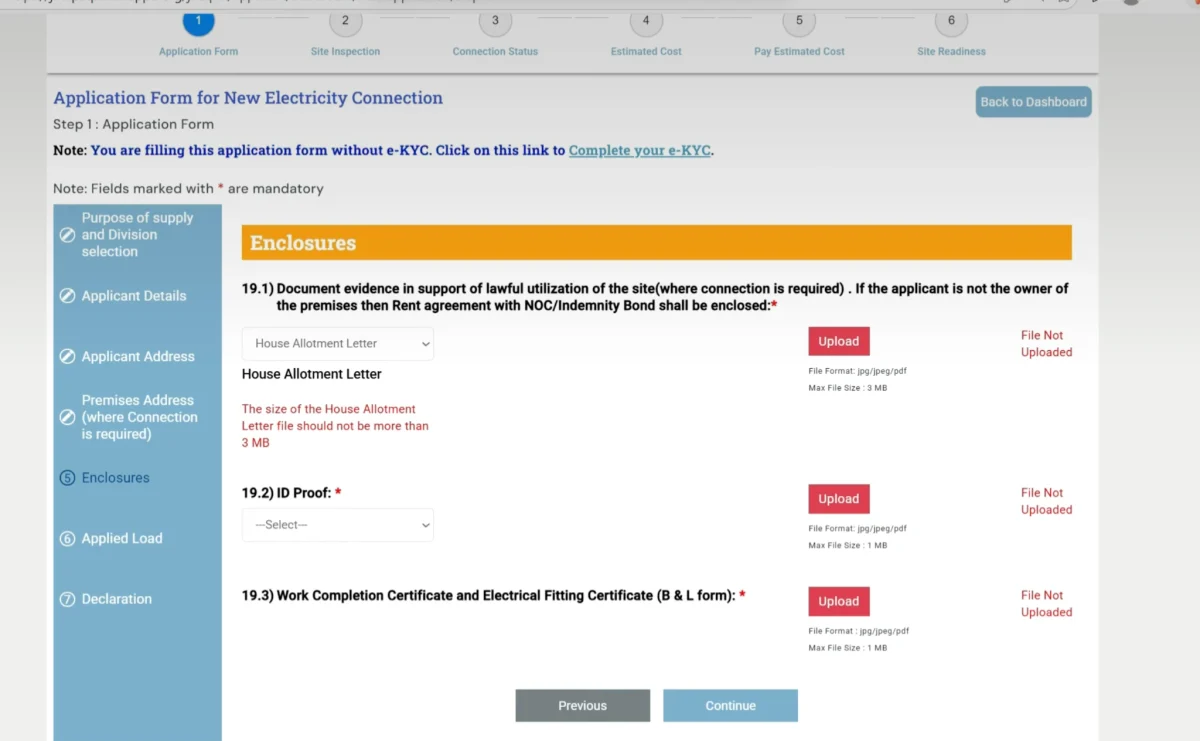
Step 9: Once you’ve filled in the details, click Continue and upload all the business-related documents(House allotment letter, ID proof, B&L Form) on the next page. Please note that the max file size cannot be above 3 MB. Click Continue to proceed further.
Step 10: In this section, add all the appliances/equipment you will be using for your commercial activities. Enter their potential usage in watts, the load you’ll need, and click Continue. The next page is for terms and conditions. Read through it and click ‘I Agree’. The page will then allow you to preview your filled application. You can, for the last time, verify if the information is correct. You can also download the application for future reference. Once verified, click submit to proceed further.

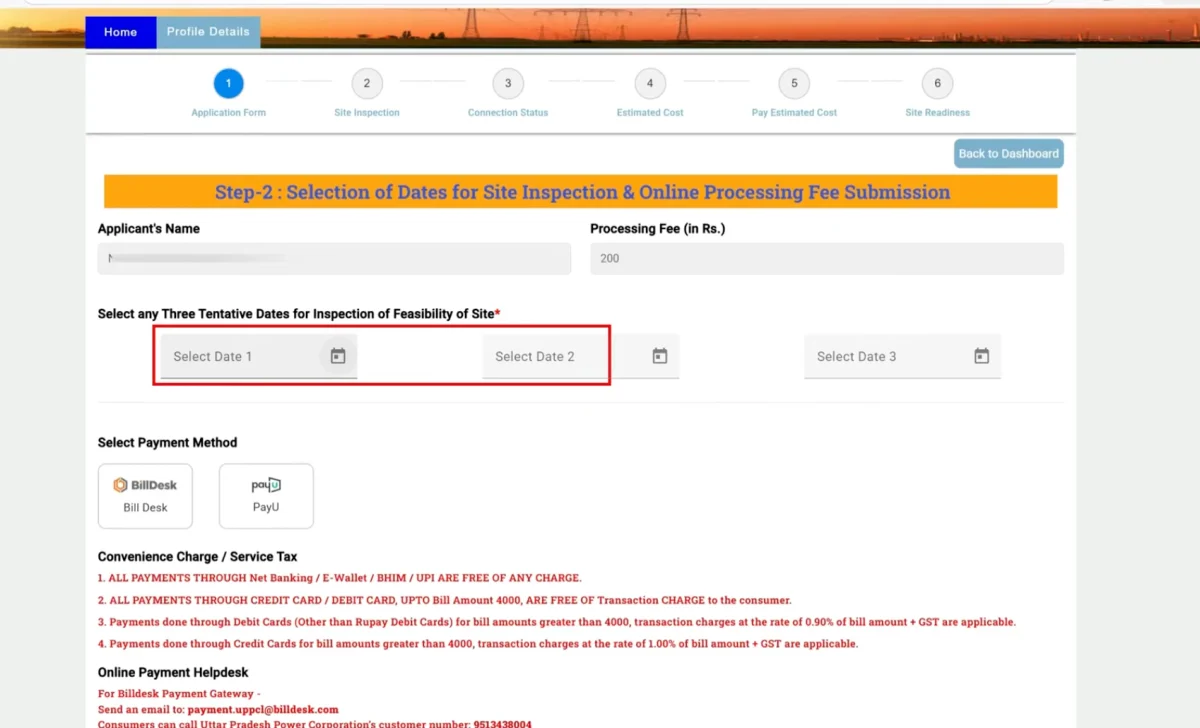
Step 11: The next page will ask you to pay the ₹200 processing fee and select 2-3 preferred date slots for a site inspection of your commercial space. Once you have read the terms and conditions, select the ‘Click here to agree’ box and click the ' Proceed to pay' button in this order. You will be redirected to the payment window where you can use net banking, UPI, Debit/credit card options to pay the fee.
Step 12: Once payment has been made, your request has been registered. You can also download the receipt from the same page. If you need to know about the status of your application, you can click on Back and check the current status. The page will also inform you which are still pending and when they are due.

Step 13: Once your case moves forward and the site inspection is complete, you’ll need to navigate to the same website and pay the final connection fees. You can do this by going to the application menu and clicking on the process button on the page. This page will also give you detailed insight into how much energy different equipment and electronics use. Once you proceed to the next step, you will be asked to select the 3 best dates for meter installation. Once that is also done, check the terms and conditions and ‘Proceed to pay’, and complete the payment using any of the previously available payment methods.

Step 14: For the next step, navigate back to your application status, click on the ‘Proceed’ button, and complete the ‘site readiness’ process by selecting Yes. Once you click Yes, this step is also complete from your end. Now, all that remains is meter installation, which will be handled by the distributor. When that is done as well, you can use your commercial electricity connection without worry.

How to Pay Commercial Electricity Bill in UP?
You can pay your UP commercial electricity bill online through the UPPCL portal, via the official UPPCL Commercial App or offline at a discom collection center.
Online:
- Step 1: Go to the UPPCL portal and click on Bill Payment on the bill generation and payment section.

- Step 2: Fill in all the customer details like your district, account number, or log in via registered mobile number. Fill in the CAPTCHA and click view to see your bill.

- Step 3: The next page will take you to the bill details page. You can see your bill due date, total amount payable, units consumed, and other such details.
- Step 4: You can scroll down and select your preferred payment method. Select and move on to the next page.
- Step 5: Complete the payment using debit or credit card, UPI, or net banking. Download the receipt for future reference.
Offline:
UPPCL also has various electricity bill collection centers, customer care centers, and kiosks installed at these centers for paying electricity bills.
- Step 1: Visit the Nearest Electricity Office: You can visit the closest customer care center or designated payment counters provided by the electricity distribution companies.
- Step 2: Provide Your Bill or Account Number: Carry a copy of your electricity bill or note down your account number to provide at the counter.
- Step 3: Pay via Cash, Cheque, or Card: You can pay the bill in cash, by cheque, or by card. Cheques should be made payable to the respective electricity distribution company.
Payment via app:
- Go to the Play Store or App Store and download the official UPPCL Commercial App.
- Log in to the app using your account number or your registered mobile number, then verify with the OTP sent to your number. For first-time payers, create an account using the same details and email id.

- The first page will show you your outstanding bill. How many units are consumed and the daily average usage. You will also get an option to pay the bill. Click on the button to proceed further.

- On the next page, select your district and enter your account number, registered mobile number, and the CAPTCHA.

- The next window will again show you your outstanding bill. You can either settle the full amount or enter the amount you wish to pay in the box below. Please note that you’ll incur late payment fees on the outstanding balance.
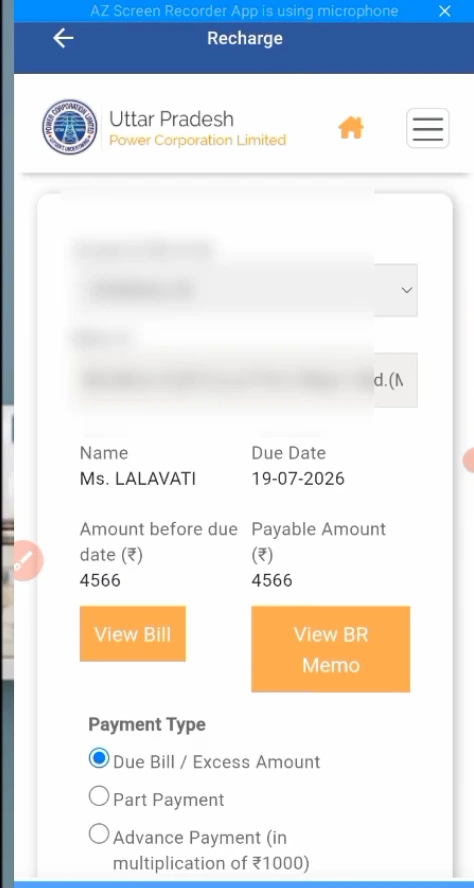
- Proceed further to the final payment window. Here you can select your payment mode and settle the bill. You can also download the receipt for future reference
Late payment and other charges:
- Late payment surcharge: 1.25% per month for the first three months after the bill’s due date. This is increased to 2.00% per month for all months after this if the bill is still unpaid.
- Reconnection charge: After a long non-payment period, reconnection charges are ₹150 for small connections, ₹275 for medium connections,, and ₹500 for large commercial connections.
Factors Influencing the Commercial Electricity Connection Charges in UP
In Uttar Pradesh, the charges for a new commercial electricity connection can vary based on several factors determined by the Uttar Pradesh Power Corporation Limited (UPPCL) and its regional distribution companies. Here are the key factors influencing the new commercial electricity connection charges in the region:
The amount of power (in kW or kVA) required by the commercial establishment plays a significant role in determining connection charges. Higher loads require more power and therefore incur higher charges.
Connections at higher voltage levels (e.g., above 11 kV) may incur additional costs due to the need for more sophisticated equipment and installation processes compared to low-voltage connections.
- Distance from Existing Infrastructure
If the new connection site is located far from existing electrical infrastructure, additional poles, wires, and possibly even new transformers may be needed to extend service. The further the distance, the higher the cost.
- Regulatory Charges and Duties
Government-imposed duties, taxes, and regulatory charges can also affect the total cost of obtaining a new commercial electricity connection. These may include service charges, meter installation fees, and inspection fees.
Urban areas might have more readily available infrastructure and therefore lower connection costs than rural areas, where infrastructure may require significant expansion.
- Demand for Infrastructure Upgrades
When existing infrastructure cannot handle the additional load from new connections, system upgrades may be required, which can significantly affect connection charges.
If you wish to get an estimate of the electricity bill you might have to pay based on your consumption, then you can use the UPPCL Bill Calculator 2026-27 to do so manually.
State-wise Commercial Electricity Rate Per Unit
Bill or Payment Problems? Who to Contact
In case of any problem faced, users can contact:
UPPCL helpline 1912 (Toll-Free from any phone in UP) or file a complaint at the UPPCL mPower Portal. Or, for your DISCOM-based issues, you can connect at:
- MVVNL (Madhyanchal): Call 1800-180-0440 or WhatsApp 7669003409 or https://www.mvvnl.in/index.aspx
- PVVNL (Paschimanchal): Call 1800-180-3002 or WhatsApp 7859804803 or https://www.pvvnl.org/
- PUVVNL (Purvanchal): Call 1800-180-5025 or WhatsApp 8010968292 or https://puvvnl.in/en
- DVVNL (Dakshinanchal): Call 1800-180-3002 or WhatsApp 8010957826 or https://www.dvvnl.org/
- KESCO (Kanpur): Call 1800-180-1912 or WhatsApp 8287835233 or https://kesco.org.in/
- Greater Noida (NPCL): Call 0120-6226666 or email crmnpcl@rpsg.in
Pay Your Commercial Electricity Bills in UP with NoBroker
DVVNL, MVVNL, PVVNL, PuVVNL and KESCO bills can be paid on NoBroker Pay. NoBroker Pay is secured with BBPS, used by banks, which makes sure that all your transactions are secured and transparent. Complete you bill payment for UP electricity board from the comfort of your home, download NoBroker Pay today!
- Go to the App Store or Play Store and download the NoBroker Pay app. Log in with your pre-registered account number or create an account.
- Go to the Utilities section and select Electricity bill payment.

- Search for your discom's name, enter your account number, and confirm the amount shown before paying.

- Select your preferred payment method: debit or credit card, UPI, or netbanking. Complete the payment and download the receipt for future reference. A convenience fee may apply and is shown before payment.
Pay your UP electricity bill on time, worry-free, with NoBroker.
Frequently Asked Questions
Q. What factors influence commercial electricity rates in UP? Ans: Commercial electricity rates in UP are influenced by various factors including the type of business, consumption levels, tariff category, and government regulations.
Q. How can I find the current commercial electricity rates in UP? Ans: You can typically find the current commercial electricity rates in UP by visiting the official website of Uttar Pradesh Power Corporation Limited (UPPCL) or by contacting your local electricity distribution company.
Q. Are there different tariffs for different types of commercial establishments in UP? Ans: Yes. Shops and offices fall under LMV-2, while the bulk commercial loads above 75 kW are supplied under HV-1.
Q. How can I lower my commercial electricity bills in UP? Ans: Check whether your sanctioned load matches actual use. Fixed charges are billed per kW whether or not you consume, and a ≤4 kW connection pays ₹330/kW, while above 4 kW is ₹450/kW.
Most Viewed Articles
Ritika is a content writer at NoBroker who writes practical guides on running a home, including paying utility bills, personal loans, household finance, repairs and home improvement. She explains each task in simple steps, with the charges, documents and official links a reader needs.
Loved what you read? Share it with others!




 ✕


 Full RM + FRM support