- https://igr.karnataka.gov.in/info-2/Fees/Stamp%2BDuty%2Band%2BRegistration%2BFees/en
Table of Contents
Bhoomi RTC Karnataka - A Quick InformationBhoomi RTC Karnataka 2026Bhoomi Government Of Karnataka Contact DetailsBhoomi RTC KarnatakaKarnataka Land Document Fees and Registration ChargesWhat Does Mutation of Property Mean?Benefits of the Bhoomi RTC PortalHow To Register Yourself at the Bhoomi Karnataka Portal?How to View RTC on Bhoomi Portal Kartanaka?How To Check Mutation Status Online on the Bhoomi Portal?Bhoomi Karnataka: The Mobile AppNavigating Real Estate Records Like a Pro: Download the Dishank AppDownloading Pahani (RTC) on Bhoomi Karnataka RTC OnlineApplying For Conversion of Land from the Karnataka Online Land Records BhoomiLand conversion based on an AffidavitProcedure to obtain an affidavit online for land conversionVillage land records Bhoomi RTC online: How to view dispute case reportsVillage land records Bhoomi RTC online: How to apply for land conversionVillage land records Bhoomi RTC online: How to view the land conversion request statusVillage land records Bhoomi RTC online: HelplineBhoomi Karnataka Land Records Guide with NoBroker Legal Services SupportFrequently Asked Questions
Loved what you read? Share it with others!


Bhoomi RTC Karnataka: Download and View Karnataka Land Records Online (Updated 2026)
Updated : March 9, 2026, 12:13 PM
Author :
 Simon
Simon
Table of Contents
Bhoomi RTC Karnataka - A Quick InformationBhoomi RTC Karnataka 2026Bhoomi Government Of Karnataka Contact DetailsBhoomi RTC KarnatakaKarnataka Land Document Fees and Registration ChargesWhat Does Mutation of Property Mean?Benefits of the Bhoomi RTC PortalHow To Register Yourself at the Bhoomi Karnataka Portal?How to View RTC on Bhoomi Portal Kartanaka?How To Check Mutation Status Online on the Bhoomi Portal?Bhoomi Karnataka: The Mobile AppNavigating Real Estate Records Like a Pro: Download the Dishank AppDownloading Pahani (RTC) on Bhoomi Karnataka RTC OnlineApplying For Conversion of Land from the Karnataka Online Land Records BhoomiLand conversion based on an AffidavitProcedure to obtain an affidavit online for land conversionVillage land records Bhoomi RTC online: How to view dispute case reportsVillage land records Bhoomi RTC online: How to apply for land conversionVillage land records Bhoomi RTC online: How to view the land conversion request statusVillage land records Bhoomi RTC online: HelplineBhoomi Karnataka Land Records Guide with NoBroker Legal Services SupportFrequently Asked Questions
Having trouble authenticating land information or ownership documents in Karnataka? The Bhoomi Karnataka website has made it easier for citizens to access land information. You no longer have to go to government offices and stand in long lines to access crucial land information. With the Bhoomi Karnataka website, you can now access crucial land information from the comfort of your home. Whether you are purchasing agricultural land, applying for a loan, or settling a land ownership dispute, the Bhoomi Karnataka website assists you in downloading and accessing RTC documents quickly. Knowing how the Bhoomi Karnataka website operates can save you time, protect you from fraud, and help you understand the process clearly. Here is all the information you need to access Karnataka land records easily in 2026.
Bhoomi RTC Karnataka - A Quick Information
It is an initiative that provides online access to all the land records in Karnataka. It helps citizens to get the details like land ownership, crop ownership, and mutation status easily. The table below will help you understand things in a better way:
| Details | Information |
|---|---|
| Launched | It was launched in 2000 by the Karnataka Government |
| Where is it used | Used across Karnataka to access land ownership and revenue details. |
| Why is it used | To check land records, ownership, and avoid property fraud |
| How to use | Visit the website and enter the land details to view the RTC |
| Benefits | It saves time and provides easy online land access |
| Contact info | Number: 080-22113255 https://landrecords.karnataka.gov.in/ |
Bhoomi RTC Karnataka 2026
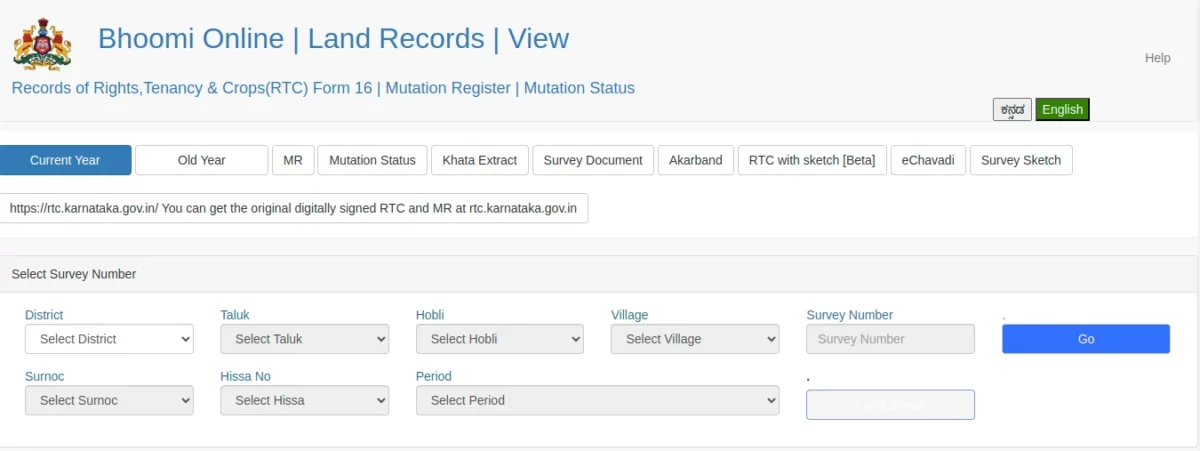
Bhoomi RTC Karnataka is a digital land platform launched by the government of Karnataka. It allows users to access land details with a click on their mobile phones. The platform supports the goal of the Digital India Land Records Modernisation Program (DILRMP) by promoting transparency and accuracy in land management.
Through the Bhoomi online login, all users can view and download Bhoomi RTC information, including ownership crop details and the type of land. The portal also helps users check the Bhoomi RTC mutation status and track changes in land ownership. It is a simple and user-friendly system that allows farmers and landowners to get reliable and paperless services.
Bhoomi Government Of Karnataka Contact Details
| Address | Director (Bhoomi & UPOR) Bhoomi Monitoring Cell, SSLR Building, K.R. Circle Bangalore - 560001Special Deputy Commissioner Bhoomi Monitoring Cell, SSLR Building, K.R. Circle Bangalore - 560001 |
| Phone No. | 080-22113255 |
| Email ID | bhoomi@karnataka.gov.in |
| Official Website | http://rtc.karnataka.gov.in |
So, what is Bhoomi RTC, and what are the benefits of using the Bhoomi Land Karnataka portal? Let’s find out.
Bhoomi RTC Karnataka
A bhoomi RTC Pahani, or record of RTC (Rights, Tenancy and Crop) information, all your land details. You can check the RTC details in the RTC Bhoomi online Karnataka portal, including the following:
- Details of the landowner
- Type of land
- Area of measurement
- Type of soil
- Water rate
- Nature of land possession
- Liabilities
- Flood areas (includes agricultural, non-agricultural, commercial and residential)
- Cultivated crops
You can also avail of any of the following land-related services via the Bhoomi RTC portal:
- Check your pahani or RTC status
- Register Mutation
- Get Revenue maps
- Check Mutation status
- Extract Mutation details
- Get an i-RTC or internet record of Rights, Tenancy, and Crops
- Register dispute cases
- Get tippan
- Get the list of new taluks
- Get XML verification of RTC
Karnataka Land Document Fees and Registration Charges
Here’s a clear breakdown of Karnataka land document fees and registration charges for 2026, helping buyers understand stamp duty, cess, surcharge, and registration costs before property purchase [1]:
| Fee Type | Rate / Amount | Notes |
|---|---|---|
| Stamp Duty | 2% to 5% of the property value | 2% up to ₹20 lakh, 3% between ₹20 lakh and ₹45 lakh, 5% above ₹45 lakh |
| Registration Charge | 2% of property value | Calculated on market value or guidance value, whichever is higher |
| BMRDA, BBMP & Village Area Cess | 10% of stamp duty | Charged on the total stamp duty amount |
| BMRDA & Other Surcharges | 3% of stamp duty | Applicable in the notified planning authority areas |
| Corporation / BBMP Surcharge | 2% of stamp duty | Applicable in municipal corporation areas |
Note: Stamp duty, cess, and surcharge are calculated on the base stamp duty amount, while registration charges are calculated on the total property value.
What Does Mutation of Property Mean?
Every change of ownership of property must be recorded in the government documents. This process of property changing hands legally from one citizen to another is known as a mutation, typically taking place due to the following reasons:
- Any property or piece of land being sold
- Any property or piece of land being divided among family members
- Any property or piece of land being acquired by the government
- Any property or piece of land being transferred upon the death of the owner
- Any property or piece of land being converted from one purpose to another
Benefits of the Bhoomi RTC Portal
Checking Bhoomi land records online in Karnataka via https://landrecords.karnataka.gov.in/ offers numerous advantages. Through online registration and login, individuals and businesses can conveniently locate their Karnataka-based lands without visiting government offices. Services like Pahani Online enable easy access to the original record of rights for just INR 15, while Citizen Registration allows Aadhar and mobile number registration for SMS alerts on agricultural land mutations. RTC Bhoomi Online Karnataka and affidavit-based land conversion login also provide access to Karnataka Bhoomi survey number, RTC, current RTC, and historical RTC since computerization began. Excluding these, some of the other benefits for citizens and farmers include:
- Acquisition of land records for the application for loans
- Searching for RTC, RTC download, or Pahani download by entering the plot number and the name of the owner
- Putting sale requests or inheritance-related questions about mutation status in Karnataka
- Find data on your crops through the i-RTC services and claim crop insurance
- Find solutions for land-related disputes through online Pahani Karnataka services
How To Register Yourself at the Bhoomi Karnataka Portal?
To register yourself and avail of the services from the Bhoomi Karnataka portal, follow the steps below:
- Visit the official Bhoomi website of the Karnataka Government at https://www.landrecords.karnataka.gov.in.
- Click on ‘Create account’ to get redirected to the ‘Sign-up’ page.
- Enters the details required along with the captcha code.
- Click the ‘Submit’ button to register yourself with the Bhoomi Karnataka portal.
How to View RTC on Bhoomi Portal Kartanaka?
It is easy to get your Karnataka land records online. To view your RTC details or check survey no. online for Karnataka on the Bhoomi Portal, follow the steps below:
- Visit the official Bhoomi Karnataka online website https://www.landrecords.karnataka.gov.in/Service84 https://www.landrecords.karnataka.gov.in/citizenportal
- Click on the ‘Services’ button
- Click on the ‘View RTC and MR’ option to go to the page to fill in the required information
- Select the district, hobli, taluk, village ,etc., and enter the survey number of the relevant RTC
- Select the appropriate surnoc and hissa number as well as the period
- Click on the ‘Fetch details’ option
- Your RTC details will now be available to you
How To Check Mutation Status Online on the Bhoomi Portal?
In the case that you have applied for the mutation process, be sure to check your mutation register online by following the steps below for Bhoomi land conversion status:
- Visit the Bhoomi Pahani Karnataka portal at https://landrecords.karnataka.gov.in/service2/RTC.aspx and click on the ‘For Citizen Services’ to select the ‘View RTC and MR’ option.
- The website redirects you to a new page where you can choose the MR from the menu at the top.
- Fill in the relevant details, including the taluk, village, survey number, hobli, etc., and ‘Fetch details’.
- The status will be generated in a few moments
Bhoomi Karnataka: The Mobile App
Gone are the days of standing in long queues and navigating through endless paperwork just to access basic land information. With the Bhoomi Karnataka app, you can now access your land records right from the comfort of your own home! This innovative app has revolutionized the way people access and manage their land records in Karnataka, making it easier and more convenient than ever before.
Here are some of the key features of the Bhoomi Karnataka app that you should know about:
- Easy Access to Records: You can access all your land records, including the ownership details and survey number, with just a few clicks on the Bhoomi Karnataka app.
- Real-Time Updates: The app provides real-time updates on any changes or updates made to your land records, so you can stay informed at all times.
- No More Paperwork: With the Bhoomi Karnataka app, there's no need for you to physically visit government offices or deal with mountains of paperwork. You can access all the information you need from your phone or computer.
If you're still not convinced, here are a few statistics that show just how impactful this app has been in streamlining land record management in Karnataka:
- Over 5 million land records have been digitized and made accessible through the Bhoomi Karnataka app.
- In 2020, over 1.5 million transactions were completed through the app, saving people time and money.
- The app has received a 4.3-star rating on the Google Play Store, with users praising its ease of use and convenience.
If you're looking for an easier and more efficient way to manage your land records in Karnataka, then the Bhoomi Karnataka app is the way to go. With its user-friendly interface and convenient features, you'll never have to worry about losing track of your land records again.
And if you're still unsure about how to check the owner name, land details with the survey number, or property ownership online in Karnataka, NoBroker's legal services can help guide you through the process.
Navigating Real Estate Records Like a Pro: Download the Dishank App
For those who don't know, Dishank is the official mobile app for accessing land records in Karnataka. This app has made it incredibly easy to access your land records, with a user-friendly interface and intuitive navigation.
Here's what you can do with Dishank:
- View your land records and property ownership details at any time, from anywhere
- Quick and easy access to important information about your property, including the survey number and tax paid
- Increased transparency in land record-keeping reduces the potential for corruption
So, how do you check land details with a survey number in Karnataka? It's as easy as downloading the Dishank app and entering your survey number. You'll have all the information you need about your property right at your fingertips.
Downloading Pahani (RTC) on Bhoomi Karnataka RTC Online
To download your Bhoomi Pahani Karnataka details from the portal for any purpose, like legal or loan application, you need to make a small payment and follow the procedures below for Land Records on Bhoomi online Service 78:
- Log in to the Bhoomi portal at https://rtc.karnataka.gov.in/Service78/ and create a login account for accessing the option of ‘Pahani Online (ONLINE RTC) ANYWHERE-ANYTIME’.
- Enter the required information to proceed and get redirected to the i-wallet services page. Here click on the i-RTC button.
- After getting redirected to a new page, fill in the details such as the district, hobli, taluk, etc., and click on the ‘Go’ button. Now enter the surnoc and hissa number, as well as the RTC validity period, to ‘Fetch Details’. After this, you will be able to view the details of ownership and RTC. Now click on ‘Pay and Print i-RTC’ for which the amount will be deducted from the i-Wallet. You can also get the original i-RTC copy printed.
Applying For Conversion of Land from the Karnataka Online Land Records Bhoomi
Landowners can also apply for the conversion of land from the Karnataka Bhoomi RTC portal, given that all the land records are stored in the government database. Here’s how you can apply:
- Visit the official Bhoomi Karnataka portal (https://landrecords.karnataka.gov.in/Service84/) and click on the ‘Citizen services’ button.
- On the new redirected page, you will be shown a list of services offered from the Bhoomi Portal. Here, select the ‘Apply for conversion’ option.
- Choose the land conversion type from the three options:
- Land situated outside your master plan area, for which you need to share a notarised affidavit through the ‘Affidavit-based conversion’ option
- Land located within your master plan, published by the local authority, for which you need to click on the ‘Master plan-based deemed land conversion’ option
- Agricultural land, which falls under Section 109 of the Karnataka Land Revenue Act, for which you need to click on the last option
Land conversion based on an Affidavit
The State government of Karnataka introduced an affidavit-based online land conversion system recently to make the licensing process for converting agricultural property to non-agricultural purposes easier. According to Revenue Minister R.V. Singh, this is a simple and transparent approach that will greatly reduce delays in the land conversion process. Let’s take a brief look at the process for land conversion based on an affidavit.
Procedure to obtain an affidavit online for land conversion
Visit http://landrecords.karnataka.gov.in/service63 for more information. Provide the RTC information, a properly sworn affidavit (in front of a notary), and an 11E drawing. If a portion of the land is to be converted, an 11E drawing is filed.
Village land records Bhoomi RTC online: How to view dispute case reports
Here are the steps to view dispute case reports online
- Visit the Bhoomi Dispute Case Reports first.
- Select the Taluk and District. Click the' Get Report' icon to access the Land Dispute Case Report.
Village land records Bhoomi RTC online: How to apply for land conversion
Here are the steps to apply for land conversion for village land records:
- Click on the 'Citizen services' option on the official Bhoomi Karnataka webpage (https://landrecords.karnataka.gov.in/Service84/)
- On the new redirected page, you will see a list of services offered by the Bhoomi Portal. Choose the 'Apply for conversion' option here.
- Choose one of the three alternatives for land conversion:
- The 'Affidavit-based conversion' option requires sharing a notarised affidavit for land outside your master plan region.
- You must select the 'Master plan-based presumed land conversion' option for land included within your local authority's master plan.
- Click on the last choice for agricultural land under Section 109 of the Karnataka Land Revenue Act.
Village land records Bhoomi RTC online: How to view the land conversion request status
Here are the steps to view the land conversion request status:
- Step 1: Visit the Bhoomi official website.
- Step 2: Select 'View RTC and MR' from the menu.
- Step 3: You will be directed to a new page where you will be asked to fill in the information.
- Step 4: Fill in the blanks with the information that you need.
- Step 5: Next, select 'Fetch Details.'
Village land records Bhoomi RTC online: Helpline
To contact the monitoring cell, users can use the following number: Karnataka Bhoomi RTC:
- Call: 8277864065/67/68
- Email: bmchelpdesk.s@gmail.com
Finding information about your landholding has been made fairly transparent by the government of Karnataka for the smooth functioning of the land-based system and to keep disputes to a minimum. The blog provides fundamental information about RTC and the Bhoomi Portal in Karnataka. But if you have more queries, then head to NoBroker Forum. And if you are looking for a home in Karnataka, then NoBroker is your answer!
Bhoomi Karnataka Land Records Guide with NoBroker Legal Services Support
Bhoomi Karnataka has ensured that checking land records, such as RTC, mutation status, and ownership information, is easier and more transparent. Although the website makes it easier to check land records, it is always important to understand the legal implications of property transactions. At NoBroker Legal Services, we assist you in checking land documents, analyzing ownership information, and ensuring that all information is legally valid. Our services are intended to minimize risks, avoid conflicts, and ensure that your property transactions are smooth and secure.
Frequently Asked Questions
Q1. What is the RTC full form inland or real-estate terms?
Ans: Also referred to as Pahani, RTC is the records of Rights, Tenancy and Crops, issued to the landowner, and documents any change in such ownership or purpose of the land.
Q2. How to get RTC online?
Ans: You can check your RTC status online by visiting the official Bhoomi Karnataka online website https://www.landrecords.karnataka.gov.in/Service84 https://www.landrecords.karnataka.gov.in/citizenportal
Q3. How do I do a survey no check-in Karnataka?
Ans: You will find your land survey number on the sale deed or visit the official website of Karnataka land records and view the map. You can also visit the land revenue office to get your land survey number or simply download the Dishannk app from the Google play store.
Q4. Is there a Bhoomi Karnataka mobile app?
Ans: Yes! Simply download the mobile app for your android phone here - https://play.google.com/store/apps/details?id=app.bmc.com.BHOOMI_MRTC
Q5. How can I contact the office of the Bhoomi Karnataka portal?
You can simply drop an email to bhoomi@karnataka.gov.in or bhoomi.bmc@gmail.com
Q6: How do you get Bhoomi online citizen registration for an SMS alert?
Ans: To get the SMS alert, visit the Bhoomi online portal and complete the citizen registration by entering personal and land details and the OTP received. Once it is done, you will receive the Bhoomi RTC mutation status via SMS.
Q7: What is Bhoomi online 5.0?
Ans: Bhoomi online 5.0, part of Karnataka’s Land Records Management System, it is a digital platform that allows users to check the land records online as well as RTC (Recods of Rights, Tenancy & Crop)
Recommended Reading

Stamp Duty and Registration Charges in Bangalore in 2026
January 23, 2025
122967+ views

BBMP e-Aasthi: Search Property Details, Download Certificates, and Check Status Online
April 10, 2025
88081+ views

What are the current Stamp Duty and Property Registration Charges in Karnataka
January 23, 2025
82228+ views
EC Online Bangalore: Importance, Online Application and Status Check in 2026
June 1, 2025
70171+ views

AP Land Records 2025: Check Status, View Details, and Download Receipts Online
May 28, 2025
67137+ views
ARTICLE SOURCES
Most Viewed Articles

Franking Charges Explained: Meaning and Benefits
January 31, 2025
1116911+ views

Society Maintenance Charges : Meaning, Cost, Types and Calculation
January 31, 2025
201270+ views

Daughter's Right in Fathers' Property - the Law is Finally Equal for both Genders?
June 1, 2025
145799+ views

BBMP E-Khata Registration process for property owners in Bangalore, Karnataka in 2025
March 19, 2025
145603+ views

Rectification Deed Format and Process in India 2026
June 1, 2025
136157+ views
Author
Loved what you read? Share it with others!
Recent blogs in
Article 35 I Lease Rent Deed: Process, Calculation and Legal Guidelines in 2026
March 9, 2026 by Kiran K S
Deed of Variation Lease: Meaning, Format & Legal Process Explained in 2026
March 9, 2026 by Manasvi Bachhav










 Full RM + FRM support


Join the conversation!