DGVCL bill payment lets consumers pay electricity bills quickly through the official Dakshin Gujarat Vij Company Limited website, mobile apps, UPI, net banking, wallets, and authorized offline collection centers. It offers secure, convenient, and timely payments while helping avoid late fees. Users can check payment status, download current and previous bills, view billing history, and access account information at any time. DGVCL's online payment details are easy to access, making bill management simple for every consumer across South Gujarat.
DGVCL bill payment - Quick Info in 2026
DGVCL offers simple online and offline payment options for consumers. The quick information below covers payment methods, bill download, charges, due dates, customer support, and DGVCL bill history online for easy account management in 2026.
| Feature | Details |
|---|
| Service Provider | Dakshin Gujarat Vij Company Limited (DGVCL) |
| Parent Organisation | Gujarat Urja Vikas Nigam Limited (GUVNL) |
| Bill Payment Methods | Online(DGVCL portal, supported UPI/e-payment methods and eligible mobile-app services) and Offline |
| Service Area | Bharuch, Narmada, Tapi, The Dangs, Navsari, Valsad and most of Surat district |
| Official Bill Payment Portal | https://bps.dgvcl.co.in/BillDetail/index.php |
| Mobile Apps | DGVCL app; DGVCL Smart Meter app for smart-meter consumers |
| Customer Support | 1800 233 3003 |
| Late Payment Charges | 15% p.a. for non-agricultural consumers; 12% p.a. for agricultural-category consumers, 15 days after the applicable due date |
| Due Date | Mentioned on bill |
What are the Domestic and Commercial Electricity Charges per Unit for DGVCL in 2026-2027?
Understanding the DGVCL bill payment requires knowledge of the domestic/commercial tariff structure. This DISCOM follows
| Consumer Type | Tariff Category | Consumption / Applicable Load | Base Energy Rate |
|---|
| Residential | RGP | First 50 units | ₹3.05/unit |
| Residential | RGP | 51–100 units | ₹3.50/unit |
| Residential | RGP | 101–250 units | ₹4.15/unit |
| Residential | RGP | Above 250 units | ₹5.20/unit |
| Residential – Rural | RGP Rural | First 50 units | ₹2.65/unit |
| Residential – Rural | RGP Rural | 51–100 units | ₹3.10/unit |
| Residential – Rural | RGP Rural | 101–250 units | ₹3.75/unit |
| Residential – Rural | RGP Rural | Above 250 units | ₹4.90/unit |
| Commercial | Non-RGP | Up to and including 10 kW | ₹4.35/unit |
| Commercial | Non-RGP | Above 10 kW to 40 kW | ₹4.65/unit |
| Commercial / Larger LT connection | LTMD | Above 40 kW | ₹4.60/unit |
DGVCL Bill Payment Methods in 2026
DGVCL offers multiple convenient payment options to suit different consumer preferences. You can choose from digital methods that allow easy payments from anywhere or traditional offline methods if you prefer in-person transactions. DGVCL continues to expand its payment options to ensure maximum convenience for electricity consumers in South Gujarat.
Online Payment Options:
Offline Payment Methods:
- Authorized Collection Centers
- Authorized Bank Branches
- Designated Payment Kiosks (where available)
How to do DGVCL Bill Payment Online: Step-by-Step Guide
The DGVCL website offers a secure platform for electricity bill payments, allowing you to settle your DGVCL bill online without visiting any physical centers.
Step 1: Visit the official e - Vidhyut Seva portal and log in using your registered mobile number and applicable DISCOM (DGVCL). If you don’t have an account, you can create one by entering your mobile number, email ID, and a new password. Click the submit button to return to the login window. Use the same credentials to log in again. You can also click the ‘Pay Your Electricity Bill’ link on the right to go directly to https://mpay.guvnl.in/.

Step 2: Select your DISCOM (DGVCL) and proceed further. On the next page, enter your Consumer Number (11-digit ID for low-tension connections and 5-digit ID for high-tension connections) and complete the CAPTCHA.
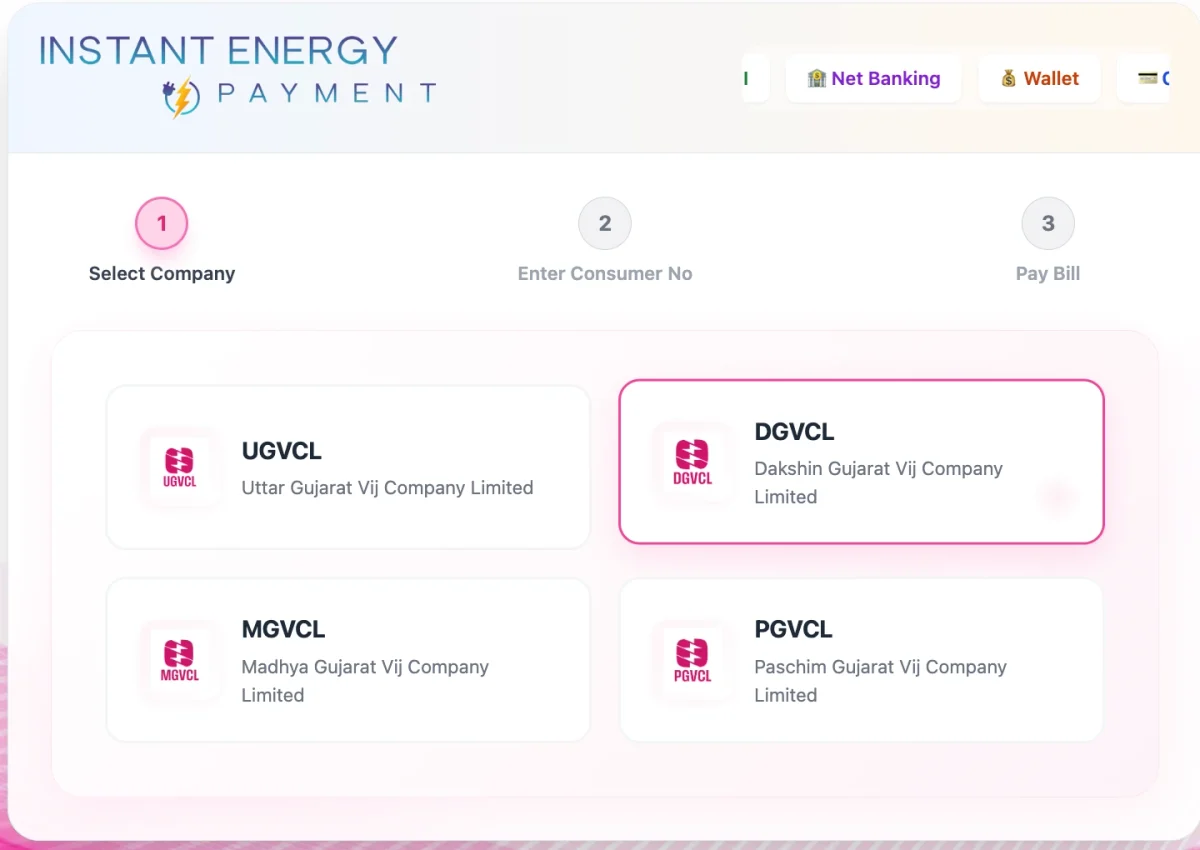
Step 3: For outstanding bills, the screen will immediately show the bill details. Verify the details and click the "Payment via Bill Desk" button. You’ll be taken to a disclaimer page; read it and proceed by pressing Continue.
Step 4: Choose your preferred payment method (credit/debit card, net banking, UPI)
Step 5: Complete the payment and download the digital receipt for your records.
DGVCL Contact Details
There are toll-free lines available 24/7 to support the users of DGVCL electricity connection. In addition to phone calls, you can connect via email or visit the office.
| Contact Type | Details |
|---|
| Central Customer Care (Toll-Free) | 1800 233 3003 |
| Power Outages & Interruptions Helpline | 19123 / 1912 |
| General & Billing Queries Email | contactus@dgvcl.com |
| Corporate Head Office Email | dgvcl@gebmail.com |
| Corporate Office Landline | 0261-2506000 / 0261-2506299 |
| Corporate Office Address | Urja Sadan, Nana Varachha Road, Kapodara, Surat – 395006, Gujarat |
How to Pay DGVCL Bill Online Using the NoBroker App?
DGVCL bill payment can be simplified using the NoBroker app. This user-friendly app as integrations with BBPS, which ensure that the transactions are secure. Use NoBroke Pay to pay your bills so you don’t have to worry about missing a deadline. Along with that, you can also download receipts, view previous bills, and much more with the NoBroker app. Here is how to pay your DGVCL electricity bill!
Step 1: Download and install the NoBroker app from your device's app store.
Step 2: Create an account or log in with your existing NoBroker credentials.
Step 3: Go to the "Utility Payments" option on the home screen and select electricity bill payment option.

Step 4: Choose DGVCL from the list of available electricity service providers. Enter your DGVCL consumer number and verify the connection details displayed.

Step 5: Verify your bill details like unit consumed, total bill amount, etc. Complete the payment via available methods of credit/debite card, UPI, net banking, or wallet, etc. Download and save the payment receipt on your DGVCL bill for future reference and records.
Frequently Asked Questions
Q. How can I download my DGVCL electricity bill online? Ans: Visit the DGVCL Bill View & Pay portal, enter your consumer number, verify with OTP, open Bill History, choose the required billing month, and download your bill. Older bills may require a customer service center visit.
Q. How do I check my DGVCL bill details online? Ans: Visit the DGVCL Bill View & Pay portal, enter your consumer number, verify with OTP, and view your latest electricity bill, including units consumed, bill amount, due date, and outstanding balance.
Q. What is the consumer number for DGVCL? Ans: The DGVCL consumer number is a unique identification number printed on every electricity bill. It is required to pay bills, download bills, check payment status, and access online electricity services.
Q. Do I need an account to pay my DGVCL electricity bill? Ans: No. You can use the DGVCL Bill View & Pay portal without creating a separate account. Enter your consumer number, complete OTP verification, check the outstanding bill amount, and proceed with the available online payment method.
Q. My DGVCL payment on NoBroker is showing as pending. What should I do? Ans: Payment processing is normal. DGVCL can take up to 24 hours to confirm the transaction status. If your payment remains pending after 24 hours, please contact NoBroker customer support with your transaction reference ID.
Q. How long does it take for my payment to reflect on DGVCL's official server? Ans: It can take up to 2 working days for the transaction to reflect in DGVCL's official billing system. You can re-check your updated billing status on the DGVCL portal after 48 hours.
Q. What happens if my DGVCL bill payment fails? Ans: If your payment fails, NoBroker initiates a full refund within 24 hours. Your bank will credit the amount back to your original payment source within 3 to 7 working days.
Most Viewed Articles
Manasvi is a partner at The Architecture Company in Mumbai, where she works with clients every day to find suitable solutions for their customised needs. Her journey into interior and product design started in 2016 with a commission to design an exhibition area while she was in the US and she has not looked back since. She believes that the key is to choose materials and research new techniques every day to blend seamlessly and create a unique experience with each project. According to her design is all about defining the problem, before you find a solution.
Loved what you read? Share it with others!



 ✕
✕


 Full RM + FRM support