Uttar Gujarat Vij Company Limited (UGVCL) is a state-run electricity distribution company serving consumers across North Gujarat. It operates under the Gujarat Urja Vikas Nigam Limited (GUVNL) and is responsible for providing a reliable power supply to residential, commercial, and industrial users. Consumers can request new connections, pay their electricity bills, request changes, download receipts, and more through the official website or the mobile app.
UGVCL Bill Payment - Quick Details
Before diving into the various payment methods, here's a quick overview of essential information on UGVCL bill payments to help you manage your electricity bills efficiently and avoid any inconvenience.
| Information | Details |
|---|
| Service Provider | Uttar Gujarat Vij Company Limited (UGVCL) |
| Bill Payment Methods | Online and Offline(Only if bill under ₹1,000) |
| Online Payment Options | Official website, Mobile app(GUVNL e-Vidhyut Seva app, UGVCL Consumer App), third-party UPI apps like Paytm and PhonePe, Internet banking |
| Offline Payment Options | Cash, cheque, and DD for bills up to ₹1,000. Anything above has to be paid digitally. |
| Mobile App | UGVCL Consumer App available on Google Play and App Store |
| Payment via Website | https://portal.guvnl.in/login.php or www.ugvcl.com |
| Electricity Charges | Varies based on consumption and category (domestic/commercial) |
| Customer Support | 1800-233-155335(Toll-free) |
| Late Payment Charges | No late fees if paid within 10 days of bill generation. But if delayed beyond that, 15% p.a. for non-agricultural consumers and 12% p.a. for the agricultural category will apply after the due date. |
| Due Date | As specified on the electricity bill |
What are the Domestic and Commercial Electricity Charges per Unit for UGVCL in 2026-2027?
Understanding UGVCL bill payment requires knowledge of the domestic/commercial tariff structure. UGVCL implements a slab-based charging system for residential consumers, in which the rate increases with higher consumption.
| Consumer Type | Tariff Category | Consumption / Applicable Load | Base Energy Rate |
|---|
| Residential | RGP | First 50 units | ₹3.05/unit |
| Residential | RGP | 51–100 units | ₹3.50/unit |
| Residential | RGP | 101–250 units | ₹4.15/unit |
| Residential | RGP | Above 250 units | ₹5.20/unit |
| Residential – Rural | RGP Rural | First 50 units | ₹2.65/unit |
| Residential – Rural | RGP Rural | 51–100 units | ₹3.10/unit |
| Residential – Rural | RGP Rural | 101–250 units | ₹3.75/unit |
| Residential – Rural | RGP Rural | Above 250 units | ₹4.90/unit |
| Commercial | Non-RGP | Up to and including 10 kW | ₹4.35/unit |
| Commercial | Non-RGP | Above 10 kW to 40 kW | ₹4.65/unit |
| Commercial / Larger LT connection | LTMD | Above 40 kW | ₹4.60/unit |
UGVCL Bill Payment Methods in 2026
UGVCL offers a variety of payment methods designed to accommodate customers' different preferences and needs. Whether you prefer digital transactions or traditional payment methods, UGVCL has options that make bill payment convenient and hassle-free.
Online Payment Options for UGVCL Bill Payment
The digital payment options provided by UGVCL allow customers to pay their electricity bills without visiting the payment center.
Offline Payment Methods for UGVCL Bill Payment
For customers who prefer traditional payment methods or face digital accessibility challenges, UGVCL continues to support various offline payment options across its service areas. You can pay your bill through the designated collection centers. However, any bill payment exceeding ₹1,000 must be made digitally. Please note that we recommend you call or check the official website for the available hours of these collection centers to ensure your bill is paid on time.
How to Check and Pay Your UGVCL Bill Online: Step-by-Step Guide
UGVCL electricity bill payment online through the official website is straightforward and convenient. Follow these simple steps to complete your payment quickly and securely without leaving the comfort of your home.
Step 1: Visit the Official Website: Open your web browser and navigate to www.ugvcl.com official website.

Step 2: Locate the Bill Payment Section: On the homepage, find and click on the ‘Quick bill payment' option(only for UGVCL) in the main menu. The portal might ask you to verify your energy provider again. Please select it as per your region. In this case, select UGVCL.
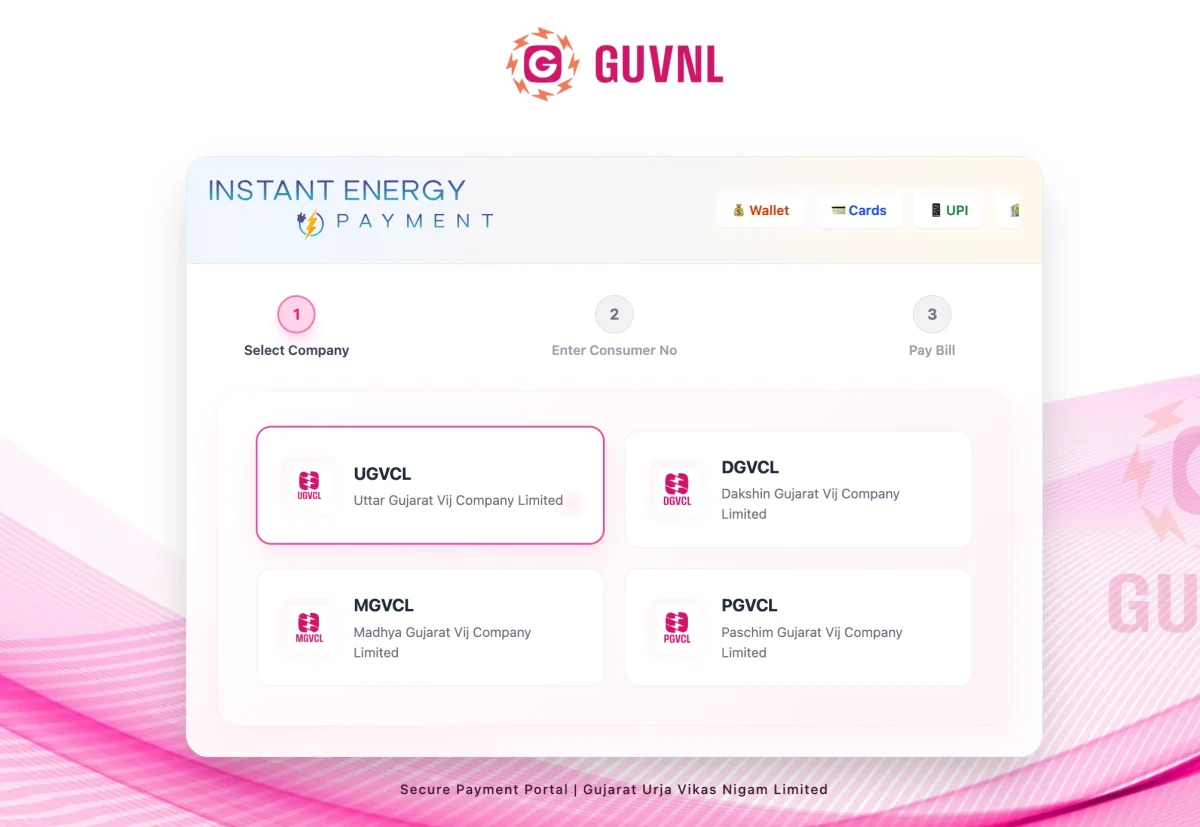
Step 3: Enter Your Consumer Details: Input your 11-digit consumer number (low-tension) or 5-digit consumer number (high-tension)/Service Number as mentioned on your electricity bill to proceed.
Step 4: Verify Bill Details: Review your displayed bill information, including the amount due, due date, and connection details for accuracy.
Step 5: Select Payment Method: Choose your preferred payment method from options like credit/debit card, net banking, UPI, or wallet.
Step 6: Complete the Payment: Enter your payment details securely, confirm the transaction, and wait for the payment confirmation page.
Step 7: Download Receipt: After successful payment, download and save the payment receipt for your records and future reference.
UGVCL Contact Details: Where to contact in case you need help?
In case of any grievances, you can reach the 24/7 UGVCL helpline.
| Contact Type | Details |
|---|
| General Customer Care | 19121 / 1800 233 155335 |
| WhatsApp Support | +91 98258 19121 |
| HT Consumer Helpline | 63566 20021 |
| Customer Support Email | ccc@ugvcl.com |
| HT Consumer Email | htcpc@ugvcl.com |
| Corporate Office Phone | 02762-222080 / 02762-222081 |
| Corporate Office Email | corporate@ugvcl.com |
| Corporate Office Address | Uttar Gujarat Vij Company Limited, Visnagar Road, Mehsana – 384001, Gujarat |
How to do UGVCL Current Bill Payment Through the NoBroker App?
The NoBroker app is an easy way to settle UGVCL bill payments. This trusted platform runs on Bharat Connect (BBPS), the same trusted payment network used by banks, so you can pay with confidence. Here is how to pay your bill.
Step 1: Download and install the NoBroker app from your device's app store.
Step 2: Create an account or log in with your existing NoBroker credentials.
Step 3: Tap on the "Pay Bills" or "Utility Payments" option on the home screen.
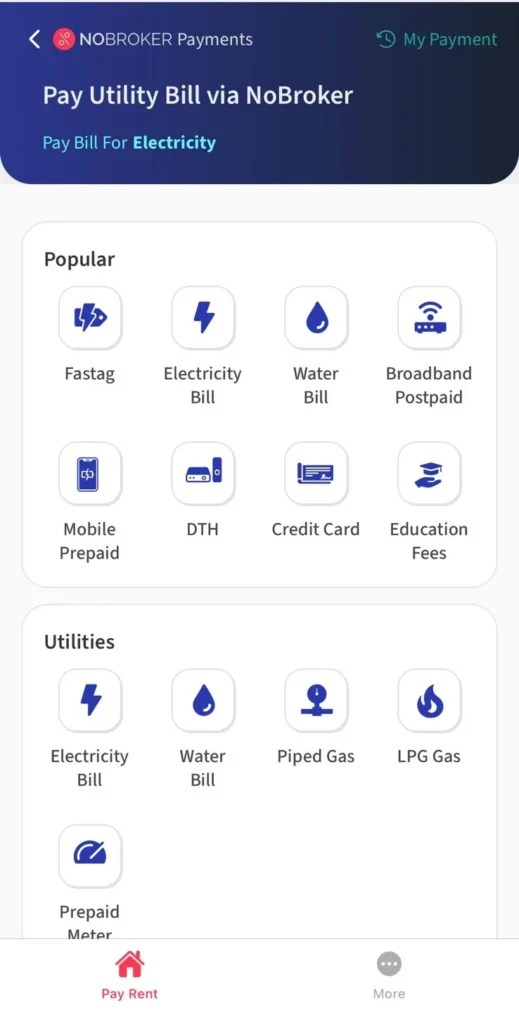
Step 4: Select the electricity bill option from the various utility services displayed. Choose UGVCL from the list of available electricity service providers.

Step 5: Enter your UGVCL consumer number and verify the connection details displayed.

Step 6: Select your preferred payment method, such as debit/credit card, UPI, wallet, or net banking. Complete payment and download the payment receipt on your UGVCL bill for future reference and records.
Frequently Asked Questions
Q. What should I do if my UGVCL bill payment fails? Ans: Check your internet connection and bank balance. Verify the transaction status in the payment history section of the UGVCL website. If debited, contact customer support with transaction details for resolution.
Q. How can I get a duplicate of my UGVCL bill? Ans: Visit the UGVCL website, go to the "View Bill" section, enter your consumer number, and download a copy of your current bill. Previous bills are available in the bill history section.
Q. Can I pay my UGVCL bill in installments? Ans: UGVCL generally requires full payment. However, consumers facing financial difficulties can apply for an installment facility by visiting their local UGVCL office with an application explaining their circumstances.
Q. Are there any late payment penalties for UGVCL bills? Ans: Yes, UGVCL charges 0 fees if the bill is not paid within the first 10 days of bill generation. But if delayed beyond that, then a payment surcharge of 15% p.a. for non-agricultural consumers and 12% p.a. for the agricultural category will apply. Prolonged non-payment may also result in temporary disconnection of electricity supply.
Q. How do I update my contact details on the UGVCL portal? Ans: Log in to your UGVCL consumer account, navigate to the "Profile" or "Personal Information" section, select "Update Details," enter new contact information, and submit with relevant identity proof.
Most Viewed Articles
Loved what you read? Share it with others!



 ✕


 Full RM + FRM support