Planning to switch to piped natural gas at home? A Gujarat Gas PNG connection can offer a convenient way to meet your household cooking needs without relying on LPG cylinders. Understanding the eligibility, documents, connection charges, and applicable gas prices can help you plan the process and costs clearly. In this blog, we cover the Gujarat Gas PNG connection process, from application and installation to charges and billing.
About Gujarat Gas
Gujarat Gas provides piped natural gas (PNG) connections for domestic households across its service areas. The company operates across 44 districts in six states and one Union Territory, with a natural gas pipeline network of more than 44,500 km. It also operates CNG stations for vehicle users. For domestic customers, Gujarat Gas provides Piped Natural Gas (PNG) primarily for cooking and water heating.
Things to Know Before Applying for Gujarat Gas PNG
Here are some important points to consider before starting the application:
- Check network availability: Confirm whether Gujarat Gas provides PNG services in your area and whether your property falls within the covered network.
- Check property connectivity: Even if PNG is available in your locality, the pipeline may not be connected to your particular building or society.
- Keep documents ready: Make sure to keep identity proof and property or occupancy-related documents available, making the registration and verification process easier.
- Check applicable charges: Applicants should review the applicable connection, facility, installation or security-related charges before completing the payment formalities.
Gujarat Gas New Connection Requirements
| Requirement | Details |
|---|
| Applicant details | Name, contact number and other basic information of the person applying for the connection. |
| Property details | Complete address and relevant details of the property |
| Identity proof | A valid identity document may be required to verify the applicant's details. |
| Address proof | A document showing the applicant's address may be required as part of the verification process. |
| Ownership proof | Property owners may need to provide documents establishing their ownership or association with the property. |
| Occupancy proof | Tenants or other occupants may need to provide documents confirming their right to occupy the property. |
| Landlord consent | Tenants may need the property owner's consent or NOC for obtaining the PNG connection. |
How to Get a Gujarat Gas Connection
The process can be completed through the Gujarat Gas registration system; here are the key steps to apply for a new connection.
Step 1: Visit the Website
- You can visit the Gujarat Gas Website and select “Online PNG Registration”, which will lead you to the registration page.

Step 2: Register for a New Connection

Step 3: OTP Verification
- Now you need to enter the mobile number linked to your Aadhaar number for OTP verification.

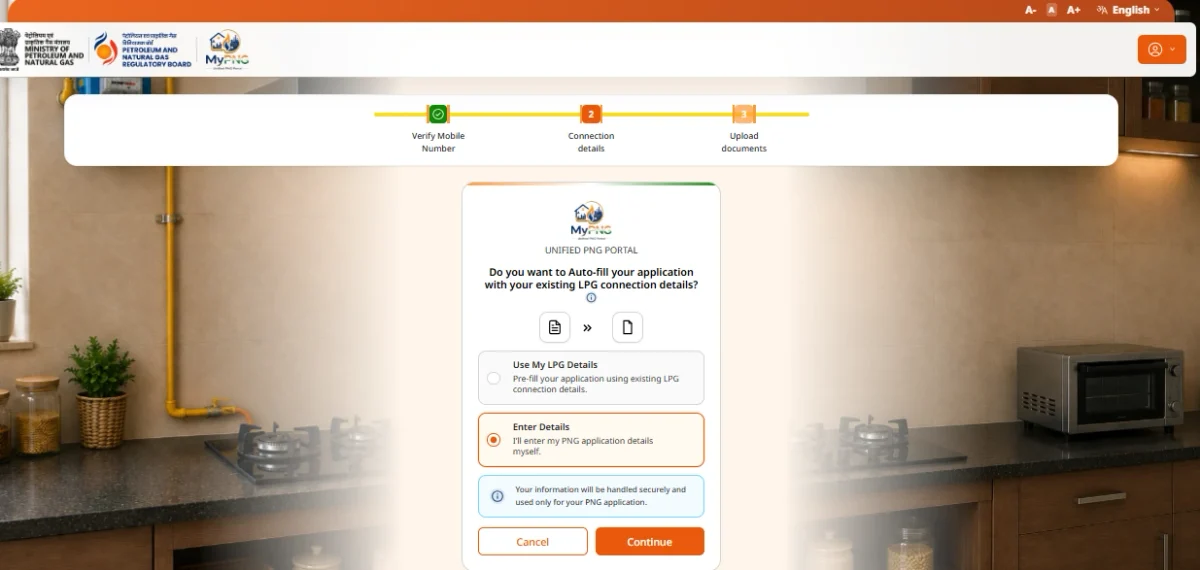
Step 4: Choose Your Application Details
- Select how you want to enter the required information in the application. You can either fill in the details manually or use your existing LPG connection details to auto-fill the application.
Step 5: Enter the Registration Details
- Provide your personal and contact details along with the complete address and other required property information. You can navigate the map to know whether there is availability in your area.

Step 6: Document Verification
- You need to submit the required identity and property-related documents depending on whether you are a tenant or owner of the property.
Step 7: Pay the Applicable Charges
- The application will be forwarded to the concerned Gas Operator for verification and further processing.
- The Gas Operator will verify your application, documents you have submitted, and the technical feasibility of providing the PNG connection.
- You will be required to pay the applicable charges for the connection.
Step 8: Get the PNG Equipment Installed
- Once the connection is processed, the required PNG equipment, including the meter and other components, can be installed at the property.
Gujarat Gas Domestic PNG Rates & Tariff Structure (2026)
The cost of a Gujarat Gas PNG connection depends on the payment scheme selected and the applicable charges. The table below gives a breakdown of the connection deposits, stamp duty and other charges mentioned in the latest tariff card.
Full Payment Scheme
| Charge | Amount |
|---|
| Stamp Duty Charges | As per state applicability |
| Gas Consumption Deposit (Refundable) | ₹500 |
| Gas Connection Deposit (Refundable) | ₹5,000 |
| Total Connection Charges | ₹5,500 + stamp duty and taxes |
Gujarat Gas EMI Scheme
| Particular | Amount |
|---|
| Gas consumption deposit | ₹500 + applicable stamp duty and taxes |
| EMI | ₹80 for 62 months |
| Final EMI | ₹40 |
| Connection charges covered through EMI | ₹5,500 + applicable stamp duty and taxes |
Other Gujarat Gas Charges
| Service/Charge | Amount |
|---|
| Additional kitchen point | ₹1,250 |
| Additional geyser point – Apartment | ₹1,500 |
| Additional geyser point – Bungalow/Row House | ₹3,000 |
| GI pipe beyond 15 metres | ₹225 per metre |
| Temporary disconnection and reconnection | ₹500 |
| Forced disconnection and reconnection | ₹500 |
| Permanent disconnection | ₹500 |
| Name change | ₹200 |
| Cheque bounce | ₹200 |
| Yearly fee | ₹150 |
| Late payment charge | ₹75 |
| Meter replacement after 1 year | ₹1,157 |
| Regulator replacement after 1 year | ₹345 |
| Rubber tube replacement | ₹102 |
What to Do If Gujarat Gas PNG Is Not Available in Your Area?
Gujarat Gas PNG connections are available only in areas covered by the company’s distribution network. Here is what you can do if it's unavailable in your locality:
- Check PNG availability: You can enter your location details on the Gujarat Gas registration portal and check for availability.
- Check the rollout plan: Gujarat Gas has an expansion plan on their website; see whether your area is covered under the existing or upcoming PNG network.
- Submit an enquiry: If the service is unavailable, use the “Enquiry for New Connection” option on the portal.
- Wait for network expansion: Connection availability will depend on the pipeline network reaching your area and the technical feasibility of providing the connection.
How to Pay Your Gujarat Gas Bill Online?

- Step 2: Enter your 12-digit Customer ID, which is mentioned on your Gujarat Gas bill and enter the verification code (CAPTCHA) displayed on the screen.
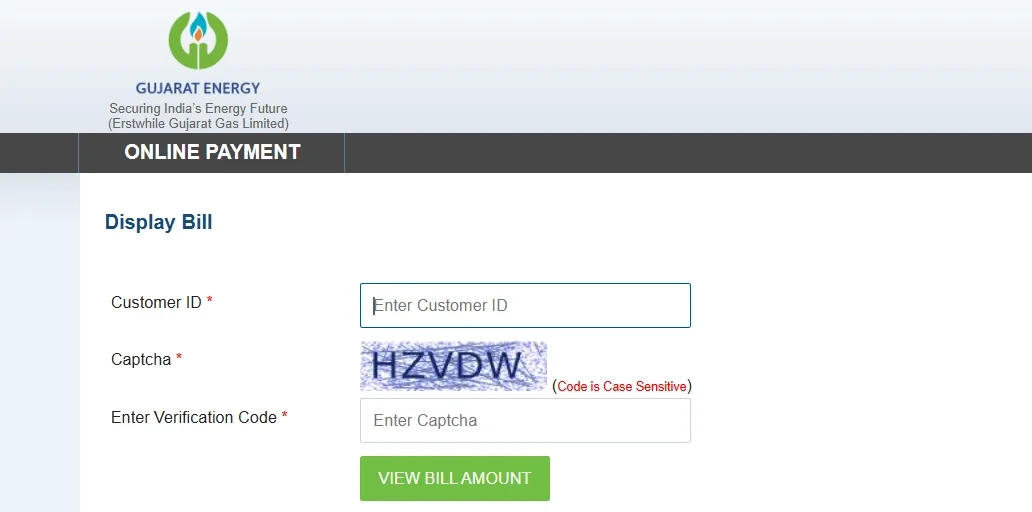
- Step 3: Click on View Bill Amount to view your latest outstanding bill details.
- Step 4: Verify the displayed customer details, bill amount, and other payment information before proceeding with the payment.
- Step 5: You will be redirected to the payment gateway, where you can select your preferred payment method.
- Step 6: Enter the required payment details and authorise the transaction through your bank or payment provider.
- Step 7: Once the payment is successfully processed, you can view and print the payment receipt for your records.
- Step 8: The payment is normally updated in the Gujarat Energy system within 3 working days
Gujarat Gas New Connection vs LPG Connection
| Feature | Gujarat Gas PNG | LPG Connection |
|---|
| Supply method | Gas is supplied continuously through a pipeline. | Gas is supplied through refillable cylinders. |
| Storage requirements | No cylinder storage is required at home. | Requires space for the LPG cylinder. |
| Billing | Billed based on the actual gas consumed through the meter. | Payment is generally made for each LPG cylinder/refill. |
| Installation | Requires installation of a PNG pipeline, meter, valve and regulator. | Requires installation of the LPG cylinder, regulator, hose and stove setup. |
| Stove requirements | Needs modification, which is carried out by an authorised technician. | Uses an LPG-compatible stove and equipment. |
| Refilling/booking | No regular cylinder booking is required because PNG is supplied through the pipeline. | A refill needs to be booked and delivered when the cylinder is empty. |
| Convenience | Provides continuous supply without needing to store or replace cylinders. | Requires managing cylinder bookings, deliveries and storage. |
Gujarat Gas Customer Care
| Customer Type | Area | Phone Number |
|---|
| Domestic / Commercial | Ankleshwar-Bharuch, Dahej, Jambusar, Narmada, Surat-Hazira | 1800-103-5001 (Toll Free), 079-71123711 |
| Domestic / Commercial | All locations except the above-mentioned areas | 1800-123-6000 (Toll Free), 079-71123711 |
| Industrial | Morbi | 02822-244002 / 02822-244003 |
| Industrial | Surat | 0261-2734007 |
| Industrial | Ankleshwar | 02646-243909 |
How NoBroker Can Help With Gas Bill Payments
One less app to install. If you are already using NoBroker for rent or property-related matters, you do not need a separate app just to pay your Gujarat Gas bill. You can manage your gas bill payment through NoBroker Pay without switching to another app. Simply add your Gujarat Gas bill details, check the payable amount, and complete the payment online from one place. Follow these steps to pay your Gujarat Gas bill through NoBroker Pay:
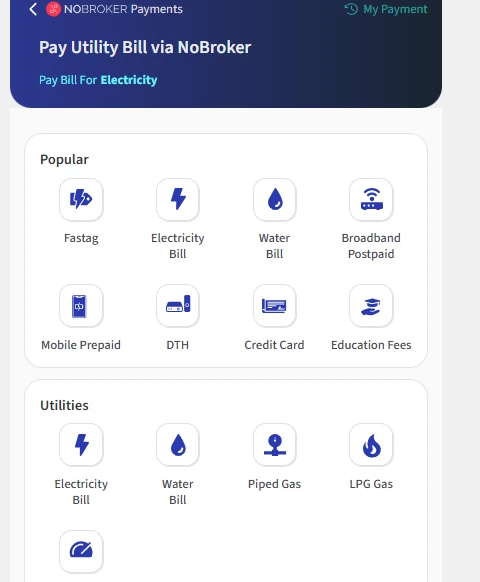
Step 1: You need to visit the NoBroker bill payment platform and choose Piped Gas.
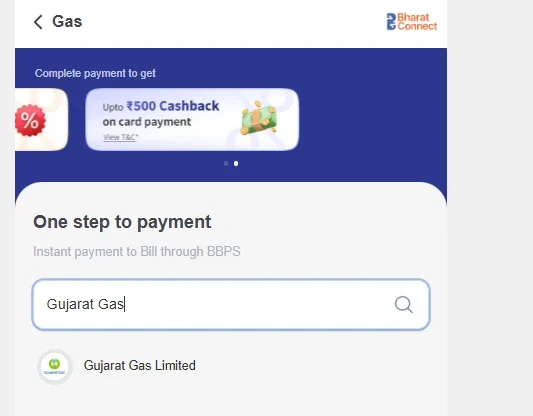
Step 2: You need to select Gujarat Gas from the list of available parties.
Step 3: Enter your Gujarat Gas customer ID as shown on the bill, then click Submit to view the bill.

Step 4: Verify the bill details and amount, then choose your preferred payment method to complete the transaction.
Step 6: After successful payment, save the payment confirmation or receipt for your records.
Frequently Asked Questions
Q. How can I apply for a new Gujarat Gas PNG connection? Ans: You can apply online through the Gujarat Gas customer registration portal by checking your area and submitting the new connection application.
Q. What documents are required for a Gujarat Gas connection? Ans: You generally need identity proof and ownership or occupancy-related documents.
Q. Can tenants apply for a Gujarat Gas PNG connection? Ans: Yes. A tenant can apply for a PNG connection with the property owner’s NOC
Q. Is Gujarat Gas PNG billed according to consumption? Ans: Yes. PNG consumption is measured through a gas meter, and customers are billed based on their consumption.
Q. Can I pay my Gujarat Gas bill online? Ans: Yes. Gujarat Gas provides online bill payment facilities through its customer services.
Q. What should I do if my Gujarat Gas bill payment on NoBroker is still pending? Ans: The payment status may take up to 24 hours to update and reconcile with the utility provider. If the status remains pending after 24 hours, contact NoBroker customer support and provide your BBPS reference ID for assistance.
Q. What happens if money is debited for a failed Gujarat Gas bill payment? Ans: If your Gujarat Gas bill payment fails after the amount has been debited, NoBroker will initiate a refund for the unsuccessful transaction within 24 hours. The amount will be refunded to the original payment source, but the time it takes to reflect may vary by bank and can take up to 7 working days.
Most Viewed Articles
Suju is a content writer at NoBroker who writes guides for people renting a home, from finding a flat to rent agreements, deposits and tenant rights. Suju takes every rule and charge from official sources and explains it in simple steps, so tenants know what to expect before they sign.
Loved what you read? Share it with others!




 ✕
✕



 Full RM + FRM support