Paschim Gujarat Vij Company Limited (PGVCL) is a government-operated power distribution company catering to consumers across Western Gujarat. Functioning under Gujarat Urja Vikas Nigam Limited (GUVNL), PGVCL is committed to delivering a steady and reliable electricity supply to residential, commercial, and industrial users. To simplify bill payments, PGVCL provides a variety of online and offline payment options.
PGVCL bill payment - Quick Info
PGVCL bill payment methods have evolved significantly over the years, offering consumers multiple convenient options for paying their electricity bills. Understanding these payment channels can help you choose the most suitable method based on your preferences and requirements.
| Parameter | Details |
|---|
| Service Provider | Paschim Gujarat Vij Company Limited (PGVCL) |
| Parent Organisation | Gujarat Urja Vikas Nigam Limited (GUVNL) |
| Service Area | Saurashtra and Kutch regions of Gujarat |
| Bill Payment Methods | Online(GUVNL e-Vidhyut Seva, PGVCL digital payment channels, UPI) and Offline options(Cash, cheque, or demand draft for bills up to ₹1,000) |
| Mobile App | PGVCL Consumer App |
| Payment via Website | https://www.pgvcl.com |
| Customer Support | 19122/1800 233 155333/+91 95120 19122 |
| Late Payment Charges | 15% p.a. for non-agricultural consumers; 12% p.a. for agricultural-category consumers, where applicable, after the bill due date |
PGVCL Bill Payment Methods
PGVCL (Paschim Gujarat Vij Company Limited) provides a variety of bill payment options to ensure convenience and accessibility for its customers.
- Online Payment Options:
- PGVCL/GUVNL official website.
- PGVCL mobile app for quick payments.
- UPI-based payments (Google Pay, PhonePe, etc.).
- Internet banking and mobile banking.
- Offline Payment Methods(only up to ₹1,000):
- Paying through customer service centers.
- Using cash, cheques, demand drafts
- Designated bank counters(depending on the area).
What are the PGVCL electricity charges per unit?
PGVCL electricity charges vary based on consumer categories, consumption slabs, and additional components like fixed charges and government duties. Understanding these components helps consumers better manage their electricity usage and expenses. Domestic charges per unit are as follows-
| Consumer Type | Tariff Category | Consumption / Applicable Load | Base Energy Charge |
|---|
| Residential | RGP | First 50 units | ₹3.05/unit |
| Residential | RGP | 51–100 units | ₹3.50/unit |
| Residential | RGP | 101–250 units | ₹4.15/unit |
| Residential | RGP | Above 250 units | ₹5.20/unit |
| Residential – Rural | RGP Rural | First 50 units | ₹2.65/unit |
| Residential – Rural | RGP Rural | 51–100 units | ₹3.10/unit |
| Residential – Rural | RGP Rural | 101–250 units | ₹3.75/unit |
| Residential – Rural | RGP Rural | Above 250 units | ₹4.90/unit |
| Commercial | Non-RGP | Up to and including 10 kW | ₹4.35/unit |
| Commercial | Non-RGP | Above 10 kW to 40 kW | ₹4.65/unit |
| Commercial | LTMD | Above 40 kW | ₹4.60/unit |
Note: These are base energy charges only. Your bill also includes a monthly fixed charge (by connected load) and Electricity Duty, which are added on top and are not included in the per-unit rate above.
How to Pay PGVCL Bill Online: Step-by-Step Guide
PGVCL’s official website provides a secure and convenient way to pay electricity bills online. Customers can quickly view bill details, select a payment method, and complete transactions without visiting a physical location. This guide outlines the step-by-step process to ensure a smooth and hassle-free payment experience.
Step 1: Visit the official PGVCL website (www.pgvcl.com) and click on ‘E Vidhyut Seva ’ to go to the ‘Customer Portal’. Once clicked, you’ll be redirected to the e-Vidhyut Seva portal.

Step 2. On this page, click on ‘Pay your electricity bill’ link on the right panel.
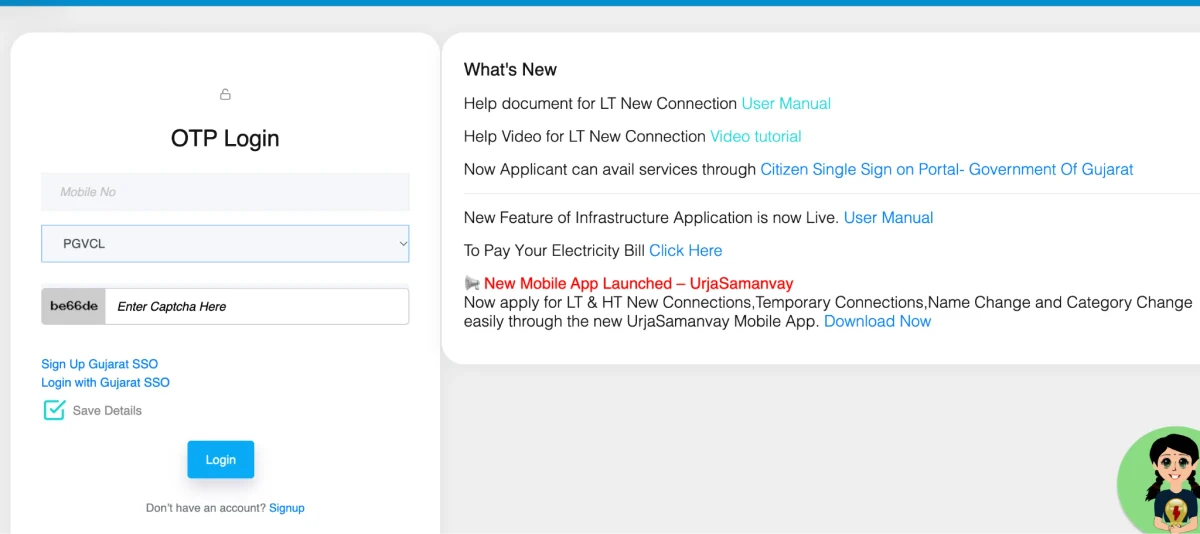
Step 3: On this page, you will be asked to select your DISCOM. Select PGVCL, then on the next page, enter your customer number and CAPTCHA to continue.
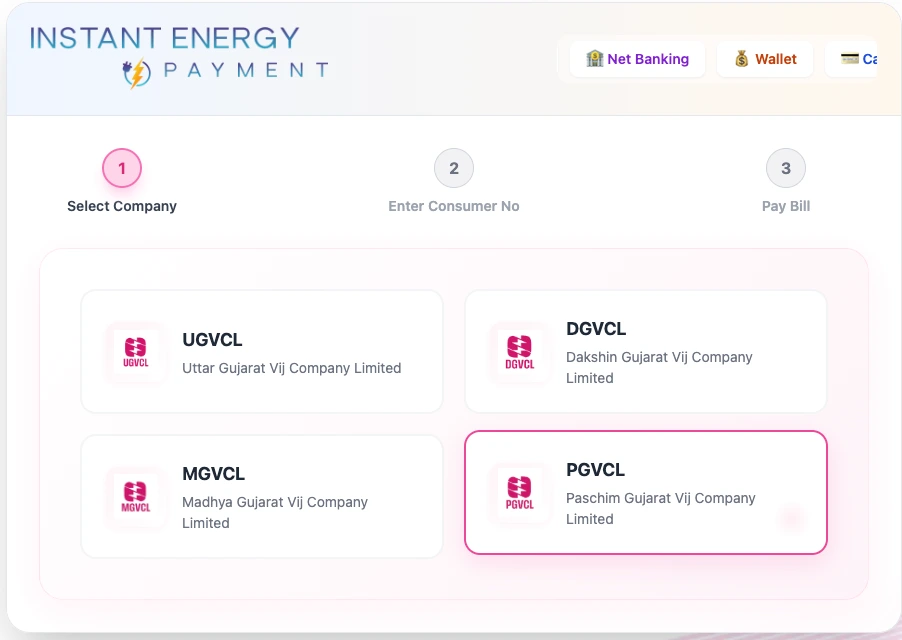
Step 4: On this page, you will get your billing details. Verify thoroughly and proceed to payment. Choose your preferred payment method (credit/debit card, net banking, UPI).
Step 5: Complete the payment process and save the transaction reference number.
Step 6: Download the latest PGVCL bill for your records.
PGVCL Contact Details: Where and whom to contact in case of emergency?
In case of any emergency, you can contact PGVCL via these available channels.
| Contact Type | Details |
|---|
| Central Customer Care (Toll-Free) | 1800 233 155333 |
| Power Outages & Electricity Helpline | 19122 |
| WhatsApp Power Complaints | +91 95120 19122 |
| HT Connection Gateway | 93139 26166 |
| General & Billing Queries Email | info.pgvcl@gebmail.com |
| General Support Lines | 0281-2380425 / 0281-2380427 |
| Corporate Office Address | Paschim Gujarat Vij Seva Sadan, Off Nana Mava Main Road, Laxminagar, Rajkot – 360004, Gujarat |
PGVCL Current Bill Payment Through NoBroker App
Paying your PGVCL bill through NoBroker Pay is the best, fast and safest option with the help of the secure Bharat Bill Payment System. Get option of multiple payment options, dedicated customer support, and bank-grade security protocols. Here is how you can pay your bills using the app without any worry.
Step 1: Download and install the NoBroker app from your device's app store.
Step 2: Create an account or log in to your existing NoBroker profile.
Step 3: Navigate to the "Utilities" section in the app menu.
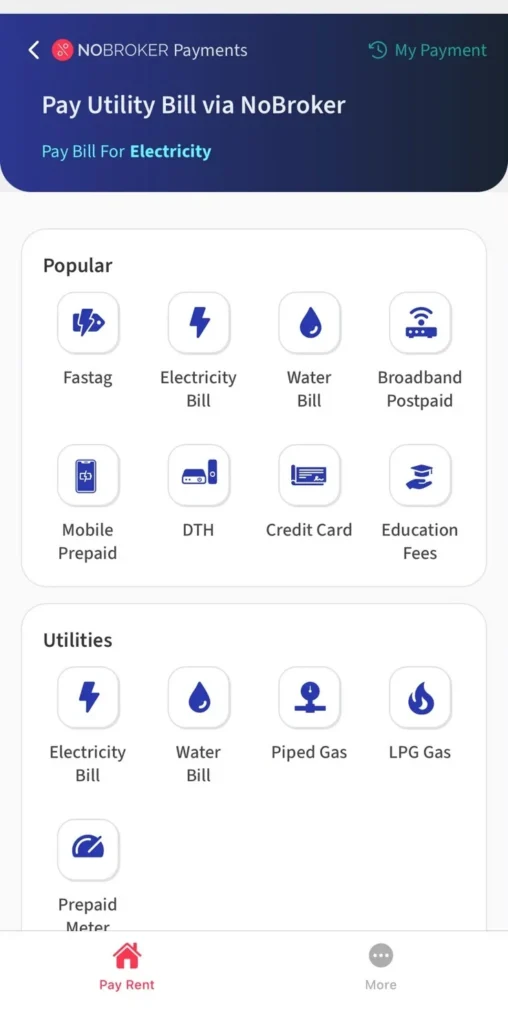
Step 4: Select "Electricity" and choose PGVCL as your service provider.

Step 5: Enter your PGVCL consumer number to fetch current bill details.
 PGVCL Consumer Number – Enter your number to retrieve your current bill
Step 6: Review the bill information and select your preferred payment method.
Step 7: Complete the payment and save the digital receipt for future reference.
Making regular and timely payments helps prevent service disruptions and late fees. Download NoBroker Pay to efficiently manage your bills, download receipts, and enjoy a smooth PGVCL bill-payment experience.
Frequently Asked Questions
Q. What should I do if my PGVCL bill payment fails? Ans: If your payment fails, check your transaction status on the PGVCL website using your reference number. Wait 24 hours for automatic updates, then retry or use an alternative PGVCL bill check method if the issue persists.
Q. How can I get a duplicate PGVCL bill? Ans: Visit the PGVCL website, log in to your account, navigate to the "View Bill" section, select the billing period, and download the duplicate bill. Alternatively, visit the nearest PGVCL office with your PGVCL bill and verify it using the consumer number.
Q. Can I pay my PGVCL bill in installments? Ans: PGVCL generally requires full payment, but consumers facing financial hardship can apply for installment facilities by submitting a written request to their local PGVCL office, explaining their situation and proposing a payment plan.
Q. Are there any late payment penalties for PGVCL bills? Ans: Yes, PGVCL charges a late payment fee only after 15 days of bill generation. After 15 days, the fee is 15% per month on the outstanding amount. Continued non-payment may lead to disconnection of the electricity supply after proper notice is given.
Most Viewed Articles
Ritika is a content writer at NoBroker who writes practical guides on running a home, including paying utility bills, personal loans, household finance, repairs and home improvement. She explains each task in simple steps, with the charges, documents and official links a reader needs.
Loved what you read? Share it with others!



 ✕


 Full RM + FRM support