- https://www.bankbazaar.com/electricity-bill/uppcl-uttar-pradesh-electricity-bill-payment.html
- https://uppclbillcalculator.com/
- https://consumer.uppcl.org/wss/contact
Table of Contents
What Is UPPCL Bill Payment?How to Check and Pay UPPCL Bill Online?How to Pay UPPCL Bill Payment via Mobile App (UPPCL & Third-Party Apps)?How to Pay UPPCL Bill Payment Without Login (Quick Pay Option)?UPPCL Consumer Login & Registration ProcessAccepted Payment Methods on UPPCL PortalHow to Download or Print UPPCL Bill Payment Receipt?UPPCL Bill Tariff and Charges (2026)How to Calculate Your UPPCL Electricity Bill?UPPCL Customer Care DetailsNeed Help?How to Pay UPPCL Bill via NoBroker?Frequently Asked Questions?
Loved what you read? Share it with others!


UPPCL Bill Payment 2026-27: Online, Offline, Due Date and Charges
Updated : February 3, 2026, 3:23 PM
Author :
 Krishnanunni
Summary
UPPCL bill payment is now easy and fully digital for electricity consumers in Uttar Pradesh. Users can check their usage, pay bills online, use mobile apps or wallets, and even make quick payments without logging in. The system also allows downloading receipts, viewing past bills, and tracking payments. Clear tariff rates, multiple payment options, and DISCOM helplines make the process smooth. NoBroker further simplifies UPPCL bill payments with fast, secure, and verified transactions.
Table of Contents
What Is UPPCL Bill Payment?How to Check and Pay UPPCL Bill Online?How to Pay UPPCL Bill Payment via Mobile App (UPPCL & Third-Party Apps)?How to Pay UPPCL Bill Payment Without Login (Quick Pay Option)?UPPCL Consumer Login & Registration ProcessAccepted Payment Methods on UPPCL PortalHow to Download or Print UPPCL Bill Payment Receipt?UPPCL Bill Tariff and Charges (2026)How to Calculate Your UPPCL Electricity Bill?UPPCL Customer Care DetailsNeed Help?How to Pay UPPCL Bill via NoBroker?Frequently Asked Questions?
The Uttar Pradesh Power Corporation Limited (UPPCL), the official electricity provider for Uttar Pradesh, has introduced a robust digital system for utility management. This streamlined process enables UPPCL online bill payment for consumers across both urban and rural areas, including major cities such as Lucknow, Ghaziabad, and Kanpur. This formal guide provides a step-by-step procedure for viewing, paying, and tracking your UPPCL bill payment to ensure timely and secure transactions.
What Is UPPCL Bill Payment?
UPPCL bill payment refers to the authorized system by which electricity consumers in Uttar Pradesh settle their dues with the state's distribution companies (DISCOMs). The billing system charges consumers based on the total electrical energy consumed (measured in Kilowatt-hours or units) and the applicable tariff slabs for their usage category. Payment can be made seamlessly online through the official UPPCL portal or mobile application, or offline at designated collection centers. The transparency and ease of payment are cornerstones of the state's modern utility management system.
How to Check and Pay UPPCL Bill Online?
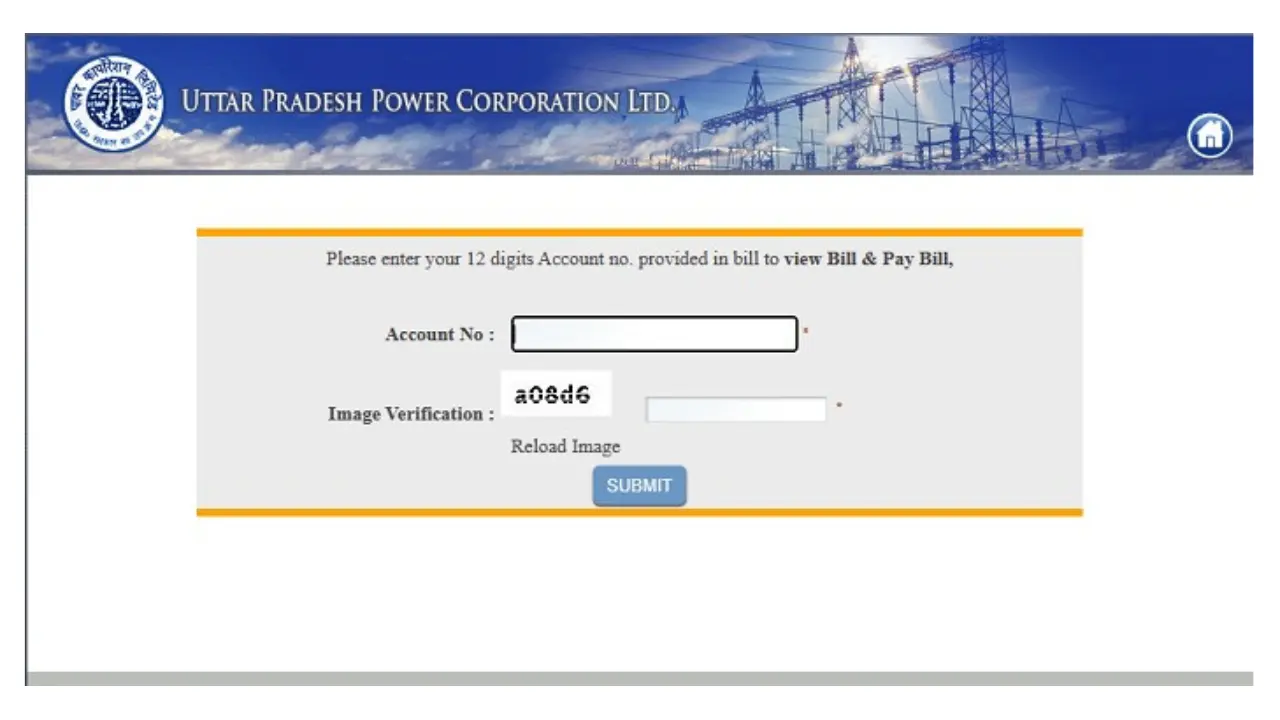
The official UPPCL website provides a secure, comprehensive platform for consumers to check their bills, view consumption history, and make payments. [1]
- Step 1: Navigate to the official website of "UPCCL".
- Step 2: On the main page, under 'My Connection', click on 'Login' to access the consumer portal.
- Step 3: Choose your specific Discom (Distribution Company), enter your account number and password, and then complete the security captcha.
- Step 4: Once logged in, you can view your UPPCL view bill, check consumption details, and verify the amount due.
- Step 5: Select the 'Pay Bill' option and choose a suitable mode of payment.
- Step 6: Enter the required payment details and the One-Time Password (OTP) sent to your registered mobile number to confirm the transaction.
How to Pay UPPCL Bill Payment via Mobile App (UPPCL & Third-Party Apps)?
For the convenience of mobile users, UPPCL has facilitated payments through its official application and popular third-party e-wallets. This ensures easy payment of the Uttar Pradesh electricity bill. [1]
Via UPPCL Mobile App:
- Step 1: Download the official UPPCL mobile app from your device’s app store.
- Step 2: Log in by entering your account number and mobile number, then click 'Verify'.
- Step 3: Navigate to the 'Quick Pay Bills' section to view the bill amount.
- Step 4: Choose your payment method (debit card, credit card, net banking, UPI) and complete the transaction using the OTP.
Via Third-Party E-Wallets:
- Step 1: Open your preferred e-wallet application (e.g., Paytm, Amazon Pay, Mobikwik) and navigate to the 'Electricity' section.
- Step 2: Select the state (Uttar Pradesh) and the electricity board (UPPCL).
- Step 3: Enter the consumer ID or account number and click on 'fetch bill'.
- Step 4: Verify the billing amount and proceed to make the payment.
How to Pay UPPCL Bill Payment Without Login (Quick Pay Option)?
For consumers seeking a fast transaction without logging in to their detailed account dashboard, there is a direct "Quick Pay" option for UPPCL bill payment online. [1]
- Step 1: Visit the alternative payment link on the UPPCL website (often a separate portal like uppcl.org bill payment for rural areas).
- Step 2: Select the specific Discom name and enter either your account number or your registered mobile number.
- Step 3: Enter the security code (captcha) and click on 'View' to fetch the current electricity bill.
- Step 4: You can view the bill amount. Choose your preferred payment method and proceed to complete the transaction immediately.
UPPCL Consumer Login & Registration Process
Registering on the official portal provides consumers with access to their complete account history, consumption graphs, and personalized services. [1]
How to Register in UPPCL:
- Step 1: Visit the official UPPCL website and select the "New Registration" or "Register" option.
- Step 2: Enter your existing account number, mobile number, and email ID.
- Step 3: Verify your details using the OTP sent to your registered mobile number.
- Step 4: Set a secure password and user ID to create your personalized online account.
- Step 5: Log in to the portal to manage your connection and services.
Accepted Payment Methods on UPPCL Portal
The UPPCL portal facilitates secure payments through a variety of digital channels, ensuring convenience for all users. [1]
| Payment method | Details |
|---|---|
| Net Banking | Payment via all major Indian banks, processed securely through authorized payment gateways. |
| Debit/Credit Cards | Acceptance of all major bank debit and credit cards (Visa, MasterCard, RuPay) for transaction completion. |
| UPI (Unified Payments Interface) | Direct and instant payment processing via UPI apps, including Google Pay and PhonePe. |
| E-Wallets/Mobile Wallets | Payments can be routed through third-party e-wallets integrated with the UPPCL portal. |
| Demand Draft/Cheque | Accepted at designated UPPCL bill payment centers (offline method). |
How to Download or Print UPPCL Bill Payment Receipt?
Obtaining the acknowledgement of a successful transaction is crucial for record-keeping. You can access the UPPCL online bill payment receipt easily through the consumer portal. [1]
- Step 1: Log in to the UPPCL official website using your registered user ID and password.
- Step 2: Go to the "Payment History" or "Billing History" section, where all your past transactions are recorded.
- Step 3: Find the specific transaction for which you require the receipt (e.g., the UPPCL last bill payment).
- Step 4: Click on the "View Receipt" or "Download" option to start the UPPCL bill payment receipt download process and save it as a PDF file for future reference.
UPPCL Bill Tariff and Charges (2026)
The UPPCL bill payment process is based on a structured tariff system that charges electricity per unit (kWh). The rates vary significantly based on whether the consumer is classified as domestic (residential) or commercial, and whether the connection is in an urban or rural area. [2]
Domestic Tariff Rates (Residential Consumers)
This table outlines the tiered rates and fixed charges applicable to general and BPL (Below Poverty Line) residential consumers in Uttar Pradesh.
| Consumption Slab | Urban Rate (₹/unit) | Rural Rate (₹/unit) |
|---|---|---|
| Fixed Charges (Monthly) | ₹110/kW | ₹90/kW |
| BPL (0 – 100 Units) | ₹3.00 | ₹3.00 |
| 0 – 100 Units | ₹5.50 | ₹3.50 |
| 101 – 150 Units | ₹6.00 | ₹5.00 |
| 151 – 300 Units | ₹6.50 | ₹5.00 |
| 301 – 500 Units | ₹7.00 | ₹6.50 |
| Above 500 Units | ₹7.50 | ₹7.00 |
Commercial Tariff Rates (Non-Domestic Consumers)
Commercial consumers are charged at a different, higher rate structure, which also includes a fixed charge based on the sanctioned load.
| Consumption Slab | Rate (₹/unit) | Fixed Charges (₹/month) |
|---|---|---|
| 0 – 100 Units | ₹7.00 | ₹300/kW |
| 101 – 300 Units | ₹9.00 | – |
| 301 – 500 Units | ₹9.50 | – |
| Above 500 Units | ₹10.00 | – |
How to Calculate Your UPPCL Electricity Bill?
Understanding the calculation process is key to managing your consumption. The total cost is determined by applying the tiered tariff slabs to your total units consumed (kWh) and adding the fixed charges and taxes. [1]
- Step 1: Determine the total units used (Current Meter Reading minus Previous Meter Reading).
- Step 2: Apply the slab rates shown in the table above to your total units.
- Step 3: Include the mandatory fixed service connection fee based on your sanctioned load.
- Step 4: Include the Electricity Duty and GST.
- Step 5: Sum all components (Energy Charges + Fixed Charges + Taxes).
- Example: If a consumer used 250 units, the energy cost would be calculated based on the three applicable slabs, totalling ₹1,249.00 in energy charges, to which the fixed and tax components are added for the final bill amount.
UPPCL Customer Care Details
For any queries regarding UPPCL bill payment status or general service issues, consumers can contact the dedicated regional support helplines (DISCOMs). [3]
For any queries regarding billing, supply interruptions, or connection requests, UPPCL provides an extensive customer support network through its regional distribution companies (DISCOMs). The UPPCL Customer Care Details are essential for filing complaints or checking the status of power issues.
| DISCOM (Distribution Company) | Toll-Free Helpline | WhatsApp Support | Address / Location |
|---|---|---|---|
| Purvanchal (PuVVNL) | 1800 180 5025 | 8010968292 | DLW Bhikaripur, Varanasi – 221004 |
| Madhyanchal (MVVNL) | 1800 180 0440 | 8010924203 | 4-A, Gokhale Marg, Lucknow – 226001 |
| Pashchimanchal (PVVNL) | 1800 180 3002 | 7859804803 | Victoria Park, Meerut – 250001 |
| Dakshinanchal (DVVNL) | 1800 180 3023 | 8010957826 | Urja Bhavan, Agra – Delhi Bypass Road |
| Kanpur (KESCo) | 1800 180 1912 | 8287835233 | 14/71 Civil Lines, Kanpur |
Centralized Support Channels
| Service | Details |
|---|---|
| 24x7 All-Purpose Helpline | 1912 |
| Complaint Email (General) | 1912@puvvnl.in or 1912@mvvnl.org |
| Corporate Address (UPPCL) | Shakti Bhawan, 14 Ashok Marg, Lucknow, UP |
| Official Website | https://uppcl.org/ |
Need Help?
If you have any issues with your bill or payment, you can contact UPPCL customer care at their 24x7 toll-free helpline 1912.
How to Pay UPPCL Bill via NoBroker?
NoBroker offers a seamless, secure platform for fast UPPCL bill payments via UPI and other digital payment methods.
- Step 1: Log in to the NoBroker application or website.
- Step 2: Select the "Bill Payments" section and choose "Electricity."
- Step 3: Select your Discom and enter your 12-digit Account Number.
- Step 4: Review the fetched bill amount and proceed to secure payment.
- Step 5: Receive instant confirmation and a digital receipt for your records.
Frequently Asked Questions?
Q1. How can I pay my UPPCL electricity bill online?
Ans: You can pay via the official UPPCL website by logging in, the UPPCL mobile app, or through third-party e-wallets like Paytm or Google Pay.
Q2. Can I pay without logging into the UPPCL portal?
Ans: Yes, you can use the "Quick Pay" option on the UPPCL website by entering your Discom and account number without needing to log in with a password.
Q3. How to download the bill payment receipt?
Ans: After a successful transaction, the UPPCL bill payment receipt can be downloaded by logging in to your UPPCL consumer account under the "Payment History" section.
Q4. What is UPPCL’s customer care number?
Ans: UPPCL uses regional helplines (DISCOMs). You should call the number specific to your region, such as 1800-180-0440 for Madhyanchal Vidyut Vitaran Nigam Limited.
Q5. How can I check if my payment was successful?
Ans: You can check the Uppcl bill payment status instantly on the portal using the "Check Payment Status" option or by verifying the transaction in your bank statement.
Recommended Reading
August 12, 2025
458275+ views
Gruha Jyothi Scheme Karnataka: Application Process, Eligibility and Documentation in 2026
September 12, 2025
70470+ views
UPPCL Jhatpat Portal for New Electricity Connection: Process, Status Tracking and Charges in 2026
January 31, 2025
50073+ views
May 24, 2025
44963+ views
New BESCOM Connection: Step-by-Step Process 2026
January 31, 2025
42928+ views
ARTICLE SOURCES
Most Viewed Articles
August 12, 2025
458275+ views
Gruha Jyothi Scheme Karnataka: Application Process, Eligibility and Documentation in 2026
September 12, 2025
70470+ views

How to Apply Online LPG Gas Connection: Application Process, Documents and Fees in 2026
June 1, 2025
62529+ views
UPPCL Jhatpat Portal for New Electricity Connection: Process, Status Tracking and Charges in 2026
January 31, 2025
50073+ views
May 24, 2025
44963+ views
Author
Loved what you read? Share it with others!
Recent blogs in
NBPDCL Bill Payment Online: Check, Download & Pay Bihar Electricity Bill in 2026
February 19, 2026 by Manu Mausam
CSPDCL Bill Payment Online: How to Check Bill Status and Download Receipt in 2026
February 18, 2026 by Manu Mausam
MPEB Bill Payment Online: Check, Download & Pay MP Electricity Bill in 2026
February 18, 2026 by Manu Mausam
JBVNL Bill Payment Online: Check Bill Status and Payment Methods in 2026
February 18, 2026 by Ananth







 Full RM + FRM support


Join the conversation!