- https://www.bajajfinserv.in/pondicherry-electricity-bill-payment
- https://pedservices.py.gov.in/
- https://pedservices.py.gov.in/UserManual/Pedservices_Quickpay.pdf
- https://www.bajajfinserv.in/smart-meter-recharge-in-puducherry
- https://electricity.py.gov.in/contact-us
Table of Contents
Pondicherry Electricity Bill Payment â Quick DetailsPondicherry Bill Check Online Using Consumer NumberPondicherry Electricity Bill Payment Online MethodsPondi Electricity Bill Payment Offline MethodsPondicherry Electricity Bill View Online ProcessPondicherry Electricity Bill Download ProcessHow to Check Pondicherry Bill Payment History Online?Common Problems While Paying Pondicherry Electric Bill & SolutionsPondicherry Helpline and Complaint RedressalHow NoBroker Can Help?Frequently Asked Questions
Loved what you read? Share it with others!


Pondicherry Electricity Bill Payment: How to Check, Pay and Download Bill in 2026
Updated : February 19, 2026, 11:18 PM
Author :
 Krishnanunni
Summary
Pondicherry electricity bill payment refers to the process of paying your monthly power consumption charges to the Puducherry Electricity Department (PED). It can be completed online through the official PED portal or via trusted platforms like NoBroker Bill Payment for a quick and secure experience. Consumers can check bill amounts, download duplicate bills, and pay using UPI, debit card, credit card, or net banking, ensuring instant confirmation and avoiding late penalties.
Table of Contents
Pondicherry Electricity Bill Payment â Quick DetailsPondicherry Bill Check Online Using Consumer NumberPondicherry Electricity Bill Payment Online MethodsPondi Electricity Bill Payment Offline MethodsPondicherry Electricity Bill View Online ProcessPondicherry Electricity Bill Download ProcessHow to Check Pondicherry Bill Payment History Online?Common Problems While Paying Pondicherry Electric Bill & SolutionsPondicherry Helpline and Complaint RedressalHow NoBroker Can Help?Frequently Asked Questions
Pondicherry Electricity Bill Payment – Quick Details
Pondicherry electricity bill payment allows consumers to view bills, make timely payments, download receipts, and monitor electricity billing records using official digital platforms and authorised collection centres.
- Electricity Provider: Electricity Department, Government of Puducherry
- Service Area: Puducherry, Karaikal, Mahe, Yanam
- Bill Check Method: Official portal, quick view, BBPS apps
- Quick Payment Option: Consumer-number-based Quick Pay
- Online Payment Modes: UPI, cards, net banking, wallets
- Consumer Types: Domestic, commercial, industrial, agricultural
- Subsidy: Targeted government electricity subsidies
- Per Unit Tariff: As per the approved tariff slabs
- Late Payment Charges: Belated Payment Surcharge applicable
- Due Date: 15–30 days based on consumer category
- Official Platform: https://pedservices.py.gov.in/
Pondicherry Bill Check Online Using Consumer Number
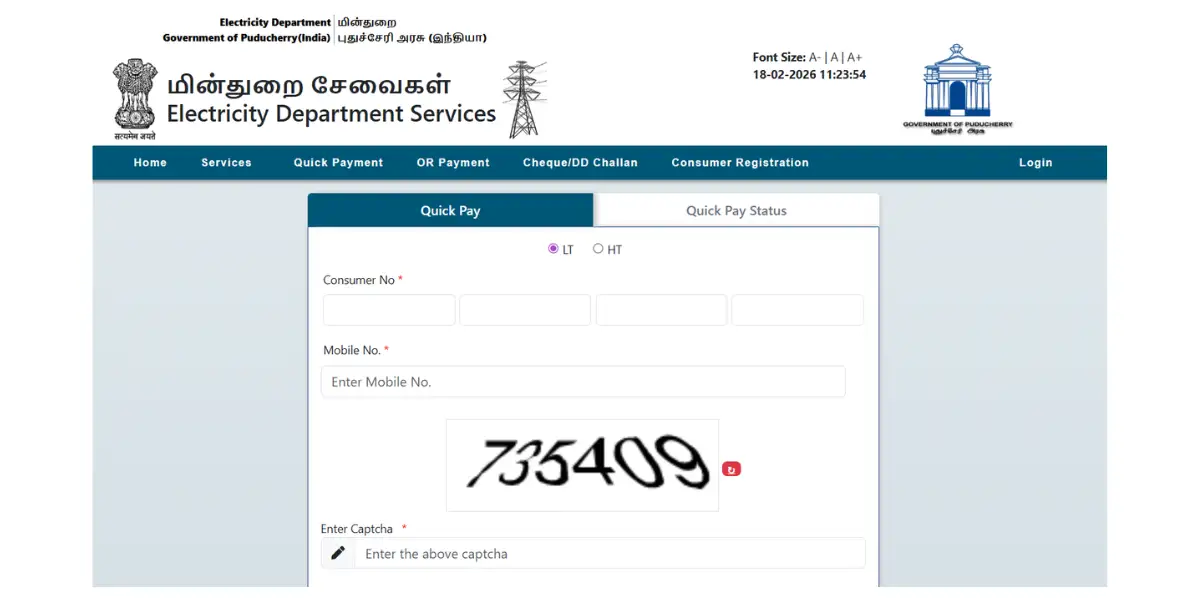
Pondicherry bill check online allows consumers to instantly view outstanding dues and due dates using only their Consumer Number through the official government electricity portal. [1]
- Step 1: Visit Portal: Open https://pedservices.py.gov.in using a secure browser.
- Step 2: Access Quick View: Select the Quick Payment or View Bill option from the homepage.
- Step 3: Enter Details: Provide your Consumer Number and registered mobile number.
- Step 4: Verify Captcha: Complete the security captcha correctly.
- Step 5: Submit: Click Next to fetch bill details instantly.
- Step 6: Review Bill: Verify the consumer name, billing month, due date, and amount payable.
Pondicherry Electricity Bill Payment Online Methods
Pondicherry electricity bill payment online ensures safe, fast, and reliable settlement of dues through the official portal and BBPS-supported platforms, providing instant confirmations and digital receipts.
How to Pay Through the Pondicherry Official Website?
Paying through the official website ensures accurate credit of payments and easy access to bill history. [2]
- Step 1: Navigate: Visit https://pedservices.py.gov.in from your device.
- Step 2: Login or Quick Pay: Choose between registered login or Quick Payment mode.
- Step 3: Fetch Bill: Enter your Consumer Number and verify details.
- Step 4: Confirm Amount: Check the payable amount and billing period.
- Step 5: Proceed Payment: Complete payment via the authorised gateway. This is a good time to compare your current usage against the general electricity rate per unit in India to see how Puducherry's tariffs compare nationally.
Pondicherry Electricity Bill Quick Pay (No Login Required)
Pondichery electricity bill quick pay offers instant payment without creating an account, making it suitable for one-time or emergency payments. [3]
- Step 1: Open Quick Pay: Visit the official Quick Payment page.
- Step 2: Enter Consumer Number: Provide the number from your electricity bill.
- Step 3: Add Mobile Number: Enter a valid mobile number for confirmation.
- Step 4: Fetch Bill: Verify the consumer name and the due amount displayed.
- Step 5: Pay: Proceed to the payment gateway and complete the transaction.
How to pay via Net Banking / Debit Card / Credit Card?
Pondicherry electricity bill payment online supports traditional banking methods via secure, government-approved gateways.
- Step 1: Proceed to Gateway: Continue from the official payment confirmation page.
- Step 2: Select Method: Choose net banking, debit card, or credit card.
- Step 3: Enter Details: Fill banking or card credentials securely.
- Step 4: Authenticate: Confirm payment through OTP verification.
- Step 5: Success Receipt: Download the receipt after the transaction is complete.
How to Pay Pondicherry Bill Through Third-Party Platforms?
Pondicherry electricity bill payments can also be made through the NoBroker app, which offers a simplified, secure interface.
- Step 1: Open the NoBroker app and access the Bill Payments section.
- Step 2: Select Electricity and choose Puducherry Electricity Department.
- Step 3: Enter Consumer Number to fetch bill details.
- Step 4: Complete payment using UPI, debit card, or credit card.
- Step 5: Download the digital receipt instantly upon successful payment.
Pondi Electricity Bill Payment Offline Methods
Pondi electricity bill payment offline options assist consumers without internet access or those preferring in-person transactions. [4]
Offline Payment Options
- Electricity Office Counters: Bills can be paid at jurisdictional PED counters using cash or card during working hours.
- Authorised Collection Centres: Common Service Centres and approved local entities accept electricity bill payments.
- Banks: Payments via SBI branches are permitted for specific cases using generated pay slips.
Pondicherry Electricity Bill View Online Process
Pondicherry electricity bill view online helps consumers verify billing details before making payments or raising queries. [2]
- Step 1: Visit the Official Website: Open the PED Services portal homepage.
- Step 2: Select Quick Payment: Click the Quick Payment or View Bill link.
- Step 3: Enter Consumer Details: Input Consumer Number and mobile number.
- Step 4: Captcha Verification: Complete security verification accurately.
- Step 5: View Bill: Review the bill amount, billing period, and due date displayed.
Pondicherry Electricity Bill Download Process
Pondicherry electricity bill downloads are available via the registered user portal for detailed PDF bills. [2]
- Step 1: Open Portal: Visit the PED Services official website.
- Step 2: Login: Sign in using your registered email and password credentials.
- Step 3: Access Dashboard: Navigate to the user dashboard menu.
- Step 4: Select Bill: Click View Bill or Bill History section.
- Step 5: Download PDF: Choose the billing month and download the bill file.
How to Check Pondicherry Bill Payment History Online?
Online Pondicherry bill payment history allows consumers to track previous payments and verify transaction records. [2]
- Step 1: Login Portal: Access the PED Services login page.
- Step 2: Open Dashboard: Enter registered credentials successfully.
- Step 3: Select History: Click on the Payment History tab.
- Step 4: Review Records: Check transaction date, amount, and payment mode.
- Step 5: Download Receipt: Save payment receipts as PDF when required.
Common Problems While Paying Pondicherry Electric Bill & Solutions
Pondicherry electric bill payment issues may occur due to gateway delays or data mismatches, but are usually resolved through official support.
Problems and Solutions:
- Payment deducted, but status pending: Wait 24–48 hours and verify status throughthe Quick Pay status page.
- Consumer number already registered: Contact support via official email to unlink previous account details.
- Incorrect bill amount displayed: File a written complaint with the issuing PED officer for correction.
- OTP not received: Retry after 60 seconds or switch to another browser or device.
Pondicherry Helpline and Complaint Redressal
Pondicherry electricity bill payment support is available through multiple official grievance channels. [5]
- Support Details
- Toll-Free Numbers: 1912, 1800-425-1912
- Email Support: se1ped.pon@nic.in, support-ped.py@gov.in
- Office Working Hours: Monday to Friday, 8:45 AM to 5:45 PM
- Complaint Registration Process
- Online: Register complaints through the PED official portal.
- CGRF: Submit formal grievances at Consumer Grievance Redressal Forum.
- Offline: Visit area engineer offices with written complaints.
How NoBroker Can Help?
NoBroker simplifies electricity bill payments in Pondicherry by offering a secure, user-friendly platform. Consumers can fetch bills instantly, complete payments safely, and store digital receipts for future reference. In addition to electricity payments, NoBroker offers home services, rental solutions, and property assistance, making it a comprehensive platform for managing household needs efficiently.
Frequently Asked Questions
Q1. How can I check my Pondicherry electricity bill online?
Ans: You can check your Pondicherry electricity bill online by visiting the official PED Services portal and entering your Consumer Number.
Q2. Is quick pay available for Pondicherry electricity bills?
Ans: Yes, Pondicherry electricity bill quick pay allows instant payment without login using only your Consumer Number.
Q3. Can I download my electricity bill receipt online?
Ans: You can download your electricity bill receipt through the registered portal or the Quick Pay status page after payment.
Q4. What should I do if payment is deducted but not updated?
Ans: Wait 24 to 48 hours for the reconciliation to complete, then verify the transaction status on the official Quick Pay portal.
Q5. Can I pay my Pondicherry electricity bill offline?
Ans: Yes, offline payments are accepted at PED office counters, CSC centres, and designated bank branches.
Recommended Reading
August 12, 2025
458506+ views
Gruha Jyothi Scheme Karnataka: Application Process, Eligibility and Documentation in 2026
September 12, 2025
70487+ views
UPPCL Jhatpat Portal for New Electricity Connection: Process, Status Tracking and Charges in 2026
January 31, 2025
50081+ views

May 24, 2025
44979+ views
New BESCOM Connection: Step-by-Step Process 2026
January 31, 2025
42941+ views
ARTICLE SOURCES
Most Viewed Articles
August 12, 2025
458506+ views
Gruha Jyothi Scheme Karnataka: Application Process, Eligibility and Documentation in 2026
September 12, 2025
70487+ views

How to Apply Online LPG Gas Connection: Application Process, Documents and Fees in 2026
June 1, 2025
62604+ views
UPPCL Jhatpat Portal for New Electricity Connection: Process, Status Tracking and Charges in 2026
January 31, 2025
50081+ views
May 24, 2025
44979+ views
Author
Loved what you read? Share it with others!
Recent blogs in
NBPDCL Bill Payment Online: Check, Download & Pay Bihar Electricity Bill in 2026
February 19, 2026 by Manu Mausam
CSPDCL Bill Payment Online: How to Check Bill Status and Download Receipt in 2026
February 18, 2026 by Manu Mausam
MPEB Bill Payment Online: Check, Download & Pay MP Electricity Bill in 2026
February 18, 2026 by Manu Mausam
JBVNL Bill Payment Online: Check Bill Status and Payment Methods in 2026
February 18, 2026 by Ananth










 Full RM + FRM support


Join the conversation!