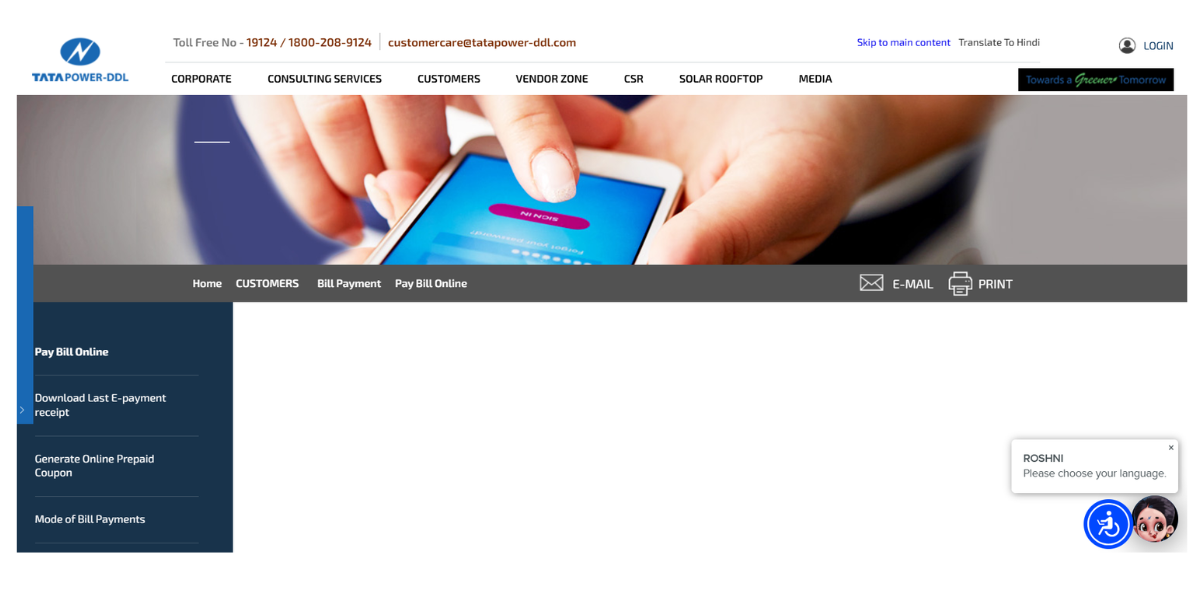
- https://www.tatapower-ddl.com/billpay/paybillonline.aspx
- https://www.tatapower-ddl.com/billpaymobile/billpaymentoption.aspx
- https://www.bankbazaar.com/electricity-bill/tata-power-bill-payment.html
- https://www.tatapower-ddl.com/contact-us/touchpoints/customer-care-centers
Table of Contents
What is Tata Power Electricity Bill Payment â Quick DetailsHow To Check Tata Power Bill Online Using Consumer Number?Tata Power Electricity Bill Payment Online MethodsTata Power Electricity Bill Payment Offline MethodsView Tata Power Electricity Bill Online ProcessTata Power Electricity Bill Download ProcessHow to Check Tata Power Bill Payment History Online?Common Problems While Paying the Tata Power Electric Bill & SolutionsTata Power Helpline & Complaint RedressedHow NoBroker Can Help?Frequently Asked Questions
Loved what you read? Share it with others!


Tata Power Bill Payment Online: Check Status, Download Receipt, and View Payment History in 2026
Updated : February 19, 2026, 11:14 PM
Author :
 Ananth
Summary
Chandigarh electricity bill payment can be completed online through the official Electricity Department, Chandigarh Administration portal or via trusted platforms like NoBroker (NB) Bill Payment for a quick and secure process. Consumers can check their current bill amount, download duplicate bills, and pay using UPI, debit card, credit card, or net banking. Online payment ensures instant confirmation and helps avoid late payment penalties through safe and timely transactions.
Table of Contents
What is Tata Power Electricity Bill Payment â Quick DetailsHow To Check Tata Power Bill Online Using Consumer Number?Tata Power Electricity Bill Payment Online MethodsTata Power Electricity Bill Payment Offline MethodsView Tata Power Electricity Bill Online ProcessTata Power Electricity Bill Download ProcessHow to Check Tata Power Bill Payment History Online?Common Problems While Paying the Tata Power Electric Bill & SolutionsTata Power Helpline & Complaint RedressedHow NoBroker Can Help?Frequently Asked Questions
What is Tata Power Electricity Bill Payment – Quick Details
Tata Power's electricity bill payment service allows consumers to view their electricity bills, pay online, and access receipts via official Tata Power digital platforms using their Consumer Number.
- Electricity Provider: Tata Power
- Service Area: Delhi, Mumbai, Odisha, Ajmer
- Bill Check Method: Consumer Number
- Quick Payment Option: Quick Pay
- Online Payment Modes: UPI, Cards, Net Banking
- Consumer Types: Domestic, Commercial, Industrial
- Subsidy: State-specific
- Per Unit Tariff: State-wise slabs
- Late Payment Charges: 18% p.a.
- Due Date: 10–15 days
- Official Platform: tatapower.com, tatapower-ddl.com, My Tata Power App
How To Check Tata Power Bill Online Using Consumer Number?
Tata Power consumers can check their electricity bill online by entering the Consumer Number on the official Tata Power portal to view current dues and billing information. [1]
- Step 1: Open the official Tata Power website for your region or access the My Tata Power application.
- Step 2: Choose the Pay Bill or Quick Pay option displayed on the homepage without logging into your account.
- Step 3: Enter your Consumer Number exactly as printed on your latest electricity bill or previous payment receipt.
- Step 4: Click on the Fetch Bill or Proceed button to retrieve your current outstanding electricity bill details.
- Step 5: Review the displayed bill amount, due date, and consumer name to ensure they match your records.
Tata Power Electricity Bill Payment Online Methods
Tata Power electricity bill payment can be completed online using official Tata Power platforms or the NoBroker app, allowing consumers to pay dues securely using their Consumer Number. [2]
How to Pay Through the Tata Power Official Website?
Tata Power's online bill payment via the official website lets consumers view bills, pay electricity dues, and download receipts using Quick Pay or a logged-in account.
- Step 1: Visit the official Tata Power regional website, such as tatapower.com or tatapower-ddl.com, from your browser.
- Step 2: Click on the Pay Bill or Quick Pay option available directly on the homepage.
- Step 3: Enter your Consumer Number exactly as mentioned on your latest electricity bill or payment receipt.
- Step 4: Verify the consumer name and payable amount displayed on the screen before proceeding further.
- Step 5: Complete payment using the available gateway, then download the confirmation receipt after the payment is successful.
Tata Power Electricity Bill Quick Pay (No Login Required)
Tata Power Quick Pay allows consumers to pay electricity bills instantly without an account login by entering the Consumer Number on the official Tata Power portal.
- Step 1: Open the Tata Power official website and select the Quick Pay option without signing in.
- Step 2: Enter your Consumer Number carefully and click on Fetch Bill to retrieve outstanding dues. This is also a good time to double-check your current slab, as the electricity rate per unit in India can vary significantly depending on the state and your consumption level.
- Step 3: Confirm the displayed bill amount and consumer details shown on the payment screen.
- Step 4: Select your preferred payment method and proceed to the secure payment gateway.
- Step 5: Complete the transaction and save the payment receipt displayed after successful confirmation.
How to Pay via Net Banking / Debit Card / Credit Card?
Tata Power electricity bill payment supports net banking, debit cards, and credit cards through secure bank-authorised payment gateways on official platforms.
- Step 1: Fetch your bill on the Tata Power website using Quick Pay or the logged-in consumer dashboard.
- Step 2: Select Net Banking, Debit Card, or Credit Card from the available payment options.
- Step 3: Enter the required banking or card details on the secure payment gateway page.
- Step 4: Authenticate the transaction using OTP or bank verification as prompted on your screen.
- Step 5: Receive instant payment confirmation along with a downloadable Tata Power payment receipt.
How to Pay Tata Power Bill Through Third-Party Platforms?
Tata Power electricity bill payment can also be made through the NoBroker app using BBPS-enabled secure payment options and Consumer Number verification.
- Step 1: Open the NoBroker app and log in using your registered mobile number.
- Step 2: Navigate to Bill Payments, select Electricity, and choose Tata Power as the provider.
- Step 3: Enter your Consumer Number correctly to fetch the outstanding Tata Power electricity bill.
- Step 4: Select UPI, debit card, credit card, or net banking to proceed with payment.
- Step 5: Complete the transaction and access the payment receipt from the app’s bill history section.
Tata Power Electricity Bill Payment Offline Methods
Tata Power electricity bill payments can also be made offline at authorised counters, collection centres, and partner banks, allowing consumers to pay by cash, cheque, or demand draft. [3]
- Electricity Office Counters: Consumers can visit authorised Tata Power customer care centres to pay electricity bills via cash, cheque, or demand draft and receive instant receipts.
- Authorised Collection Centres: Tata Power enables offline bill payments at approved collection centres, including designated kiosks, ATPMs, and utility service points, depending on the service region.
- Banks: In select regions, Tata Power electricity bills can be paid at partner bank branches using cash, cheque, demand draft, or NEFT/RTGS.
View Tata Power Electricity Bill Online Process
Tata Power electricity bill view online allows consumers to instantly check current dues, consumer details, and billing summary through official Tata Power websites using their Consumer Number. [3]
- Step 1: Visit the official Tata Power website, such as tatapower.com or tatapower-ddl.com, based on your service region.
- Step 2: Click on the Pay Bill or Quick Pay option available directly on the homepage.
- Step 3: Enter your Consumer Number carefully as printed on the latest Tata Power electricity bill.
- Step 4: Click on Fetch Bill to display your outstanding amount, due date, and consumer name.
- Step 5: Review the on-screen bill summary before proceeding to payment or download options.
Tata Power Electricity Bill Download Process
Tata Power Electricity bill download allows consumers to obtain duplicate bills in PDF format for record-keeping, proof of address, or verification via official Tata Power portals. Open the Tata Power official website or regional consumer portal applicable to your electricity connection. [3]
- Step 1: Navigate to the View Bill or Download Duplicate Bill section available on the billing page.
- Step 2: Enter your Consumer Number and registered mobile number, as required, for verification.
- Step 3: Select the billing cycle or month for which you want the electricity bill PDF.
- Step 4: Click Download Bill and save or print the PDF for future reference.
How to Check Tata Power Bill Payment History Online?
Tata Power bill payment history online lets consumers track past payments, transaction status, and receipts through official Tata Power websites or mobile applications. [3]
- Step 1: Visit the official Tata Power consumer portal and log in using your registered mobile number or credentials.
- Step 2: Go to the My Account, Billing, or Payment History section from the dashboard menu.
- Step 3: Select the required billing period or transaction date range to view payment records.
- Step 4: Check payment status, amount paid, and transaction reference number displayed on screen.
- Step 5: Download past payment receipts if needed for documentation or reconciliation purposes.
Common Problems While Paying the Tata Power Electric Bill & Solutions
Tata Power electricity bill payment issues may arise during online transactions, consumer number validation, or portal load times, but most can be resolved through official Tata Power support channels.
- Invalid Consumer Number Error: Verify the exact digit count for your region and re-enter the Consumer Number as printed on the bill.
- Amount Paid but Not Reflected: Allow up to 48 hours for payment reconciliation before checking status on the Tata Power portal.
- Website or App Timeout: Retry payment during non-peak hours or use the Quick Pay option to avoid login-related delays.
- OTP Not Received: Check mobile network availability and confirm your registered mobile number is updated in Tata Power records.
- Wrong Bill Amount Displayed: Online amount may include arrears or late fees; always rely on the latest bill fetched from the Tata Power portal.
Tata Power Helpline & Complaint Redressed
Tata Power electricity bill payment issues and service complaints can be resolved through official helplines, email support, and Tata Power's digital grievance systems. [4]
- Toll-Free Number: 1912 (national power helpline) / 19124 or 1800-208-9124 (region-specific, subject to availability)
- Email Support: customercare@tatapower.com / customercare@tatapower-ddl.com (as per service region)
- Office Working Hours: Customer care centres usually operate Monday to Friday, 9:30 AM to 5:30 PM.
- Complaint Registration Process: Register complaints via the Tata Power official website, My Tata Power app, WhatsApp support, or regional customer care centres.
How NoBroker Can Help?
NoBroker helps Tata Power consumers manage electricity bill payments through a single, easy-to-use digital platform. By entering their Consumer Number, users can access their Tata Power electricity bill and pay securely via BBPS-enabled payment options. The NoBroker app also allows users to track payment history and download receipts whenever needed. With a simple interface and occasional rewards, NoBroker makes paying Tata Power electricity bills more convenient and time-efficient for users.
Frequently Asked Questions
Q1. How can I check my Tata Power electricity bill online?
Ans: You can check your online Tata Electricity bill payment using your Consumer Number on the official Tata Power website or the My Tata Power app.
Q2. What is the due date for the Tata Power electricity bill payment?
Ans: Tata Power electricity bills generally have a due date of 10 to 15 days from bill generation, depending on the service region.
Q3. Can I download a duplicate Tata Power electricity bill online?
Ans: Yes, Tata Power consumers can download a duplicate electricity bill PDF from the official website or mobile app using their Consumer Number.
Q4. What happens if I miss the Tata Power bill payment due date?
Ans: Late payment of Tata Power electricity bills attracts a surcharge, usually calculated at 18 percent per annum on outstanding dues.
Q5. How can I check Tata Power bill payment history online?
Ans: You can view Tata Power bill payment history by logging into the official Tata Power consumer portal or the My Tata Power app.
Recommended Reading
August 12, 2025
458831+ views
Gruha Jyothi Scheme Karnataka: Application Process, Eligibility and Documentation in 2026
September 12, 2025
70540+ views
UPPCL Jhatpat Portal for New Electricity Connection: Process, Status Tracking and Charges in 2026
January 31, 2025
50089+ views
May 24, 2025
44993+ views
New BESCOM Connection: Step-by-Step Process 2026
January 31, 2025
42963+ views
ARTICLE SOURCES
Most Viewed Articles
August 12, 2025
458831+ views
Gruha Jyothi Scheme Karnataka: Application Process, Eligibility and Documentation in 2026
September 12, 2025
70540+ views

How to Apply Online LPG Gas Connection: Application Process, Documents and Fees in 2026
June 1, 2025
62714+ views
UPPCL Jhatpat Portal for New Electricity Connection: Process, Status Tracking and Charges in 2026
January 31, 2025
50089+ views
May 24, 2025
44993+ views
Author
Loved what you read? Share it with others!
Recent blogs in
NBPDCL Bill Payment Online: Check, Download & Pay Bihar Electricity Bill in 2026
February 19, 2026 by Manu Mausam
CSPDCL Bill Payment Online: How to Check Bill Status and Download Receipt in 2026
February 18, 2026 by Manu Mausam
MPEB Bill Payment Online: Check, Download & Pay MP Electricity Bill in 2026
February 18, 2026 by Manu Mausam
JBVNL Bill Payment Online: Check Bill Status and Payment Methods in 2026
February 18, 2026 by Ananth










 Full RM + FRM support


Join the conversation!