- https://www.bajajfinserv.in/view-and-download-nbpdcl-electricity-bill
- https://www.nbpdcl.co.in
- https://nbpdcl.co.in/(S(upe3g1j5cpnatgaxclphnjde))/frmQuickBillPaymentAll.aspx
- https://nbpdcl.co.in/(S(uj5napo4ajwgvr32pfbp4fna))/frmhome.aspx
- https://www.bajajfinserv.in/nbpdcl-electricity-helpline-number
Table of Contents
NBPDCL Bill Payment â Quick DetailsNBPDCL Bill Check Online Using Consumer NumberBihar Electricity Bill Payment Online MethodsBihar Electricity Bill Payment Offline MethodsHow to View and Download Your NBPDCL Bill Receipt?How to Check NBPDCL Bill Payment History Online?Common Problems While Paying NBPDCL Electric Bill & SolutionsNBPDCL Helpline & Complaint RedressalRural vs. Urban Payment: Common Service Centres (CSC)How NoBroker Can Help?Frequently Asked Questions
Loved what you read? Share it with others!


NBPDCL Bill Payment Online: Check, Download & Pay Bihar Electricity Bill in 2026
Updated : February 19, 2026, 11:39 PM
Author :
 Manu
Manu
Summary
NBPDCL bill payment refers to the process of paying electricity charges to North Bihar Power Distribution Company Limited. It can be completed online through the official NBPDCL portal or via trusted platforms like NoBroker Bill Payment for a quick and secure experience. Consumers can check bill amounts, download duplicate bills, and pay using UPI, debit card, credit card, or net banking, ensuring instant confirmation and avoiding late penalties.
Table of Contents
NBPDCL Bill Payment â Quick DetailsNBPDCL Bill Check Online Using Consumer NumberBihar Electricity Bill Payment Online MethodsBihar Electricity Bill Payment Offline MethodsHow to View and Download Your NBPDCL Bill Receipt?How to Check NBPDCL Bill Payment History Online?Common Problems While Paying NBPDCL Electric Bill & SolutionsNBPDCL Helpline & Complaint RedressalRural vs. Urban Payment: Common Service Centres (CSC)How NoBroker Can Help?Frequently Asked Questions
NBPDCL Bill Payment – Quick Details
NBPDCL bill payment enables consumers to check dues, make quick payments, download receipts, and track billing records via official and authorised platforms.
- Electricity Provider: North Bihar Power Distribution Company Limited
- Service Area: 21 districts of North Bihar
- Bill Check Method: Online portal, mobile app, missed call
- Quick Payment Option: NBPDCL Quick Bill feature
- Online Payment Modes: UPI, cards, net banking, wallets
- Consumer Types: Domestic, Commercial, Industrial, Agricultural
- Subsidy: The Bihar government electricity subsidy is available
- Per Unit Tariff: As per FY 2025–26 slabs
- Late Payment Charges: 1.5% per month after due date
- Due Date: Usually 15 days from bill issue
- Official Platform: nbpdcl.co.in, Bihar Bijli Smart Bill app
NBPDCL Bill Check Online Using Consumer Number
Checking your current dues is the first step before making a payment. The nbpdcl bill check online facility is straightforward and requires only your Consumer Account (CA) Number. [1]
- Step 1: Visit the Portal: https://www.nbpdcl.co.in.
- Step 2: Locate Section: Find the "Instant Payment" section located on the left sidebar of the homepage.
- Step 3: Select Option: Click on the link labelled "View & Pay Bill" to proceed to the verification screen.
- Step 4: Enter Details: Type your 9 to 11-digit CA Number in the designated input box.
- Step 5: Verify Captcha: Enter the Captcha code correctly to prove you are not a robot.
- Step 6: Submit: Click "Submit" to view your current bill details, including consumer name and total amount due.
- Step 7: Download: To keep a record, click the "View Bill" or "Download" button to save the bill as a PDF.
Bihar Electricity Bill Payment Online Methods
Paying your Bihar electricity bill online is a seamless process designed for user convenience. Consumers can easily settle dues via the official NBPDCL portal, mobile apps, and UPI services. These methods ensure secure digital transactions and provide instant payment receipts, helping you avoid late surcharges.
How to Pay Through the NBPDCL Official Website?
Using the official website is the most reliable way to ensure your payment is credited immediately. [2]
- Step 1: Navigate: Visit https://www.nbpdcl.co.in.
- Step 2: Log In: Enter your username and password to log in to your consumer account.
- Step 3: Select Bill: Click on "Pay Bill" to see the outstanding amount for the current month.
- Step 4: Confirm: Review the details and confirm the amount you wish to pay.
- Step 5: Transact: Complete the transaction using your preferred banking method.
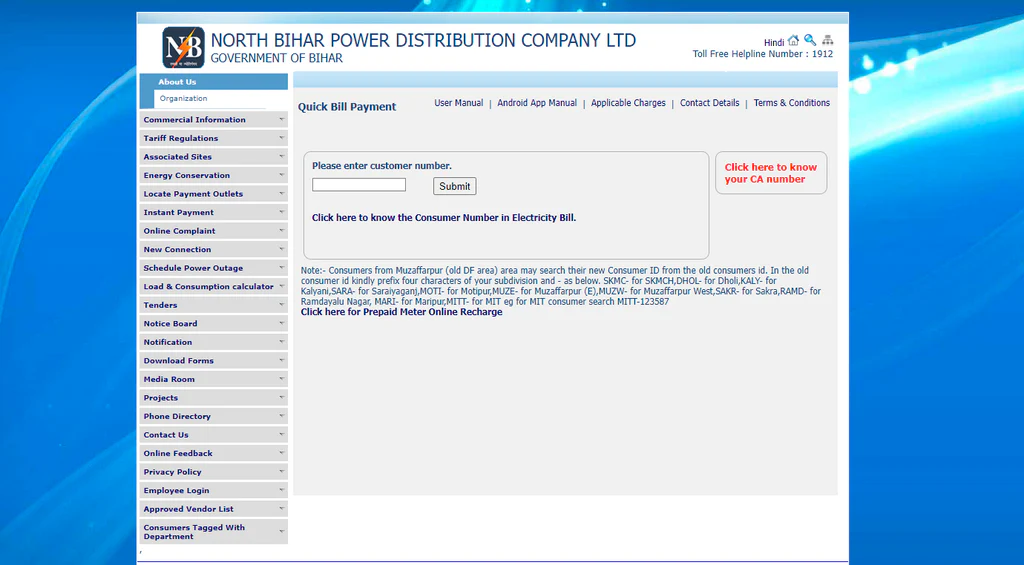
NBPDCL Quick Bill Payment (No Login Required)
The NBPDCL quick bill feature is perfect for users who do not want to remember passwords or create an account. [3]
- Direct Access: Go directly to the https://nbpdcl.co.in/(S(upe3g1j5cpnatgaxclphnjde))/frmQuickBillPaymentAll.aspx.
- Input CA Number: Enter your unique Consumer Account Number in the field provided.
- Submit: Click submit to verify the consumer name and the bill amount.
- Pay: Click "Pay Now" to proceed to the payment gateway without logging in.
How to pay via Net Banking / Debit Card / Credit Card?
Once you have selected the pay option, you can choose from traditional banking methods.
- Step 1: Follow Steps: Follow the Quick Pay steps mentioned above to reach the payment page.
- Step 2: Gateway: Choose your preferred Payment Gateway, such as BillDesk or PayU.
- Step 3: Select Mode: Select Net Banking, Debit Card, or Credit Card from the list of options.
- Step 4: Details: Enter your card or bank details securely.
- Step 5: Authenticate: Complete the payment by authenticating via the OTP sent to your mobile.
How to Pay NBPDCL Bill Through Third-Party Platforms?
The NoBroker App has become a highly efficient way to manage utility bills. It offers a smooth interface and often provides cash back or reward points on electricity payments. [4]
- Step 1: Open App: Open the NoBroker app and navigate to the 'NoBroker Pay' section.
- Step 2: Select Category: Select 'Bill Payments' and choose the 'Electricity' icon.
- Step 3: Choose Board: Select 'Bihar' as your state and 'North Bihar Power Distribution (NBPDCL)' as your board.
- Step 4: Fetch Bill: Enter your CA Number to fetch the current bill details.
- Step 5: Pay: Complete the payment using UPI, credit card, or debit card to get an instant digital receipt.
Bihar Electricity Bill Payment Offline Methods
While digital options are popular, NBPDCL offers several offline channels for bill payment to assist consumers without reliable internet access or who prefer manual transactions. [5]
- Electricity Office Counters: You can visit the Revenue Collection Counters available at nearly all divisional and sub-divisional offices. Many locations also feature Self-Service Kiosks where you can pay via cash or card to avoid queues.
- Authorised Collection Centres: The board has partnered with Common Service Centres (CSCs) and Vasudha Kendras. These are widely available in both rural and urban areas. Additionally, specific rural collection points, such as the Mains Electricity Office in Sitamarhi, serve as local hubs.
- Banks: Consumers can generate an e-pay slip on the portal and use it to make a cash payment at any State Bank of India (SBI) branch. For larger commercial bills, NEFT or RTGS can be done via your own bank branch using a generated pay slip.
How to View and Download Your NBPDCL Bill Receipt?
After making a payment, it is crucial to obtain proof of the transaction. The nbpdcl bill receipt download process is simple and can be done instantly. [6]
- Instant Status: Go to the NBPDCL Bill Payment Status page on the official website.
- Enter ID: Input your CA Number and the Captcha code.
- Submit: Click Submit to see a list of recent transactions.
- Locate: Find the most recent transaction that indicates "Success."
- Print: Click the "View/Print" button next to the transaction to save the nbpdcl payment receipt as a PDF file.
How to Check NBPDCL Bill Payment History Online?
To track your past transactions and billing cycles, you can access your nbpdcl bill payment history through the official portal. This helps monitor consumption patterns and ensure all past dues are cleared. [2]
- Portal Access: Navigate to the NBPDCL Print Receipt Page on the website.
- Input Details: Input your CA Number and click Submit.
- View List: A list of your most recent 5 to 10 successful transactions will be displayed, including dates and amounts.
- Detailed History: For a longer history (12-24 months), log in to your Consumer Account, click on "Consumer Activities," and select "Billing & Payment History."
- Mobile App: Alternatively, open the Bihar Bijli Smart Bill App, tap "Bill Details & Pay Bill," and select "Payment History" to see a chronological list.
Common Problems While Paying NBPDCL Electric Bill & Solutions
Digital transactions are usually smooth, but technical hiccups can happen. Here are common hurdles with nbpdcl electric bill payments and how to fix them.
- Payment Debited but Bill Not Updated: This is typically due to a sync delay. Wait 24 to 48 hours for the status to update. If it persists, check your status on the NBPDCL Payment Verification page.
- Bill Not Updated After Payment: Digital payments typically take 2-3 business days to appear in the official records. Always keep your digital receipt safe as proof.
- Incorrect Bill Amount: If you suspect an error, visit the NBPDCL Consumer Portal and raise a "Billing Related" complaint. You may need to provide proof of your previous meter reading.
- Unable to Fetch Bill Online: Ensure you are entering the correct CA Number. If the error persists, the server might be under maintenance; try again after 10:00 PM when traffic is lower.
NBPDCL Helpline & Complaint Redressal
If you run into trouble with your nbpdcl bill check or connection, NBPDCL provides several channels to get things sorted quickly. [7]
- Toll-Free Number: Dial 1912 for round-the-clock assistance regarding electricity grievances. Alternatively, call 1800-345-6198.
- Email Support: Send detailed complaints to contact@nbpdcl.in, including your CA Number.
- Office Working Hours: Offices operate from Monday to Saturday, 10:00 AM to 5:00 PM. They are closed on Sundays and Public Holidays.
- Complaint Registration Process: You can file a digital ticket on the NBPDCL Complaint Section or use the "Bihar Bijli Smart Bill" app to report technical issues.
Rural vs. Urban Payment: Common Service Centres (CSC)
In Bihar, Common Service Centres (CSCs), also known as Vasudha Kendras, serve as vital physical touchpoints for nbpdcl bill payment, bridging the gap between rural and urban service delivery.
- Rural Accessibility: In rural North Bihar (DS-I categories), CSCs act as "Citizen Service Points." They allow villagers to pay bills locally, saving them from travelling long distances to divisional offices.
- Urban Convenience: In urban areas (DS-II), CSCs operate as Digital Seva Centres, providing an alternative for consumers who prefer assisted transactions.
- How to Pay: Locate your nearest Vasudha Kendra, provide your CA Number, and pay the amount in cash. Ensure you collect a printed receipt generated from the NBPDCL portal.
- Note: Always ensure your bill at the CSC reflects the 125-unit free electricity subsidy before paying the remaining balance. You can compare rates with the electricity rate per unit in India to see how Bihar fares.
How NoBroker Can Help?
Managing utility bills should be a hassle-free experience. NoBroker simplifies your nbpdcl bill payment process with a secure, efficient platform. With the NoBroker app, you can not only clear your electricity dues instantly but also track your payment history and earn rewards on transactions. Beyond bill payments, NoBroker provides a comprehensive suite of services, including finding homes, drafting rental agreements, and assisting with interior design. If you want to learn more about utility costs, our resources on commercial electricity rates can be very helpful. Switch to NoBroker today for a smarter way to manage your home and utilities.
Frequently Asked Questions
Q1. How can I check my NBPDCL bill online?
Ans: You can perform an nbpdcl bill check online by visiting the official NBPDCL website, clicking on "View & Pay Bill," and entering your CA Number.
Q2. Is there a way to pay the bill without logging in?
Ans: Yes, the NBPDCL quick bill payment feature allows you to pay instantly by just entering your Consumer Account Number on the Quick Pay Portal.
Q3. How do I download my payment receipt?
Ans: To perform an nbpdcl bill receipt download, visit the "Payment Status" page on the official website, enter your CA Number, and click "View/Print" on the successful transaction.
Q4. What should I do if my payment fails, but the funds are deducted?
Ans: Wait for 24 to 48 hours, as it is often a sync issue. If the status does not update, check the Payment Verification page or contact the helpline at 1912.
Q5. Can I check my past bill history?
Ans: Yes, you can check your nbpdcl bill payment history by logging in to your consumer account on the portal or by viewing the "Payment History" section in the Bihar Bijli Smart Bill app.
Recommended Reading
August 12, 2025
461217+ views
Gruha Jyothi Scheme Karnataka: Application Process, Eligibility and Documentation in 2026
September 12, 2025
71373+ views
UPPCL Jhatpat Portal for New Electricity Connection: Process, Status Tracking and Charges in 2026
January 31, 2025
50177+ views
May 24, 2025
45128+ views
New BESCOM Connection: Step-by-Step Process 2026
January 31, 2025
43085+ views
ARTICLE SOURCES
Most Viewed Articles
August 12, 2025
461217+ views
Gruha Jyothi Scheme Karnataka: Application Process, Eligibility and Documentation in 2026
September 12, 2025
71373+ views

How to Apply Online LPG Gas Connection: Application Process, Documents and Fees in 2026
June 1, 2025
63356+ views
UPPCL Jhatpat Portal for New Electricity Connection: Process, Status Tracking and Charges in 2026
January 31, 2025
50177+ views
May 24, 2025
45128+ views
Author
Loved what you read? Share it with others!
Recent blogs in
NBPDCL Bill Payment Online: Check, Download & Pay Bihar Electricity Bill in 2026
February 19, 2026 by Manu Mausam
CSPDCL Bill Payment Online: How to Check Bill Status and Download Receipt in 2026
February 18, 2026 by Manu Mausam
MPEB Bill Payment Online: Check, Download & Pay MP Electricity Bill in 2026
February 18, 2026 by Manu Mausam
JBVNL Bill Payment Online: Check Bill Status and Payment Methods in 2026
February 18, 2026 by Ananth







 Full RM + FRM support


Join the conversation!