- https://www.bajajfinserv.in/mpeb-electricity-bill-payment
- https://mpeb.mponline.gov.in/Portal/Services/MPEZ/RMS/BillReceiptMPPKVV.aspx?
- https://mpeb.mponline.gov.in/portal/home.aspx
- https://portal.mpcz.in/web/
- https://www.bajajfinserv.in/view-and-download-mpcz-electricity-bill
Table of Contents
What is MPEB Bill Payment â Quick DetailsMPEB Bill Check Online Using Consumer NumberMP Electricity Bill Payment Online MethodsMP Electricity Bill Payment Offline MethodsHow to View and Download Your MPEB Bill Receipt?How to Check MPEB Bill Payment History Online?Common Problems While Paying MPEB Electric Bill & SolutionsMPEB Helpline & Complaint RedressalRural vs. Urban Payment: Common Service Centres (CSC) How NoBroker Can Help?Frequently Asked Questions
Loved what you read? Share it with others!


MPEB Bill Payment Online: Check, Download & Pay MP Electricity Bill in 2026
Updated : February 19, 2026, 11:04 PM
Author :
 Manu
Manu
Summary
MPEB bill payment helps consumers in Madhya Pradesh manage their electricity expenses easily and on time. Through the official services of Madhya Pradesh Electricity Board, users can check their current bill amount, due date, and payment status online. Digital payment methods save time, reduce paperwork, and offer secure transactions. Regular bill payment also helps maintain a good payment record and ensures continuous and reliable electricity supply for homes and businesses.
Table of Contents
What is MPEB Bill Payment â Quick DetailsMPEB Bill Check Online Using Consumer NumberMP Electricity Bill Payment Online MethodsMP Electricity Bill Payment Offline MethodsHow to View and Download Your MPEB Bill Receipt?How to Check MPEB Bill Payment History Online?Common Problems While Paying MPEB Electric Bill & SolutionsMPEB Helpline & Complaint RedressalRural vs. Urban Payment: Common Service Centres (CSC) How NoBroker Can Help?Frequently Asked Questions
What is MPEB Bill Payment – Quick Details
MPEB bill payment helps Madhya Pradesh users view electricity bills, pay online, download receipts, and check payment history through MPOnline and official regional DISCOM portals.
- Electricity Provider: Madhya Pradesh Electricity Board (via DISCOMs)
- Service Area: Madhya Pradesh
- Bill Check Method: IVRS Number
- Quick Payment Option: MPOnline Pay
- Online Payment Modes: UPI, Cards, Net Banking
- Consumer Types: Domestic, Commercial
- Subsidy: Samadhan, Solar
- Per Unit Tariff: ₹3.34–₹6.80
- Late Payment Charges: 1.25% monthly
- Due Date: 15 days
- Official Platform: MPOnline, DISCOM Sites
MPEB Bill Check Online Using Consumer Number
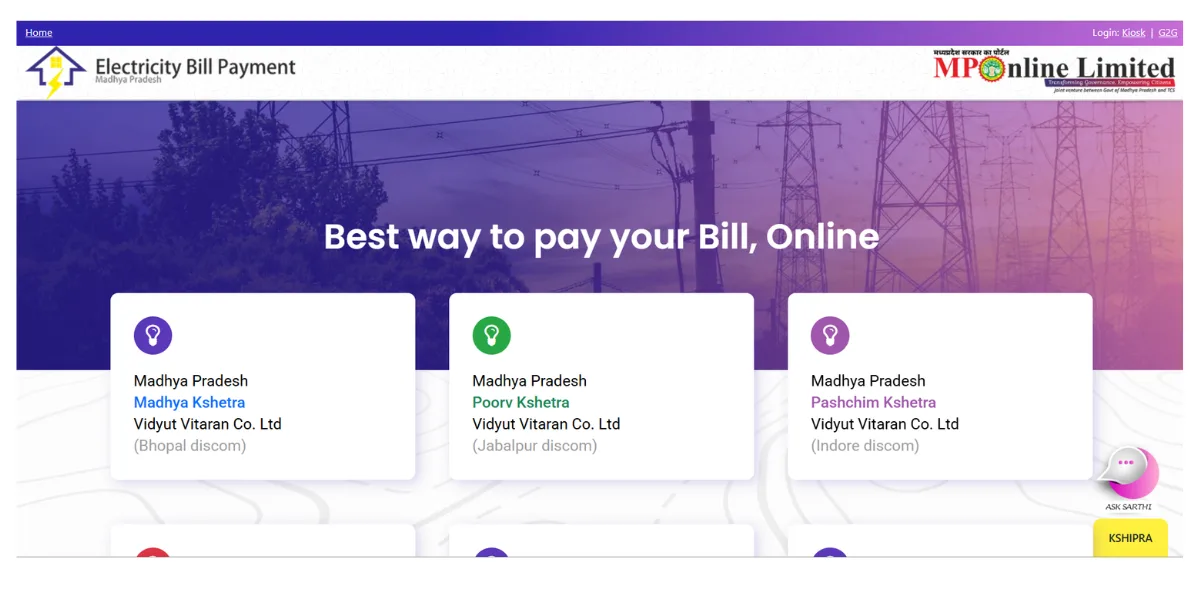
MPEB bill check online enables Madhya Pradesh users to view electricity bills, outstanding amounts, and payment status via IVRS or Consumer Number via MPOnline or regional DISCOM portals. [1] [2]
- Step 1: Open the MPOnline electricity services portal linked with Madhya Pradesh Electricity Board billing systems.
- Step 2: Select your distribution zone and enter the IVRS or Consumer Number exactly as printed on the bill.
- Step 3: Complete the CAPTCHA to retrieve and view the latest bill amount and due date.
MP Electricity Bill Payment Online Methods
MP electricity bill payment online allows Madhya Pradesh consumers to pay MPEB bills conveniently via MPOnline portals or NoBroker, supporting quick settlement and instant digital receipts. [3]
How to Pay Through the MPEB Official Website
MPEB online bill payment via MPOnline provides a centralised platform for all MP DISCOMs, enabling smooth bill clearance using IVRS or Consumer Number.
- Step 1: Visit the MPOnline electricity bill payment portal linked with Madhya Pradesh Electricity Board services.
- Step 2: Select your regional DISCOM, enter your IVRS/Consumer Number, and submit to fetch bill details.
- Step 3: Click Pay Now, complete payment through the gateway, and download the receipt for records.
MPEB Quick Bill Payment (No Login Required)
MPEB Quick Pay enables consumers to pay electricity bills instantly without registration using only their IVRS or Consumer Number.
- Step 1: Open the MPOnline portal and select Pay Electricity Bill under public or citizen services.
- Step 2: Enter the IVRS or Consumer Number carefully and submit to display the bill amount.
- Step 3: Proceed with payment and save the confirmation receipt after a successful transaction.
How to Pay via Net Banking / Debit Card / Credit Card
MPEB supports multiple online payment modes, including net banking, debit cards, and credit cards through MPOnline’s integrated gateways.
- Step 1: After bill fetch, select the preferred payment option on the MPEB Bill Online payment gateway page.
- Step 2: Enter banking or card details, verify via OTP, and authorise the payment securely.
- Step 3: Proceed with payment and save the confirmation receipt after a successful transaction.
This is a convenient way to stay on top of your dues, similar to how one might periodically check the electricity rate per unit in India to manage household budgets.
How to Pay MPEB Bill Through Third-Party Platforms
MPEB electricity bill payments through NoBroker offer added convenience, secure processing, and access to unified payment tracking.
- Step 1: Open the NoBroker App, select Electricity, choose Madhya Pradesh board, enter Consumer Number, fetch the bill, and complete payment via UPI or cards.
MP Electricity Bill Payment Offline Methods
MP electricity bill payment offline facilities enable MPEB consumers to clear dues at DISCOM offices, MPOnline kiosks, and select bank branches via assisted or manual payments. [4]
- Electricity Office Counters: Consumers can pay bills at regional DISCOM offices by submitting cash, cheque, or demand draft with a valid consumer number. For business owners, paying in person can sometimes be an opportunity to clarify specific costs like the commercial electricity rate per unit in Madhya Pradesh directly with officials.
- Authorised Collection Centres: MPOnline kiosks, CSC Digital Seva centres, and Any Time Payment machines provide statewide offline bill payment support.
- Banks (If Applicable): Certain banks accept electricity bill payments through cheque submission or NEFT/RTGS transactions linked to consumer accounts.
How to View and Download Your MPEB Bill Receipt?
MPEB bill receipt download lets Madhya Pradesh consumers retrieve electricity payment slips, confirm successful transactions, and maintain billing records using MPOnline or regional DISCOM portals. (5)
- Step 1: Visit the MPOnline electricity services portal linked with Madhya Pradesh Electricity Board billing systems.
- Step 2: Click Print Receipt or Duplicate Receipt and enter the IVRS number or transaction reference.
- Step 3: Generate and download the electricity bill payment receipt in PDF format for future reference.
How to Check MPEB Bill Payment History Online?
MPEB bill payment history online helps users track past electricity payments, verify cleared dues, and analyse monthly billing patterns through official MP DISCOM portals. [5]
- Step 1: Open your respective regional DISCOM website or MPOnline portal and access the consumer services section.
- Step 2: Enter the IVRS or Consumer Number and complete the captcha verification process.
- Step 3: Review previous electricity bill payments, including dates, amounts paid, and transaction status.
Common Problems While Paying MPEB Electric Bill & Solutions
MPEB electric bill payment issues typically arise from IVRS errors, payment gateway delays, or server timeouts; most issues can be resolved quickly via the official MPOnline portals.
- Money Debited, Bill Unpaid: Wait 24–48 hours for synchronisation, then verify transaction status using the MPOnline receipt portal.
- Invalid IVRS Number: Recheck consumer details on the physical bill and ensure no extra digits or prefixes are entered.
- Website Timeout Error: Clear browser cache or use UPAY or Smart Bijlee mobile apps for a smoother payment process.
- Subsidy Not Applied: Confirm Samagra ID linking and active subsidy status through the respective DISCOM customer service channel.
MPEB Helpline & Complaint Redressal
MPEB helpline and complaint redressal mechanisms allow Madhya Pradesh consumers to resolve electricity billing, payment, and subsidy-related issues through DISCOM-level support systems. (4)
- Toll-free number: Call the centralised helpline 1912 for billing issues, payment confirmation, or electricity supply complaints across MP.
- Email support: Email your regional DISCOM support address with IVRS number, mobile number, and transaction details attached.
- Office working hours: Most DISCOM offices operate Monday to Saturday, 10:30 AM to 5:30 PM, except on public holidays.
- Complaint registration process: Lodge complaints digitally using MPOnline or respective DISCOM portals under Madhya Pradesh Electricity Board services.
Rural vs. Urban Payment: Common Service Centres (CSC)
MP electricity bill payment via CSCs supports rural MPEB consumers with assisted digital transactions, while urban users rely more on self-service apps and MPOnline portals.
- Low Digital Literacy (Rural): CSC staff guide consumers through IVRS-based bill checks and complete payments on official DISCOM platforms.
- System Downtime Confusion: CSCs retry failed transactions and provide printed receipts, helping rural users avoid duplicate electricity payments.
- Urban Convenience Needs: Urban residents visit CSCs mainly for quick bill printing or when MPOnline portals are temporarily unavailable.
How NoBroker Can Help?
NoBroker helps MPEB consumers by providing a unified payment solution for Madhya Pradesh electricity bills. Users can select their DISCOM, fetch bills instantly using IVRS numbers, and complete payments securely within minutes. The platform streamlines the management of recurring bills, storage of digital receipts, and review of payment history, without requiring navigation of multiple government portals. With reliable BBPS processing and support for various payment modes, NoBroker is ideal for users seeking speed, clarity, and centralised bill management across MP regions.
Frequently Asked Questions
Q1. Is MPEB still an active electricity board in Madhya Pradesh?
Ans: MPEB is a legacy name; electricity billing and distribution are now handled by regional DISCOMs through MPOnline and official portals.
Q2. How do I find my MPEB IVRS or consumer number?
Ans: Your IVRS or consumer number is printed on your physical bill, usually near the meter or account information section.
Q3. Can I pay my MPEB bill without logging in?
Ans: Yes, MPOnline offers quick electricity bill payments without a login, using only the IVRS or the consumer number.
Q4. What happens if I pay my MPEB bill twice by mistake?
Ans: Any excess payment is automatically adjusted in the next billing cycle; keep the receipt for reference until the adjustment reflects.
Q5. Are subsidies reflected automatically on MPEB bills?
Ans: Subsidies are applied automatically when eligibility criteria are met; missing subsidies may indicate pending KYC or linkage issues.
Recommended Reading
August 12, 2025
458594+ views
Gruha Jyothi Scheme Karnataka: Application Process, Eligibility and Documentation in 2026
September 12, 2025
70494+ views
UPPCL Jhatpat Portal for New Electricity Connection: Process, Status Tracking and Charges in 2026
January 31, 2025
50082+ views
May 24, 2025
44984+ views
New BESCOM Connection: Step-by-Step Process 2026
January 31, 2025
42947+ views
ARTICLE SOURCES
Most Viewed Articles
August 12, 2025
458594+ views
Gruha Jyothi Scheme Karnataka: Application Process, Eligibility and Documentation in 2026
September 12, 2025
70494+ views

How to Apply Online LPG Gas Connection: Application Process, Documents and Fees in 2026
June 1, 2025
62635+ views
UPPCL Jhatpat Portal for New Electricity Connection: Process, Status Tracking and Charges in 2026
January 31, 2025
50082+ views
May 24, 2025
44984+ views
Author
Loved what you read? Share it with others!
Recent blogs in
NBPDCL Bill Payment Online: Check, Download & Pay Bihar Electricity Bill in 2026
February 19, 2026 by Manu Mausam
CSPDCL Bill Payment Online: How to Check Bill Status and Download Receipt in 2026
February 18, 2026 by Manu Mausam
MPEB Bill Payment Online: Check, Download & Pay MP Electricity Bill in 2026
February 18, 2026 by Manu Mausam
JBVNL Bill Payment Online: Check Bill Status and Payment Methods in 2026
February 18, 2026 by Ananth







 Full RM + FRM support


Join the conversation!