- https://www.bajajfinserv.in/check-chandigarh-electricity-bill-payment-status
- sampark.chd.nic.in
- https://chandigarh.gov.in/e-governance/e-sampark
Table of Contents
What is Chandigarh Electricity Bill Payment â Quick DetailsChandigarh Electricity Bill Check Online Using Consumer NumberChandigarh Electricity Bill Payment Online MethodsChandigarh Electricity Bill Payment Offline MethodsView Chandigarh Electricity Bill Online MethodsChandigarh Electricity Bill Download MethodsHow to Check Chandigarh Bill Payment History Online?Common Problems While Paying Chandigarh Electric Bill & SolutionsChandigarh Helpline and Complaint RedressedHow NoBroker Can Help?Frequently Asked Questions
Loved what you read? Share it with others!


Chandigarh Electricity Bill Payment: Online Payment Method, View Bill and Download Receipt in 2026
Updated : February 19, 2026, 11:12 PM
Author :
 Ananth
Summary
Chandigarh electricity bill payment allows residents and businesses to check bills, pay dues, and download receipts through official platforms like the e-Sampark portal. Consumers can use their Consumer Account Number to access billing details, view payment history, and submit complaints. With flexible payment options, structured tariffs, and government subsidies, the system ensures a convenient and transparent electricity billing experience.
Table of Contents
What is Chandigarh Electricity Bill Payment â Quick DetailsChandigarh Electricity Bill Check Online Using Consumer NumberChandigarh Electricity Bill Payment Online MethodsChandigarh Electricity Bill Payment Offline MethodsView Chandigarh Electricity Bill Online MethodsChandigarh Electricity Bill Download MethodsHow to Check Chandigarh Bill Payment History Online?Common Problems While Paying Chandigarh Electric Bill & SolutionsChandigarh Helpline and Complaint RedressedHow NoBroker Can Help?Frequently Asked Questions
What is Chandigarh Electricity Bill Payment – Quick Details
Chandigarh electricity bill payment enables consumers to check dues, make online payments, and download receipts through official government platforms using a Consumer Account Number.
- Electricity Provider: Electricity Wing of the Engineering Department, Chandigarh / CPDL
- Service Area: Chandigarh UT
- Bill Check Method: Consumer ID
- Quick Payment Option: Quick Pay
- Online Payment Modes: UPI, Cards, Net Banking
- Consumer Types: Domestic, Commercial, Industrial
- Subsidy: Applicable
- Per Unit Tariff: Slab-based
- Late Payment Charges: 1.25–2% monthly
- Due Date: 15 days
- Official Platform: e-Sampark Chandigarh, myChandigarh App
Chandigarh Electricity Bill Check Online Using Consumer Number
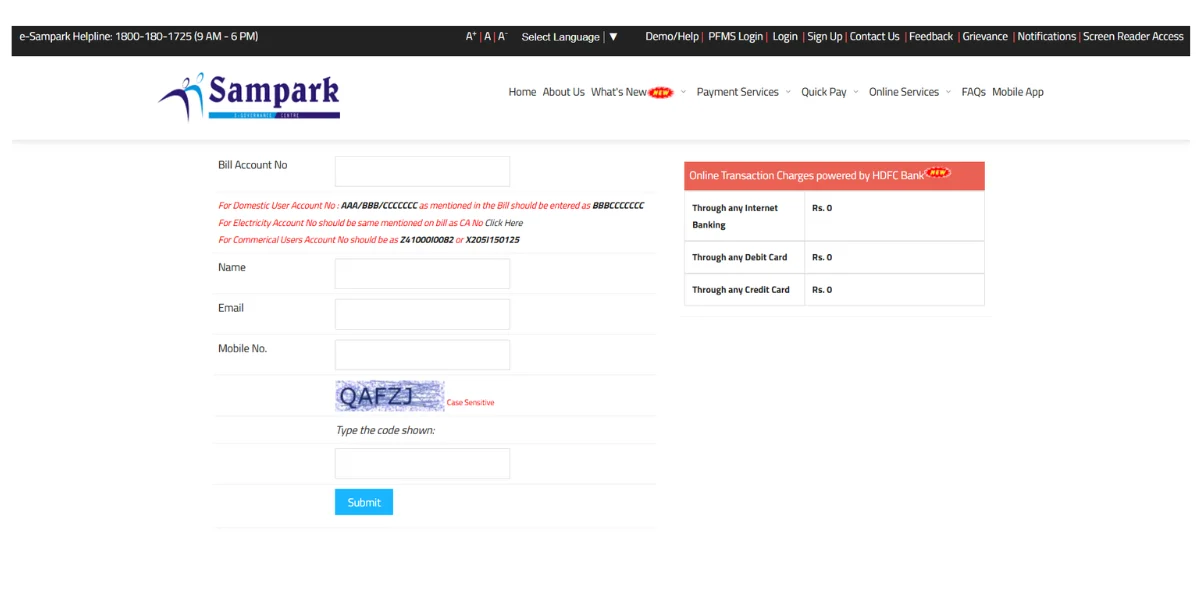
Consumers can check the Chandigarh electricity bill online by entering their Consumer Account Number on the official e-Sampark portal to view dues, due date, and bill details instantly. [1]
- Step 1: Visit the official e-Sampark Chandigarh website and open the Online Electricity Bill service from the homepage menu.
- Step 2: Select the Electricity Bill option and proceed to the bill check or fetch bill section.
- Step 3: Enter your Consumer Account Number carefully, following the format mentioned on your physical or electronic bill.
- Step 4: Type the captcha code exactly as shown on the screen to complete the security verification process.
- Step 5: Click on Submit or Fetch Bill to view the outstanding amount, due date, and consumer details instantly.
Chandigarh Electricity Bill Payment Online Methods
Chandigarh electricity bill payments can be made online via the official e-Sampark platform or the NoBroker app, using a Consumer Account Number for quick, secure transactions. [2] [3]
How to Pay Through the Chandigarh Official Website?
Chandigarh electricity bill payment via the official e-Sampark website allows consumers to pay dues, view bills, and download receipts without visiting service centres.
- Step 1: Visit the official e-Sampark Chandigarh website from your desktop or mobile browser.
- Step 2: Select the Electricity Bill Payment service from the available citizen services menu.
- Step 3: Enter your Consumer Account Number following the format shown on your electricity bill.
- Step 4: Verify the captcha code and submit the details to fetch your bill amount.
- Step 5: Proceed with payment, and download the receipt after the transaction is confirmed. Many residents use this time to verify their usage against the latest electricity rate per unit in India to ensure their billing aligns with national trends
Chandigarh Electricity Bill Quick Pay (No Login Required)
Chandigarh Electricity Quick Pay enables consumers to pay bills instantly, without logging in, by entering their Consumer Account Number on the e-Sampark portal.
- Step 1: Open the e-Sampark Chandigarh website and click on the Quick Pay electricity option.
- Step 2: Enter your Consumer Account Number correctly as mentioned on your physical or digital bill.
- Step 3: Provide your registered mobile number for transaction verification and updates.
- Step 4: Review the fetched bill amount, due date, and consumer details carefully.
- Step 5: Complete payment through the secure gateway and save the generated payment receipt.
How to Pay via Net Banking / Debit Card / Credit Card?
Chandigarh electricity bill payments are accepted via net banking, debit cards, and credit cards through the official e-Sampark payment gateway.
- Step 1: Fetch your electricity bill on the e-Sampark portal using Quick Pay or logged-in access.
- Step 2: Select Net Banking, Debit Card, or Credit Card from the available payment methods.
- Step 3: Enter your banking or card details securely on the authorised payment gateway page.
- Step 4: Complete OTP or bank authentication to confirm the electricity bill payment.
- Step 5: Download or save the payment receipt shown after successful transaction completion.
How to Pay Chandigarh Bill Through Third-Party Platforms?
Chandigarh electricity bill payments through third-party platforms are supported via the NoBroker app, which uses BBPS-compliant secure payment services.
- Step 1: Launch the NoBroker app and sign in with your registered mobile number.
- Step 2: Go to Bill Payments, choose Electricity, and select Chandigarh Electricity Department.
- Step 3: Enter your Consumer Account Number to fetch the current outstanding electricity bill.
- Step 4: Select your preferred digital payment method and complete the transaction securely.
- Step 5: Access and download the payment receipt from the app’s transaction history section.
Chandigarh Electricity Bill Payment Offline Methods
Chandigarh electricity bill payment offline is facilitated through the e-Sampark network, allowing consumers to pay electricity bills conveniently at government-authorised service centres across the Union Territory. (4)
- Electricity Office Counters: Consumers can pay electricity bills in person at the authorised Electricity Wing of the Engineering Department's Chandigarh offices and at e-Sampark counters, using cash or cheque.
- Authorised Collection Centres: e-Sampark and Mini Sampark centres across Chandigarh accept electricity bill payments and provide computer-generated receipts after successful transactions.
- Banks: Bank-based offline payments are limited; consumers may enquire at select branches about accepting cheques or demand drafts using electricity bill account details.
View Chandigarh Electricity Bill Online Methods
Chandigarh electricity bill view online allows consumers to check outstanding dues, due dates, and consumer details using the official e-Sampark portal and Consumer Account Number. [3]
- Step 1: Visit the official e-Sampark Chandigarh website from any desktop or mobile browser.
- Step 2: Select the Electricity Bill Online service available under citizen utility services.
- Step 3: Enter your Consumer Account Number in the correct format mentioned on the electricity bill.
- Step 4: Complete the captcha verification shown on the screen to proceed further.
- Step 5: Click Submit to view the current bill amount, due date, and consumer details instantly.
Chandigarh Electricity Bill Download Methods
Electricity bill download Chandigarh enables consumers to obtain duplicate bill PDFs for payment proof, address verification, and personal record-keeping through the e-Sampark portal. [3]
- Step 1: Open the official e-Sampark Chandigarh website and access the electricity bill services section.
- Step 2: Enter your Consumer Account Number and complete the required captcha verification carefully.
- Step 3: Fetch your bill details by clicking the Submit or View Bill option.
- Step 4: Look for the Download Bill or View PDF option on the displayed bill screen.
- Step 5: Save the PDF file to your device or print it directly for offline use.
How to Check Chandigarh Bill Payment History Online?
Chandigarh electricity bill payment history online helps consumers track previous payments and download receipts through the e-Sampark portal or registered user dashboard. [3]
- Step 1: Visit the e-Sampark Chandigarh portal and log in using your registered user credentials.
- Step 2: Navigate to the Electricity Services or Transaction History section from the dashboard.
- Step 3: Select the relevant billing cycle or payment date range to view past transactions.
- Step 4: Review payment status, receipt number, and paid amount displayed on the screen.
- Step 5: Download previous payment receipts if required for records or dispute resolution.
Common Problems While Paying Chandigarh Electric Bill & Solutions
Chandigarh electricity bill payment issues may arise from entry errors, payment delays, or portal glitches, but most problems can be resolved easily through official e-Sampark services.
- Consumer Number Not Found: Ensure only the correct segment of the Consumer Account Number is entered as per the bill format, then retry on the e-Sampark portal.
- Payment Successful but Bill Unpaid: Wait 24–48 hours for system synchronisation; if unresolved, raise a complaint on the e-Sampark grievance portal.
- Transaction Failed but Amount Debited: Banks usually auto-refund within three to five working days if the payment gateway transaction fails.
- Captcha or Page Not Loading: Refresh the page, clear browser cache, or try using a different browser or device for payment.
- Receipt Not Downloading: Disable pop-up blockers in browser settings, as e-Sampark receipts often open in a new window.
Chandigarh Helpline and Complaint Redressed
Chandigarh electricity bill payment complaints can be addressed through official helplines, email support, and grievance portals managed by the Chandigarh Administration and the electricity department. [2]
- Toll-Free Number: 1800-180-1725 (Chandigarh electricity helpline) / 1912 (national power helpline)
- Email Support: support-sampark-chd@nic.in (billing and transaction issues via e-Sampark)
- Office Working Hours: e-Sampark centres operate Monday to Saturday, 8:00 AM to 8:00 PM.
- Complaint Registration Process: Complaints can be registered online via the e-Sampark Chandigarh portal or mobile app, or by visiting local SDO offices.
How NoBroker Can Help?
NoBroker simplifies online Chandigarh electricity bill payment by enabling consumers to manage their utility payments securely from one place. Using the NoBroker app, users can instantly access their electricity bill using their Consumer Account Number and pay via BBPS-supported digital modes. The platform also allows easy access to payment receipts and transaction history, helping users stay organised. With periodic offers and a user-friendly interface, NoBroker helps residents conveniently pay electricity bills without navigating multiple official portals.
Frequently Asked Questions
Q1. How can I check my Chandigarh electricity bill online?
Ans: You can check your Chandigarh electricity bill online by entering your Consumer Account Number on the official e-Sampark portal to view your dues.
Q2. What is the due date for the Chandigarh electricity bill payment?
Ans: The due date for the Chd electricity bill payment is usually 15 days from the bill issue and is clearly mentioned on your physical or electronic bill.
Q3. Can I download my Chandigarh electricity bill receipt online?
Ans: Yes, consumers can download the Chandigarh electricity bill receipt PDF from the e-Sampark portal after fetching bill details or completing payment.
Q4. What should I do if payment is successful but the bill shows unpaid?
Ans: If your payment shows as unpaid, wait 24–48 hours for a system update, or file a complaint via the e-Sampark grievance service.
Q5. Are subsidies available on Chandigarh electricity bills?
Ans: Yes, eligible domestic consumers and specific categories may receive electricity subsidies in Chandigarh, in accordance with UT Administration policies.
Recommended Reading
August 12, 2025
458849+ views
Gruha Jyothi Scheme Karnataka: Application Process, Eligibility and Documentation in 2026
September 12, 2025
70543+ views
UPPCL Jhatpat Portal for New Electricity Connection: Process, Status Tracking and Charges in 2026
January 31, 2025
50089+ views
May 24, 2025
44995+ views
New BESCOM Connection: Step-by-Step Process 2026
January 31, 2025
42965+ views
ARTICLE SOURCES
Most Viewed Articles
August 12, 2025
458849+ views
Gruha Jyothi Scheme Karnataka: Application Process, Eligibility and Documentation in 2026
September 12, 2025
70543+ views

How to Apply Online LPG Gas Connection: Application Process, Documents and Fees in 2026
June 1, 2025
62717+ views
UPPCL Jhatpat Portal for New Electricity Connection: Process, Status Tracking and Charges in 2026
January 31, 2025
50089+ views
May 24, 2025
44995+ views
Author
Loved what you read? Share it with others!
Recent blogs in
NBPDCL Bill Payment Online: Check, Download & Pay Bihar Electricity Bill in 2026
February 19, 2026 by Manu Mausam
CSPDCL Bill Payment Online: How to Check Bill Status and Download Receipt in 2026
February 18, 2026 by Manu Mausam
MPEB Bill Payment Online: Check, Download & Pay MP Electricity Bill in 2026
February 18, 2026 by Manu Mausam
JBVNL Bill Payment Online: Check Bill Status and Payment Methods in 2026
February 18, 2026 by Ananth








 Full RM + FRM support


Join the conversation!