



How to Unlock AC Remote
If the remote control of your AC suddenly stops functioning and displays a small lock symbol, there’s no need to worry. This indicates that the child lock mode has been enabled on the remote. In the following sections, you will learn how to unlock the AC remote control, including the steps for different AC brands such as Voltas, LG, Daikin, Hitachi, Godrej, Whirlpool, Panasonic, Onida, and O General.
What Does Lock Mode on the AC Remote Control Mean?
Lock mode, also known as child lock, locks all the buttons on the remote control to avoid any accidental changes.
When the lock mode on the remote control of the air conditioner is enabled:
- Buttons on the remote are not functioning.
- You can’t change the temperature.
- It displays the “🔒” Lock symbol on the screen.
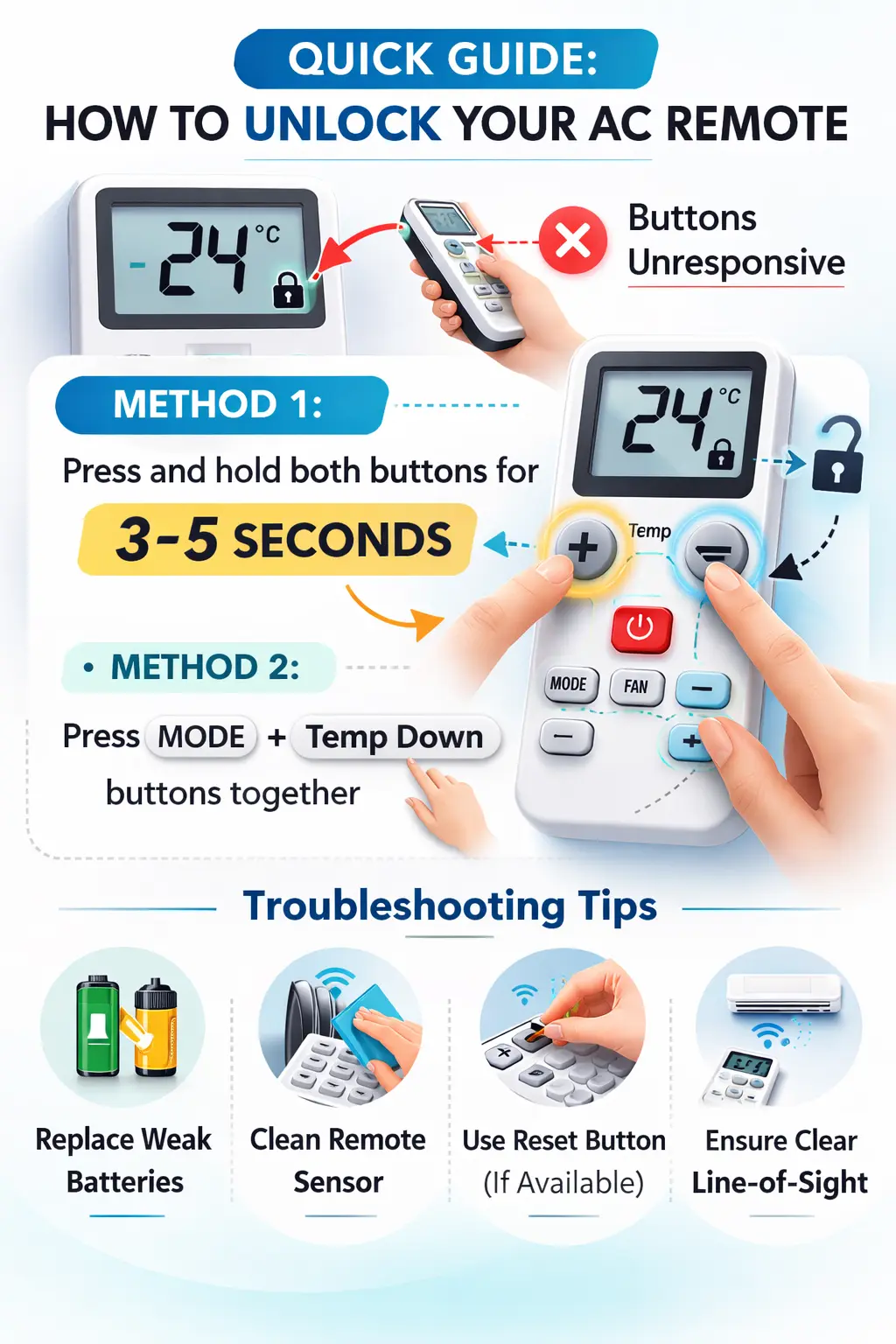
How to Unlock AC Remote (General Method)
The majority of ACs from different brands operate on a similar procedure to unlock the AC remote.
Step-by-Step Generic Method:
- Press the “+” and “–” buttons simultaneously for 3 to 5 seconds.
- Alternatively, press the Mode and Temperature Down buttons together for a few seconds.
- The lock symbol should disappear from the display.
If the above procedure doesn’t work, then the batteries should be removed for 2 to 3 minutes before reinstalling the batteries.
Troubleshooting Tips:
- Replace weak batteries- Weak batteries may cause the remote to malfunction or become locked. It is important to always use fresh batteries, especially if you are facing constant remote problems.
- Clean the remote sensor with a dry cloth- Sometimes dust gets formed on the IR sensor of the remote. This may prevent the remote control from communicating with the Air Conditioner.
- Ensure nothing is in front of the AC indoor unit sensor– This may prevent the remote control and AC unit from communicating.
- Reset the remote control (if available)- Pressing the reset button may resolve lock issues and other software problems you might be having.
Unlock AC Remote – Brand-Specific Guides
Here are the brand-specific guidelines to unlock the AC remote control.
How to Unlock Voltas AC Remote
The remotes of Voltas ACs are relatively easy to unlock.
Steps to unlock Voltas AC remote control:
- Press and hold Temp “+” and Temp “–” keys simultaneously for 5 seconds.
- The lock symbol will disappear.
How to Unlock LG AC Remote
The remotes of LG ACs are relatively easy to unlock.
Steps to unlock LG AC remote control:
- Press and hold Temp Up “+” and Temp Down “–” keys simultaneously.
- Hold the keys for 3-5 seconds.
How to Unlock Daikin AC Remote
Steps to unlock Daikin AC remote control:
- Press Mode and Temp Up “+” & Temp Down“–” keys simultaneously.
- Hold the keys for 5 seconds.
How to Unlock Hitachi AC Remote
Hitachi air conditioner remotes support child lock.
Steps:
- Use the “+” and “–” buttons that are used to change the temperature.
- The remote will unlock.
How to Unlock Godrej AC Remote
Godrej Group remotes use the same process.
Steps:
- Press the “+” and “–” buttons that are used to change the temperature.
- The lock symbol will disappear.
How to Unlock Whirlpool AC Remote
Whirlpool Corporation air conditioner remotes can be easily unlocked.
Steps:
- Use the “+” and “–” buttons to change the temperature.
- These buttons are pressed for 5 seconds.
How to Unlock Panasonic AC Remote
Panasonic remotes may have a separate button for the lock.
Steps:
- Press the Lock button, OR
- Press temp “+” and “–” buttons simultaneously for 5 seconds.
How to Unlock Onida AC Remote
Steps:
- Press the “+” and “–” buttons to change the temperature.
- The lock symbol will disappear.
How to Unlock O General AC Remote
O General remotes may vary slightly by model, but usually follow a simple unlock combination.
Steps:
- Press and hold Mode + Temp Down – together.
- Keep holding for 3–5 seconds.
- The lock icon will disappear, and the remote will start working normally.
How to Unlock Croma AC Remote
Steps to unlock Croma AC Remote:
Steps:
- Press Temp Up + and Temp Down – together.
- Hold the buttons for about 5 seconds.
- The lock symbol will disappear from the display.
How to Unlock Samsung AC Remote
To unlock your Samsung AC Remote you should:
Steps:
- Press and hold Mode + Temp Down – simultaneously.
- Hold for 3–5 seconds.
- The lock symbol will disappear, unlocking the remote.
How to Unlock Mitsubishi AC Remote
To unlock Mitsubishi AC remotes you have to:
Steps:
- Press Temp Up + and Temp Down – together.
- Hold for around 5 seconds.
- The child lock icon will disappear.
How to Unlock Lloyd AC Remote
Unlock Lloyd AC remote by:
Steps:
- Press Temp + and Temp – together.
- Hold the buttons for 3–5 seconds.
- Once the lock icon disappears, the remote is unlocked.
How to Unlock Toshiba AC Remote
To unlock Toshiba AC remote follow the steps below:
Steps:
- Press the “+” and “–” buttons that are used to change the temperature.
- Hold for about 5 seconds.
- The lock symbol will disappear, unlocking the remote.
How to Remove Lock from AC Remote (Alternative Methods)
If the above methods of button combinations fail, the following methods can be tried:
- Removing the Batteries for 5 Minutes- Removing the batteries for a few minutes will allow the remote control to power cycle completely, removing any temporary glitches.
- Pressing All the Buttons Once- Removing the batteries and pressing all the buttons once will discharge the power stored in the remote control.
- Inserting New Batteries- New batteries can be a solution if the problem was a result of the batteries’ hidden performance issues.
- Checking the User Manual- There are different key combinations for different models of AC remote controls, which can be found in the user manual.
How to Lock AC Remote Again (Enable Child Lock)
If you wish to enable the lock feature, then follow these steps:
- Use the same button combination to lock- In most AC remotes, the button combination to lock and unlock is the same.
- Hold the button for 3-5 seconds- This will enable the child lock feature of the remote.
- The lock symbol will appear on the display screen- This is a confirmation that the child lock feature is enabled.
Why Your AC Remote Is Still Not Working After Unlocking
If the above methods don’t work, then:
- Batteries might be dead- Dead batteries might be displaying, but they are not strong enough to send signals to the AC unit.
- The remote’s sensor might be damaged- This might be due to a faulty infrared emitter, which might have stopped communicating with the AC unit.
- The AC unit’s PCB board might be faulty– Sometimes, the problem is not with the remote but with the AC unit’s internal control board.
- The remote might need to be changed- This is because, in this case, changing the remote is the easiest solution.
- Remote camera test- Open the camera of your phone → Press any button of the remote → If the IR light is blinking, then the remote is working fine.
Pro Tips to Prevent Accidental Locking
- Avoid long pressing of multiple buttons randomly- Random long pressing of multiple buttons can accidentally trigger child lock mode.
- Keep the remote out of children’s reach- While child lock mode prevents changing settings, supervision of children is always a good idea to avoid locking the remote unnecessarily.
- Use a remote holder- This will keep the remote out of children’s reach, thus avoiding accidental button pressing.
- Replace weak battery power with new ones- Strong battery power is a must to avoid any issues with the remote.
FAQ’s
1. Why is the lock symbol appearing on my AC remote?
Ans- Due to the child lock feature being active on the AC remote.
2. For how long should I keep the buttons pressed to unlock the AC remote?
Ans- For 3-5 seconds.
3. Can I unlock the AC without using the remote?
Ans- No, the child lock feature affects the AC remote only and not the AC itself.
4. Will removing the batteries from the AC remote unlock it?
Ans- Sometimes, especially if it is a software issue on the AC remote.
5. Is there a universal method to unlock any AC remote?
Ans-Most AC remotes require pressing Temp + and – buttons together; however, this may vary from brand to brand or model to model.
6. Why is my AC remote not responding even without the presence of a lock symbol on it?
Ans- Due to issues with the batteries or sensor on the AC remote or due to physical damage to the AC remote.
7. Can I repair a damaged AC remote?
Ans- Yes, if the damage is minor; however, in most cases, it is more cost-effective to buy a new one.