If you need a new electricity connection for your home, shop, office or other property in Maharashtra, you can apply for a new Mahadiscom connection through its Web Self Service portal or mobile app. You can apply for domestic, non-domestic, industrial, agricultural, bulk and electric vehicle charging connections. The application process involves submitting your details and required documents online, paying the applicable charges and tracking your application status through the portal or the Mahavitaran mobile app.
Mahadiscom New Electricity Connection at a Glance
MSEDCL, commonly known as MAHADISCOM, extends its electricity services throughout the State of Maharashtra and in a few suburbs of Mumbai. A quick overview of MAHADISCOM new connection is as follows:
| Particulars | Details |
|---|
| Electricity Provider | Maharashtra State Electricity Distribution Co. Ltd. |
| Application Mode | Online |
| Connection Types | Domestic, Commercial, Industrial, Agricultural, bulk and electric vehicle charging connections |
| Application Portal | Mahadiscom |
| Documents Required | Proof of ownership/occupancy, identity proof and category-specific documents |
| Processing Time | 7 to 30 days where the existing network is available |
Who Can Apply for a Mahadiscom New Connection?
A new Mahadiscom electricity connection can be applied for by the lawful owner or occupier of a premises in Maharashtra. The connection category depends on how the electricity will be used and the type of premises. MSEDCL accepts applications for domestic, non-domestic, industrial, agricultural, bulk and electric vehicle charging connections. You can apply for a new connection if you are:
- A homeowner who needs electricity for a new or existing residential property
- A tenant or lawful occupier applying for an eligible premises
- A business owner requiring electricity for a shop, office or other non-domestic premises
- An industrial consumer requiring electricity for industrial activities
- An agricultural consumer applying for an eligible agricultural connection
- An applicant requiring a bulk connection for premises with multiple or higher electricity requirements
- An eligible EV charging applicant setting up an electric vehicle charging facility.
Documents Required for a Mahadiscom New Connection
When applying for a new MAHADISCOM connection, ensure you have the necessary documents based on your sector. Here's a breakdown:
For residential, commercial or industrial purposes:
1. Proof of Ownership or Occupancy (Choose one):
- Occupancy Certificate issued by a statutory body or other Competent Authority.
- Ownership Document, Form 8, Form 7-12, Tax or Lease issued by Local Authority
- Leave & License/Lease agreement with Property Owner's NOC, for tenants
- Allotment letter, for quarters
- Affidavit on ₹200/- stamp paper, for slum areas without any other documents
2. Identity Proof (Choose one):
- Voter’s Identification Card
- Collector or Government-Authorised Photo ID
- Aadhaar Card
- PAN Card
- Driving License
- Passport
3. Category-specific Documents (If Applicable):
- SC or ST Caste Certificate
- BPL Certificate
4. Additional documents for industrial connections:
- Industrial Registration or DIC Certificate
- Separate sheet for Load profile
Note: Ensure submission of required statutory and regulatory permissions.
For Agricultural Connection:
1. Address Proof (Essential):
- 7/12 Extract (mentioning well or borewell details if on the same land)
2. Other Documents (If Applicable):
- NOC from the concerned Department (for dark watershed areas)
- NOC from other shareholders (if land, well or water pump is shared)
- SC or ST Certificate
Note: Electrical Contractor's Completion Report Form D-1 shall be submitted separately.
How to Apply for a New Mahadiscom Connection Online
You can apply for a new MAHADISCOM connection through the Web Self Service portal or the Mahavitaran mobile app through the following steps:

- Step 2: Select your connection type from general information, then fill the form as requested
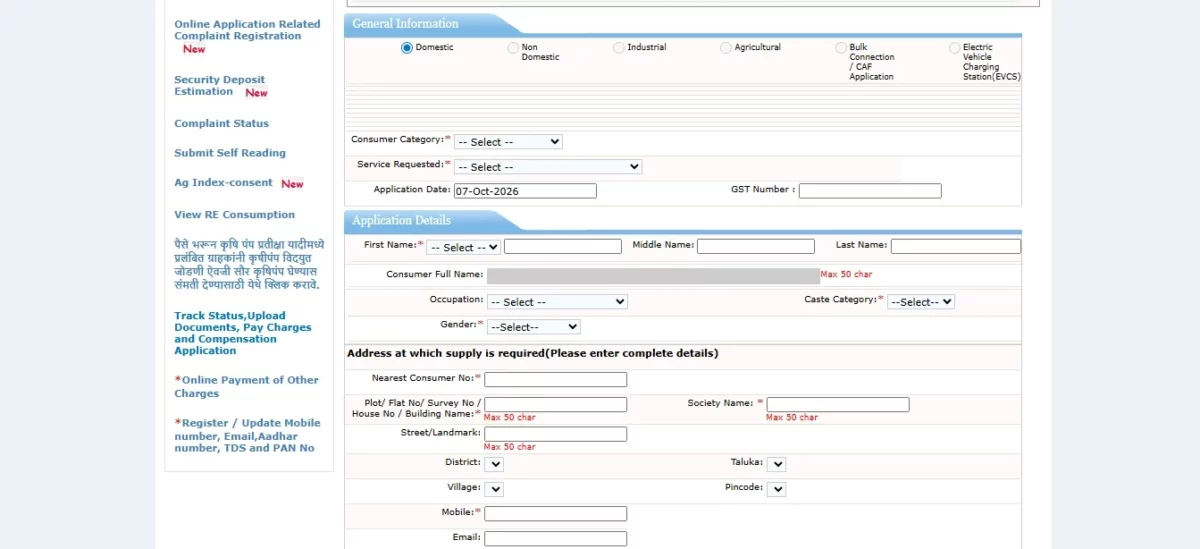
- Step 3: Enter your applicant and billing details and authenticate using Aadhaar and OTP verification

- Step 4: Click on Save and then upload the required documents based on your connection type
- Step 5: Review the information and note the request ID for tracking
Apply Through the Mahavitaran Mobile App
You can also use the official Mahavitaran Consumer App to apply for a new electricity connection. You can do so in these steps:
Step 1: Download and open the Mahavitaran app from the Google Play Store or Apple App Store
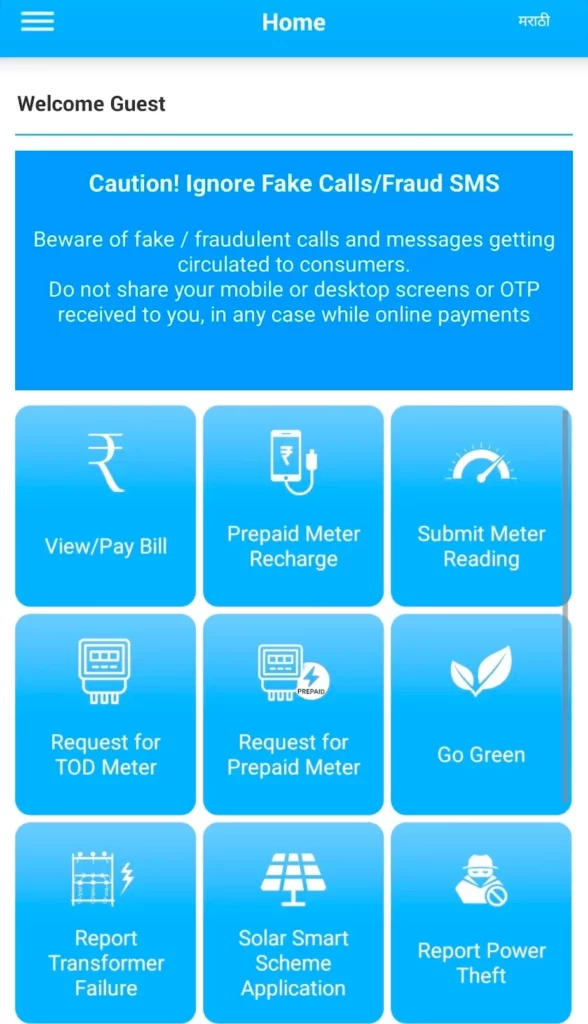
Step 2: Select the Apply for New Connection option and start your application

Step 3: You will be redirected to the website. Enter the required connection, applicant and premises details, and upload the documents as requested

Step 4: Submit the application and save the unique application ID for future reference
Step 5: After submitting the request, you can then use the application ID to track the new connection application through the app. Through the app, you can also pay estimated charges when they become due.
Mahadiscom New Connection Charges
Mahadiscom new connection charges depend on the type of supply, load and whether the connection is provided through an overhead or underground service line. As per MSEDCL's Schedule of Charges effective from 1 April 2023, applicants have to pay service connection charges along with application, registration and processing charges. GST is applicable extra on these charges.
For new overhead connections, the approved service connection charges include:
| Connection Type | Load | Overhead Connection Charge | Underground Connection Charge |
|---|
| LT single phase | Up to 0.5 kW | ₹1,410 | ₹3,680 |
| LT single phase | Above 0.5 kW and up to 7.5 kW | ₹1,840 | ₹8,230 |
| LT three phase | Up to 20 kW | ₹7,790 | ₹14,940 |
| LT three phase | Above 20 kW to 50 kW (Overhead: above 20 kW to 80 kW) | ₹13,640 | ₹26,300 |
| LT three phase | Above 50 kW to 100 kW (Overhead: above 80 kW to 160 kW) | ₹23,380 | ₹50,760 |
| LT three phase | Above 100 kW to 150 kW | ₹23,380 | ₹76,950 |
HT and EHV connection charges
| Supply | Load/capacity | Overhead charge | Underground charge |
|---|
| 11kV | Up to 1,000 kVA | ₹2,38,110 | ₹2,73,820 |
| 11kV | Above 1,000 up to 5,000 kVA | ₹2,79,230 | ₹2,85,730 |
| 22kV | Up to 1,000 kVA | ₹2,81,400 | ₹3,30,100 |
| 22kV | Above 1,000 up to 10,000 kVA | ₹3,43,090 | ₹3,49,580 |
| 33kV | Up to 20,000 kVA | ₹3,98,290 | ₹4,09,110 |
| EHV and beyond SOP cases | - | Actual cost, subject to ₹5,41,500 ceiling | Actual cost, subject to ₹5,41,500 ceiling |
Mahadiscom Application and Processing Charges
Apart from the service connection charge, MSEDCL also charges application, registration and processing charges:
| Connection | Application, Registration and Processing Charge |
|---|
| Single Phase | ₹120 |
| Three Phase | ₹170 |
| LT Agricultural | ₹170 |
| HT supply up to 33 kV | ₹2,660 |
| EHV supply | ₹5,400 |
Note: GST is applicable extra on the charges specified in the schedule. Road-opening charges, where applicable, are recovered on an actual basis. The actual amount payable for a new connection can vary based on the applicable load, infrastructure work and other charges.
How Long Does Mahadiscom Take to Provide a New Connection?
The time taken to provide a new Mahadiscom connection depends on your location and whether new infrastructure is required. As per MSEDCL:
| Connection requirement | Notified time |
|---|
| Existing network, Municipal Corporation within a Metropolitan Area | 7 days |
| Existing network, other urban areas | 15 days |
| Existing network, rural areas | 30 days |
| Extension or augmentation of the distribution network required | Up to 3 months |
| New sub-station required | Up to 1 year |
Note: These apply after the required process and formalities are completed. If your connection requires infrastructure work, the process can take considerably longer.
How to Check Mahadiscom New Connection Application Status
You can check the status of your Mahadiscom new connection application online through the MSEDCL Web Self Service portal. Just remember to keep your application or request ID handy, as this will be needed for future tracking. You can check the same through:

- Step 3: Enter your application number, mobile number or consumer number as required
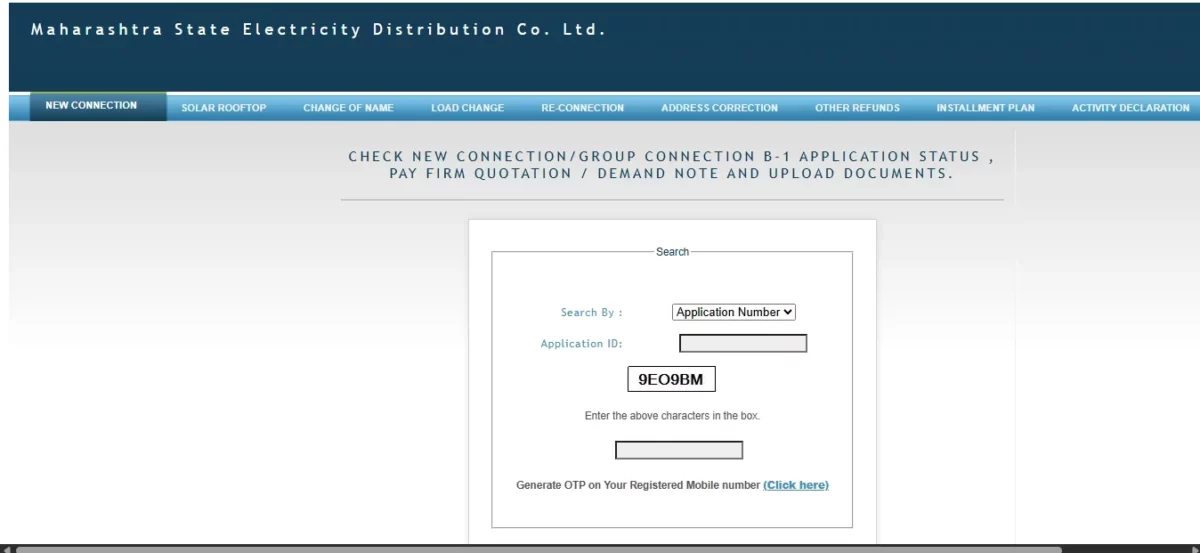
- Step 4: Submit the details to view the current status of your application
- Step 5: Check if any further action, document submission or payment is pending.
Common Reasons for Delay in Mahadiscom New Connection
A Mahadiscom new connection can oftentimes take longer than usual if there are issues with the application, documents or electricity infrastructure. Common reasons for these delays include:
- Missing ownership, occupancy or identity documents
- Mahadiscom might need to inspect the premises before approving the connection
- If the existing network cannot support the requested connection, line extension or network augmentation might be needed
- Pending payment. The connection might not proceed until applicable charges, deposits or the quoted amount are paid
- Electrical work not completed. You will need to complete work through a licensed electrical contractor before the connection can be released
- NOC or statutory approval pending. Certain properties or connection categories can require extra permissions or clearances.
Mahadiscom New Connection vs Temporary Connection
While a permanent new connection is best when you need electricity supply for a property on an ongoing basis, a temporary connection is intended for short-term requirements, such as construction or temporary events.
| Particulars | New Connection | Temporary Connection |
|---|
| Typical use | Homes, shops, offices, industries and other permanent premises | Construction sites, events and other temporary requirements |
| Application | Applied for as a regular new connection | Applied for specifically as a temporary supply |
| Charges | Includes applicable connection charges, deposits and other quoted amounts | Charges and deposits are assessed based on the temporary supply requirements |
| Best for | Properties where regular electricity supply is required | Situations where electricity is needed only for a limited period. |
How to Pay Your Mahadiscom Electricity Bill
Once your new connection is active, you can pay your Mahadiscom electricity bill online through the Web Self Service portal or Mahavitaran Consumer App. You can use your consumer number to view the bill amount and make the payment.

- Step 2: Select the View / Pay Bill option.
- Step 3: Enter your consumer type, number and CAPTCHA details, as required.

- Step 4: Check the outstanding bill amount and due date.
- Step 5: Select your preferred online payment method and complete the payment.
- Step 6: Save the payment receipt for your records.
MAHADISCOM Contact and Support Details
For quick assistance, utilise the Missed Call Service at 022 50897100. Dial the National Toll-Free numbers 1912 or 19120, or reach MSEDCL Toll-Free at 1800-212-3435 or 1800-233-3435.
Pay Your Mahadiscom Bill Online with NoBroker Pay
Once your Mahadiscom new connection is active, you will need to keep track of your electricity bills and due dates to avoid late payments. Instead of visiting a payment centre, you can pay your Mahadiscom electricity bill online through NoBroker Pay. With NoBroker Pay, you can make your electricity bill payment digitally from the convenience of your phone or computer. The platform uses the BBPS network, ensuring safe and secure bill payments.
Pay your Maharashtra electricity bill on NoBroker →
You can pay your Mahadiscom electricity bill online with NoBroker Pay through the following steps:
- Step 1: Visit the NoBroker Pay website or open the NoBroker app and go to the Payments and Rewards section

- Step 2: Select Utility Bills, then Electricity Bill Payment from the available bill payment options

- Step 3: Select Maharashtra State Electricity Distbn Co Ltd as your electricity provider

- Step 4: Enter your consumer number, BU and any other details required to fetch your bill

- Step 5: Check your outstanding bill amount and due date
- Step 6: Select your preferred payment method and complete the payment
- Step 7: Save the payment confirmation or receipt for your records.
Frequently Asked Questions:
Q. Can I apply for a Mahadiscom connection without an existing consumer number? Ans: Yes, you can apply for a Mahadiscom connection without having an existing customer number. A new consumer does not need an existing Mahadiscom consumer number to apply for a new connection, and you can submit the request for the same via the Web Self Service portal.
Q. Can a tenant apply for a Mahadiscom new connection? Ans: Yes, a tenant can apply for a Mahadiscom new connection if they meet the eligibility criteria, as mentioned above. Mahadiscom's application documents include a Leave & License or Lease Agreement along with the property owner's NOC for tenants.
Q. What happens after I submit my Mahadiscom new connection application? Ans: After you submit your application, Mahadiscom will verify the form and documents and likely conduct a site inspection or load survey. If applicable, it then issues a quotation covering the charges and deposits payable before the connection is released.
Q. Is Aadhaar mandatory for a new Mahadiscom electricity connection? Ans: No, an Aadhaar card is not mandatory for applying for a new electricity connection. The official portal lists it as optional, and you can use other government-issued IDs instead, such as a Voter ID, PAN card, or passport.
Most Viewed Articles
Ritika is a content writer at NoBroker who writes practical guides on running a home, including paying utility bills, personal loans, household finance, repairs and home improvement. She explains each task in simple steps, with the charges, documents and official links a reader needs.
Loved what you read? Share it with others!




 ✕


 Full RM + FRM support