TNPDCL distributes electricity in Chennai under the tariff framework approved by the Tamil Nadu Electricity Regulatory Commission (TNERC), with tariff revisions generally taking effect on July 1. This blog covers the electricity tariff structure for LT and HT consumer categories in 2026, the process of applying for a new electricity connection, and the available options for paying your electricity bill online through the TNPDCL portal or NoBroker.Enter Location Details: Select your District, Circle, and Section for the new connection. If the wrong section is selected, the application may be forwarded to the appropriate section.
Electricity Rates in Chennai 2026
Here are the latest electricity tariff rates in Chennai, Tamil Nadu across different consumer categories, including domestic, commercial, industrial, agricultural, and other connections:
| Tariff Category | Consumer / Load Category | Fixed Charge | Energy Charge (₹/unit) |
|---|
| LT-IA | Domestic, multi-tenements, old-age homes and handlooms | As applicable | ₹4.95–₹12.15/unit, based on bi-monthly consumption |
| LT-IB | Huts | ₹332/service/month until meter installation | ₹10.10/unit after meter installation |
| LT-IC | Bulk supply – single-point metering | ₹110/service/month | ₹8.80/unit |
| LT-ID | Common facilities in multi-tenements | ₹110/kW/month | ₹8.80/unit |
| LT-IE | Common facilities in residential multi-tenements ≤3 floors without lift facility | ₹110/kW/month | ₹8.80/unit |
| LT-IIA | Public lighting and water supply provided by government/local bodies | ₹110/kW/month | ₹8.80/unit |
| LT-IIB(1) | Government educational institutions and hostels, government hospitals, and other hospitals rendering totally free service | ₹110–₹608/kW/month, based on load | ₹8.80/unit |
| LT-IIB(2) | Private educational institutions and hostels, and segregated private medical colleges | ₹110–₹608/kW/month, based on load | ₹9.40/unit |
| LT-IIC | Actual places of public worship | ₹110/kW/month | ₹6.40–₹7.75/unit, based on bi-monthly consumption |
| LT-IIIA(1) | Cottage and micro industries | ₹77/kW/month | ₹4.95–₹7.15/unit, based on bi-monthly consumption |
| LT-IIIA(2) | Power looms | ₹110/kW/month | ₹7.15–₹8.25/unit, based on bi-monthly consumption |
| LT-IIIB | Industries and IT services | ₹84–₹608/kW/month, based on load | ₹8.25/unit |
| LT-IV | Agriculture and allied activities | ₹3,925/HP/year until meter installation | ₹4.95/unit after meter installation |
| LT-V | Miscellaneous / General purpose | ₹110–₹608/kW/month, based on load | ₹6.65/unit up to 100 units bi-monthly; ₹10.45/unit for all units above 100 units* |
| LT-VI | Construction activities and temporary purposes | ₹608/kW/month | ₹13.25/unit |
| LT-VII | EV charging stations | ₹55–₹304/kW/month, based on load | ₹6.50–₹9.75/unit, based on time slot |
| HT-I | Industries, factories and IT services | ₹608/kVA/month | ₹7.50/unit |
| HT-IIA | Government educational institutions/hospitals, railway traction, CMRL, lift irrigation societies, etc. | ₹608/kVA/month | ₹7.75/unit |
| HT-IIB | Private educational institutions and hostels, segregated medical colleges | ₹608/kVA/month | ₹8.25/unit |
| HT-III | Miscellaneous categories | ₹608/kVA/month | ₹9.40/unit |
| HT-IV | Construction activities and other temporary purposes | ₹608/kVA/month | ₹13.25/unit |
| HT-V | EV charging stations | ₹304/kVA/month | ₹6.50–₹9.75/unit, based on time slot |
Note: Rates reflect the TNERC July 2025 CPI-linked revision effective 1 July 2025. The LT-IIIB (industries/IT) and all HT rates above require verification against the official TNERC order before publication. Electricity duty (5%), fixed charges, and any fuel adjustment charges are additional to energy charges.
Who Is Responsible for Providing Electricity in Chennai?
The Tamil Nadu Power Distribution Corporation Limited (TNPDCL) is responsible for providing commercial electricity in Chennai. A state-owned enterprise under TNEB Limited (Tamil Nadu Electricity Board), TNPDCL took over power distribution and retail supply responsibilities from TANGEDCO following a government restructuring scheme. As a result, TNPDCL serves as the sole public utility overseeing commercial, industrial, and domestic electrical connections across Chennai and the broader state.
How to Get a New Electricity Connection in Chennai?
Here are the steps to apply for a new commercial electricity connection through the TNPDCL portal:
Step 1: Select the Service: Choose Apply → New Service Connection from the available options.

Step 2: Enter Location Details: Select your District, Circle, and Section for the new connection. If the wrong section is selected, the application may be forwarded to the appropriate section.
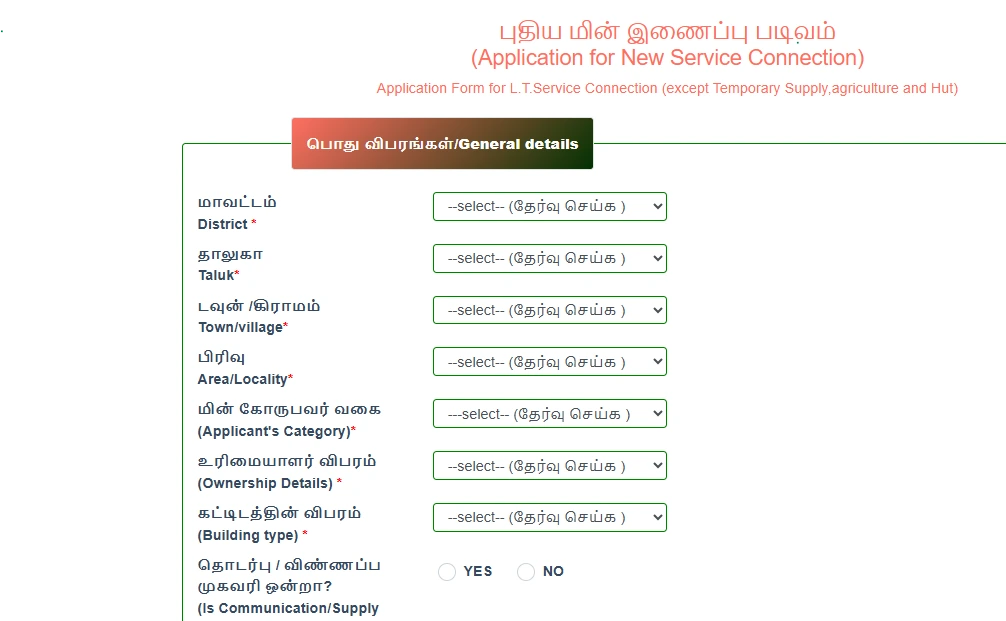
Step 3: Provide Connection Details: Enter the premises address, required load, supply category, wiring date, GST details (if applicable), and select the required phase (single-phase or three-phase).

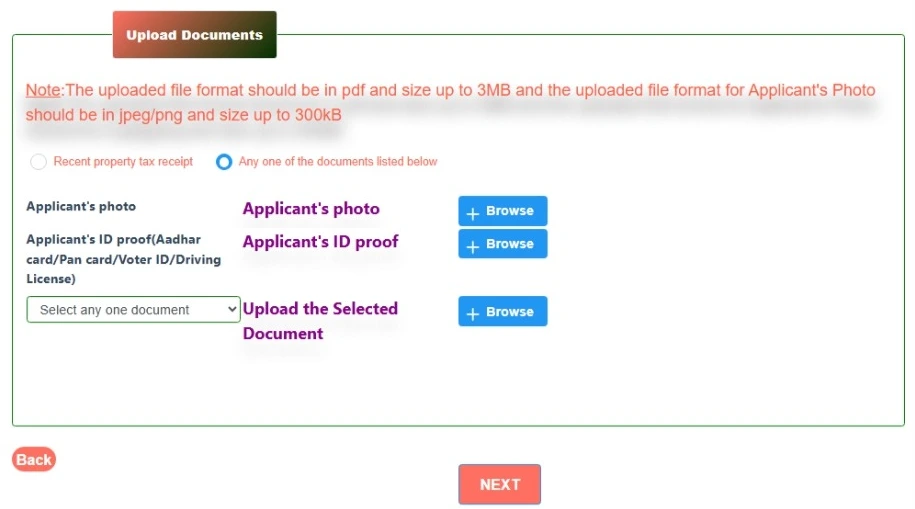
Step 4: Upload Documents: Keep your identity proof, property ownership or occupancy documents, and other supporting certificates ready when applying for a new electricity connection. Check the official TNPDCL new connection guidelines for the complete list of documents required based on your application type.
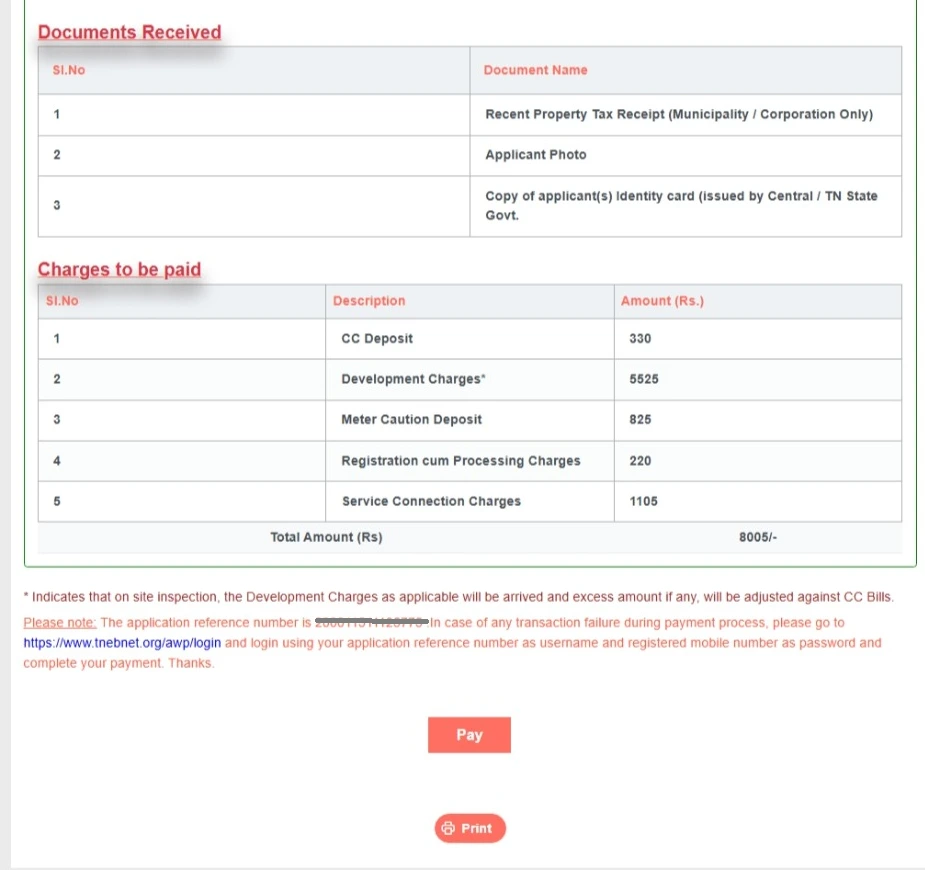
Step 5: Save the Application Reference Number: After submitting the application, an acknowledgment with an Application Reference Number will be generated.
How to Pay an Electricity Bill Online in Chennai?
To make an online commercial electricity bill payment in Chennai, log in to the TNPDCL portal. You can find the Payments section on the left side of the portal. Select your preferred payment option and follow the steps below.

Commercial electricity consumers in Chennai can pay their electricity bills online through multiple payment options available on the TNPDCL portal. To make an online payment, visit the TNPDCL portal. You can find the Payments section on the left side of the portal. Select your preferred payment option and follow the steps below.
BBPS Commercial Electricity Bill Payment
- Step 1: Select BBPS from the payment options.
- Step 2: Scan the displayed QR code using your preferred UPI app.
- Step 3: Verify the bill amount and payment details.
- Step 4: Complete the payment and save the transaction confirmation.
EB Auto Pay for Electricity Bills
TNPDCL’s EB Auto Pay is an E-NACH facility that enables automatic electricity bill payments from your registered bank account.
- Step 1: Log in to: https://www.tnebnet.org/awp/nach
- Step 2: Register the Mandate: Select the EB - Auto Pay Option and click Register Mandate.
- Step 3: Enter Consumer Details: Enter your consumer details and submit them to verify your service connection.

- Step 4: Set Mandate Details: Enter the mandate start and end dates and set a maximum debit amount higher than your electricity bill. Select Get OTP.
- Step 5: Verify OTP: Enter the OTP sent to your registered mobile number and confirm the registration.
- Step 6: Enter Bank Details: Verify the mandate details, enter your bank account details, and select Next.
- Step 7: Complete Bank Verification: Select Proceed after successful bank account validation. You will be redirected to your bank's website to verify and submit the E-Mandate.
- Step 8: Receive Confirmation: Once registration is successful, the mandate details will be displayed, and confirmation will be sent to your registered mobile number or email.
Note: The bill is automatically debited on the 10th day from billing. If the bill amount exceeds the maximum debit limit selected by you, the auto-debit will fail. You can then pay the bill through another available payment method before the due date.
Mobile Scan Pay for Electricity Bills
- Step 1: Select Mobile Scan Pay from the payment options.
- Step 2: Scan the displayed QR code using your preferred UPI app.
- Step 3: Verify the bill amount and payment details.
- Step 4: Complete the payment and save the transaction confirmation.
Online Payment for Electricity Bills
- Step 1: Select Pay Online from the TNPDCL payment section.
- Step 2: Enter your User ID, Password, and CAPTCHA to log in.

- Step 3: Check your outstanding commercial electricity bill details.
- Step 4: Select your preferred payment method and complete the transaction.
- Step 5: Save the payment receipt for future reference.
Quick Pay for Electricity Bills
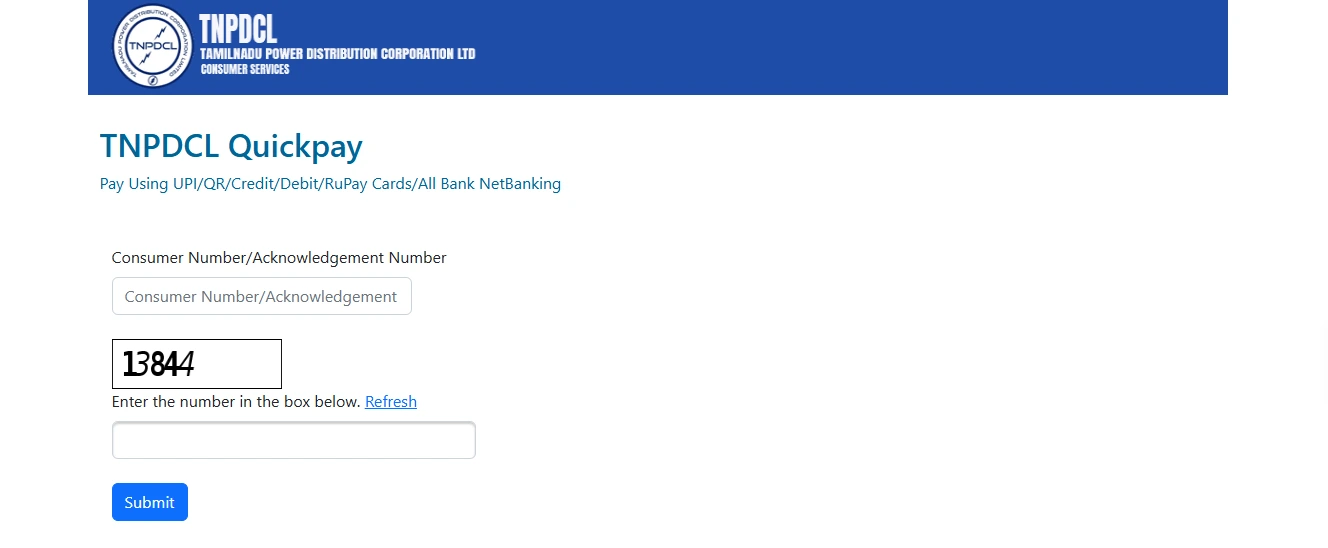
- Step 1: Select Quick Pay from the TNPDCL payment section.
- Step 2: Enter your Consumer Number or Acknowledgement Number.
- Step 3: Enter the displayed verification code.
- Step 4: Click Submit to view your bill details.
- Step 5: Choose UPI, QR, credit/debit card, RuPay card, or net banking.
- Step 6: Complete the payment and save the payment receipt.
How to Pay Electricity Bill Offline in Chennai?
You can pay your commercial electricity bill offline by visiting a nearby TANGEDCO collection counter or designated electricity bill payment centre in Chennai. Here are the steps to Pay Offline:
- Visit the Payment Centre: Visit the nearest TANGEDCO Section Office or designated collection centre in Chennai.
- Carry Details: Bring your physical electricity bill or note down your Consumer ID/Service Connection Number.
- Make the Payment: Pay the bill amount using an accepted payment method, such as cash, cheque, or demand draft (DD).
- Collect the Receipt: Collect the payment receipt from the counter and retain it as proof of payment.
How Is Domestic Electricity Bill Calculated in Chennai?
Domestic electricity bills in Chennai are calculated on a bi-monthly billing cycle using a telescopic slab system. The applicable charges depend on the total electricity consumption during the two-month billing period, along with the applicable government subsidies and free-unit benefits.
Key Components of the Calculation
- Bi-Monthly Billing: Domestic electricity consumption is generally recorded once every two months, and the applicable tariff slabs are based on the total consumption during that billing cycle.
- Telescopic Slabs: Electricity charges are calculated progressively, with different portions of consumption charged at the applicable slab rates. Higher consumption can therefore result in higher applicable rates.
- Free Units and Subsidies: The free-unit benefit depends on the household's total bi-monthly consumption:
- Up to 500 units: Households consuming up to 500 units in two months receive the first 200 units free.
- Above 500 units: Households consuming more than 500 units in two months receive only the first 100 units free. The applicable telescopic tariff starts from the 101st unit, and crossing the 500-unit threshold changes the applicable slab structure.
- Additional Charges: The final bill may also include applicable charges or adjustments depending on the consumer category and prevailing tariff provisions.
Example Calculation:
Assume a household in Chennai consumes 350 units of electricity over a two-month billing cycle under the LT-IA domestic tariff category.
Step 1: Divide the consumption into applicable slabs
| Consumption slab | Units consumed | Applicable benefit |
|---|
| First 100 units | 100 | Free |
| 101–200 units | 100 | Free |
| 201–350 units | 150 | Chargeable |
Step 2: Calculate the electricity charges
Assuming an illustrative tariff rate of ₹4.95 per unit for the 201–400 unit slab:
150 × ₹4.95 = ₹742.50
| Bill component | Amount |
|---|
| First 200 units | ₹0 |
| Remaining 150 units | ₹742.50 |
| Fixed charges and other applicable adjustments | As applicable |
| Illustrative energy charge | ₹742.50 |
Note: This is an illustrative calculation. ₹4.95 is the approved tariff rate. The actual amount payable may differ based on government subsidies, free-unit benefits, fixed charges and other applicable adjustments.
How Is Your Commercial Electricity Bill Calculated?
For example, assume a shop has a 3 kW sanctioned load and consumes 350 units during a two-month billing cycle. Using the illustrative tariff figures mentioned above, the bill can be calculated as follows:
- Energy charge: 350 × ₹10.45 = ₹3,657.50
- Fixed charge: ₹110 × 3 kW × 2 months = ₹660
- Electricity tax: 5% of ₹3,657.50 = ₹182.88
- Illustrative total: ₹4,500.38
Note: This is an illustrative calculation. The applicable fixed charge, electricity tax, and other charges may vary depending on the consumer category, sanctioned load, billing period, and applicable TNPDCL tariff.
Watch the 100-Unit Threshold
The 100-unit threshold can create a significant difference in the energy-charge calculation under this illustrative slab structure:
- At 100 units: 100 × ₹6.65 = ₹665
- At 101 units: 101 × ₹10.45 = ₹1,055.45
- Difference: ₹390.45
This means that moving from 100 to 101 units can substantially increase the energy charge under the applicable slab. Small commercial establishments operating close to this threshold can benefit from monitoring their electricity consumption and avoiding unnecessary usage.
Important: The ₹390.45 difference represents the change in energy charge between the two examples. It should not be interpreted as the exact increase in the final bill, as applicable taxes and other charges may also affect the total amount payable.
Pay Your TNPDCL Bill on NoBroker
NoBroker Payments supports TNPDCL bill payments through the Bharat Bill Payment System (BBPS). Follow these steps to pay your TNPDCL electricity bill online through NoBroker Payments:
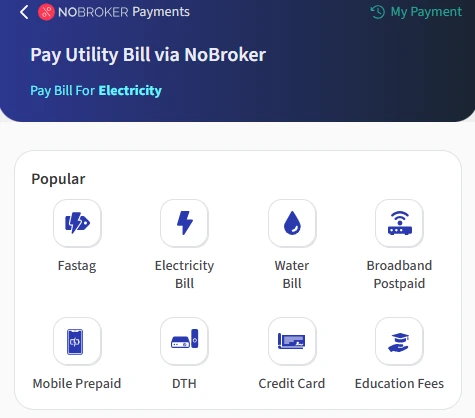
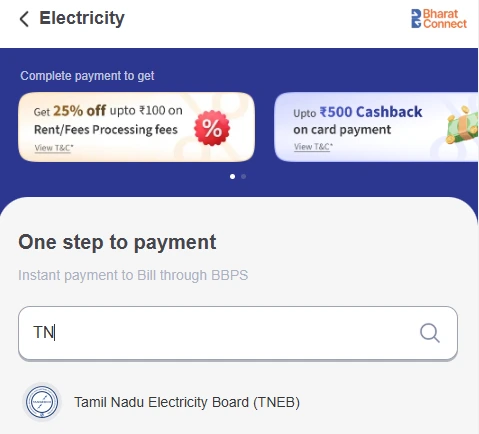
- Step 3: Search for TNPDCL: Type TN and find Tamil Nadu Electricity Board (TNEB) from the list of available billers.
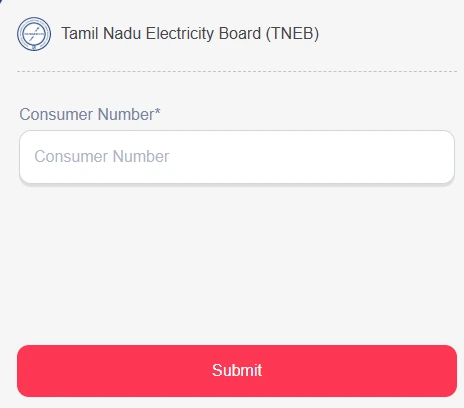
- Step 4: Enter your service connection number: Provide your TNPDCL service connection number as shown on your electricity bill and click Submit.
- Step 5: Check your bill: Your outstanding bill amount will be fetched and displayed for you to review.
- Step 6: Confirm the payment: Verify the bill details and amount, then proceed with your preferred payment method.
- Step 7: Save the confirmation: After successful payment, retain the payment confirmation or receipt for your records.
- You can also pay your Tata Power electricity bill through the NoBroker mobile app by following the same steps.
Note: NoBroker Payments is a bill-payment service and does not provide new electricity connections. For a new commercial electricity connection, apply through TNPDCL or the applicable official Tamil Nadu electricity service portal.
Frequently Asked Questions
Q. How can I check my Chennai commercial electricity bill online? Ans: You can check your bill online using your Service Connection Number and registered mobile number through the TNPDCL bill status service.
Q. Can I pay a TNPDCL electricity bill for multiple service connections? Ans: Yes, registered users can add multiple service connection numbers to their account and pay bills for different connections online.
Q. What happens if I miss the commercial electricity bill payment due date? Ans: If you miss the due date, a 1.5% monthly belated payment surcharge may apply to outstanding arrears after the applicable notice period.
Q. What should I do if my TNPDCL online payment is not reflected? Ans: Check your payment history online. Contact your bank for payment issues, raise a complaint through the TNPDCL portal for delays, or contact NoBroker support if applicable.
Q. How can commercial consumers update their GST number with TNPDCL? Ans: Commercial consumers can update their GST details by submitting their service connection number, valid ID proof, and GST certificate through TNPDCL.
Most Viewed Articles
Ritika is a content writer at NoBroker who writes practical guides on running a home, including paying utility bills, personal loans, household finance, repairs and home improvement. She explains each task in simple steps, with the charges, documents and official links a reader needs.
Loved what you read? Share it with others!




 ✕


 Full RM + FRM support