LG Microwave Symbols Meaning: Every Icon, Function & Feature Explained

171 Views
Table of Contents
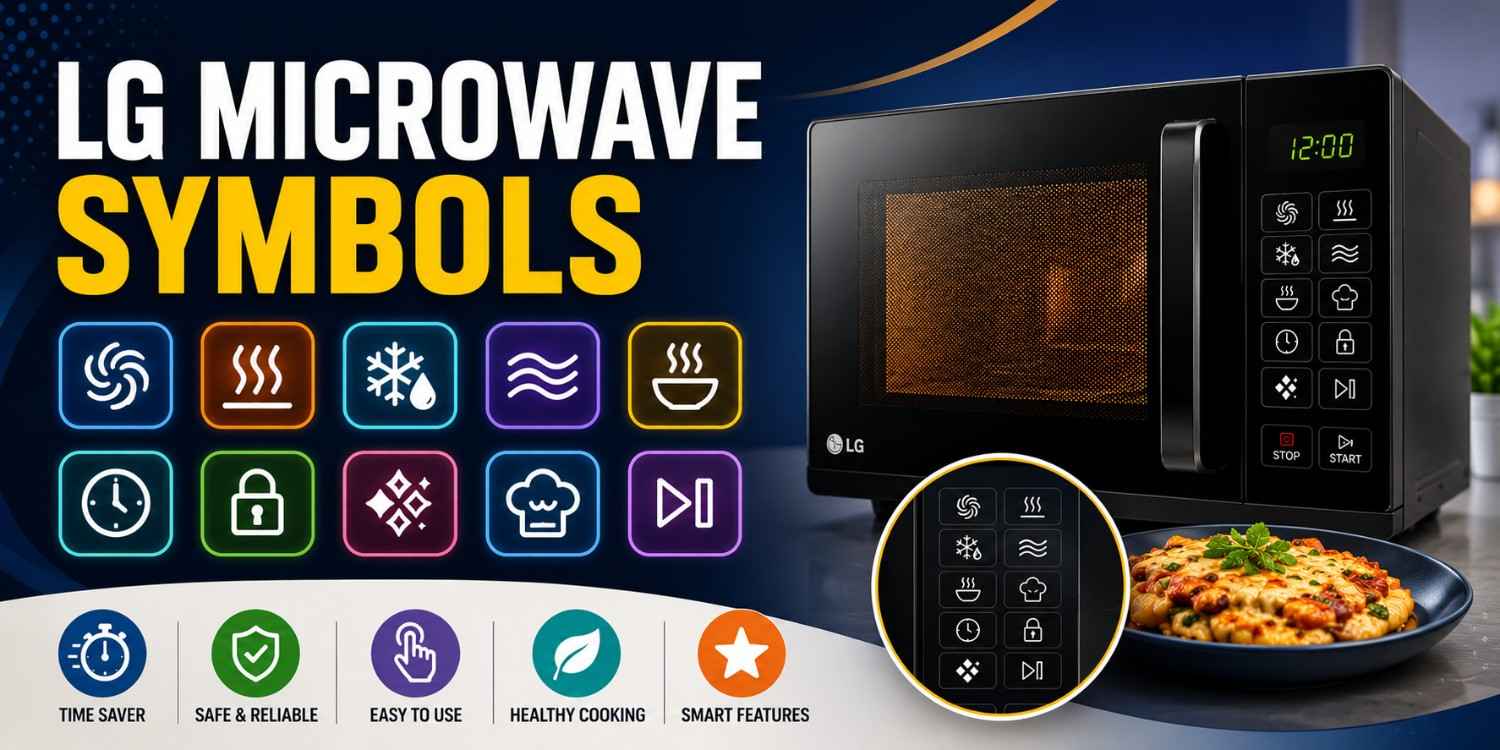
LG microwaves come with various symbols and icons that make cooking, reheating, grilling, and defrosting easier. However, if you're unfamiliar with these icons, understanding their functions can be confusing. This guide explains the meaning of LG microwave symbols, including cooking modes, display icons, smart features, and safety symbols, so you can use your microwave with confidence and get the best cooking results every time.
Understanding LG Microwave Symbols: Quick Overview Table
LG microwaves use symbols for their cooking functions. Knowing what these LG microwave display symbols mean speeds up the right mode selection and boosts cooking efficiency.
| Symbol | Meaning | When to Use |
| 🌪️ | Convection Mode | Baking and roasting |
| 🔥 | Grill Mode | Browning and crisping food |
| ❄️ | Defrost | Thawing frozen food |
| ⚡ | Microwave Mode | Regular cooking and reheating |
| 🍲 | Reheat | Warming cooked food |
| 🕒 | Timer/Clock | Setting cooking duration |
| 🔒 | Child Lock | Preventing accidental operation |
| 💎 | Healthy Cooking/Diamond Feature* | Special cooking programs |
*Symbols may vary depending on the LG model.
LG Microwave Cooking Mode Symbols Explained
LG microwave symbols for cooking modes show how heat is made and spread inside the microwave. Knowing them can really improve how well your food cooks and tastes, too.
1. Convection (🌪️)
What it does
- Used for baking, roasting, and cooking with hot air circulation
- Ensures even heating throughout the food
Quick tips
- Preheat before baking
- Use convection-safe cookware
- Avoid opening the door frequently
2. Grill (🔥)
What it does
- Browns and crisps the outer layer of food
- Ideal for grilling snacks and meats
Quick tips
- Place food on the grill rack
- Turn food halfway through cooking
- Use lightly oiled ingredients for better browning
3. Defrost (❄️)
What it does
- Thaws frozen food safely
- Uses time or weight-based settings
Quick tips
- Remove packaging before defrosting
- Enter the correct food weight
- Cook immediately after thawing
4. Microwave Mode (⚡)
What it does
- Standard mode for cooking and reheating
- Uses microwave energy for fast heating
Quick tips
- Stir the food midway
- Cover food to retain moisture
- Select suitable power levels
5. Reheat (🍲)
What it does
- Warms previously cooked food
- Helps maintain food texture and taste
Quick tips
- Heat in short intervals
- Stir during reheating
- Avoid overheating
LG Microwave Smart Feature Symbols Explained
LG microwaves include smart icons that simplify cooking by automating settings and providing preset functions. These LG microwave symbols help save time and improve convenience.
1. Auto Cook (🍛)
What it does
- Uses preset cooking programs
- Automatically adjusts cooking settings
Quick tips
- Select the correct menu option
- Follow recommended portion sizes
- Check food periodically
2. Timer/Clock (🕒)
What it does
- Sets cooking time and delays start
- Helps manage cooking duration
Quick tips
- Double-check timer settings
- Use shorter timings when needed
- Reset after each cooking cycle
3. Healthy Cooking / Diamond Symbol (💎)
What it does
- Activates healthy cooking presets
- Optimises settings for specific recipes
Quick tips
- Follow recipe recommendations
- Use suitable cookware
- Avoid altering settings unnecessarily
4. Power Level (⚡)
What it does
- Controls microwave heating intensity
- Allows precise cooking adjustments
Quick tips
- Low for defrosting
- Medium for reheating
- High for cooking
LG Microwave Control & Safety Symbols Explained
Control and safety symbols help ensure safe operation and provide better control over microwave functions. These LG microwave display symbols are important for daily usage.
1. Child Lock (🔒)
What it does
- Prevents accidental operation
- Locks the control panel
Quick tips
- Enable when children are nearby
- Unlock before changing settings
- Check lock status before use
2. Start/Pause (⏯️)
What it does
- Starts or pauses cooking cycles
- Allows quick cooking adjustments
Quick tips
- Pause to check food progress
- Resume without resetting settings
- Use before changing modes
3. Stop/Cancel (⛔)
What it does
- Stops current operation
- Clears selected settings
Quick tips
- Use to reset cooking programs
- Cancel incorrect selections
- Restart with new settings
LG Microwave Symbols by Model: Solo, Grill & Convection Differences Explained
LG microwave models come with different symbol sets depending on their cooking capabilities. While some icons are common across all models, advanced features vary by model type.
1. Solo Microwave Models
Solo microwave models focus on basic cooking and reheating functions, making them suitable for everyday kitchen tasks.
Main Symbols
- ⚡ Microwave Mode
- ❄️ Defrost
- 🕒 Timer
- 🍲 Reheat
Features
- Basic cooking functions
- Easy operation
- Compact design
- Cost-effective option
2. Grill Microwave Models
Grill microwave models combine microwave heating with grilling functionality for better texture and browning.
Main Symbols
- 🔥 Grill
- ⚡ Microwave Mode
- ❄️ Defrost
- 🍛 Auto Cook
Features
- Crispy food texture
- Faster cooking
- Grill rack support
- Better browning results
3. Convection Microwave Models
Convection microwave models offer the most versatility, supporting baking, roasting, grilling, and standard microwave cooking.
Main Symbols
- 🌪️ Convection
- 🔥 Grill
- ⚡ Microwave Mode
- ❄️ Defrost
Features
- Baking and roasting support
- Even heat distribution
- Multi-stage cooking
- Advanced cooking options
LG Microwave Symbols Not Working? Common Issues and Fixes
Sometimes, the LG microwave display symbols' meaning may become difficult to understand when icons stop responding or disappear. Most issues are simple to diagnose and resolve.
Common Issues
- Touch buttons not responding – Often caused by dirt, moisture, or panel wear.
- Display icons faded – May result from display ageing or power fluctuations
- Certain symbols not working – Could indicate keypad damage or software glitches
- Delayed response – Often caused by voltage fluctuations
- Panel is completely unresponsive – May indicate an electrical or hardware fault
Expert Tips to Keep LG Microwave Symbols Working Properly
Proper care helps maintain the visibility and functionality of LG microwave symbols, meaning over time.
- Clean the control panel regularly.
- Avoid excessive pressure on buttons
- Keep the panel dry
- Use a voltage stabiliser if needed
- Avoid harsh cleaning chemicals
- Restart the microwave occasionally
Conclusion
Understanding LG microwave symbols helps you make better use of your microwave's features. Whether you're using the convection symbol in LG microwave, the grill symbol in LG microwave, or smart cooking presets, knowing what each icon represents can improve cooking results and simplify daily use.
Cities We Cover for Microwave Repair & Services
NoBroker offers reliable microwave repair services across major cities, including Bangalore, Chennai, Hyderabad, Delhi, Mumbai, Pune, Gurgaon, Noida, Ghaziabad, Greater Noida, and Faridabad. Our expert technicians provide hassle-free doorstep repairs with technician assistance within 15 minutes of booking, along with transparent pricing for a smooth service experience.
What Brands Do We Cover For Microwave Repair Services?
NoBroker provides expert microwave repair services for leading brands like Samsung, LG, IFB, Whirlpool, Panasonic, Bosch, Haier, and more. Our skilled technicians handle all types of microwaves, including solo, grill, and convection models, ensuring reliable and efficient repairs.
Frequently Asked Questions
1. What is the convection mode symbol in the LG microwave?
2. What does the grill symbol in the LG microwave mean?
3. What is the LG microwave diamond symbol?
4. Why are the LG microwave display symbols not working?
5. Are LG microwave symbols the same on all models?
6. What does the defrost symbol on the LG microwave do?
7. How do I use the LG microwave display symbols correctly?
8. What does the power level symbol mean in an LG microwave?
9. What is the child lock symbol on the LG microwave?
10. Can LG microwave symbols differ by series?

Login / Sign up
Zero Brokerage.
Thousands of new listings daily.
100 Cr+ Brokerage saved monthly.
About the Author

Siri Hegde K
Senior Editor


Recent Blogs

Subscribe to our Newsletter
Get latest news delivered straight to your inbox