Commercial Electricity Rate Per Unit in Pune Online Payment, New Connection and Rate Calculation


Packers and Movers Tips

42.3K Views
Table of Contents
From 1 April 2026, MSEDCL charges Pune shops, offices and restaurants with a sanctioned load up to 20 kW ₹10.11 per unit (₹8.51 energy + ₹1.60 wheeling), plus a ₹540 monthly fixed charge. Electricity duty, FAC and Tax on Sale of Electricity (28.94 paise per unit in Pune city) are added on top. Above 20 kW, higher rates apply and billing moves to kVAh. This guide covers bill calculation, new connections and payment.
Pune Commercial Electricity Rate 2026-27: Quick Overview
For a commercial connection in Pune, MSEDCL's applicable tariff depends mainly on the sanctioned load and tariff category. Under the FY 2026-27 LT-II Non-Residential tariff, connections up to 20 kW are billed in kWh, while connections above 20 kW are billed in kVAh.
Recommended Reading

| Information | Details |
|---|---|
| Electricity provider | Maharashtra State Electricity Distribution Company Limited (MSEDCL), also known as Mahavitaran |
| Started in | Incorporated on 31 May 2005 |
| Commercial category | LT-II: LT Non-Residential |
| Rate | ₹10.11/kWh for 0–20 kW; ₹13.92/kVAh for above 20–50 kW; ₹16.42/kVAh for above 50 kW |
| Who needs it? | Non-residential and commercial premises such as shops, offices, restaurants, showrooms and other business premises covered under the LT-II category |
| Fixed/demand charges | ₹540/month for 0–20 kW; ₹550/kVA/month for loads above 20 kW |
| Energy charges | ₹8.51/kWh for 0–20 kW; ₹12.40/kVAh for above 20–50 kW; ₹14.89/kVAh for above 50 kW |
| Wheeling charges | ₹1.60/kWh for loads up to 20 kW; ₹1.52/kVAh for loads above 20 kW |
| Other applicable charges | Electricity Duty, FAC, ToD adjustments, Tax on Sale of Electricity and other applicable bill components |
| Online bill payment | Available through MSEDCL's Web Self Service (WSS) portal and other official online payment channels |
| Offline bill payment | Available through MSEDCL collection/payment centres and other authorised channels |
| New connection | Applications can be submitted online through MSEDCL's WSS new-connection system |
| Connection charges | MSEDCL issues a quotation that may include service connection charges, service line charges and security deposit, as applicable |
MSEDCL's current company profile states that it was incorporated on 31 May 2005 after the restructuring of the erstwhile Maharashtra State Electricity Board. The current FY 2026-27 tariff is from the MERC order in Case No. 75 of 2025 and is effective from 1 April 2026.
MSEDCL Commercial Electricity Rates in Pune 2026
MSEDCL classifies non-residential electricity consumers under LT-II: LT – Non-Residential, with the applicable category determined largely by sanctioned load.
| Commercial category | Sanctioned load | Energy charge | Wheeling charge | Total variable charge | Fixed/demand charge |
|---|---|---|---|---|---|
| LT-II(A) | 0–20 kW | ₹8.51/kWh | ₹1.60/kWh | ₹10.11/kWh | ₹540/connection/month |
| LT-II(B) | >20–50 kW | ₹12.40/kVAh | ₹1.52/kVAh | ₹13.92/kVAh | ₹550/kVA/month |
| LT-II(C) | Above 50 kW | ₹14.89/kVAh | ₹1.52/kVAh | ₹16.42/kVAh | ₹550/kVA/month |
Note:Rates are effective from 1 April 2026 under MSEDCL's FY 2026-27 tariff approved by MERC. Up to 20 kW is billed in kWh, while higher-load LT-II categories are billed in kVAh. Your sanctioned load is printed on your MSEDCL bill.
Eligibility for a Commercial Electricity Connection in Pune
Any lawful owner or occupier of a commercial premises in Pune can apply for an MSEDCL electricity connection with identity proof and proof of ownership or occupancy. Applications are made using MSEDCL's A-1 form through the Web Self Service (WSS) portal. https://wssebill.mahadiscom.in/wss/wss
Documents Required for a Commercial Electricity Connection in Pune
The documents required depend on the type of premises and connection. MSEDCL's current WSS new-connection page provides a “Know Your Relevant Document for New Connection” option and a separate facility to upload the mandatory documents.
You may need to provide:
- Identity proof: A document accepted by MSEDCL for the application.
- Proof of ownership or occupancy: A document establishing your right to occupy or use the premises.
- Test report: A test report from a licensed electrical contractor, where required before supply is released.
- Additional documents: Any other documents specified by MSEDCL for your particular application or connection type.
Note: Aadhaar is not mandatory for every online new-connection application. MSEDCL's current WSS application page explicitly states that providing an Aadhaar number is optional.
How to Apply for a New Commercial Electricity Connection in Pune?
You can apply for a new commercial electricity connection in Pune through MSEDCL's Web Self Service (WSS) portal. Follow these steps:
Step 1: Open MSEDCL's New Connection Request page
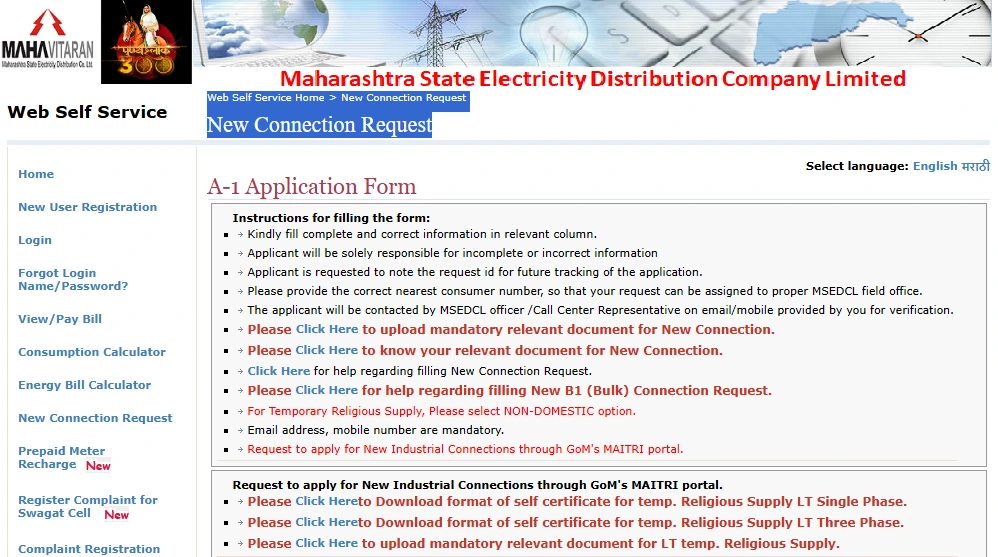
Go to the MSEDCL WSS portal and select New Connection Request. You can start the application without an existing MSEDCL consumer number.
Step 2: Select "Non-Domestic"

On the New Connection Request page, select Non-Domestic under the connection category. This category is used for commercial electricity connections.
Step 3: Verify your mobile number and email
Enter the applicant's mobile number and email address, then use the Generate OTP option to complete verification.
Step 4: Complete and submit the A-1 application
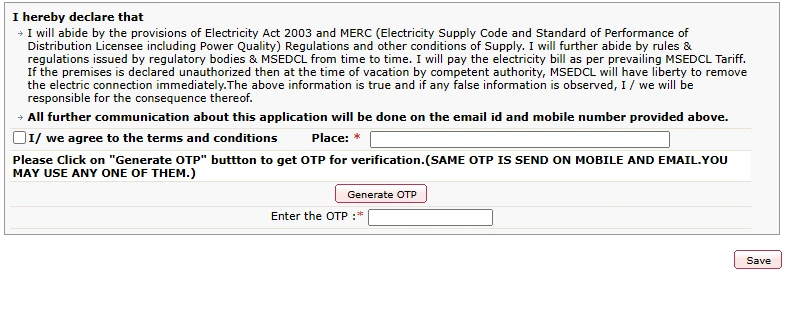
Enter the required premises, applicant, activity and electricity-load details in the A-1 application. Check the details, complete the final OTP verification and select Save to submit the request.
Step 5: Note the request ID
After submitting the application, MSEDCL generates a request ID. Save it because you will need it to track the application and complete subsequent online requirements.
Step 6: Upload the documents for your new connection
On the A-1 New Connection Request page, use the “Please Click Here to upload mandatory relevant document for New Connection” link under the form instructions. If you are unsure which documents apply, use the “Please Click Here to know your relevant document for New Connection” link first.
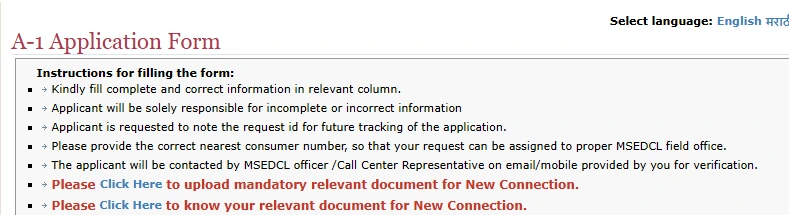
Step 7: Track the request and pay the applicable charges
Use the request ID to check the application status. Once MSEDCL processes the application and issues the applicable quotation, pay the charges shown for the connection.
Step 8: Complete the electrical installation requirements
After the required payment and other formalities, submit the test report from a licensed electrical contractor, if MSEDCL requires it. MSEDCL releases the service connection after you complete the applicable requirements.
How Long Does a Commercial Electricity Connection Take in Pune?
For a Non-Domestic (Commercial) connection in Pune, the notified timeline depends on whether MSEDCL can provide the supply from its existing network or needs additional distribution infrastructure.
| Connection requirement | Notified timeline |
|---|---|
| Supply from existing network, without augmentation | 3 days |
| Extension or augmentation of distribution mains | 90 days |
| New distribution substation required | 90 days |
Important Note: The 3-day period should not be read as the time from submitting the first online form to getting electricity. It is the notified timeline for releasing a connection from the existing network without augmentation, subject to the application being complete and applicable requirements being met. If the connection requires distribution network extension or augmentation, or a new distribution substation, the notified timeline is 90 days
What Other Charges Are Included in a Commercial Electricity Bill in Pune?
The ₹10.11 per kWh LT-II(A) energy-plus-wheeling tariff is not the complete amount payable on a commercial electricity bill. MSEDCL may also include the following charges, depending on the connection and billing period.
| Bill component | What it means |
|---|---|
| Energy charge | Charge for electricity consumed |
| Wheeling charge | Charge for using the distribution network |
| Fixed/demand charge | Monthly charge based on the applicable tariff category |
| FAC | Fuel Adjustment Charge, which may vary with applicable power-purchase and fuel-related costs |
| Electricity Duty | Statutory charge applicable to commercial consumers |
| ToD charge/rebate | Time-based charge or rebate for eligible consumers |
| ToSE | Tax on Sale of Electricity at the applicable notified rate |
| Other charges | Applicable arrears, adjustments, penalties or other bill-specific amounts |
MSEDCL's bill format shows these components separately. For FY 2026-27, eligible commercial and industrial consumers have a 25% ToD peak-hour charge from 5 PM to midnight. . The solar-hour rebate is 15% from April to September 2026 and 25% from October 2026 to March 2027.
The revised Tax on Sale of Electricity (ToSE) rates took effect from 1 December 2025. For applicable industrial and commercial consumers in city areas covered under MSEDCL's licence, the rate is 28.94 paise per unit; for other applicable areas, it is 27.90 paise per unit. MSEDCL implemented these rates through Commercial Circular No. 354 dated 15 April 2026.
What Is the Cost of a New Commercial Electricity Connection in Pune?
There is no single fixed cost for a new commercial electricity connection. The amount depends on the connection requirements, sanctioned load and the applicable distribution infrastructure. MSEDCL states that the quotation can include service connection charges, service line charges, security deposit and other applicable charges.
How to Get Your Exact Cost?
- Submit an application: Apply through MSEDCL's Web Self Service (WSS) portal and provide the required connection and premises details. The portal also allows applicants to upload mandatory documents.
- Load survey and feasibility check: MSEDCL carries out the applicable load survey and checks the technical feasibility of the connection.
- Receive the quotation/demand note: MSEDCL issues the applicable quotation after the assessment. The WSS system also allows applicants to check the application status and pay the firm quotation/demand note.
- Pay the quoted amount: Pay the charges specified in the quotation and complete the remaining connection formalities. Where required, the electrical installation must also meet MSEDCL's testing and certification requirements before the connection is released.
Note: Use the MSEDCL quotation/demand note as the final amount payable rather than relying on a generic online estimate.
How to Calculate Your Commercial Electricity Bill in Pune?
For an LT-II(A) connection with a sanctioned load up to 20 kW, you can estimate the main tariff components using the FY 2026-27 rates.
Example: A café in Pune city has a 12 kW sanctioned load and consumes 1,200 units in a month.
| Bill component | Calculation | Amount |
|---|---|---|
| Energy charge | 1,200 × ₹8.51 | ₹10,212.00 |
| Wheeling charge | 1,200 × ₹1.60 | ₹1,920.00 |
| Fixed charge | ₹540 | ₹540.00 |
| Electricity Duty | ₹12,672 × 21% | ₹2,661.12 |
| Tax on Sale of Electricity (ToSE) | 1,200 × ₹0.2894 | ₹347.28 |
| Total before FAC, ToD and other applicable adjustments | ₹15,680.40 |
Here, the ₹12,672 duty base consists of the energy charge, wheeling charge and fixed charge. The 21% Electricity Duty is then ₹2,661.12. ToSE is calculated separately and is not added to the Electricity Duty base.
MSEDCL's actual bill can also include Fuel Adjustment Charge (FAC), Time of Day (ToD) charges or rebates and other applicable adjustments, so the final amount can differ from this example. MSEDCL's bill format lists these components separately.
For connections above 20 kW, use the applicable LT-II tariff in kVAh from the tariff table and the applicable fixed/demand charge rather than the ₹10.11 per kWh calculation.
How to Pay Your MSEDCL Commercial Electricity Bill in Pune?
MSEDCL allows consumers to pay electricity bills online through its Web Self Service (WSS) portal and Mahavitaran mobile app. LT consumers can also use the UPI QR code printed on the bill.
Online Payment
Open the MSEDCL WSS View/Pay Bill page or the Mahavitaran app and follow these steps:

Step 1: On the WSS portal, click View/Pay Bill, then select your Consumer Type and enter your 12-digit Consumer Number.
Step 2: Select your Billing Unit (BU) and Circle Code from the dropdowns, enter the displayed captcha and click Submit.
Step 3: Check the displayed bill amount, billing period and due date.
Step 4: Click Make Payment, select an available payment method and complete the transaction.
Step 5: Save the payment confirmation or receipt for your records.
Registered users can also use the MSEDCL WSS portal to view previous bills and payment history.
If your LT bill has a UPI QR code, you can scan it using a supported UPI app to make the payment.
Offline Payment
You can pay your MSEDCL bill at an MSEDCL collection centre, including departmental and authorised private collection centres where the relevant payment facility is available.
Find your nearest Pune collection centre using MSEDCL's Locate Collection Center page. MSEDCL also provides a Consumer Facilitation Centres list.
MSEDCL Electricity Helpline and Complaint Numbers in Pune
| Contact | Details |
|---|---|
| Customer care | 1912 / 19120 |
| Toll-free numbers | 1800-233-3435 / 1800-212-3435 |
| customercare@mahadiscom.in | |
| Missed-call power complaint | 022-50897100 |
| Power-failure SMS | Send NOPOWER <12-digit consumer number> to 9930399303 |
Note: MSEDCL lists these channels for billing, power-supply and application-related complaints and queries.
Pay Your Pune Commercial Electricity Bill Through NoBroker
Once your MSEDCL commercial connection is active, you can pay the bill on NoBroker Payments. If you already use NoBroker for your shop or office rent, the bill is in the same account, with no separate app needed. A convenience fee, if any, is shown before you pay.
Step 1: Open the NoBroker app or website and go to Utility Bills.
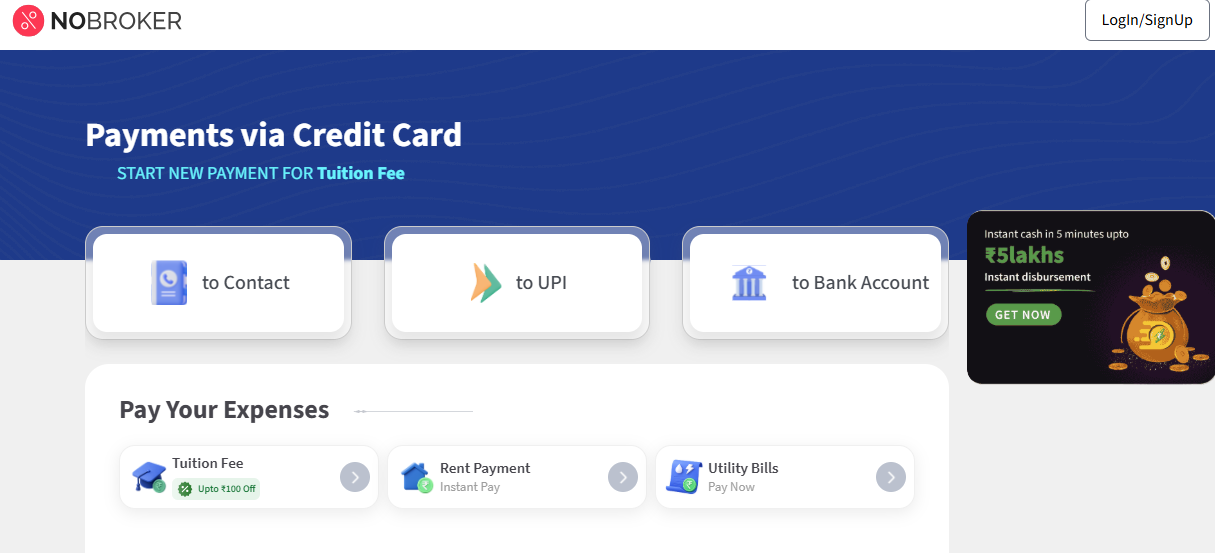
Step 2: Select Electricity Bill and choose Maharashtra as the state.
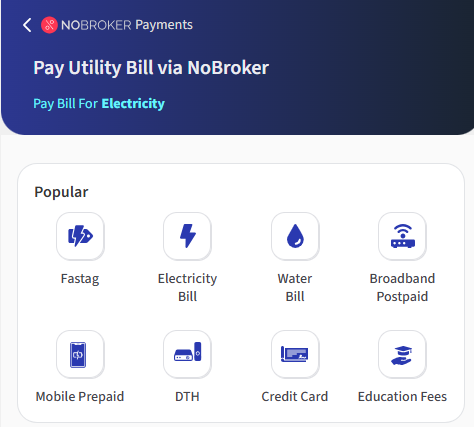
Step 3: Select (MSEDCL) Maharashtra State Electricity Distribution Co.Ltd.) from the available electricity billers.
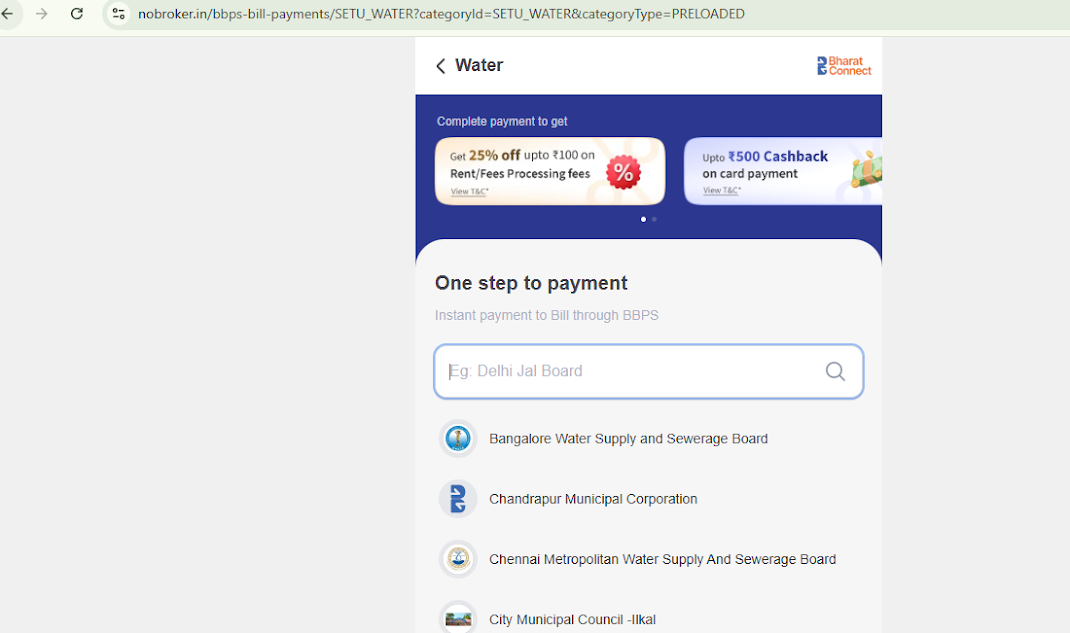
Step 4: Enter your 12-digit MSEDCL consumer number.
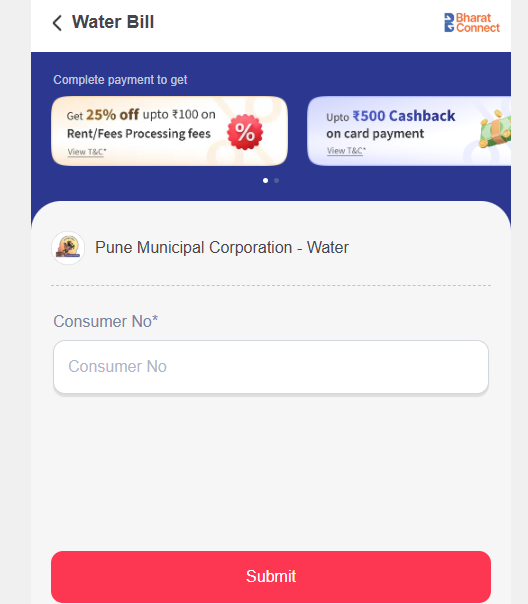
Step 5: Check the bill amount and other details displayed on the screen.
Step 6: Select your preferred payment method and complete the transaction.
Step 7: Save the payment confirmation for your records.
Important: NoBroker Payments is only a bill-payment option. It does not provide or process a new MSEDCL electricity connection. For a new connection, use the official MSEDCL application process.
About the Author

Simon
Senior Editor


Recent Blogs
Subscribe to our Newsletter
Get latest news delivered straight to your inbox